
HP OmniBook 3 14 inch Next Gen AI PC
4.4Editor score
Snapdragon X Processor
2K OLED Display
Up to 41 Hours Battery
Artificial intelligence is reshaping how we work and create on portable devices. Modern AI laptops integrate specialized neural processing units to handle complex tasks locally. This evolution brings smarter assistants, enhanced security, and faster workflows to your desk or coffee shop.
We analyzed ten leading models from HP, Lenovo, Dell, ASUS, and Acer. Our review focuses on AI capabilities, display quality, battery endurance, and overall performance. We compare specs and real-world features to help you find the perfect machine for your needs.
Each pick highlights unique strengths, whether it is an OLED screen or a long-lasting battery. Note that availability and pricing can change frequently across online retailers. Always check the latest details before purchasing to ensure you get the best current offer.
4.4Editor score

4.3Editor score

5.0Editor score
As an Amazon Associate we earn from qualifying purchases.
The following table provides a side by side comparison of all ten AI laptops reviewed in this guide. Each entry lists key specifications and links to the product page for more detailed information and current availability.
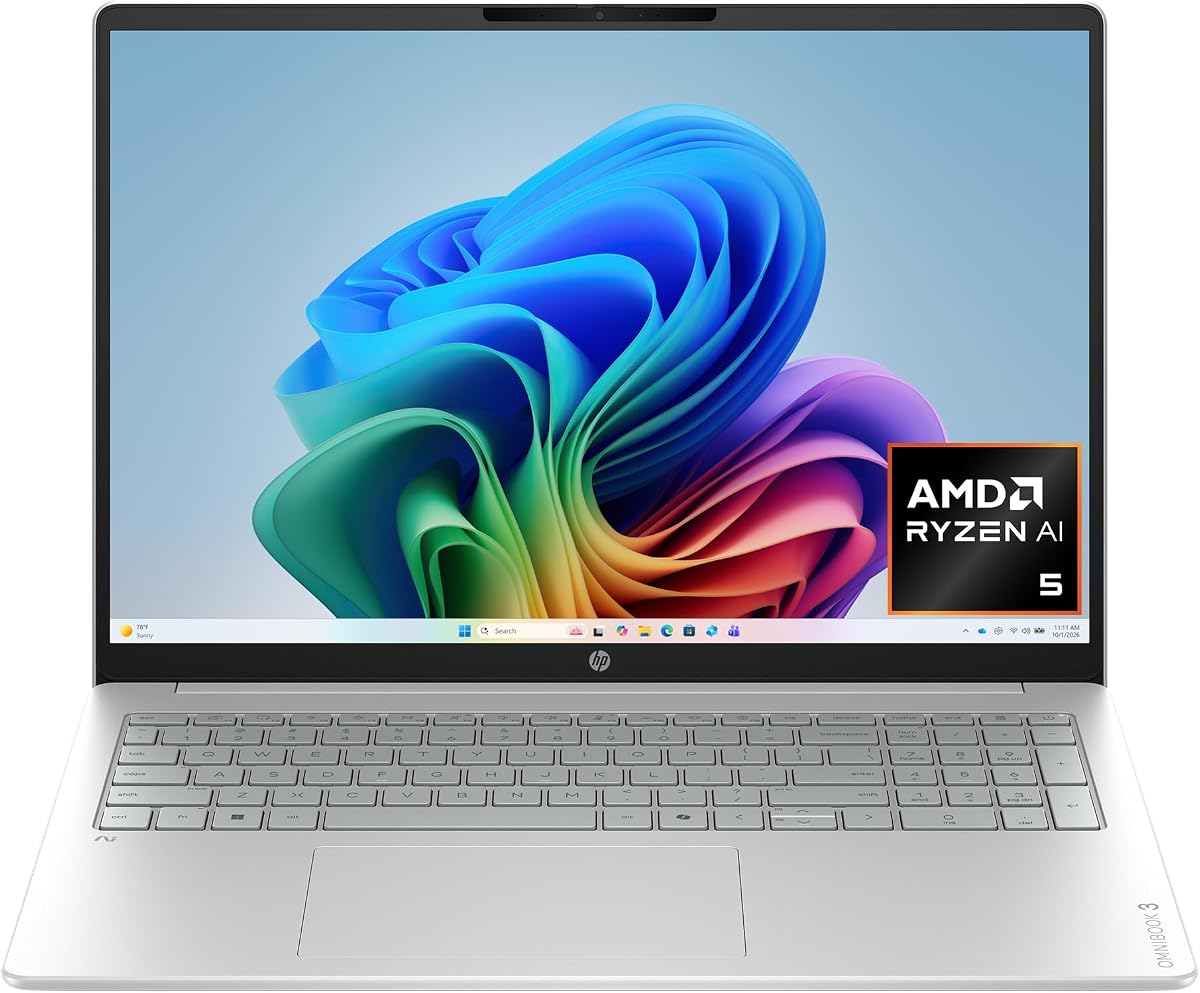


The HP OmniBook 3 16 inch stands out as a strong contender in the AI laptop space. It features an AMD Ryzen AI 5 430 processor designed to handle next-generation AI tasks efficiently. With a 4.8 rating from users, it offers a reliable experience for daily productivity and creative work.
We may earn a commission when you buy through this link, at no additional cost to you.
Its standout qualities include the 2K IPS touchscreen which provides excellent color accuracy and viewing angles. The Advanced AI Noise Reduction ensures clear communication during calls by filtering out background sounds effectively. The Copilot key offers quick access to intelligent assistance for streamlined workflows.
While the storage is modest at 512 GB, the SSD speed makes file access quick. Some users might find the camera basic compared to premium rivals, but the HDR auto-switch helps in various lighting. These trade-offs are acceptable given the price and performance balance.
This laptop is ideal for students and professionals seeking a balanced AI experience. It handles multitasking well with 16 GB of DDR5 RAM. We recommend it for anyone wanting a dependable machine with solid AI integration without breaking the budget.
The included Copilot key allows instant access to AI tools, making it easier to draft documents or summarize data without interrupting your flow.
Advanced Personal Mode tracks your voice during calls, ensuring you are heard clearly even in noisy environments.
We may earn a commission when you buy through this link, at no additional cost to you.
The Lenovo ThinkBook 16 Gen 8 is built with business needs in mind. It pairs an Intel 16-Core Ultra 7 processor with 32 GB of DDR5 RAM to handle heavy workloads. This combination ensures smooth performance even when running multiple enterprise applications simultaneously.
We may earn a commission when you buy through this link, at no additional cost to you.
Its key strengths lie in its professional features like Windows 11 Professional and a fingerprint reader for enhanced security. The 16 inch display offers ample space for data analysis and presentations. WiFi 6E provides stable connections for video conferencing which is vital for remote teams.
However, the device is heavier than some ultrabooks which might make travel slightly less convenient. The display is functional but lacks the vividness of OLED panels found in other models. These downsides are minor for users prioritizing raw performance and security.
We recommend this laptop for corporate users and power users who need robust computing. It is a solid choice for those who value stability and high memory capacity over portability or flashy screen technology.
Windows 11 Professional and a fingerprint reader provide advanced protection for sensitive business data and secure logins.
The 16 core processor and 32 GB of RAM allow for effortless handling of complex spreadsheets and virtual machines.
We may earn a commission when you buy through this link, at no additional cost to you.
The HP OmniBook X 14 inch offers a premium experience with its 3K OLED touchscreen. It uses an Intel Core Ultra 7 processor that brings powerful performance and built-in AI capabilities. The 4.3 rating reflects user satisfaction with its display quality and battery efficiency.
We may earn a commission when you buy through this link, at no additional cost to you.
Its key strengths include the OLED panel which delivers deeper blacks and vibrant colors ideal for media consumption. The battery life is exceptional reaching up to 27 hours which is rare for modern laptops. Smart Sense technology optimizes performance and temperature automatically for comfort.
The main trade-off is the price which is higher than many other options on this list. Additionally the memory is soldered so you cannot upgrade it later. These factors are acceptable if you value top-tier visuals and long battery life above all else.
This model is perfect for creatives and travelers who demand the best display and portability. It is recommended for those willing to invest in a high-quality machine that looks great and lasts all day without needing a charger.
The 3K OLED screen lights each pixel separately for richer contrast and more power efficiency than traditional LED screens.
Smart Sense uses AI to switch modes based on your activity adjusting temperature and fan noise automatically for comfort.
We may earn a commission when you buy through this link, at no additional cost to you.
The HP OmniBook 5 16 inch delivers a balanced mix of performance and features. It comes with an Intel Core Ultra 7 processor and 16 GB of RAM for efficient multitasking. The 1TB SSD provides plenty of space for files and applications without needing external storage.
We may earn a commission when you buy through this link, at no additional cost to you.
Its standout qualities include the large 16 inch touchscreen which offers responsive control for creative tasks. The Copilot AI support helps you work smarter with intelligent suggestions and enhanced security features. The design is sleek and modern suitable for both work and home use.
While the webcam is standard it works well enough for video calls. The weight might be slightly higher than smaller 14 inch models but it offers a larger screen for viewing. These minor issues are balanced by the strong overall value and reliability.
We suggest this laptop for users who want a versatile machine for various tasks. It is a great choice for home users and students who need storage and screen space without compromising on AI features or design.
Copilot AI support offers intelligent suggestions and faster workflows to help you get things done more efficiently.
The large 16 inch touchscreen provides an immersive experience perfect for presentations streaming and creative tasks.
We may earn a commission when you buy through this link, at no additional cost to you.
The HP OmniBook 5 16 inch Snapdragon focuses heavily on battery life and efficiency. Powered by the Snapdragon X processor it delivers essential performance and AI capabilities for daily tasks. Users appreciate the ability to work unplugged for over 34 hours on a single charge.
We may earn a commission when you buy through this link, at no additional cost to you.
Its key strengths include the Otter.ai assistant which records meetings and generates summaries automatically. The 2K OLED display offers rich colors and crisp visuals for productivity. Wi-Fi 6E ensures fast speeds and enhanced connectivity for seamless file sharing and streaming.
Some users may notice app compatibility limitations compared to traditional x86 chips though Windows apps are improving. The graphics are optimized for power efficiency rather than heavy gaming. These trade-offs are acceptable for those prioritizing battery and efficiency over raw power.
This laptop is ideal for travelers and students who need long battery life. It is recommended for anyone who wants a reliable device that stays charged all week and handles everyday AI tasks without issues.
Otter.ai records audio and automatically transcribes and summarizes meetings so you can save time and stay organized.
Qualcomm Wi-Fi 6E technology harnesses the 6 GHz spectrum for faster speeds and better wireless performance.
We may earn a commission when you buy through this link, at no additional cost to you.
The HP OmniBook 3 14 inch is designed for portability and endurance. It runs on the Snapdragon X processor which provides great battery life for on-the-go productivity. With a 4.4 rating it offers a dependable option for those who need a lightweight laptop.
We may earn a commission when you buy through this link, at no additional cost to you.
Its standout qualities include the 2K OLED display which delivers rich colors and crisp visuals. The battery life reaches up to 41 hours which is incredible for frequent travelers. The IR camera supports Windows Hello for secure login without typing passwords.
Storage is limited to 256 GB which might require cloud solutions for large libraries. Graphics are optimized for power efficiency rather than heavy gaming. These trade-offs are acceptable given the price and battery performance which are strong for this category.
We recommend this laptop for students and travelers needing a light and efficient device. It is a great choice for anyone wanting a capable AI laptop that does not weigh down a bag and lasts all day.
The 14 inch form factor combined with Snapdragon efficiency makes this one of the most portable AI laptops available.
The OLED display provides 300 nits of brightness and 100 percent color accuracy for accurate visuals.
We may earn a commission when you buy through this link, at no additional cost to you.
The Dell 16 Plus Touchscreen is built for demanding tasks and professionals. It uses an Intel Core Ultra 9 processor with advanced AI acceleration for intensive workflows. With 32 GB of memory and Wi-Fi 7 it offers future-ready connectivity and performance.
We may earn a commission when you buy through this link, at no additional cost to you.
Its key strengths include the extensive port selection including Thunderbolt 4 which allows for high-speed data and dual displays. The 16 inch touchscreen supports comfort viewing with narrow bezels. Noise cancellation ensures clear calls which is vital for remote collaboration.
The premium design and specs come with a higher price point than average models. Weight is also a factor for travelers needing a ultralight device. These downsides are acceptable for users who need maximum speed and connectivity options.
We recommend this for power users and IT professionals who need top specs. It is an excellent choice for those who value raw performance and connectivity standards over lightweight portability.
With Wi-Fi 7 and Thunderbolt 4 you get the fastest wireless and wired connections currently available on laptops.
The 32 GB memory ensures smooth multitasking across multiple virtual machines and creative apps.
We may earn a commission when you buy through this link, at no additional cost to you.
The ASUS Vivobook S16 Laptop stands out with its perfect user rating and robust specs. It is powered by the AMD Ryzen AI 9 processor delivering up to 50 NPU TOPS for smooth AI tasks. The OLED display provides immersive visuals perfect for media and creative work.
We may earn a commission when you buy through this link, at no additional cost to you.
Its key strengths include the minimal design which is slim and lightweight. The privacy shutter adds a layer of security for the IR camera. Fast charge gives you 60 percent battery in under an hour keeping you productive throughout the day.
The price is on the higher side for a Windows laptop. The port selection is standard but you might need a dock for multiple displays. These trade-offs are acceptable given the high performance and display quality offered.
We recommend this laptop for creatives and enthusiasts who want top visuals and power. It is the best choice for those who value screen quality and a sleek design without compromising on memory or speed.
With up to 50 NPU TOPS AI features like Windows Studio Effects run smoothly without using the CPU.
The narrow bezels and OLED clarity create a spacious feel for work and entertainment.
We may earn a commission when you buy through this link, at no additional cost to you.
The acer Aspire 16 AI focuses on display quality and connectivity at a budget price. It features a 120Hz multi-touch screen which makes scrolling and animations feel smooth. With a 4.2 rating it offers solid value for those who want a high refresh rate.
We may earn a commission when you buy through this link, at no additional cost to you.
Its standout qualities include the Wi-Fi 7 support for future-proofing and the Snapdragon X processor for AI capabilities. The 100 percent sRGB colors ensure accurate visuals for web browsing and media. The Copilot+ features allow for natural searches and quick interactions.
Build quality is functional but feels less premium than some rivals. Port selection is limited so you might need adapters for other devices. These trade-offs are acceptable given the high refresh rate and Wi-Fi 7 in a budget machine.
We recommend this for users who want fast screen refresh rates on a budget. It is a great choice for media consumers who value smooth visuals and connectivity standards.
The 120Hz refresh rate makes scrolling through documents and web pages incredibly smooth and responsive.
Wi-Fi 7 ensures you get the fastest wireless speeds for file transfers and streaming.
We may earn a commission when you buy through this link, at no additional cost to you.
The HP Omnibook 16 inch offers a powerful configuration for heavy workflows. It uses the AMD Ryzen AI 7 processor with a 50 TOPS NPU for seamless AI workloads. With 32 GB of RAM and Windows 11 Pro it handles professional tasks with ease.
We may earn a commission when you buy through this link, at no additional cost to you.
Its key strengths include the large storage and memory which supports large project files and media libraries. The 2K touchscreen offers anti-glare finish for comfortable viewing in bright areas. FreeSync technology ensures fluid visuals during navigation.
The price is higher than standard models but justified by the specs. The webcam is functional but not outstanding compared to premium rivals. These trade-offs are acceptable for professionals needing reliable performance and security.
We recommend this laptop for power users and creators. It is an excellent choice for those who want high memory capacity and robust AI features in a professional package.
Windows 11 Pro adds enterprise-grade security features ideal for business users.
The 32 GB of RAM ensures you can run multiple heavy apps without any lag.
We may earn a commission when you buy through this link, at no additional cost to you.
Choosing an AI laptop requires understanding how neural processing units work and what you need them for. This guide covers essential factors to help you select the right device.
The NPU is a dedicated chip designed to handle AI tasks locally on your laptop. This allows features like background blur in video calls and natural language processing to run faster and more securely. Look for models with higher TOPS ratings for better future-proofing.
A strong NPU ensures your laptop can run the latest AI features without lag.
Modern AI laptops use either Intel Core Ultra or AMD Ryzen AI chips. These processors combine CPU GPU and NPU power for efficient performance. Consider your specific tasks like video editing or general browsing to pick the right tier.
Ensure the processor matches your performance needs for daily work and creative projects.
Since you will interact with touchscreens often a high-resolution display is vital. OLED panels offer better contrast while IPS provides wider viewing angles. Check the refresh rate and brightness to ensure comfortable use in different lighting.
Choose a display that fits your usage whether it is for media or work.
AI applications often require significant memory to run smoothly. Aim for at least 16 GB of RAM to handle multitasking without slowdowns. For storage a 512 GB SSD is a good baseline to store files and apps efficiently.
Prioritize capacity if you work with large files or many applications.
Efficient chips like Snapdragon X or Core Ultra help extend battery life. Check the manufacturer claims but expect real-world usage to vary. Fast charging is a valuable feature to get power quickly during a busy day.
Select a model with enough battery to last your typical work hours.
Look for Wi-Fi 6E or Wi-Fi 7 support for faster wireless speeds. Bluetooth 5.3 or higher ensures stable connections for peripherals. Ports like Thunderbolt 4 allow for quick data transfers and external displays.
Verify connectivity options match your current setup and future needs.
Many AI laptops come with Copilot+ PC features like Recall and Search. These tools help you organize files and find info faster. Check if specific software like Otter.ai is included to boost productivity.
Make sure the software ecosystem supports your workflow.
Features like fingerprint readers and IR cameras provide secure login options. Physical privacy shutters add an extra layer of protection for webcams. Windows 11 Pro offers enterprise-grade security for sensitive data.
Invest in these features if you handle confidential information.
Always allow your laptop to update its drivers and AI features regularly. This ensures your NPU and OS stay compatible with the latest tools and security patches. Keep your device in a cool place to maintain battery health.
Use the Copilot key to quickly access AI assistants for drafting or summarizing. This saves time during busy work sessions. If your laptop has a touchscreen keep it clean with a soft cloth to avoid scratches.
Optimize your settings to balance performance and battery life. Turn on adaptive brightness and manage apps running in the background. This helps extend battery life during travel and keeps the system running smoothly.
An AI laptop includes a dedicated Neural Processing Unit (NPU) designed to handle artificial intelligence tasks locally. This allows for features like real-time background blur and advanced search without slowing down the main processor.
Not always. Many AI features rely on the NPU rather than the GPU. However if you plan to use AI for heavy video editing or gaming a dedicated GPU can still be helpful for rendering.
We recommend at least 16 GB of RAM for smooth performance with AI features. If you run many applications simultaneously or work with large files 32 GB is better to ensure you do not experience lag.
Yes many models include noise reduction and better cameras. The AI features often improve video quality by reducing background noise and adjusting lighting automatically to make you look better on screen.
Most Copilot+ features rely on the local NPU so they work offline. However some cloud-based features like advanced web search will still require an active internet connection to function properly.
Both Intel Core Ultra and AMD Ryzen AI chips offer strong performance. AMD often focuses on energy efficiency while Intel provides broad compatibility. Choose the one that fits your specific workflow and battery needs.
Use the built-in update tools or manufacturer apps like HP Command Center. Ensure you check for BIOS updates and driver updates regularly to keep your NPU running efficiently.
Most modern AI laptops have soldered RAM so you cannot upgrade it later. It is important to choose the right memory amount when you buy the laptop to ensure it meets your future needs.
We have reviewed ten top AI laptops that offer a range of performance and features. From the HP OmniBook X 14 inch for its stunning OLED screen to the Lenovo ThinkBook 16 Gen 8 for business power each model has unique strengths.
Prioritize what matters most to you whether it is battery life screen quality or raw performance. The right choice depends on your specific tasks and how often you travel with your device.
Remember to check current availability and deals as prices can change. We hope this guide helps you find the perfect AI laptop to boost your productivity and creativity in 2026.