
Thermaltake Pure 20 Series
4.5Editor score
High airflow design
Anti-vibration mounting
Long life sleeve bearing
Finding the right cooling solution is essential for maintaining optimal performance in your computer system. 200mm case fans offer a perfect balance of high airflow and low noise levels, making them ideal for spacious cases that need efficient heat dissipation without sacrificing silence.
We have carefully selected and analyzed the top ten models available on the market today. Our comparison focuses on key performance metrics including airflow capacity, static pressure, bearing technology, and overall build quality to ensure you get the most reliable cooling for your hardware.
Each product in this list showcases unique features tailored to different user needs, from budget-conscious builders to enthusiasts seeking premium quiet operation. Please note that product availability and pricing can change frequently, so always check the current listings before making your final purchase decision.
4.5Editor score
4.8Editor score

4.6Editor score
As an Amazon Associate we earn from qualifying purchases.
The following table provides a side-by-side comparison of all ten selected fans, highlighting their key specifications and unique selling points to help you quickly identify the best fit for your specific case and cooling requirements.


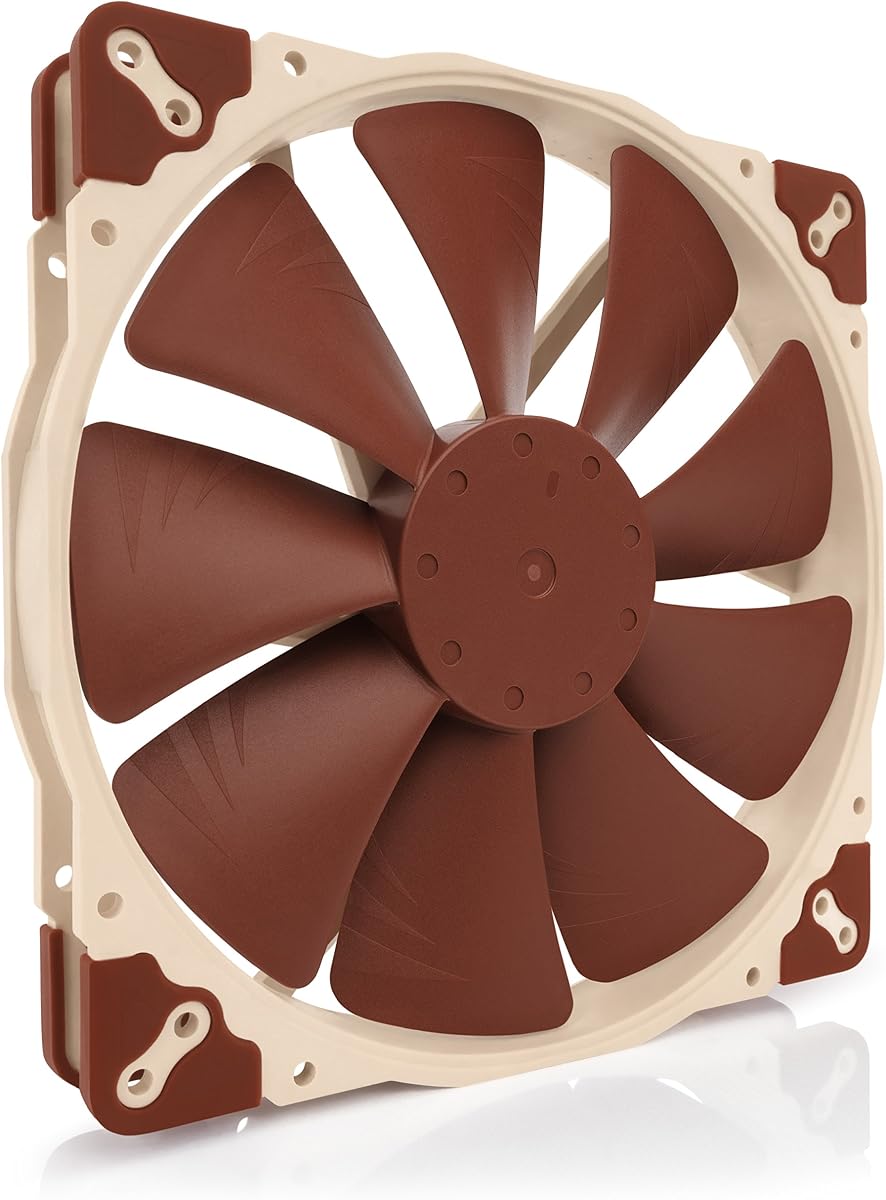
The Noctua NF-A20 PWM stands out as the top choice for users seeking the perfect balance of high performance and near-silent operation. With a stellar rating of 4.8 stars, this fan is engineered to deliver significant airflow while maintaining extremely low noise levels ideal for quiet builds.
We may earn a commission when you buy through this link, at no additional cost to you.
Its award-winning A-series design features Flow Acceleration Channels and an Advanced Acoustic Optimisation frame that work together to minimize turbulence and noise. The large 200mm diameter allows it to move a high volume of air at lower RPMs, ensuring efficient cooling without the harsh sounds of smaller, faster fans.
While the price is higher than many competitors, the inclusion of anti-vibration mounts, fan screws, extension cables, and a Low-Noise Adaptor adds substantial value. The only trade-off is the standard brown and beige color scheme, which may not match all-black setups without additional modification.
This fan is best suited for enthusiasts and professionals who prioritize silence and reliability above all else. If you want a fan that will run quietly for years without needing replacement, the Noctua NF-A20 PWM is the definitive recommendation for your 200mm mounting slot.
The Advanced Acoustic Optimisation frame reduces airflow turbulence and noise, ensuring a peaceful computing environment even under load.
Three sets of mounting holes allow installation in various chassis configurations, making it versatile for different case designs.
We may earn a commission when you buy through this link, at no additional cost to you.
The Thermaltake Pure 20 Series offers an excellent entry point for builders needing effective cooling without breaking the bank. Rated 4.5 stars, it provides high performance in a thick 200x30mm design that pushes strong airflow while keeping noise levels comfortably low.
We may earn a commission when you buy through this link, at no additional cost to you.
Its blade design focuses airflow efficiently to create a torrent of air without excess noise. The shaved frame allows for more installation flexibility, and the anti-vibration mounting system helps dampen any potential resonance during operation.
The main drawback is the long life sleeve bearing, which generally has a shorter lifespan than fluid dynamic or ball bearings. However, for the price, it offers a perfect balance of silence, style, and efficiency suitable for most standard PC builds.
Budget-conscious users or those building a secondary system will find this fan to be a reliable and cost-effective choice. It delivers solid airflow performance that keeps components cool while maintaining a quiet environment for everyday use.
Fan blades are specifically shaped to focus airflow and reduce noise, ensuring efficient cooling without creating excess acoustic disturbance.
The shaved frame design allows for easier installation in tight spaces, especially within Thermaltake chassis models.
We may earn a commission when you buy through this link, at no additional cost to you.
For users who demand both top-tier performance and a sleek all-black aesthetic, the Noctua NF-A20 PWM chromax.Black.swap is the ideal solution. It carries a 4.6 rating for its premium quiet performance and advanced acoustic optimization features that keep noise below 18.1 dB(A).
We may earn a commission when you buy through this link, at no additional cost to you.
This model retains all the core benefits of the standard NF-A20 PWM including Flow Acceleration Channels and a 150,000 hour MTTF. The standout feature is the chromax.black.swap edition which allows you to swap out the anti-vibration pads for various colors to match your build theme.
The higher price reflects the premium build quality and customization options. It is designed for automatic speed control via 4-pin PWM headers, ensuring efficient power usage and silent operation during lighter loads.
This fan is perfect for enthusiasts who want to showcase a unified all-black theme without compromising on cooling quality. If you value aesthetics alongside silence and performance, this model is the definitive choice for high-end builds.
The chromax.black.swap edition includes swappable red, black, white, blue, yellow, and green anti-vibration pads for total color control.
Award-winning A-series design ensures high airflow at extremely low noise levels, making it perfect for silent PC builds.
We may earn a commission when you buy through this link, at no additional cost to you.
The Thermaltake CT200 PWM delivers massive airflow with a rating of 4.3 stars, designed specifically to complement the CT fan lineup for a cohesive build. It pushes up to 131.6 CFM of airflow thanks to its optimized nine-blade design.
We may earn a commission when you buy through this link, at no additional cost to you.
Hydraulic bearings ensure silent and reliable operation while maintaining performance when necessary. The fan runs between 500 and 900 RPM, and the inclusion of daisy chainable 4-Pin PWM connectors simplifies cable management for multi-fan setups.
While it offers impressive airflow, it might not be the quietest option for silent enthusiasts. However, for users prioritizing raw cooling power and easy installation, this fan provides a solid balance of performance and convenience.
This model is a great choice for mid-range builds needing strong intake or exhaust airflow without complex wiring. The daisy chain feature makes it easy to expand cooling capacity with minimal extra cables.
Each fan features daisy chainable connectors for quick installation and access to further fan headers with minimal cabling.
Nine optimized blades push up to 131.6 CFM and 1.92mm-H20 static pressure for effective cooling performance.
We may earn a commission when you buy through this link, at no additional cost to you.
The Cooler Master SickleFlow 200 aRGB brings vibrant lighting to your build with a 4.6 rating for its performance and design. It features Gen2 Lighting and a frosted blade design that creates a vibrant and customizable luminous effect visible through the blades.
We may earn a commission when you buy through this link, at no additional cost to you.
Engineered for efficiency, the hybrid frame offers optimal airflow and stability. The two-tier sealing mechanism prevents dust and oil leakage, enhancing stability and extending lifespan while minimizing noise through anti-resonance mounting.
The main consideration is that it requires an ARGB header to utilize its lighting features. However, the dynamic PWM fan allows you to balance noise and airflow easily from 0 to 800 RPM based on your system needs.
This fan is perfect for gamers and content creators who want both cooling performance and visual flair. If you want your build to shine while keeping your hardware cool, this is an excellent selection for your case.
Frosted blades enhance the dispersion of aRGB lighting, creating a vibrant and customizable luminous effect for your build.
A two-tier sealing mechanism prevents dust and oil leakage, extending fan stability and lifespan significantly over time.
We may earn a commission when you buy through this link, at no additional cost to you.
The Noctua NF-A20 FLX is designed for systems with legacy or specific header requirements, holding a strong 4.7 rating. As a 3-pin FLX version, it provides 800/550 RPM speed settings via Low-Noise Adaptor to fine-tune the fan for maximum airflow or near-silent operation.
We may earn a commission when you buy through this link, at no additional cost to you.
It retains the same award-winning A-series design as the PWM variant, delivering superior quiet cooling with Flow Acceleration Channels and an Advanced Acoustic Optimisation frame. The MTTF exceeds 150,000 hours ensuring long-term reliability.
The only trade-off is the lack of automatic speed control via motherboard PWM, though the 3:4-pin adaptor allows direct power from the supply if needed. This makes it versatile for various power configurations.
This fan is best for older systems or specific setups where a 3-pin connection is required. If you need reliable quiet cooling without complex controller dependencies, the FLX version is a straightforward and effective choice.
The Low-Noise Adaptor allows you to choose between 800 RPM for airflow or 550 RPM for near-silent operation as needed.
Includes anti-vibration mounts, fan screws, extension cable, and a 3:4-pin adaptor for powering from the power supply directly.
We may earn a commission when you buy through this link, at no additional cost to you.
The Noctua NF-A20 5V PWM offers unique power flexibility with a 4.7 rating for its performance and connectivity. It features a 5V 4-pin PWM version with polarity protection, allowing it to run on devices with USB host ports or power banks.
We may earn a commission when you buy through this link, at no additional cost to you.
It keeps the same premium A-series design with Flow Acceleration Channels for high performance. The USB power adaptor cable makes it a versatile option for special builds or cases where standard headers are not available.
While the standard color scheme might not match all-black aesthetics, the technical features provide real utility for specific setups. It also includes an OmniJoin adaptor set for connection to proprietary fan headers.
This fan is perfect for projects requiring portable or USB-based cooling solutions. If you are building a custom PC case that needs flexible power options, this model offers significant versatility without sacrificing performance.
USB power adaptor cable allows the fan to run on devices with USB host ports or power supplies for unique installation options.
OmniJoin adaptor set enables connection to proprietary fan headers, expanding compatibility beyond standard motherboard connections.
We may earn a commission when you buy through this link, at no additional cost to you.
The Cooler Master MF200R RGB holds a 4.4 rating for its reliable performance and extensive RGB compatibility. It supports major brands like Asus Aura and MSI RGB, ensuring it blends seamlessly into your ecosystem with its hybrid design.
We may earn a commission when you buy through this link, at no additional cost to you.
Its jet engine and helicopter blade design applies the right amount of static air pressure without sacrificing airflow. Silent cooling technology combines noise reduction with sound absorbing rubber pads to ensure a quiet experience.
Smart fan sensor technology protects your hardware by automatically stopping the motor if jammed, adding an extra layer of safety. While it requires a separate RGB controller, the installation is straightforward.
This fan is ideal for users wanting extensive lighting compatibility and robust safety features. If you need a reliable fan that works with multiple RGB standards, this model provides a solid and safe choice.
Certified compatible with Asus Aura, as Rock RGB, Gigabyte Fusion, and MSI RGB for seamless lighting integration.
Smart fan sensor for jam protection protects your fan by automatically stopping the motor if jammed by objects.
We may earn a commission when you buy through this link, at no additional cost to you.
The CHICIRIS 200mm Case Fan offers a strong balance of lighting and cooling with a 4.5 rating. It features 34 RGB lamp beads for vibrant ARGB lighting that diffuses beautifully through the translucent nine-blade design.
We may earn a commission when you buy through this link, at no additional cost to you.
Designed for maximum airflow, it delivers a powerful 95CFM while maintaining low noise levels as low as 9dBA. The hydraulic bearing design ensures stable and reliable performance over an extended lifespan with minimal oil leakage.
While the brand is less known than major competitors, the specs and features compete well. It includes motherboard sync light control for 5V 3pin ARGB systems to match your software setup easily.
This fan is perfect for budget builds needing high-quality lighting and reliable cooling. If you want vibrant visuals without sacrificing performance or reliability, this is an excellent value choice for your PC.
Immerse your build in stunning illumination with 34 RGB lamp beads creating a bright, uniform, and soft glow.
Delivers powerful 95CFM air volume while maintaining peak speed of 1000RPM for efficient heat dissipation.
We may earn a commission when you buy through this link, at no additional cost to you.
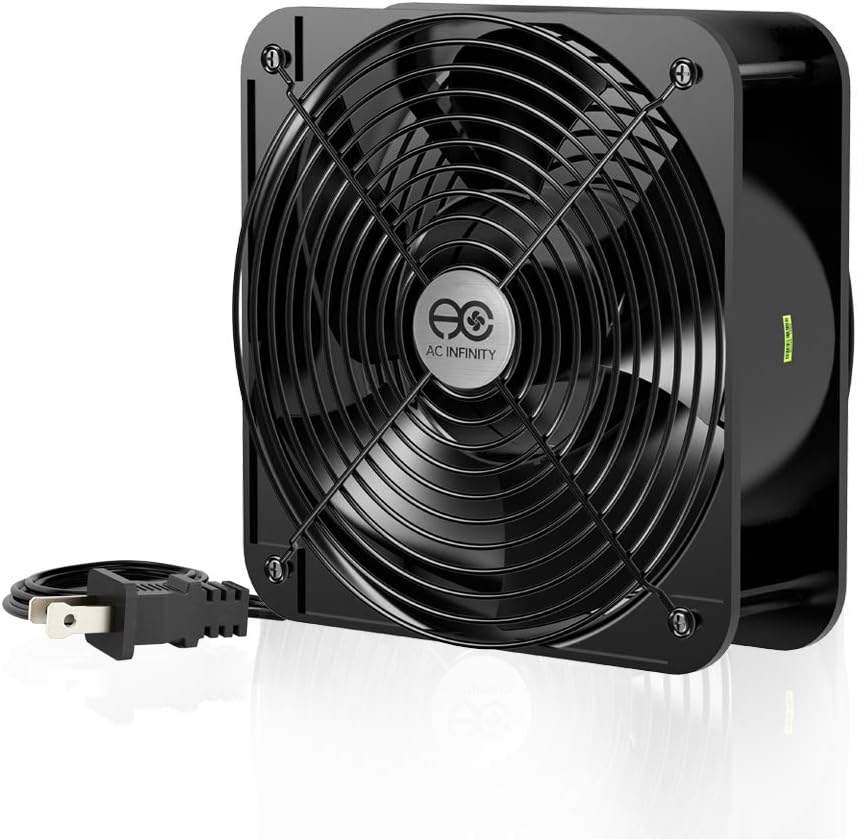
The AC Infinity AXIAL 2060 provides extreme airflow capabilities with a 4.5 rating for heavy-duty ventilation. With 425 CFM and a 60mm thick frame, this muffin fan maximizes airflow for projects requiring significant ventilation or specialized cooling setups.
We may earn a commission when you buy through this link, at no additional cost to you.
It runs on 120V AC power and includes dual-ball bearings with a 67,000-hour lifespan allowing it to be laid flat or stand upright. However, this high speed can be too loud for standard PC desktop applications.
This model is not designed for quiet builds but rather for projects that need aggressive cooling and ventilation. The heavy-duty aluminum construction ensures durability for demanding environments outside of typical consumer PC use.
This fan is best for workshop PCs, rack mounts, or ventilation projects needing maximum air exchange. If you need robust performance and do not mind the noise, it is a reliable solution for demanding tasks.
Designed to maximize airflow with 425 CFM output making it ideal for projects requiring heavy ventilation or specialized cooling.
Dual-ball bearings have a lifespan of 67,000 hours allowing the fans to be laid flat or stand upright reliably.
We may earn a commission when you buy through this link, at no additional cost to you.
Choosing the right 200mm case fan requires understanding several critical factors including size compatibility, airflow ratings, bearing type, and noise levels. This guide breaks down the most important aspects to consider before making your purchase.
Before purchasing a 200mm case fan, verify that your PC case supports this size. While common in mid-tower and full-tower cases, some slim or compact designs may only support smaller 140mm or 120mm fans. Check your case manual or measure the available slots to ensure the 200mm dimensions fit without obstruction.
Additionally, consider the mounting hole patterns. Some fans offer multiple sets of holes for versatile installation which can be helpful if your case has non-standard mounting options. Ensuring physical compatibility prevents installation headaches and ensures optimal performance.
Airflow is measured in CFM and indicates how much air a fan moves. For intake or exhaust in an open case, high CFM fans are ideal for moving heat out efficiently. Static pressure, measured in mm-H20, indicates the fan's ability to push air through dense obstacles like radiators or dust filters.
If your case has tight spots or dust filters, prioritize static pressure. Otherwise, focus on high CFM for general cooling. Most 200mm fans offer a good balance of both, but checking these specific numbers helps you match the fan to your specific airflow needs.
Noise levels are measured in decibels (dB(A)). Lower dB values indicate quieter operation. High-performance fans often trade noise for speed, but 200mm fans generally move more air at lower RPMs making them inherently quieter than smaller counterparts. Look for ratings below 25 dB(A) for near-silent operation.
Noise can also be reduced with rubber mounts or lower speed settings. If you prefer a silent environment, prioritize fans specifically marketed for low noise. This ensures your cooling system does not distract during work or gaming sessions.
The bearing type significantly affects a fan's lifespan and noise. Sleeve bearings are affordable but less durable over time. Fluid dynamic or hydraulic bearings offer better durability and quieter operation making them a standard for quality fans. Ball bearings last longest but may produce more noise.
Check the MTTF (Mean Time To Failure) rating. A higher MTTF indicates better reliability and longer operational life. Investing in a fan with a robust bearing type ensures you do not have to replace your cooling components frequently.
PWM (Pulse Width Modulation) fans use a 4-pin connection allowing motherboard speed control based on temperature. This offers the best balance of cooling and noise. DC fans use 3-pin connections and are simpler but lack automatic speed adjustments. Ensure your motherboard supports the fan type you choose.
If your motherboard lacks PWM headers, a 3-pin fan may be necessary. However, PWM is preferred for modern systems as it adjusts speed dynamically ensuring efficient power usage and quieter performance when full speed is not required.
RGB lighting adds visual flair to your build. ARGB (Addressable RGB) allows for more complex color and effects compared to standard RGB. Ensure your motherboard supports ARGB if you want synchronized lighting. If you prefer a clean look, consider fans without lighting.
Some fans offer frosted blades to diffuse light effectively. While lighting enhances appearance, it can add complexity to cable management. Decide if aesthetics are a priority before choosing a model with integrated lighting features.
Prices for 200mm fans range significantly from budget models to premium options. Budget fans often use simpler bearings and lack PWM control but still offer solid cooling. Premium fans include better build quality, longer warranties, and advanced features like auto speed control.
Determine your budget based on your needs. If you need basic cooling, a budget option may suffice. However, for long-term reliability and silence, investing in a premium model often pays off by reducing maintenance and noise issues over time.
Modern fans often include daisy chain connectors or extension cables to simplify installation. Daisy chains allow multiple fans to connect to a single header reducing clutter. Extension cables help reach headers that are far from the mounting spot.
Check what is included in the package. High-quality fans typically come with screws, rubber mounts, and adapters. Having all necessary tools ensures easy installation without needing to buy extra accessories separately.
Installing a 200mm case fan correctly ensures optimal airflow and longevity. Position intake fans at the front or bottom of the case and exhaust fans at the rear or top to create a balanced airflow path that directs heat away from components.
Regularly clean dust from the fan blades and housing to maintain performance. Dust buildup can restrict airflow and cause overheating. Use compressed air or a soft brush to remove dust every three months to keep your system running efficiently.
Monitor fan speeds via BIOS or software tools to ensure they are running as expected. If you notice unusual noise or vibrations, check the mounting screws and rubber pads. Replacing worn out pads or tightening screws can resolve most noise issues effectively.
Most mid-tower and full-tower PC cases support 200mm fans. These are typically found in front or top mounting positions. Always check your case specifications before purchasing to ensure compatibility with your build layout.
Yes, generally 200mm fans are quieter because they move the same amount of air at a lower RPM. Larger blades require less speed to achieve similar airflow which reduces noise and vibration effectively for a quieter system.
PWM fans use a 4-pin connection allowing automatic speed control via motherboard temperature sensors. DC fans use a 3-pin connection and offer fixed speeds. PWM provides better efficiency and noise management for modern systems.
Some RGB fans require an ARGB header on the motherboard. Others may need a separate controller hub. Check the product details to see if it includes a controller or requires specific motherboard support before installation.
You should clean your fans every three months to remove dust buildup. Regular cleaning maintains optimal airflow and prevents overheating. Use compressed air to blow dust out carefully without damaging the blades or bearings.
No, you cannot install a 200mm fan in a 140mm slot physically. The dimensions are too large. However, some cases offer adjustable mounting brackets that may allow adapters or spacers, but direct compatibility is generally not possible.
MTTF stands for Mean Time To Failure and represents the expected lifespan of the fan. A higher MTTF indicates better reliability. For example, 150,000 hours means the fan is designed to run for years without failure.
Hydraulic bearings are generally better because they offer better durability and quieter operation compared to sleeve bearings. They use oil to reduce friction and extend lifespan making them a preferred choice for high-quality fans in modern builds.
We have reviewed ten top 200mm case fans ranging from budget friendly options to premium performance models. The Noctua NF-A20 PWM remains our top pick for its superior silence and reliable performance. However, the Thermaltake Pure 20 Series offers great value for those watching their budget.
When choosing a fan, prioritize airflow and noise levels that match your usage scenario. If you need high airflow for gaming or intense workloads look for higher CFM ratings. For quiet office setups focus on models with low decibel ratings and robust bearing technology.
Remember that prices and availability can change frequently so check current listings before making your final decision. With the right 200mm case fan you can ensure your system stays cool and quiet for years to come.