
ASRock DeskMini X300 2.5G Series
4.2Editor score
Compact 1.92L chassis
AM4 socket compatibility
Triple display support
This guide compares ten top barebone PCs with AMD processors for gaming, productivity, and home server setups based on performance and features.
Barebone PCs with AMD processors offer a unique blend of power and flexibility for builders who want control over their components. These systems provide the chassis, motherboard, and cooling while leaving RAM and storage open for customization.
We compared ten leading models based on processor architecture, expansion options, connectivity, and cooling efficiency. Our analysis highlights which units deliver the best value for gamers, creators, and home lab enthusiasts.
Each pick shows key specs and real-world use cases to help you choose the right platform. Note that prices and availability change frequently so verify details before you buy to ensure compatibility with your needs.
4.2Editor score

4.0Editor score

3.1Editor score
This side by side comparison evaluates ten AMD barebone platforms across key metrics including processor generation, memory speed, storage expansion, and network connectivity to guide your final selection.





The AOOSTAR MACO earns Editor's Choice for balancing high performance with flexible expansion. Rated 4.0 stars it stands out with the Ryzen 7 PRO 8845HS and dedicated OCuLink for external GPUs.
We may earn a commission when you buy through this link, at no additional cost to you.
Its 8 core Zen 4 CPU handles heavy multitasking while the OCuLink port lets gamers connect desktop class GPUs with minimal performance loss. Dual USB4 and dual 2.5G LAN ensure fast connectivity for any workflow.
The trade off is the barebone nature meaning you must supply RAM SSD and OS yourself. This extra step adds cost but gives full control over your final system configuration.
Buyers seeking a powerful gaming or creative mini PC with future proof connections will find this unit worth the investment. It is ideal for users who need desktop level performance in a compact form.
OCuLink offers near native PCIe performance for eGPUs making it perfect for AAA gaming on a mini PC.
With dual USB4 supporting 8K output and 100W power delivery this system adapts to evolving display standards.
We may earn a commission when you buy through this link, at no additional cost to you.
The GEM12+ Barebone earns high marks with 4.5 stars for its multi-monitor capability and OCuLink support. It is powered by the Ryzen 7 PRO 8845HS and delivers 16 TOPS of AI performance.
We may earn a commission when you buy through this link, at no additional cost to you.
Its standout feature is support for four 4K screens which is rare in this size. The vapor chamber cooling keeps it quiet even under load and BIOS adjustable modes let you tailor power use to your needs.
Like most on this list it does not include RAM or storage so expect additional purchase steps. Also OCuLink requires a shutdown before plugging devices which can interrupt workflow.
Ideal for video editors or traders who need multiple displays in a small footprint. The combination of AI acceleration and strong GPU support makes it versatile for modern creative tasks.
Support for four 4K outputs transforms this mini PC into a command center for trading or content production.
Vapor chamber technology transfers heat efficiently keeping the unit cool and quiet during extended sessions.
We may earn a commission when you buy through this link, at no additional cost to you.
Rated 4.1 stars the GEM12+ PRO adds a fingerprint scanner for quick secure access. It shares the strong Ryzen 7 PRO 8845HS core with the other GEM units but distinguishes itself with security and customization.
We may earn a commission when you buy through this link, at no additional cost to you.
The fingerprint reader speeds up login without passwords and the customizable display panel allows monitoring of system stats in real time. OCuLink support ensures you can upgrade graphics power when needed.
It remains a barebone system requiring you to install memory and storage yourself. The display customization may be niche but adds a professional touch to home office setups.
Business users who prioritize security and will appreciate the fingerprint feature. Gamers and creators benefit from the same high performance as other models in this family with added convenience.
The built-in fingerprint sensor provides instant login which is convenient for shared workstations or home offices.
Custom display software lets you track CPU and GPU metrics directly on the unit for better diagnostics.
We may earn a commission when you buy through this link, at no additional cost to you.
With a 4.8 star rating the DeskMeet X300 is rated choice for builders wanting desktop level expansion. It supports a wide range of AM4 processors and offers a PCIe x16 slot for real graphics cards.
We may earn a commission when you buy through this link, at no additional cost to you.
Unlike many mini PCs it includes a 500W power supply which saves money and simplifies setup. The compact eight liter case fits easily under a monitor while still accepting full size hardware.
You must source the CPU memory and storage yourself so expect added time and cost. Assembly requires patience and some technical skill to fit components into the tight case.
This model suits tinkerers who want maximum upgrade flexibility in a small chassis. If you already own AM4 parts this unit can turn them into a powerful compact desktop for gaming or work.
The PCIe x16 slot allows installation of full size GPUs making it far more expandable than standard mini PCs.
Inclusion of a 500W power supply means you do not need to buy a separate unit to get started.
We may earn a commission when you buy through this link, at no additional cost to you.
The X1 Lite-255 offers impressive I/O for its size with Wi-Fi 6e and USB4. Rated 3.9 stars it still delivers solid 8 core performance and flexible display options for work or entertainment.
We may earn a commission when you buy through this link, at no additional cost to you.
Its USB4 port supports high speed data and video while OCuLink readiness allows future GPU upgrades. The PCM phase change cooling helps maintain steady performance even during heavy loads.
Some users note that using OCuLink requires installing an adapter plate which adds a setup step. The slightly lower rating suggests quality control may vary but core performance remains strong.
Tech enthusiasts who want future proof ports and triple display support will enjoy this unit. It is well suited for home offices needing multiple monitors and fast network connections without bulk.
With USB4 Wi-Fi 6e and 2.5G LAN this model connects to modern networks and displays with ease.
Phase change material and dedicated fans help keep the memory and SSD running cool under load.
We may earn a commission when you buy through this link, at no additional cost to you.
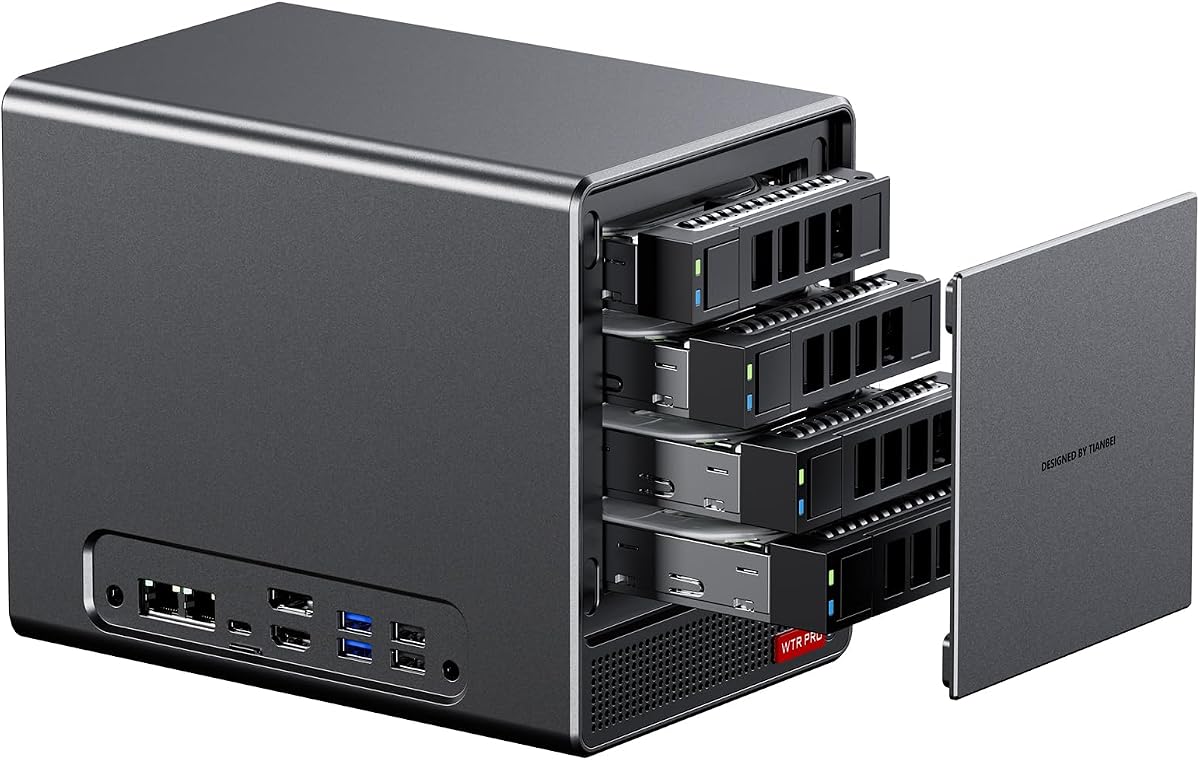
The WTR PRO targets home server users with four 3.5 inch SATA bays and an AMD Ryzen 7 5825U. It runs cool and quiet with a large fan and efficient power design ideal for 24 7 operation.
We may earn a commission when you buy through this link, at no additional cost to you.
Its dual M.2 slots allow fast cache drives while the 2.5G LAN ensures quick data transfers. Wake on LAN lets you power up the server remotely when you need access to stored files.
As a barebone system you must install memory and drives yourself. The design lacks a public rating but its specialized features speak to its purpose as a compact storage server.
Ideal for media enthusiasts or small businesses needing reliable local storage. The low power draw and flexible storage options make it a smart choice for always-on network tasks.
Four 3.5 inch bays plus two M.2 slots provide ample room for massive data storage in a small case.
Low 15 to 25 watt power consumption and silent cooling let it run uninterrupted without high energy costs.
We may earn a commission when you buy through this link, at no additional cost to you.
Rated 4.2 stars the DeskMini X300 2.5G is our Best Budget pick for its low entry cost and compact size. It supports a wide range of AMD AM4 CPUs for flexible builds without breaking the bank.
We may earn a commission when you buy through this link, at no additional cost to you.
Despite its tiny 1.92L footprint it supports three displays and includes a modern 2.5G LAN port. DDR4 memory is still capable for most tasks and the system handles everyday workloads smoothly.
You will need to provide CPU memory and storage which adds to total cost. The older AM4 platform is not as fast as newer chips but remains cost effective for light to medium use.
Students or home users needing a small functional PC will find excellent value here. It is a reliable foundation for budget builds that do not need cutting edge raw performance.
Wide CPU support and low part prices make this an accessible entry point for custom mini PC builds.
At just under two liters it fits easily in dorm rooms or home offices where desk space is limited.
We may earn a commission when you buy through this link, at no additional cost to you.
The ExpertCenter PN54 brings next-gen Ryzen AI 300 processors in an ultra-slim 0.6L chassis. It is designed for professionals who need modern connectivity like Wi-Fi 7 in a highly portable package.
We may earn a commission when you buy through this link, at no additional cost to you.
Its NPU delivers up to 50 TOPS of AI performance which accelerates content creation and responsive computing. The toolless design makes upgrades easy while the chassis supports 24/7 reliability.
Rating data is sparse and the unit is pricier than most competitors. These factors suggest it is a niche choice for those who need its specific form factor and AI capabilities above all else.
Corporate agents or mobile professionals will appreciate the thin design and advanced connectivity. If you need the latest AI features in a tiny frame this is the premium option worth considering.
The XDNA2 NPU boosts AI workloads five times faster than previous generations for smarter computing tasks.
Wi-Fi 7 ensures ultra-fast network speeds and lower latency for cloud and remote work scenarios.
We may earn a commission when you buy through this link, at no additional cost to you.
This variant offers a hybrid 4+2 bay layout allowing four SATA drives plus two M.2 NVMe slots for up to 96TB total. It targets home labs and NAS builders who need expandable storage in a compact chassis.
We may earn a commission when you buy through this link, at no additional cost to you.
Dual 2.5G LAN ports enable fast network data transfers and it supports multiple OS options including Linux and Windows. Silent operation and efficient cooling make it suitable for living room or office use.
Linux users may need to tweak settings to prevent SATA speed drops during heavy load. You must install memory drives and OS yourself which adds initial setup time for new users.
Home server enthusiasts will value the storage flexibility and network performance. It is a robust choice for media libraries backups or virtualization tasks in a small footprint.
Up to 96TB of combined storage lets you archive large media collections or server datasets easily.
Compatible with Windows Linux and router OSes this unit adapts to various server software needs.
We may earn a commission when you buy through this link, at no additional cost to you.
The PN54-S1 pushes ultra compact design to the limit with a slim 0.34mm chassis. It is built for environments where space is at a premium while still delivering reliable 24/7 operation.
We may earn a commission when you buy through this link, at no additional cost to you.
Tool-free access makes upgrades simple and it supports the latest connectivity standards like Wi-Fi 7. The three year warranty adds peace of mind for business deployments or critical setups.
Like others on this list it requires you to install RAM and storage which means initial cost beyond the kit. The lack of public reviews means users rely on brand reputation for assurance.
Corporate offices or mobile professionals who need minimal desk footprint will find this unit practical. It is a premium option for those who value size and ease of maintenance above all.
At 0.34mm the chassis occupies nearly no space on a desk or shelf ideal for tight workspaces.
Tool-free access panels let you upgrade components quickly without special tools or lengthy disassembly.
We may earn a commission when you buy through this link, at no additional cost to you.
Selecting the right AMD barebone PC involves weighing processor generation, memory speed, expansion options, and intended use cases.
Look for Zen 4 chips like the 8845HS for top performance or Zen 3 for budget builds. Newer processors offer better efficiency and AI capabilities for modern software needs.
Prioritize the latest architecture if you need future-proofing or AI acceleration for professional workloads.
Check how many DDR5 slots the unit supports and whether it accepts 64GB sticks. Also count M.2 NVMe slots and SATA bays if you plan large storage arrays.
Ensure there are enough slots to meet your long-term memory and storage needs without requiring extra adapters.
Systems with vapor chambers or large fans handle sustained loads better and stay quieter. Look for intelligent fan control that balances performance with noise output.
Choose models with proven cooling solutions if you plan to run the PC continuously or under heavy load.
USB4 Thunderbolt and OCuLink ports enable high-speed data and external GPUs. Also check LAN speed and Wi-Fi standards for network performance.
Pick units with enough modern ports to match your peripheral and network setup without needing a hub.
Form factors range from tiny 1L to larger 8L models. Smaller cases save space but may limit component height or cooling options.
Select a size that fits your workspace while leaving room for the CPU cooler and drive bays you need.
Some kits include Windows keys while others require you to provide an OS. Ensure Linux or Windows compatibility if you plan specific software.
Confirm the vendor offers clear documentation and OS keys if you prefer a ready-to-run experience.
Factor in the cost of RAM storage power supply and OS if not included. The kit price is only part of the total build.
Compare final system cost including accessories to see which model offers the best overall value.
Look for at least a one-year warranty and responsive support channels. Some vendors offer extended coverage or onsite service options.
Check warranty terms and support reputation before buying to protect your investment against defects.
Install RAM and storage by aligning notches and pressing modules firmly until they click. Secure SSDs with provided brackets before connecting data cables.
Place the unit in a well-ventilated area away from direct sunlight. Keep vents clear of dust and debris to maintain proper airflow and cooling performance.
Update BIOS and drivers from the manufacturer website after setup. Regular updates improve stability performance and compatibility with new software features.
A barebone PC includes the chassis motherboard and basic components but no RAM storage or OS. Choosing one gives full control over specs and often costs less than prebuilt systems. You tailor memory and drives to your exact needs while keeping a compact form.
Many models support eGPUs via OCuLink or USB4 though speeds vary. OCuLink offers near native PCIe performance while USB4 has higher latency. Check the product specs to confirm which ports are available for external graphics.
Yes most barebone kits feature accessible memory slots and M.2 ports for easy upgrades. Some also include SATA bays for extra storage. Just verify the maximum supported capacity before buying additional components.
Most AMD-based units work well with Linux though some features may require driver tweaks. Check the vendor's compatibility notes especially for network or sleep functions. Many models also support Windows for broader software options.
Power supply needs vary by model with some including a unit and others requiring an external adapter. Higher wattage models include internal PSUs while compact units may use a plug-in brick. Verify the included accessories before purchase.
Mini PCs offer similar performance with a much smaller footprint but may lack the expandability of full towers. They are ideal for offices gaming setups or home servers where space matters. Desktops allow more component choices but take up more room.
The AOOSTAR MACO GEM12+ and DeskMini X300 lead the list with strong performance and value. Each serves different users from gamers to budget builders with clear advantages in cooling ports or price.
Prioritize processor generation cooling efficiency and expansion slots when deciding. Make sure the unit supports your required memory and storage before buying.
Prices and stock change regularly so verify current listings and compatibility notes. Use vendor support pages to confirm OS keys and accessory details before finalizing your purchase.