
BenQ Zowie XL2566X+
4.3Editor score
400Hz refresh rate
DyAc 2 technology
Fast TN panel
Finding the right gaming monitor can transform your experience. Benq offers a wide range of displays tailored for esports professionals and casual gamers alike. Their focus on motion clarity and eye care stands out in a crowded market.
We analyzed ten top models based on refresh rates, panel types, and connectivity. Each option serves a specific need from competitive shooting to immersive single player titles. This list covers the most relevant Benq gaming monitors available today.
Every pick includes key specs and real user feedback to guide your decision. Prices and availability change frequently so check current listings before buying. Use this guide to match your hardware and play style with the perfect screen.
4.3Editor score

4.6Editor score

4.2Editor score
As an Amazon Associate we earn from qualifying purchases.
Below you will find a side by side comparison of all ten monitors featured in this guide. Each entry lists key specifications such as resolution refresh rate and panel type to help you evaluate options quickly.
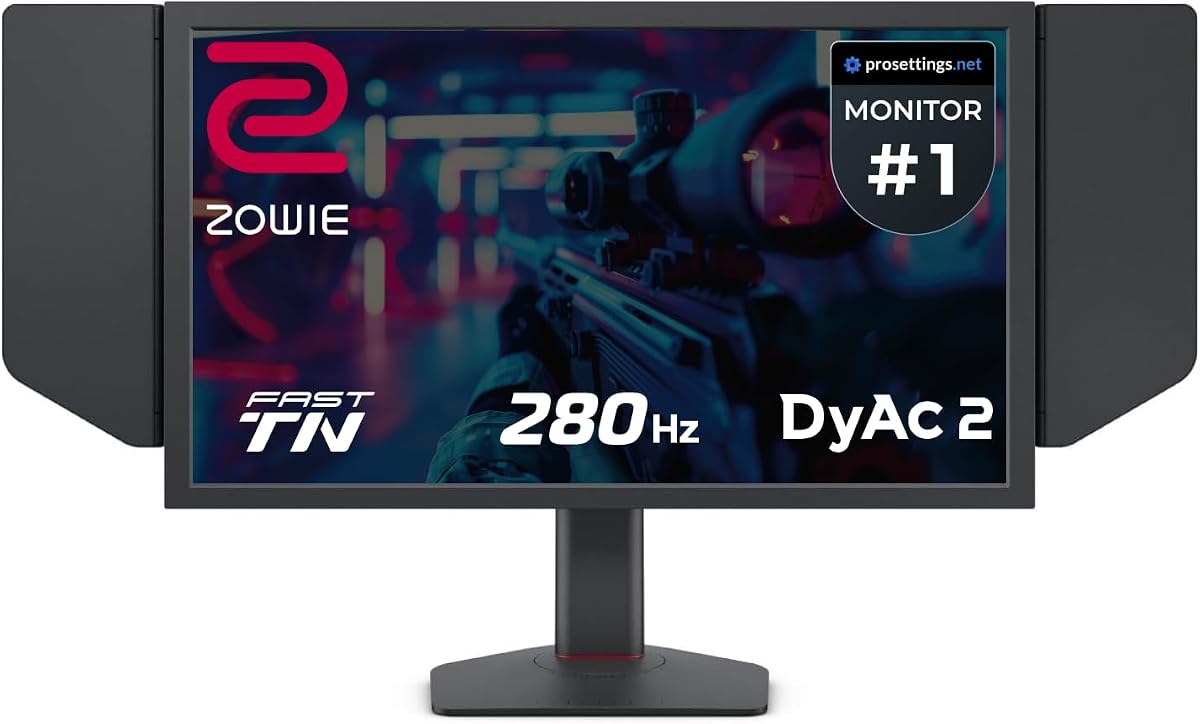


The BenQ Zowie XL2566X+ delivers top tier motion clarity for esports. It scores 4.3 out of 5 and features DyAc 2 technology. This monitor is built for competitive shooters where tracking moving targets is critical.
We may earn a commission when you buy through this link, at no additional cost to you.
Its Fast TN panel ensures minimal blur during rapid screen movement. The 400Hz refresh rate provides ultra smooth visuals that reduce eye strain. Users report better enemy identification and sharper outlines in fast paced matches.
Color performance has improved over earlier models but remains functional. The focus remains on speed and clarity rather than vibrant imagery. Trade offs include limited viewing angles typical of TN panels.
Competitive gamers seeking speed without overspending should consider this model. It fits well with mid range PCs focused on frame rates. The value proposition is strong for serious players aiming to improve reflexes.
DyAc 2 reduces blur by toggling the backlight multiple times per frame. This creates a clearer image during motion without sacrificing brightness.
The stand offers height and tilt adjustments. This helps maintain proper viewing angles during long practice sessions.
We may earn a commission when you buy through this link, at no additional cost to you.
The BenQ Zowie XL2546X+ focuses on delivering clear moving images for esports. It holds a 4.3 rating and uses a Fast TN panel with DyAc 2. This model prioritizes sharp outlines over distracting afterimages during gameplay.
We may earn a commission when you buy through this link, at no additional cost to you.
Its design improves electrical conductivity for faster liquid crystal response. This reduces overshoot which can cause ghosting artifacts. Colors are vibrant enough for competitive play while maintaining clarity.
Compared to IPS screens it offers less distraction from motion blur. The trade off is narrower viewing angles. It suits players who prioritize response speed above all else.
Gamers wanting reliable motion clarity without maximum refresh rates will appreciate this. It works well with systems targeting 240 plus FPS. The balance of speed and visual clarity makes it a solid choice.
New panel design minimizes overshoot artifacts. This ensures cleaner edges on moving objects during rapid action.
Enhanced color performance helps identify enemies quickly. Vibrant hues stand out without washing out details.
We may earn a commission when you buy through this link, at no additional cost to you.
The BenQ MOBIUZ EX271U brings 4K resolution to gaming. It has a 4.2 rating and supports 165Hz. This monitor features built-in eARC for immersive sound without extra speakers.
We may earn a commission when you buy through this link, at no additional cost to you.
AI Detail Enhancement tailors visuals to your preferences. Color Shuttle presets boost experience delicacy for popular games. The remote control simplifies navigation of these features during play.
Connectivity includes DP 1.4 and HDMI 2.1 for modern consoles. USB-C offers 65W power delivery for laptops. Trade-offs include high price and average HDR brightness.
Console and PC gamers wanting high resolution and audio integration will like this. It suits those who value versatility. The premium build and features justify the cost for many users.
Built-in eARC supports up to 7.1 channels. Console sound is addressed directly through the monitor.
Authorized presets optimize colors for specific games. This enhances visual delicacy for a better experience.
We may earn a commission when you buy through this link, at no additional cost to you.
The BenQ Zowie XL2586X+ offers the fastest refresh rate here. It earns a 4.6 rating and features 600Hz speed. This model provides the best motion clarity in the industry for esports.
We may earn a commission when you buy through this link, at no additional cost to you.
It uses a new vivid color film improving performance by 35 percent. Target visibility is enhanced compared to standard TN panels. The design also reduces overshoot effectively.
DyAc 2 technology ensures soft light output. This helps eye adaptation during long sessions. The trade-off is needing a PC capable of driving 600Hz.
Professional gamers needing absolute speed should choose this model. It fits high end setups prioritizing frame rates. The enhanced color and motion clarity make it top tier.
New film improves color performance significantly. This enhances target visibility and reduces color wash-out.
Electrical conductivity improvements enhance responsiveness. This ensures clearer and sharper images than other types.
We may earn a commission when you buy through this link, at no additional cost to you.
The BenQ MA320U is designed for MacBook users gaming casually. It has a 4.4 rating and supports 4K resolution. The monitor offers calibrated colors for MacBook Pro and Air devices.
We may earn a commission when you buy through this link, at no additional cost to you.
Dual USB-C ports deliver 90W power delivery. You can charge your device and display with one cable. Controls for brightness and volume integrate directly with your keyboard.
It features a P3 wide color gamut for vibrant visuals. The stand adjusts height and tilt for comfort. The trade-off is a standard refresh rate not built for esports.
Mac users wanting a seamless experience should consider this. It supports casual gaming and productivity well. The color match and power delivery are standout features.
Exclusive color tuning ensures vibrant P3 gamut. This offers a vibrant experience tailored to MacBook users.
Dual USB-C ports support 90W delivery. You can expand your display with a single cable.
We may earn a commission when you buy through this link, at no additional cost to you.
The BenQ GW2790Q prioritizes eye comfort. It has a 4.6 rating and offers 2K resolution. The monitor features Low Blue Light Plus and filters harmful radiation.
We may earn a commission when you buy through this link, at no additional cost to you.
Input Hotkey allows seamless device switching. This helps transition between work and play quickly. Brightness Intelligence adjusts auto based on ambient light.
Coding and ePaper modes ensure readability. The trade-off is a 100Hz refresh rate which is lower than gaming standards. However it is smooth for general use.
Users wanting eye care features should look here. It suits mixed use environments. The high rating and comfort features make it a reliable choice.
Low Blue Light Plus filters harmful radiation. This maintains vivid color quality while protecting vision.
Single click device switching improves workflow. This ensures seamless transitions between different devices.
We may earn a commission when you buy through this link, at no additional cost to you.
The BenQ RD320U offers a 2000:1 contrast ratio. It has a 4.4 rating and features a Nano Matte panel. This monitor delivers deep blacks for coding and movies.
We may earn a commission when you buy through this link, at no additional cost to you.
Coding modes provide clear fonts and differentiation. Night Hours Protection uses minimum brightness for dark room usage. MoonHalo backlight ensures optimal eye protection.
The trade-off is a focus on coding over gaming. It lacks high refresh rates. However it suits users needing long session comfort.
Users wanting deep blacks should consider this. It supports eye protection features. The ergonomic design and contrast make it unique.
Customizable temperature ensures optimal focus. This enhances eye protection and maintains clarity.
Minimum brightness technology protects eyes. This enhances comfort during dark room usage.
We may earn a commission when you buy through this link, at no additional cost to you.
The BenQ GW2486TC targets office and play. It has a 4.4 rating and supports FHD resolution. This monitor features edge to edge display for focus.
We may earn a commission when you buy through this link, at no additional cost to you.
Built-in noise cancellation reduces background noise. This shifts focus to what is important. Adaptive brightness optimizes performance for work and play.
USB-C supports 60W power delivery for mobile devices. The trade-off is 1080p resolution which is lower than gaming standards. However it suits mixed usage.
Users wanting office and casual gaming should look here. It supports voice calls well. The high rating and brightness make it versatile.
Built-in mic reduces background noise effectively. This shifts focus to what is important.
One cable synchronizes images and video. This supports 60W power delivery for devices.
We may earn a commission when you buy through this link, at no additional cost to you.
The BenQ PD2706QN focuses on color accuracy. It has a 4.5 rating and factory calibration. This monitor delivers consistent colors for design and gaming.
We may earn a commission when you buy through this link, at no additional cost to you.
ICCsync matches profiles between Mac and monitor. This ensures color consistency across devices. The Nano matte panel diffuses light for clarity.
The trade-off is a 100Hz refresh rate which is moderate. However it suits creative tasks well. Uniformity is a key benefit for visuals.
Users wanting consistent colors should look here. It supports design workflows well. The rating and accuracy make it a great choice.
Auto matches ICC profiles between Mac and monitor. This ensures color consistency across different displays.
Factory calibrated color accuracy ensures consistency. This maintains uniformity across the entire screen.
We may earn a commission when you buy through this link, at no additional cost to you.
The Acer Nitro KG241Y offers a VA panel option. It has a 4.5 rating and supports 180Hz. This monitor provides FreeSync Premium for smooth visuals.
We may earn a commission when you buy through this link, at no additional cost to you.
Zero-frame design offers an edge to edge display. It supports HDR ready for better visuals. The ergonomic tilt range is adjustable.
The trade-off is VA response speed which can lag. However it suits general gaming well. The high rating supports its value.
Users wanting affordable gaming should look here. It supports AMD systems well. The rating and smoothness make it a good choice.
AMD FreeSync Premium technology ensures smooth visuals. This reduces tearing and stuttering during play.
Edge to edge display focuses on content. This provides a wider and more immersive view.
We may earn a commission when you buy through this link, at no additional cost to you.
Choosing the right monitor depends on your priorities. This guide breaks down key factors to help you decide.
Refresh rate determines how many frames per second the monitor displays. Higher rates like 240Hz or 400Hz provide smoother motion which is critical for competitive shooters. Benq offers models ranging from 100Hz to 600Hz. Choose high refresh for fast paced esports.
Higher refresh rates reduce motion blur and improve tracking. Look for 240Hz or above for competitive play.
Panel types include TN IPS and VA. TN panels like those in Zowie monitors prioritize speed. IPS panels offer better colors and viewing angles. VA panels provide high contrast. Choose based on your balance of speed and color needs.
TN is fastest. IPS has better colors. VA has high contrast. Select what fits your play style.
Resolution impacts image clarity. FHD is common for esports. 2K and 4K are used for immersive single player games. Higher resolutions need more powerful GPUs. Match resolution to your hardware capabilities and desk size.
FHD for speed. 2K or 4K for detail. Ensure your GPU can support the resolution.
Motion clarity features like DyAc reduce blur. Benq uses DyAc technology to enhance tracking. This toggles the backlight to reduce ghosting. Look for these features if you play competitive shooters. They improve sharpness during rapid movement.
DyAc technology reduces blur. Look for dual backlight systems for sharper motion.
Connectivity ensures your device connects. HDMI 2.1 and DP 1.4 support high refresh. USB-C offers power delivery for laptops. Choose monitors with ports matching your PC or console. Extra ports add flexibility.
Check HDMI and DP versions. USB-C adds convenience for laptops.
Eye care features reduce strain. Low Blue Light Plus filters harmful radiation. Brightness Intelligence adjusts to light. These matter for long sessions. Benq emphasizes eye comfort across many models. Prioritize if you play hours daily.
Look for Blue Light filters and auto brightness. These help comfort.
Ergonomics affect posture. Height tilt and pivot adjustments help. Benq monitors usually offer adjustable stands. Proper positioning reduces fatigue. Ensure the stand suits your desk height and preferences.
Adjustable stands improve posture. Check height and tilt options.
Price varies by specs. Zowie models are budget focused. MOBIUZ models are premium. Consider what features you need. Spending more gets higher refresh or better colors. Value depends on your needs.
Compare specs against price. Choose features that match your usage.
Connect your monitor using the appropriate cable. HDMI or DisplayPort for gaming. USB-C for laptops. Ensure the cable matches the port version like HDMI 2.1 for 4K gaming.
Adjust display settings to match your games. Use presets like FPS or RTS modes. Calibrate color if needed. Adjust brightness to match your room lighting.
Clean the screen with a microfiber cloth. Avoid chemicals. Adjust the stand to your eye level. This prevents strain. Update firmware periodically for best performance.
For competitive gaming, higher refresh rates are preferred. Look for monitors with 240Hz or more like the BenQ Zowie XL2586X+ at 600Hz. This ensures smooth motion. It helps track fast enemies. This reduces motion blur significantly.
Yes, many Benq monitors work with consoles. Models with HDMI 2.1 support 4K and higher refresh rates. The MOBIUZ EX271U supports this. Always check port compatibility. This ensures full performance with your console.
DyAc technology reduces motion blur. It toggles the backlight multiple times per frame. This creates clearer images during fast movement. It is found in Zowie monitors. It improves tracking in shooters.
TN panels are the fastest. They offer the quickest response times. Benq Zowie monitors use Fast TN panels. This minimizes ghosting. Choose TN for speed priority over colors.
Yes, Benq includes Eye-Care features. Models have Low Blue Light and brightness adjustment. This helps during long sessions. Look for these features for comfort. It reduces strain over time.
Look for HDMI 2.1 and DisplayPort 1.4. These support high refresh and resolution. USB-C is useful for laptops. Ensure your monitor has ports matching your device. This ensures full performance.
Yes, some models suit work. The GW2790Q has coding modes. The MA320U supports Mac. These focus on comfort. Choose based on your primary task. Gaming monitors still work well for work.
Yes, high refresh rates need power. To utilize 400Hz or more, your GPU must output that FPS. If your PC cannot do this, consider lower refresh models. Match hardware to monitor specs.
You have seen ten top Benq monitors. The XL2586X+ leads for speed. The MOBIUZ EX271U is best for premium. The XL2566X+ is great for budget. Each fits different needs.
Prioritize refresh rate for esports. Look for eye care if playing long. Match resolution to your PC. Consider your budget. Choose the model that fits your setup best.
Prices change frequently. Check current listings for deals. Use this guide to compare specs. Pick the monitor that helps you play better. Happy gaming.