Compare the top biometric scanner for PC options for Windows Hello security. We evaluate hardware standards, speed, and compatibility to help you choose the
As an Amazon Associate we earn from qualifying purchases. We may earn a commission when you buy through links on this page, at no additional cost to you. Read our affiliate disclosure.As an Amazon Associate we earn from qualifying purchases.Purchases through our links may earn us a commission, at no extra cost to you. Read our affiliate disclosure.
Securing your personal computer has become more critical than ever in the digital age. A biometric scanner for PC offers a seamless way to log in without typing complex passwords every time you sit down at your desk.
We compared ten top-rated fingerprint readers based on their security certifications, connection types, and recognition speed. This guide covers essential features like Windows Hello support, encryption standards, and build quality to ensure you find a reliable device.
Each product pick includes detailed specifications and real-world usage notes to help you decide. Please note that availability and pricing can change frequently, so check the linked product pages for the most current information before purchasing.
Top 3 Picks for Best Biometric Scanner for PC
Best Budget
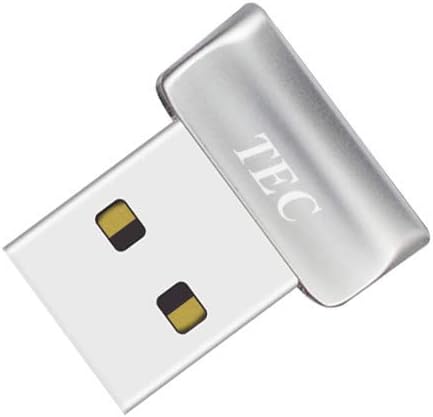
TEC Mini USB Fingerprint Reader for Windows 11/10 Hello, TEC TE-FPA2 Bio-Metric Fingerprint Scanner PC Dongle for Password-Free and File Encryption, 360 Touch Speedy Matching Security Key
Kensington Upgraded VeriMark Desktop 2.0 USB Fingerprint Reader Supports USB-C and USB-A – Windows Hello with ESS, Windows 11 Fingerprint Scanner for PC, FIDO U2F, FIDO2, TAA Compliant (K64741WW)
Top 10 Best Biometric Scanner for PC in 2026 Compared
Below is a side-by-side comparison of the ten best biometric scanners for PC currently available. We analyze their key specifications to help you understand the differences in build, features, and support at a glance.
The Kensington Upgraded VeriMark Desktop 2.0 stands out as a top-tier security device for Windows users seeking robust authentication. It holds the highest certification from Microsoft for fingerprint security, ensuring your biometric data is handled with the utmost care and precision. This makes it an ideal choice for enterprises and privacy-conscious individuals who prioritize security over convenience.
Pros
Highest security certification
360 degree recognition
Local data storage
USB-A and USB-C
TAA compliant
Cons
Limited software ecosystem
Higher price point
We may earn a commission when you buy through this link, at no additional cost to you.
Its on-device storage ensures that your fingerprint data never leaves the hardware, protecting it from cloud breaches or external interception. The scanner supports both USB-A and USB-C connections, making it versatile for modern and legacy systems alike. Additionally, it is fully TAA compliant, which is essential for government contracts and federal agency procurement processes.
While the hardware is excellent, the user experience relies heavily on Windows Hello integration, which may not appeal to those seeking third-party authentication apps. The device is also priced higher than many consumer-grade alternatives, which might be a barrier for home users. However, for professional environments, these features justify the investment in a secure login experience.
If you need a scanner that meets rigorous government and corporate standards, this Kensington model is the best choice available. It balances high-grade encryption with user-friendly access through Windows Hello. We recommend this for IT professionals or agencies needing certified hardware solutions that comply with strict privacy regulations like GDPR and CCPA.
Enhanced Security Certification
Certified to Microsoft's highest standards, this scanner ensures your login data remains isolated within the device to prevent external access or leakage.
Dual Port Flexibility
Supporting both USB-C and USB-A, it adapts to any desktop setup without needing extra dongles or adapters for connectivity.
The TEC Mini USB Fingerprint Reader offers an affordable entry point for users wanting to upgrade their PC security without breaking the bank. It is designed specifically for Windows Hello, allowing you to skip passwords entirely for a seamless login experience. This makes it a practical upgrade for home PCs or small offices looking to improve daily usability.
Pros
Low price point
360 degree touch
Folder encryption tools
Fast matching speed
Compact dongle style
Cons
Not ARM compatible
Driver setup required
We may earn a commission when you buy through this link, at no additional cost to you.
One of its standout features is the included support for file and folder encryption. This means you can lock away sensitive documents easily without needing third-party software. The 360-degree touch capability ensures you can scan your finger from any angle, reducing friction during use. However, users should note that it is not compatible with ARM-based chipsets, limiting its use on some newer devices.
While the hardware is reliable, the software experience requires some driver installation and configuration to function correctly. The support team is active, but the setup process can be slightly more involved than plug-and-play models. Despite this, the speed of matching is quick, making it a functional replacement for passwords on compatible systems.
For those on a tight budget who need a reliable biometric solution, this device provides great value. It delivers the core security features you need without the premium price tag. We suggest it for home users who want to secure their files and log in quickly without complex setups.
Cost-Effective Security
This affordable option brings Windows Hello authentication to your desk, enabling fast, password-free login for everyday users.
Integrated File Locking
Beyond login security, it includes tools to encrypt your documents, adding an extra layer of protection for sensitive data.
The Verifi P6000 USB Fingerprint Reader is the ultimate choice for users demanding top-tier security and durability. It holds a spot on the FBI's Certified Products List, meeting government standards for fingerprint quality. This level of certification makes it suitable for highly secure environments where data protection is non-negotiable and reliability is paramount.
Pros
FBI CPL certified
All metal housing
Plug and play
High durability
Windows Hello support
Cons
High cost
Limited consumer features
We may earn a commission when you buy through this link, at no additional cost to you.
Its all-metal housing ensures that the device can withstand daily wear and tear, whether on a busy office desk or in a rugged field environment. The plug-and-play functionality means you can connect it and start using it immediately without installing drivers. Windows Hello support ensures smooth integration with your system for secure and fast access.
While it is expensive compared to consumer models, the build quality and security clearance justify the cost for professional use. There are fewer consumer-focused features like RGB lighting or extra ports, as the focus is purely on security and robustness. For government or military-grade applications, this device delivers the necessary reliability.
If you need a scanner that meets federal standards and offers unmatched durability, this is the best option available. It provides a secure login experience that can be trusted in critical situations. We recommend it for security professionals or organizations requiring compliance with government standards.
Government Grade Security
Certified by the FBI, this reader meets strict federal standards, making it ideal for high-security environments and compliance.
Rugged Metal Build
The all-metal casing ensures long-term durability, protecting the sensor from physical damage during daily office use.
The Kensington VeriMark Desktop 1.0 is a trusted device for users needing both Windows Hello and broader web authentication. It is FIDO U2F certified, which means it works with passwordless login services across major browsers. This feature is valuable for web developers and users who frequently access online accounts securely.
Pros
FIDO U2F certified
Windows Hello certified
Long cable length
Tap and Go support
Cons
No ARM support
Older 1.0 model
We may earn a commission when you buy through this link, at no additional cost to you.
Its 360-degree readability allows for easy scanning from any angle, while the Match-in-Sensor technology ensures your data stays private on the device. The long 3.9-foot cable provides flexibility in placement, allowing you to position the scanner comfortably on your desk. It is fully Windows Hello certified, ensuring seamless integration with your operating system.
However, this is the older 1.0 model, so it lacks some of the newer features found in the 2.0 version. It is not supported on ARM-based computers, which limits its compatibility with newer device types. Despite this, it remains a reliable choice for those needing specific FIDO compatibility for web-based security.
For users who prioritize web authentication and desktop convenience, this scanner is a strong choice. It offers a balance of security and usability that fits many office environments. We recommend it for those who need FIDO support for their online workflows.
Web Authentication Ready
FIDO U2F certification enables secure login to online accounts without passwords, supporting modern web security standards.
Flexible Placement
The long USB cable allows you to place the sensor anywhere on your desk, ensuring easy access to your PC.
The Portable USB Fingerprint Reader for Windows is a versatile hybrid device that combines a security key with a charging port. Its built-in USB-C pass-through allows you to charge your laptop while using the scanner, which is a great space-saving feature. This makes it perfect for travelers or professionals who want a compact solution on the go.
Pros
USB-C pass-through
Premium aluminum build
Fast login speed
Adhesive backing
Compact and portable
Cons
Requires USB-C
Adhesive may peel
We may earn a commission when you buy through this link, at no additional cost to you.
It features a premium aluminum build that feels durable and sleek on your desk. The 360-degree touch ensures accurate scans regardless of how you place your finger. The adhesive backing allows you to mount it securely to your laptop or desk, keeping it accessible whenever you need it. It supports Windows Hello for fast and seamless login.
While it is a fantastic hybrid tool, it relies on USB-C, so older devices with USB-A ports will need adapters. The adhesive mount is strong but may not stick well on all surfaces over time. However, its speed and portability make it a great option for mobile professionals.
For users who value versatility and need a charging port, this scanner is an excellent choice. It simplifies your desk setup by combining security with power. We recommend it for laptop users who want a compact, efficient way to stay secure while traveling.
Dual Port Utility
The USB-C pass-through feature lets you charge your device and scan at the same time, reducing cable clutter.
Durable Portable Design
Constructed from aluminum with an adhesive mount, it is designed to withstand travel while staying secure on your desk.
The Fingerprint Reader Biometric Authentication is a rebranded version of the trusted DigitalPersona URU4500. It is an ideal choice for those needing a proven, reliable scanner that works with various software solutions. The device is known for its ability to read fingerprints even if they are dry or rough, which is a common issue with cheaper sensors.
Pros
HID brand original
512 dpi sensor
Works on dry fingers
Rugged metal build
Cons
Higher price
Older sensor tech
We may earn a commission when you buy through this link, at no additional cost to you.
Its metal casing resists accidental movement, making it stable for office use. The 512 dpi sensor ensures clear image capture for accurate matching. It is fully compatible with Windows 10 and 11, supporting standard authentication frameworks. This makes it a versatile device for both home and professional environments.
However, it is priced higher than many modern alternatives, reflecting its legacy status. The design is older and lacks the sleekness of newer models. Despite this, its reliability and ability to handle difficult fingerprint conditions make it a solid backup or alternative for older systems.
If you need a rugged scanner that works with dry fingerprints and various authentication software, this device is a strong candidate. It prioritizes reliability over modern design. We recommend it for users who need consistent performance across different hardware setups.
Robust Sensor Technology
The 512 dpi sensor captures detailed images, ensuring reliable reads even with dry or rough skin.
Durable Construction
The metal casing ensures the device stays put during use, preventing accidental shifts that could affect accuracy.
The USB Fingerprint Reader for Windows is a straightforward device designed for easy integration with your PC. It is Microsoft certified, ensuring it meets the standards for Windows Hello authentication. The setup process is simple, often requiring no driver installation on genuine systems. This makes it an ideal choice for users who want a hassle-free experience.
Pros
Microsoft certified
Plug and play
10 fingerprint slots
Braided cable
Cons
Variable driver support
Basic sensor
We may earn a commission when you buy through this link, at no additional cost to you.
It supports up to 10 fingerprints, allowing multiple users to share a device comfortably. The aluminum housing protects the sensor from damage, while the 5-foot braided cable offers flexibility in placement. This durability and capacity make it suitable for family PCs or shared office workstations.
While it works well on standard systems, some custom Windows builds may require manual driver updates. The sensor is functional but lacks some of the advanced features of higher-end models. However, for basic secure login, it provides reliable performance at an affordable price.
If you need a simple, reliable scanner for family or shared use, this device is a great choice. It prioritizes ease of use and compatibility. We recommend it for users who want a plug-and-play solution without technical complexity.
Multi-User Support
Store up to 10 fingerprints, allowing multiple household or office members to access the PC securely.
Plug and Play Setup
Designed for instant recognition on Windows systems, so you can start using it without installing extra software.
The Verifi P2000 Desktop USB Fingerprint Reader is a solid option for users looking to adopt PASSKEY login for websites and apps. Its 3D touch capacitance technology provides high-definition imaging, which improves accuracy over standard 2D sensors. This makes it a strong choice for those prioritizing biometric accuracy for daily use.
Pros
3D touch technology
PASSKEY compatible
Office 365 support
Windows Hello certified
Cons
Older model
Basic design
We may earn a commission when you buy through this link, at no additional cost to you.
It is Windows Hello certified and integrates seamlessly with Microsoft services like Office 365. The device is compatible with most leading password management software, allowing you to replace passwords with fingerprints across multiple platforms. This versatility makes it valuable for businesses adopting modern security protocols.
While it is older than newer models, it still delivers reliable performance for its intended use. The design is functional with a black and silver finish that fits most desks. However, it lacks some of the extra features found in newer devices like extra ports or adaptive sensors.
For users who want to transition to PASSKEY login and need a reliable device for Office 365, this is a great choice. It balances legacy compatibility with modern authentication needs. We recommend it for professionals using Microsoft services.
3D Touch Precision
Superior 3D touch technology captures detailed fingerprint images for more accurate and reliable authentication.
Microsoft Integration
Fully certified for Windows Hello and Office 365, making it a seamless addition to your Microsoft ecosystem.
The ineo USB Fingerprint Reader for Windows 10/11 is designed for speed and convenience. Its high-precision optical sensor ensures quick and accurate recognition, allowing you to log in instantly. The one-touch computer lock feature lets you secure your screen immediately when you walk away, adding an extra layer of security.
Pros
One touch lock
Fast scanning
Plug and play
Compact design
Cons
No Mac support
Basic software
We may earn a commission when you buy through this link, at no additional cost to you.
It is a plug-and-play device that requires no complex setup. Just connect it to your USB port and start using it. The compact design ensures it does not clutter your workspace, and the 5-foot cable provides flexibility. This makes it ideal for users who want a no-fuss security solution.
While it is efficient, it is not compatible with Mac systems, limiting its use to Windows users. The software is basic compared to more advanced models, focusing on core login and lock functionality. Despite this, it performs its tasks reliably and is a good value for the price.
If you need a simple, fast scanner that supports Windows Hello and screen locking, this device is a great choice. It prioritizes usability and speed. We recommend it for home or office users who want quick access to their PC.
One-Touch Security
Use a single touch to lock your screen instantly, keeping your data safe whenever you step away.
Sleek Design
A compact footprint ensures it fits easily on any desk without taking up valuable workspace.
The Windows Hello Fingerprint Reader for PC is a unique 2-in-1 device that acts as both a power button and a security scanner. It connects via a Y-split cable, allowing your PC to function normally while adding biometric login. This is a clever solution for desktop users who want to integrate power and security.
Pros
2-in-1 power design
RGB lighting modes
Fast recognition
Desktop only
Cons
Desktop only
Extra cable required
We may earn a commission when you buy through this link, at no additional cost to you.
It features 18 RGB lighting modes that let you customize its look to match your setup. The scanning is fast and works from any angle, ensuring a smooth login experience. The 5-foot extension cable offers flexible placement, so you can position it wherever it is most convenient.
However, it is designed only for desktop PCs and will not work with laptops. This limits its use to stationary setups. The RGB lighting adds flair but may not be necessary for all users. Despite this, it provides a distinctive and functional way to secure your desktop.
If you want a scanner that also acts as your PC's power button with customizable lighting, this is a great option. It combines utility and aesthetics in a unique way. We recommend it for desktop enthusiasts who want a distinctive look.
Power Button Integration
The Y-split design lets you power on your PC and log in with a fingerprint, merging two functions into one device.
Customizable RGB
With 18 lighting modes, you can match the scanner's glow to your desk setup for a personalized vibe.
We may earn a commission when you buy through this link, at no additional cost to you.
Buying Guide – How to Choose the Best Biometric Scanner for PC
Choosing the right biometric scanner for your PC depends on several key factors. This section breaks down the most important features to consider when making your purchase.
Windows Hello Compatibility
Ensure the scanner supports Windows Hello. This native integration provides a seamless login experience without needing third-party software. Certified devices guarantee smooth performance with your operating system.
Look for Microsoft certification to avoid compatibility issues.
Connection Type
Choose between USB-A and USB-C connections based on your device. Newer laptops often have only USB-C ports, so dual support is beneficial. Ensure you have the necessary adapters if needed.
Dual-port support offers the most flexibility for modern devices.
Security Standards
Security standards like FIDO U2F or ESS certification are crucial for high-security needs. These ensure your data is encrypted and compliant with regulations. For general use, basic Windows Hello support is usually sufficient.
Higher certifications are needed for enterprise or government use.
Sensor Quality
A high-quality sensor ensures accurate reads even with dry or angled fingers. Look for 360-degree touch or 3D touch technology for better performance. This reduces the need to re-scan your finger repeatedly.
Better sensors improve convenience and reduce daily frustration.
Build Quality
The build material impacts durability. Metal casings are more resistant to damage and movement than plastic. If the device will be on a busy desk, a sturdy design is essential.
Metal builds provide better longevity in daily use.
Cable Length
A longer cable allows for flexible placement on your desk. A 5-foot or longer cable ensures the scanner can reach your hand comfortably while staying near the computer. This improves the overall user experience.
Longer cables offer better placement options.
Multi-Fingerprint Support
If multiple users access your PC, ensure the scanner supports multiple fingerprints. This allows each person to have their own secure login. Shared environments benefit greatly from this feature.
Multiple slots are essential for shared workstations.
Price vs. Features
Balance the features you need with your budget. While cheaper models work well for home use, premium models offer better security certifications. Decide what level of security justifies the cost for your situation.
Choose a model that fits your specific security needs.
How to Use and Care for Your Biometric Scanner for PC
To set up your scanner, plug it into a USB port and follow the on-screen prompts in Windows Settings. If the device requires drivers, install them from the manufacturer's website or included disc to ensure proper functionality.
For best results, scan your fingers under consistent lighting and ensure they are dry. Register multiple prints of the same finger from different angles to improve recognition accuracy. This helps the sensor learn your fingerprint better.
Keep the sensor clean by gently wiping it with a soft, lint-free cloth. Avoid using harsh chemicals or abrasive materials that could damage the surface. Regular cleaning ensures the scanner remains responsive over time.
Frequently Asked Questions
Will these scanners work with Windows 11?
Yes, all the scanners listed in this guide support Windows 11 and Windows 10. Most of them are certified for Windows Hello, which is the native biometric system in these operating systems.
Can I use these on a Mac?
No, these biometric scanners are designed specifically for Windows. macOS has its own native Touch ID for compatible MacBooks and Macs, so these devices are not compatible with Mac systems.
Are these scanners secure?
Yes, they use secure authentication protocols like FIDO U2F or Microsoft ESS. Your fingerprint data is typically stored locally on the device, ensuring it does not leave your computer.
What if my finger is dry?
Some models like the DigitalPersona URU4500 are better at reading dry fingers. For other models, moistening your finger slightly or registering multiple angles can improve detection accuracy.
Do I need to install drivers?
Most devices are plug and play with genuine Windows systems. However, custom setups might require downloading specific drivers from the manufacturer's site to ensure full functionality.
What happens if my PC has only USB-C?
If your PC only has USB-C ports, look for models with USB-C support or purchase a USB-C to USB-A adapter. Some models are specifically designed with USB-C connectivity in mind.
Final Thoughts on Choosing the Best Biometric Scanner for PC
We have reviewed the top biometric scanners for PC, highlighting options for every need. From the high-security Verifi P6000 to the affordable TEC Mini, there is a device for everyone.
Prioritize security certifications and connection types to match your workflow. If you need government-grade security, look for FBI or ESS certification. For home use, basic Windows Hello support is often enough.
Prices and availability may change frequently, so verify the details on the product pages before purchasing. We hope this guide helps you secure your PC efficiently and conveniently.
Discover the top battery for sump pump backup systems reviewed for October 2026. Compare inverters, charging speeds, and protection features to keep your