
Nettbe 60 PCS Reusable Cable Ties
4.8Editor score
Reusable nylon adhesive material
Sixty pieces included in pack
Adjustable cord straps wrap
Building a powerful gaming PC involves many cables that can quickly turn your setup into a tangled mess. Proper cable management ensures safety, better airflow, and a professional look for your battlestation.
We compared ten highly rated solutions including sleeves, clips, trays, and full kits. Each product was evaluated on durability, ease of installation, capacity, and overall value for gamers.
Each pick highlights key features and ideal use cases. Remember that prices change frequently so check the current listing before making your final purchase decision today.
4.8Editor score

4.6Editor score
4.6Editor score
As an Amazon Associate we earn from qualifying purchases.
Below is a detailed side-by-side comparison of all ten products to help you quickly identify the right solution for your specific gaming desk setup needs.




This comprehensive kit offers an extensive range of tools to organize your gaming PC cables effectively. With 192 pieces including sleeves, ties, and clips, it covers almost every wiring need in one box.
We may earn a commission when you buy through this link, at no additional cost to you.
The kit includes four wire organizer sleeves that are split for easy loading without disconnecting cables. The self-adhesive cable tie rolls provide long lasting hold for bundling cords neatly under desks.
While the variety is excellent, the adhesive pads require clean surfaces to function optimally. Also, the braided sleeves might need some manual shaping to route around tight corners smoothly.
If you need a one stop solution for a messy gaming setup, this kit is a top choice. It provides everything required to transform a cluttered space into a clean organized workstation.
The high piece count ensures you have enough ties and clips for multiple devices and power strips.
The sleeves act as a barrier preventing cats from chewing on vulnerable power and data cables.
We may earn a commission when you buy through this link, at no additional cost to you.
These reusable ties are perfect for quickly bundling loose cables around your gaming PC. Made from premium nylon adhesive materials they can be used many times without losing grip strength.
We may earn a commission when you buy through this link, at no additional cost to you.
The hook and loop design allows you to adjust the tightness of the wrap effortlessly. This is ideal for managing bundles of USB or power cables under your desk or behind your monitor.
Limitations include the lack of mounting hardware meaning they only bundle rather than secure cables to surfaces. However for simple bundling needs they are highly effective and economical.
Buy this if you need a simple way to group cables together without spending much. It is an essential accessory for anyone wanting to keep cords organized and accessible.
The strap design lets you loosen and tighten bundles instantly as your cable setup changes.
Reusable ties reduce waste compared to single use plastic zip ties found in most kits.
We may earn a commission when you buy through this link, at no additional cost to you.
This kit offers a flexible approach to managing cables around gaming setups with split sleeves and various clips. The 192 pieces provide ample tools to organize cables on desks and walls.
We may earn a commission when you buy through this link, at no additional cost to you.
The wire loom splits open making it easy to load wires without disconnecting them first. Once loaded the braided sleeve closes on itself for a perfect wire wrap that looks neat.
While the material is sturdy the sleeves can sometimes feel less robust than rigid trays. Additionally adhesive strength varies depending on the surface texture where you apply the clips.
Choose this if you want a mix of protective sleeves and adhesive holders for a versatile setup. It works well for standard desktop organization where cables need both bundling and routing.
The split design eliminates the hassle of threading wires through closed tubing.
Mixing sleeves with clips allows you to manage both long runs and short bundles.
We may earn a commission when you buy through this link, at no additional cost to you.
This cord protector provides a reliable way to bundle and protect power and audio cables from damage. The split design allows you to add or remove wires without cutting the sleeve.
We may earn a commission when you buy through this link, at no additional cost to you.
Made from materials that work in a wide temperature range it ensures safety and longevity. The insulation properties help protect wires from external elements and accidental damage.
A key downside is the lack of mounting clips so you must use separate ties to secure it. This means you might need to buy additional accessories to keep the sleeve in place on walls.
If you have long cable runs under a desk or along a baseboard this is a solid choice. It offers durable protection at an affordable price for basic cable management tasks.
UL recognition indicates the material meets safety standards for electrical insulation and fire resistance.
The thick sleeve prevents pets from chewing on cables which protects both wires and pets.
We may earn a commission when you buy through this link, at no additional cost to you.
These J channel cable organizers help hide power cords and computer cables along the edges of your desk. The open design allows you to place and remove cables effortlessly without tools.
We may earn a commission when you buy through this link, at no additional cost to you.
Made from flame retardant PVC they provide an extra layer of safety for your electronics. The strong adhesive tape ensures a robust installation on smooth surfaces for extended periods.
Be aware that removing the channels may require heat to avoid damaging furniture surfaces. Also they are best for desks with clean edges rather than textured or porous materials.
Ideal for office desks or home setups where you want visible wires to be out of sight. This set offers a neat solution for routing cables along the perimeter of your workspace.
Flame retardant material helps prevent fires from spreading along the cable runs on desks.
Channels can be installed under desks or along walls to suit your specific layout needs.
We may earn a commission when you buy through this link, at no additional cost to you.
These under desk trays provide a clean way to hide power strips and cables from view. The adhesive backing makes installation straightforward without needing drills or screws.
We may earn a commission when you buy through this link, at no additional cost to you.
Users find the trays spacious enough to hold multiple cables and transformers securely. The design allows for efficient organization without taking up too much space under the desk.
While the adhesive is strong it works best on smooth and clean surfaces. On textured wood or glass surfaces additional mounting may be necessary for stability.
Consider this option if you want a simple and affordable way to organize cables under a desk. The two pack ensures you have enough trays for multiple sections of your desk.
Peel and stick application allows you to install trays quickly without any tools or expertise.
Concealing cables improves the visual appeal of your workspace significantly for guests.
We may earn a commission when you buy through this link, at no additional cost to you.
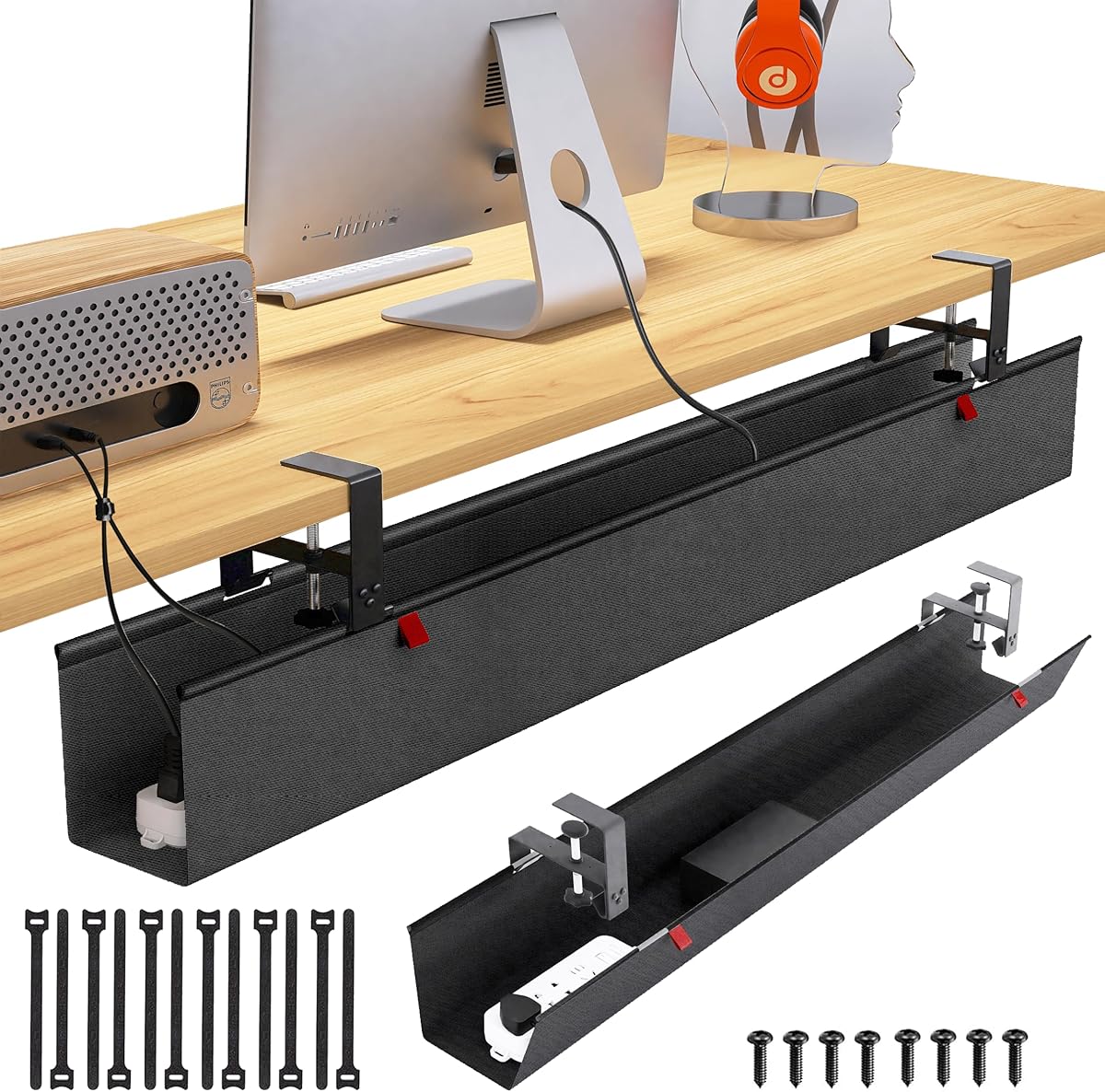
This cable tray offers a larger capacity solution for gaming setups with many devices. The design fits all size adapters and sockets making it versatile for various PC rigs.
We may earn a commission when you buy through this link, at no additional cost to you.
You can choose between clamp on installation or screw fixing depending on your table material. The thick 600D oxford fabric provides durability and flame resistance for safety.
Installation requires some clearance on the table edge for the clamps to work properly. If your desk has built-in drawers or back rods you may not be able to install it.
For heavy duty needs this tray provides reliable support without drilling into your desk. It is an excellent choice for gamers with extensive power needs and large cable runs.
Having both clamp and screw options makes this tray compatible with many different desk types.
The bottom support and thick fabric allow it to hold heavy power bricks safely.
We may earn a commission when you buy through this link, at no additional cost to you.
This cable tray is built from sturdy metal with a mesh structure that promotes ventilation. It can withstand a significant weight of up to 15 pounds securely under your desk.
We may earn a commission when you buy through this link, at no additional cost to you.
The mesh design helps prevent overheating by allowing air to flow freely around power strips. This is crucial for high performance setups that generate considerable heat during use.
Assembly requires using screws to connect the two parts which is a simple process. However the clamps should be adjusted carefully to avoid scratching delicate wood table surfaces.
If you need a strong and durable tray that supports ventilation this is a great pick. It is well suited for standing desks where airflow and strength are top priorities.
The mesh structure reduces dust accumulation and prevents power supplies from getting too hot.
Metal construction ensures the tray will not sag under heavy loads of equipment.
We may earn a commission when you buy through this link, at no additional cost to you.
These elastic cable clips offer versatile ways to hold wires using adhesive screws or zip ties. The impact resistant ABS plastic hook design allows one handed operation for quick changes.
We may earn a commission when you buy through this link, at no additional cost to you.
The new white silicone elastic loop offers long lasting strength and UV resistance. This ensures a firm grip on cables that lasts for years without breaking or losing elasticity.
The clips are designed for smaller cables up to one inch diameter which may not fit thick bundles. However they are perfect for organizing power adapters and peripheral cables easily.
Select these clips if you need flexible mounting options for various locations like desks and walls. The included screws and zip ties provide extra security for heavy duty installations.
Having adhesive, screw, and tie options ensures you can secure clips to almost any surface.
Swapping cables without waste is easy since the elastic loop stays functional after many uses.
We may earn a commission when you buy through this link, at no additional cost to you.
This large cable hider provides a stealth way to conceal wires under gaming desks. The all black design vanishes into shadows allowing your RGB lights to stand out more.
We may earn a commission when you buy through this link, at no additional cost to you.
Built to handle heavy gear the reinforced base prevents sagging even with large power bricks. The high-density fabric blocks the view of colorful mess inside keeping the look professional.
It fits desks up to 2 inches thick and supports both inward and outward installation. However you need to ensure your table has the necessary clearance for the clamps.
For gamers aiming for a clean and professional battlestation this tray is an excellent choice. It effectively hides dust and cables while maintaining heat dissipation for power supplies.
Total blackout concealment keeps your under-desk area looking dark and tidy for streaming.
The intelligent side-opening allows for easy routing of thick HDMI and Ethernet cables.
We may earn a commission when you buy through this link, at no additional cost to you.
Choosing the right solution depends on your setup size and specific needs. We outline key factors to help you pick the ideal product.
Different products serve different purposes such as bundling, routing, or hiding. Determine if you need sleeves to bundle wires or trays to hide power strips.
Consider whether you prefer clips for surface mounting or loose ties for flexible bundling under desks.
Check the weight capacity and number of cables the product can hold. Heavy gaming gear requires sturdy trays to prevent sagging or dropping.
Ensure the solution can handle your specific number of cables without becoming overstuffed or loose.
Decide if you want adhesive, screw, or clamp on installation. Adhesive is easy but may damage walls while screws are permanent.
Clamp on trays are best for tables with edges but require sufficient clearance for the clamps.
Look for high quality materials like nylon or reinforced fabric that last over time. Cheap plastic clips may break easily under stress.
Flame retardant materials add an extra layer of safety for power cables.
Black products blend best with most gaming setups and desks. Choose colors that match your furniture to keep the look clean.
Opaque materials hide wires better than mesh if you want a totally clean look.
Split sleeves and side opening trays make adding or removing cables easier. Avoid options that require removing the whole system to change one wire.
Tools free assembly saves time and makes maintenance easier for busy gamers.
Measure your desk dimensions before buying. Ensure the tray fits under your specific desk height and width without obstruction.
Small clips are better for tight spaces while large trays need ample under desk room.
If pets are around look for materials that prevent chewing on cables. Sleeves and robust trays offer better protection than loose ties.
Safety features like flame retardance and insulation protect against electrical hazards.
Start by planning your cable routes before applying any adhesive. This helps you decide where to place clips or trays to avoid future rework.
Clean surfaces thoroughly before sticking clips or trays to ensure strong adhesion. Dust or oil can prevent the adhesive from holding properly over time.
Regularly inspect mounts and clips for signs of wear. Replace any loose adhesive pads immediately to prevent cables from falling or getting damaged.
Using an under desk cable tray is often the best way to hide power cords. It keeps the wires completely out of sight while protecting them from damage and improving airflow.
Most comprehensive kits include sleeves, ties, and adhesive clips. However you should check the contents list to ensure it has enough for your specific number of cables.
Use peelable adhesive options or avoid using on painted or delicate surfaces. Always clean the surface first to ensure proper sticking without residue.
Reusable ties are more environmentally friendly and adjustable. They allow you to change cable configurations without needing to cut new ties.
Textured surfaces may not hold adhesive well. For textured desks clamp on trays or screw mounted options are recommended for better stability.
Use protective sleeves that cover the cable entirely. These hard shells prevent pets from chewing on wires and causing electrical hazards.
We have reviewed ten top options ranging from simple ties to comprehensive trays. Each offers unique benefits for keeping your gaming setup organized and safe.
Prioritize products that match your specific desk size and cable volume. Consider installation methods that fit your skill level and furniture material.
Prices change frequently so verify current listings before purchase. Investing in quality management now saves time and ensures safety for years to come.