
LeFix 2 Pins 2 Wires BIOS CMOS Battery
4.6Editor score
Includes standard MOLEX connector
Manufactured by Japanese battery giant
Professional anti-static packaging included
This guide compares the top Cmos Batteries for Motherboards available in October 2026, evaluating voltage, connector types, battery life, and safety features
CMOS batteries are essential components that maintain your computer's BIOS settings when power is disconnected. These small lithium coin cells ensure your system clock, boot order, and hardware configurations remain intact without constant power supply.
We evaluated ten leading CMOS battery options based on voltage stability, connector compatibility, packaging safety, and overall reliability. Our analysis considers both standard CR2032 coin cells and specialized versions with wire leads for motherboards requiring direct connections.
Each product pick highlights specific strengths like child safety features, long shelf life, or specialized connectors. Note that availability and pricing may change frequently, so verify current stock before making your final purchase decision for your system needs.
4.6Editor score

4.8Editor score

4.7Editor score
The following table presents a side-by-side comparison of all ten products, highlighting key specifications, connector types, battery counts, and unique features to help you identify the right CMOS battery for your specific motherboard requirements.


This Duracell CR2032 pack offers exceptional value and safety for CMOS applications. With a 4.8 rating from thousands of verified buyers, it stands out for its reliable 3V output and child safety features that protect households with young children.
We may earn a commission when you buy through this link, at no additional cost to you.
The standout quality is the bitter taste coating applied to both sides of the battery. This prevents accidental ingestion while the precise manufacturing ensures each cell delivers consistent power for your motherboard BIOS or other small electronics.
While the price might be slightly higher than generic options, the reliability and safety features justify the cost. The child-safe packaging provides an extra layer of protection for families, and the 8 count pack ensures you have spares.
Buy this if you need a dependable battery for a motherboard or other CR2032 devices. It is ideal for households prioritizing safety and longevity. The consistent performance and trusted brand make it a top recommendation for any system needing CMOS power.
Duracell lasts longer than Energizer 3-in-1 based on ANSI Digital Household tests, ensuring your BIOS settings remain stable for years without unexpected power loss.
The bitter taste coating on both sides deters accidental ingestion by children, making this the safest option for families with young children.
We may earn a commission when you buy through this link, at no additional cost to you.
The LeFix CMOS battery offers a budget-friendly solution for laptop users needing a direct wire connection. It comes with a standard MOLEX connector that matches many Dell HP and ASUS models ensuring easy installation without soldering or extra parts.
We may earn a commission when you buy through this link, at no additional cost to you.
Manufactured by a Japanese battery giant, it delivers stable power for your BIOS. The anti-static packaging protects the battery during shipping and handling. Each item is tested before shipping so you receive a functional product right away.
While this is a great budget option, verify your laptop model compatibility before buying. The connector might not fit all motherboards. Ensure you check the polarity images provided to avoid installation errors or potential hardware issues.
Buy this if you need a cheap CMOS replacement for compatible laptops. It is ideal for budget-conscious builders replacing old cells. The Japanese manufacturing quality ensures reliability, making it a solid choice for standard BIOS maintenance needs.
The MOLEX 51021-0200 connector with 1.25mm pitch ensures secure connection to motherboard BIOS ports without requiring additional wiring or adapters for installation.
High-quality Japanese manufacturing ensures consistent voltage output and long life, offering reliable performance for critical system BIOS functions.
We may earn a commission when you buy through this link, at no additional cost to you.
This Panasonic CR2032 pack delivers premium quality and unmatched safety. With standards-based child resistant packaging compliant with US Law, it is the safest option for homes with young children. The batteries offer a long storage life of up to 8 years.
We may earn a commission when you buy through this link, at no additional cost to you.
The long-lasting performance is engineered for reliable power even in extreme temperatures. Made in Japan, these cells maintain stable 3.0V output ensuring your motherboard BIOS settings remain intact. The 10 pack ensures you always have spares on hand.
The bulkier packaging may make storage slightly harder but the safety standards are worth it. The batteries are suitable for hundreds of devices beyond motherboards so versatility is a strong advantage. Verify device compatibility before purchase.
Buy this if you prioritize safety and longevity above all else. It is ideal for families with young children who need CMOS replacements. The trusted Panasonic quality ensures your system settings stay consistent over the years.
Packaging meets IEC 60086-4:2019 and ANSI standards complying with US Law to prevent accidental ingestion and ensure child safety during handling and storage.
These batteries maintain power for up to 8 years when unused and properly stored, ensuring you have reliable CMOS power available whenever needed for system setup.
We may earn a commission when you buy through this link, at no additional cost to you.
This 4 count pack offers the same quality as the larger option in a more compact size. It maintains the durable bitter taste coating and child-safe packaging that protects households. The reliable 3V output ensures your motherboard BIOS remains consistent without issues.
We may earn a commission when you buy through this link, at no additional cost to you.
The standout quality is the trusted brand reputation combined with safety features. Each battery is guaranteed against defects in material and workmanship. The precise manufacturing ensures consistent performance for your CMOS or other CR2032 devices.
While the cost per battery is slightly higher than bulk options, the safety and quality are worth it. The compact pack is ideal for those who need just a few replacements. Ensure the model fits your specific device requirements.
Buy this if you need a small quantity of reliable batteries quickly. It is ideal for quick replacements or backup stock. The trusted quality ensures your BIOS settings stay consistent without the risk of lower-quality generic alternatives.
The 4 count pack saves space in drawers and electronics kits while still providing reliable CMOS power for motherboard BIOS and other CR2032 devices.
Bitter taste coating and child-safe packaging protect young children from accidental ingestion making this a safe choice for family homes.
We may earn a commission when you buy through this link, at no additional cost to you.
Amazon Basics offers a straightforward affordable solution for CMOS needs. This pack includes four non-coated CR2032 cells that work for most devices. The engraved model helps identify the battery quickly ensuring you select the right replacement for your system.
We may earn a commission when you buy through this link, at no additional cost to you.
The standout quality is the value combined with reliable performance. These cells replace BR2032 DL2032 and ECR2032 models ensuring compatibility with many devices. The child-proof package adds a layer of safety for homes with young children.
The lack of bitter taste coating might be a concern for safety-focused families. However for standard use the performance is consistent. The simple packaging ensures easy storage and handling in your toolbox electronics kit for future needs.
Buy this if you need a simple affordable replacement for standard devices. It is ideal for users on a tight budget who need basic reliability. The engraved model ensures you identify the battery easily before installation.
Non-coated cells work with standard devices while child-proof packaging prevents accidental access ensuring safety for households with young children.
The engraved model name allows for quick identification and selection ensuring you always use the correct 3V battery for your motherboard BIOS.
We may earn a commission when you buy through this link, at no additional cost to you.
This 2 count pack is perfect for quick replacements when you need just one battery now and a spare for later. It maintains the durable bitter taste coating and child-safe packaging that protects households. The reliable 3V output ensures your motherboard BIOS remains consistent.
We may earn a commission when you buy through this link, at no additional cost to you.
The standout quality is the trusted brand reputation combined with safety features. Each battery is guaranteed against defects in material and workmanship. The precise manufacturing ensures consistent performance for your CMOS or other CR2032 devices.
While the cost per battery is higher than bulk options the convenience of immediate availability is valuable. The compact pack is ideal for quick repairs. Ensure the model fits your specific device requirements before purchase.
Buy this if you need a quick replacement for a single device. It is ideal for emergency repairs or immediate BIOS fixes. The trusted quality ensures your settings stay consistent without the risk of lower-quality generic alternatives.
This 2 count pack provides the perfect number for immediate replacement while keeping a spare handy for future needs in any household or workshop.
Bitter taste coating and child-safe packaging protect young children from accidental ingestion making this a safe choice for family homes.
We may earn a commission when you buy through this link, at no additional cost to you.
This 10 pack is ideal for businesses or households that manage multiple systems. It offers premium quality with standards-based child resistant packaging compliant with safety laws. The batteries maintain a long storage life ensuring your CMOS stock remains fresh for years.
We may earn a commission when you buy through this link, at no additional cost to you.
The standout quality is the consistent 3.0V output even in extreme temperatures. Made in Japan these cells provide reliable power for BIOS settings. The high volume pack ensures you always have spares for repairs or replacements.
While the upfront cost is higher the value per battery is excellent for high-volume needs. The packaging ensures safety for workers and storage areas. Verify your motherboard compatibility to ensure the coin cell fits the specific slot.
Buy this if you need to stock multiple batteries for various devices. It is ideal for businesses managing IT equipment. The trusted Panasonic quality ensures your system settings stay consistent over the years.
This 10 pack is ideal for businesses or IT departments stocking replacements for multiple systems ensuring consistent reliable CMOS power.
Panasonic maintains power for up to 8 years when unused and properly stored ensuring your stock remains fresh and reliable for future repairs.
We may earn a commission when you buy through this link, at no additional cost to you.
This DL2032B2 pack is another option from Duracell offering reliable lithium performance. It provides 2 batteries per pack ensuring you have a spare for future use. The standard 3V output ensures your motherboard BIOS settings remain stable without interruptions.
We may earn a commission when you buy through this link, at no additional cost to you.
The standout quality is the trusted Duracell brand reputation. These cells are manufactured to precise specifications ensuring consistent power. The original branding ensures you receive authentic products that meet safety and quality standards.
While specific features like bitter taste coating may vary this option is still a solid choice. Ensure the model matches your CMOS requirements. The simple packaging ensures easy storage and handling in your toolbox electronics kit for future needs.
Buy this if you prefer an alternative Duracell option for your BIOS. It is ideal for users who trust the brand and need reliable power. The consistent performance ensures your system settings stay consistent.
Authentic Duracell branding ensures you receive authentic products that meet safety and quality standards for critical motherboard BIOS functions.
The 3V lithium coin cell provides stable power ensuring your CMOS settings remain intact during power outages or system shutdowns.
We may earn a commission when you buy through this link, at no additional cost to you.
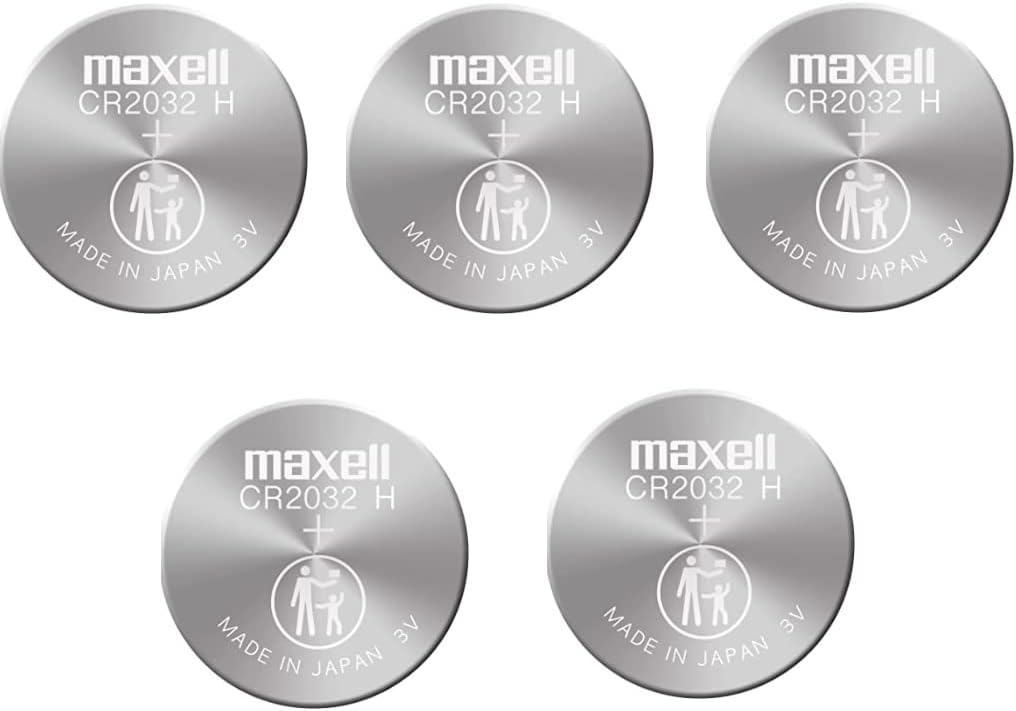
Maxell offers a reliable alternative with this 5 pack CR2032 solution. It provides a good amount of spares for future use. The 235mAh energized capacity rating suggests consistent performance for motherboard BIOS requirements ensuring stable power delivery.
We may earn a commission when you buy through this link, at no additional cost to you.
The standout quality is the repair or replace guarantee provided by Maxell. This ensures you receive a functional product without hassle. The batteries are suitable for standard electronic devices ensuring broad compatibility across systems.
While the safety features might be standard the performance is consistent. The 5 pack ensures you have spares for multiple systems. Verify your motherboard compatibility to ensure the coin cell fits the specific slot.
Buy this if you need a reliable alternative to major brands. It is ideal for users who trust Maxell for quality. The consistent performance ensures your system settings stay consistent.
Maxell provides a repair or replace guarantee ensuring you receive a functional product without hassle or warranty claims for any defects.
The 235mAh energized battery rating suggests consistent performance for your CMOS requiring stable power for reliable BIOS settings.
We may earn a commission when you buy through this link, at no additional cost to you.
This Maxell pack offers Japanese quality for your CMOS needs. It comes with fresh expiration dates ensuring you receive a functional product. The 5 count provides spares for future use while the trusted brand reputation ensures consistent performance.
We may earn a commission when you buy through this link, at no additional cost to you.
The standout quality is the Japanese manufacturing that ensures reliable output. These batteries are suitable for standard electronic devices ensuring broad compatibility across systems. The consistent voltage ensures your motherboard BIOS settings remain stable.
The expiration date listed might be older than expected. Verify the expiration date upon receipt before installing in critical hardware. The 5 pack ensures you have spares for multiple systems if needed.
Buy this if you trust Japanese quality for reliable BIOS power. It is ideal for users seeking a reliable alternative to major brands. The consistent performance ensures your system settings stay consistent.
Made in Japan ensures consistent quality and performance for your CMOS batteries meeting high manufacturing standards for reliability.
New batteries with fresh dated expiration dates ensure you receive a product with maximum shelf life for reliable motherboard power.
We may earn a commission when you buy through this link, at no additional cost to you.
Choosing the right CMOS battery requires considering connector types, safety features, battery life, and compatibility with your specific motherboard model.
Motherboards use two main types of CMOS connections: direct coin cell slots or wires with MOLEX connectors. Standard desktops usually require a CR2032 coin cell while laptops often need a battery with wire leads. Always check your motherboard manual or old battery connector before purchasing.
Verify connector type to ensure fit.
CMOS batteries must provide stable 3V output to maintain BIOS settings. High-quality lithium cells maintain voltage better under varying conditions. Look for batteries from reputable brands like Duracell or Panasonic that guarantee consistent voltage output for long-term reliability.
Choose stable 3V lithium cells.
Battery capacity determines how long your BIOS settings stay intact when power is off. Most CMOS batteries last several years but higher capacity models may offer longer backup time. Consider shelf life and expiration dates when buying bulk packs for future replacements.
Check capacity for longevity.
Child safety features are critical for households with young children. Some batteries include bitter taste coatings and child-resistant packaging to prevent accidental ingestion. Always check for child-safety packaging if you have small children in the home.
Prioritize child-safe packaging.
Proper packaging protects batteries from damage and static discharge. Look for anti-static bags or sealed blister packs. Store unused batteries in cool dry places to maintain performance and extend shelf life. Bulk packs offer better value for frequent replacements.
Store properly for performance.
Reputable brands like Duracell Panasonic and Maxell offer consistent quality and warranties. Check for repair or replace guarantees and defect protection. Reliable brands ensure your CMOS battery won't fail prematurely causing BIOS data loss.
Trust reputable brands.
Packs with more batteries offer better value per unit. Consider how many replacements you need now and in the future. Bulk packs are ideal for IT departments or households with multiple devices. Verify compatibility before buying large quantities.
Choose count for value.
CMOS batteries must fit specific slots on your motherboard. CR2032 is standard but dimensions vary slightly by manufacturer. Ensure diameter and height match your motherboard slot. Incorrect dimensions can cause poor contact or damage to the system.
Check dimensions carefully.
To replace a CMOS battery, power off your computer and unplug it. Open the case and locate the battery on the motherboard. Remove the old cell by pressing the retaining clip gently. Insert the new CR2032 cell ensuring the positive side faces up.
If your system uses a wire connector, disconnect the old battery carefully. Align the new battery wire connector ensuring correct polarity. Most MOLEX connectors have a key to prevent incorrect insertion. Secure the connection firmly to avoid contact issues.
After installation, power on the system and enter BIOS setup. Reset date time and hardware settings as needed. Save changes and exit. Store unused batteries in cool dry places away from extreme temperatures to maintain performance.
A CMOS battery powers the BIOS chip on your motherboard when the main power supply is disconnected. It keeps critical settings like date time boot order and hardware configurations intact. Without it your system would reset every time you unplug it.
Check your motherboard manual for the required battery model. Most desktop boards use CR2032 coin cells while laptops may require wire-connected CMOS batteries. Look at your existing battery label or connector type to confirm before purchasing a replacement.
No only CR2032 or specified lithium coin cells should be used. Standard alkaline batteries may not provide stable voltage and could damage components. Always choose lithium cells designed for CMOS applications to ensure reliability and compatibility with your motherboard slot.
A good CMOS battery lasts 3 to 5 years. Replace it if you notice BIOS settings resetting after power loss or system time changing automatically. High-quality batteries from brands like Duracell or Panasonic often last longer under normal conditions.
Yes especially if you have young children at home. CMOS batteries are small and dangerous if swallowed. Look for options with bitter taste coatings and child-resistant packaging to prevent accidental ingestion and protect your family from safety risks.
Installing the CMOS battery backward can damage the battery or motherboard. Always match the positive side marked with plus signs to the correct socket. Incorrect polarity may cause system failure prevent booting or require hardware repairs.
Store spare CMOS batteries in cool dry places away from direct sunlight and extreme temperatures. Keep them in original packaging or anti-static bags to prevent corrosion. Avoid storing near metal objects that could short the terminals.
This guide reviewed ten top CMOS batteries ranging from Duracell 8-count packs to specialized LeFix wire-connected models. Each option offers reliable performance with distinct strengths like child safety features or bulk packaging for business needs.
Prioritize compatibility and safety when choosing. Verify connector types before purchasing and choose reputable brands for consistent voltage stability. Child-safe packaging adds protection for families while bulk packs ensure you have spares for future replacements.
Remember that prices and availability change frequently. Check current stock and expiration dates before buying. With the right CMOS battery your motherboard BIOS settings will remain stable and your system will run smoothly for years to come.