
BENFEI 4in1 USB 3.0 and USB-C Card Reader
4.5Editor score
4-in-1 simultaneous card access
USB-C and USB 3.0 support
Compact integrated design for travel
This guide compares the top ten compact flash card reader options for professionals and hobbyists seeking reliable data transfer across multiple card types.
Finding the right compact flash card reader is essential for photographers and videographers who need quick access to their media. Modern readers support various formats including SD, Micro SD, and legacy CF cards. This ensures you can offload footage efficiently regardless of your camera model.
We evaluated ten highly rated models based on speed, build quality, and compatibility with current devices like USB-C laptops and smartphones. Our analysis focuses on real-world performance and the ability to handle multiple cards simultaneously without slowdowns or errors.
Each pick highlights key strengths and potential drawbacks to help you match the device to your workflow. Prices and availability may change over time so check current listings before purchasing. Read on to discover the best options for your needs today.
4.5Editor score

4.7Editor score

4.6Editor score
Below you will find a detailed side-by-side comparison of all ten featured card readers. This table highlights essential specifications such as supported card types, interface standards, and unique features to help you make an informed decision quickly.



The BENFEI 4in1 reader stands out as a budget-friendly solution that does not compromise on core functionality. It earns a strong rating for its ability to read four different card types simultaneously which saves significant time during media offloading.
We may earn a commission when you buy through this link, at no additional cost to you.
This model features both USB-C and USB 3.0 connectivity ensuring it works with modern MacBooks and older PCs alike. The integrated design keeps it compact while the advanced IC chip ensures stable data transfer for HD movies.
While it offers excellent value, note that it does not support CF Type I cards which may limit legacy users. The lack of an included USB-C cable might also require an extra purchase if your computer only has that port.
This reader is ideal for photographers on a budget who need reliable multi-card access without spending heavily. It balances performance and affordability effectively making it a top choice for general use.
Read and write to four cards at once to eliminate constant swapping and speed up your editing process.
Supports both USB-C and USB 3.0 ensuring compatibility with current laptops and future devices.
We may earn a commission when you buy through this link, at no additional cost to you.
UGREEN delivers a robust card reader that combines high-speed USB 3.0 performance with a versatile multi-slot design. With a rating of 4.6 it is trusted by users who need to manage large files efficiently across different card formats.
We may earn a commission when you buy through this link, at no additional cost to you.
This hub supports reading and writing to four cards simultaneously which streamlines workflows for those handling multiple camera outputs. The 5Gbps transmission rate allows you to transfer gigabytes of data in seconds rather than minutes.
The design is compact and includes a 1.7 foot cable making it easy to carry in a bag. However, it lacks USB-C connectivity which may require an adapter for newer MacBooks or smartphones without a USB-A port.
If you need a reliable reader that handles large capacity cards without breaking the bank this is an excellent choice. Its stability and speed make it a favorite for professionals and hobbyists alike.
Accommodates cards up to 2TB ensuring you can use the highest capacity media available today.
Access multiple connected cards at once for seamless browsing and downloading without constant swapping.
We may earn a commission when you buy through this link, at no additional cost to you.
The Lexar Multi-Card reader offers exceptional speed which is critical for professionals working with high-resolution photos and videos. Its 4.7 rating reflects consistent performance and reliability across a wide range of devices and operating systems.
We may earn a commission when you buy through this link, at no additional cost to you.
This model supports SD microSD and CF cards with speeds up to 312MB/s for SD and microSD which significantly reduces offloading times. The USB 3.1 compatibility ensures backward compatibility with older ports while maximizing speed on modern ones.
While it lacks simultaneous multi-card reading this reader excels in single-task performance and build quality. The only trade-off is the limited to three card types which might not cover every niche format like Memory Stick or XD cards.
For users prioritizing speed and reliability for standard formats this reader is a top recommendation. It is perfect for those who need quick access to their primary memory cards without complex setups.
Achieve transfer rates up to 312MB/s for rapid data access during tight shooting schedules.
Works seamlessly with both USB 3.1 and 2.0 ports ensuring you can use it anywhere.
We may earn a commission when you buy through this link, at no additional cost to you.
This adapter is built for versatility supporting six different card types simultaneously which is rare in this category. It stands out for including legacy formats like XD and CFast making it a comprehensive archive tool for diverse camera gear.
We may earn a commission when you buy through this link, at no additional cost to you.
The aluminum alloy chassis not only looks professional but also helps dissipate heat during long transfers. With speeds up to 5Gbps and dual connectors it bridges the gap between modern USB-C devices and older USB-A ports effortlessly.
Although it covers more formats than most the added functionality comes with a higher price tag. It may be more complex than needed for casual users who only deal with standard SD cards daily.
This is the ideal choice for photographers and videographers with mixed camera setups. If you need one device to handle everything from modern DSLRs to older point-and-shoots this reader delivers unmatched flexibility.
Supports older XD Picture Cards and Memory Stick Pro Duo ensuring access to archived footage.
Aluminum chassis provides durability and effective heat management during intensive data transfers.
We may earn a commission when you buy through this link, at no additional cost to you.
The ZIYUETEK reader provides a streamlined solution for users who need to manage multiple cards without bulky hubs. It features five card slots that allow simultaneous access to CF SD Micro SD MS and M2 formats with impressive speed.
We may earn a commission when you buy through this link, at no additional cost to you.
Its slim aluminum alloy cover is both durable and aesthetic fitting well with modern laptop setups. The built-in intelligent protection guards against overcurrent and short circuits which adds peace of mind when transferring valuable data.
While it handles five cards well it does not support newer CFast or legacy XD cards which might be needed for specific professional workflows. The cable is non-detachable which could limit repair options if damaged over time.
This hub is a solid middle-ground option for those needing multi-card speed without excessive complexity. It balances portability and performance effectively making it a reliable choice for on-the-go work.
Built-in intelligent protection prevents overcurrent and short circuit damage to your equipment.
Access multiple cards simultaneously to keep your workflow smooth without constant unplugging.
We may earn a commission when you buy through this link, at no additional cost to you.
This UGREEN model is tailored for users with modern devices like iPhone 15 and new MacBooks that lack USB-A ports. It brings reliable performance to the compact USB-C form factor without sacrificing speed or stability during large transfers.
We may earn a commission when you buy through this link, at no additional cost to you.
It supports four card types simultaneously allowing you to read SD CF MS and TF cards at once. The 5Gbps speed ensures that even 1G files move in seconds which is crucial when working with high volume shoots.
The main limitation is the lack of USB-A support meaning you cannot use it with older laptops directly. Also it only supports four card types which excludes some niche formats like M2 or XD that might be in older equipment.
For users invested in the USB-C ecosystem this reader offers the best balance of portability and performance. It is an excellent choice for mobile creators who need to offload photos directly to their phones or tablets.
Perfectly compatible with USB-C phones and tablets enabling direct photo offloading on the go.
Plug and play functionality ensures no driver installation is needed for any modern operating system.
We may earn a commission when you buy through this link, at no additional cost to you.
The SmartQ C368 is designed with travelers in mind offering a small footprint that fits easily into any camera bag. It supports four common card types with a high-speed connection that ensures quick access to your media.
We may earn a commission when you buy through this link, at no additional cost to you.
A blue LED indicator provides clear visual feedback on power status which is helpful in low-light situations. The unit includes a cable organizer and manual making it a complete package right out of the box for immediate use.
It only reads one card at a time which is slower than hubs that support simultaneous access. However for solo photographers who only need to swap cards occasionally this design keeps costs and size down.
This reader is perfect for casual users and travelers who value simplicity and portability. It does what it says simply and efficiently without extra bulk or complex features you may not need.
Small lightweight form factor makes it easy to carry anywhere without adding bulk to your gear.
Blue LED light clearly shows when the device is powered on for hassle-free operation.
We may earn a commission when you buy through this link, at no additional cost to you.
Video professionals who use CFast cameras will find this reader essential as it supports the specific high-speed format. It also handles five cards simultaneously which is invaluable when working with multiple cameras or backup drives on set.
We may earn a commission when you buy through this link, at no additional cost to you.
The aluminum body not only protects the internal components but also helps dissipate heat during long continuous transfers. With 5Gbps speeds you can offload 4K or 8K footage quickly without waiting around during production breaks.
The device is more specialized than general readers so it may not appeal to casual users who only use SD cards. Also the cable is included but not detachable which could be a maintenance issue if it gets damaged.
This reader is the top pick for videographers needing reliable CFast support. It bridges the gap between legacy and modern formats ensuring your workflow remains efficient regardless of the camera used.
Dedicated CFast 2.0 slot supports high-speed cards used in professional cinema cameras.
Read five cards at once to streamline the transfer process between shoots and editing sessions.
We may earn a commission when you buy through this link, at no additional cost to you.
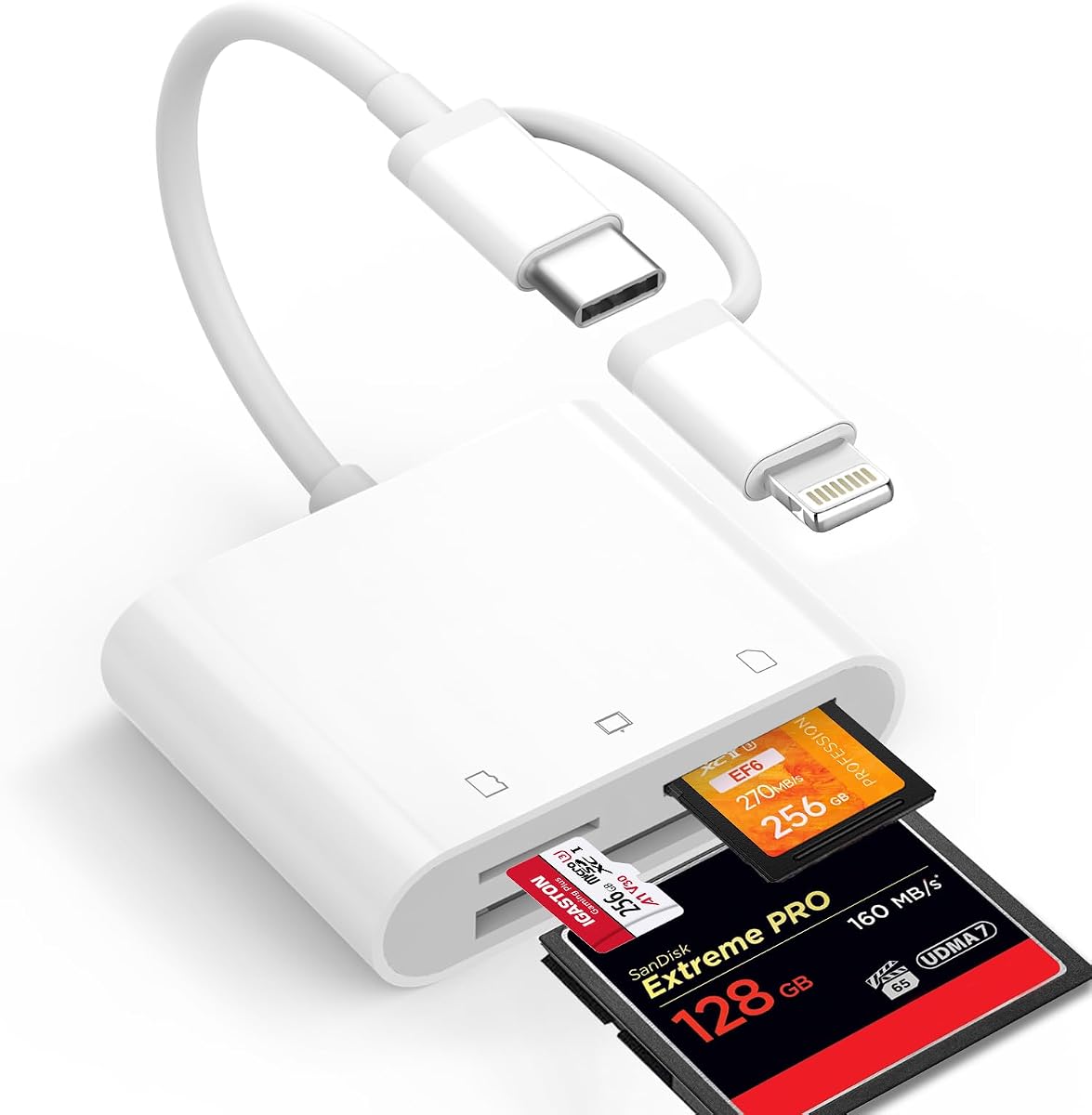
This reader offers unique dual connectivity with both Lightning and USB-C ports making it compatible with a wide range of older and newer Apple devices. It is perfect for users who have mixed device fleets and want one adapter for all.
We may earn a commission when you buy through this link, at no additional cost to you.
It supports CF SD and Micro SD cards allowing you to view photos directly on your iPhone or iPad without extra apps. The certified connection ensures stable data transfer which is crucial for avoiding file corruption during the process.
Note that you cannot use both connectors at the same time so you must choose based on your device. The cable is fixed and short which might feel restrictive if your device is far from the camera or memory card.
For iPhone and iPad users who need to move files directly to their phone this is a smart solution. It simplifies the process of sharing images instantly and is ideal for travel and social media workflows.
Dual connectors support both old Lightning and new USB-C devices for broader compatibility.
Transfer photos from camera cards to your phone easily to share with friends immediately.
We may earn a commission when you buy through this link, at no additional cost to you.
The ChiaoPio reader features a built-in USB-C cord that keeps the unit compact and prevents it from blocking adjacent ports on your laptop. This design ensures you can plug it in alongside other accessories without hassle.
We may earn a commission when you buy through this link, at no additional cost to you.
It supports CF SD and Micro SD cards covering the most common formats for both DSLR and mirrorless cameras. The plug and play functionality means no extra software is needed to access your files on Windows or Mac systems.
Since it only supports three card types it might not be suitable for users with a wide variety of older formats. Also the lack of a Lightning connector means it is less versatile for older iPhones or iPads.
This reader is ideal for owners of recent MacBooks and iPhones who want a simple and affordable option. It provides reliable connectivity for standard memory cards and is a practical tool for daily use.
Built-in cord ensures the reader stays compact and does not block adjacent ports on laptops.
No drivers needed allows you to plug and play immediately with any compatible operating system.
We may earn a commission when you buy through this link, at no additional cost to you.
Selecting the right card reader involves assessing several technical and practical factors. This guide outlines the key aspects to consider to ensure you choose a device that fits your workflow and device ecosystem.
Check which card formats your current cameras use and ensure the reader supports them. Look for support for CF SD and Micro SD as a baseline and consider legacy formats like XD or Memory Stick if you still use older gear.
Ensure the reader supports the exact types of cards you own to avoid purchasing a device that cannot read your media.
Determine if your computer or phone has USB-A USB-C or Lightning ports. Modern laptops often lack USB-A so a USB-C reader may be necessary. For iPhone users consider dual connectors or Lightning specific models.
Match the connection type to your device to ensure direct plug-and-play without needing extra dongles.
Higher transfer speeds like USB 3.0 or USB 3.1 allow faster offloading of large media files. Look for readers that advertise speeds up to 5Gbps for efficient workflow especially when handling 4K video footage.
Prioritize USB 3.0 or higher standards to reduce wait time when transferring gigabytes of data.
If you use multiple cameras or frequently swap cards look for a reader that can read multiple cards at once. This feature eliminates the need to constantly swap cards during a transfer session.
Choose a multi-card hub if you want to optimize your workflow efficiency during large data transfers.
Aluminum bodies are generally more durable and dissipate heat better than plastic housings. A sturdy build ensures the device lasts longer especially if you carry it in a crowded camera bag daily.
Look for solid construction and protective features to ensure reliability and longevity over time.
Most modern readers are plug and play on Windows Mac and Linux but it is wise to verify compatibility. Ensure the driverless operation works on your specific OS version to avoid installation headaches.
Verify the device works on your operating system to ensure seamless setup without extra software.
Check if the cable is detachable or fixed. A long cable provides flexibility during transfer while a short fixed cable keeps the unit compact. A detachable cable allows you to replace it if damaged.
Decide between portability and flexibility based on your typical usage environment and travel needs.
Set a budget based on your needs since prices vary from basic models to professional hubs. Higher prices often bring better build quality or specialized features but a basic reader may suffice for casual use.
Balance cost with essential features to get the best value without paying for capabilities you will not use.
Insert your memory card firmly into the correct slot until you feel a click. Ensure the card is oriented correctly as forcing it can damage both the card and the reader.
Connect the reader to your computer via USB or USB-C. Most devices do not require drivers so your system will automatically recognize the new storage device.
Keep the reader clean and dry by storing it in a protective case when not in use. Avoid exposing it to extreme heat or moisture to maintain its performance over time.
Not all readers support CFast cards so you must check the product specifications carefully. Specialized readers with dedicated CFast slots are required for these high-speed professional cards.
Ensure the card is inserted correctly and the port is functioning. Try a different USB port or restart your computer to refresh the connection if issues persist.
Yes many modern readers support simultaneous reading of multiple card types like SD CF and Micro SD at the same time. This allows you to transfer files from several cards without swapping them.
Most USB-C card readers are plug and play and do not require additional drivers on Windows Mac or Linux systems. They are recognized immediately by the operating system.
USB 3.0 card readers can reach speeds up to 5Gbps allowing large files to transfer in seconds. Real-world speeds depend on the card and your computer's port quality.
Yes models with Lightning or USB-C connectors work with iPhones and iPads. Ensure the device is compatible with your specific iOS version for direct file access.
Most modern readers support SDXC cards which include capacities of 1TB and higher. Check the product description to confirm it supports large capacity cards.
Most USB powered readers do not need external power. They draw energy directly from the computer or phone port they are connected to.
We reviewed ten compact flash card readers that cater to a variety of needs from budget-friendly options to professional-grade hubs. Each model offers unique benefits such as multi-card support or specialized connectivity.
When choosing prioritize transfer speed and compatibility with your specific card formats. If you need to manage multiple cameras at once a multi-card reader will save you time.
Check current availability and prices before buying since offers may change over time. Select a reader that fits your device ecosystem and workflow for efficient media management.