
Lian Li O11D Mini V2 Compact ATX Mid-Tower PC Case
4.7Editor score
Optimized slanted bottom design
Pillar-less tempered glass panels
Anti-sag GPU support brackets
This guide compares the top Compact E ATX Case models for performance, airflow, and build quality to help you choose the right chassis for your next high-power
Finding the right chassis for your powerful hardware requires balancing size with thermal performance. A compact E ATX case offers the space needed for high-end components while fitting into smaller desks or workspaces. This selection ensures your build remains efficient and stylish without sacrificing cooling potential.
We evaluated these cases based on airflow design, motherboard support, and build quality. Each option was chosen for its ability to handle large GPUs and cooling systems within a reduced footprint. Our analysis covers everything from portability features to cable management solutions for streamlined assembly.
Each pick highlights specific strengths like modular layouts, premium materials, and cooling support. These details help you match a case to your specific hardware needs and aesthetic preferences. Remember that availability and pricing can change, so verify current stock before purchasing your next chassis.
4.7Editor score

4.4Editor score

3.9Editor score
This side-by-side comparison highlights the key specifications and unique features of each selected case. We focus on dimensions, compatibility, and cooling capabilities to help you distinguish between similar options quickly.


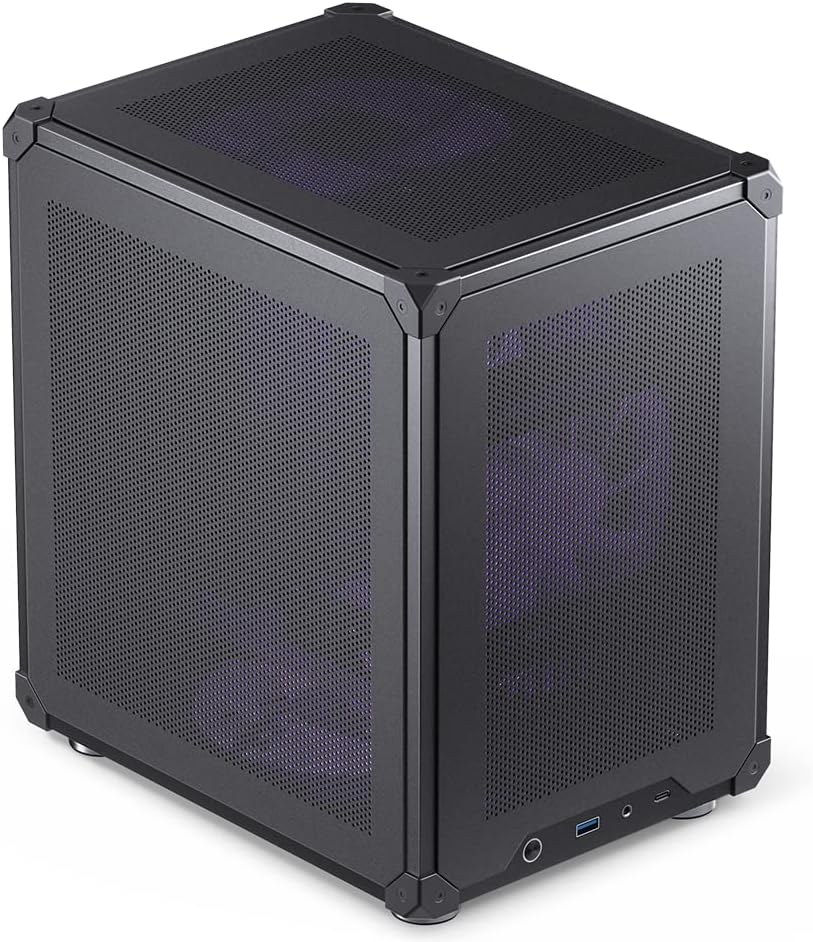

The Cooler Master QUBE 540 stands out as a highly versatile option for builders seeking a compact E ATX case. With a 4.4 rating, it balances modern aesthetics and functional design effectively. Its most unique selling point is the flexible orientation system that allows for both horizontal and vertical setups.
We may earn a commission when you buy through this link, at no additional cost to you.
This case supports motherboards up to 11 inches wide, making it compatible with large E-ATX boards. It also offers impressive GPU clearance of up to 415 mm without front fans. The full front mesh panel ensures maximum airflow to keep high-end components cool under load.
While the glass panels provide a stunning view, they can require frequent cleaning to maintain a pristine look. The movable handles and reversible I/O panel are great additions but might require careful planning during cable management. These trade-offs are acceptable given the high level of customization.
If you need a case that adapts to different desk layouts while supporting high-end hardware, the QUBE 540 is an excellent choice. It is particularly recommended for users who value airflow and flexible installation options over strict traditional tower designs.
The reversible I/O panel and movable handles allow you to reposition the case effortlessly to suit your workspace layout.
Supporting GPUs up to 415 mm ensures that even the largest modern graphics cards fit without compromising case stability or airflow.
We may earn a commission when you buy through this link, at no additional cost to you.
The Lian Li O11D Mini V2 offers a premium experience with its optimized airflow and sleek design. With a 4.7 rating, it is highly regarded for its ability to support full-sized hardware in a compact footprint. The slanted bottom design is a standout feature that enhances cold air intake for GPU cooling.
We may earn a commission when you buy through this link, at no additional cost to you.
This case supports ATX back-connect motherboards which helps reduce cable clutter significantly. The horizontal and vertical anti-sag brackets provide robust support for heavy graphics cards. The pillar-less tempered glass front and side panels ensure an unobstructed view of your components.
However, the case does not come with any fans, so you will need to purchase them separately. While the price is higher than average, the build quality and specific design optimizations justify the investment for enthusiasts looking for top-tier cooling.
This case is ideal for users who want a high-end build with maximum visual clarity and optimized thermal performance. It works best with modern back-connect motherboards and high-performance GPUs that benefit from the specific airflow direction.
The 10 degree slanted bottom enhances direct cold air intake and significantly improves cooling performance for your graphics card.
Included horizontal and vertical anti-sag brackets reduce strain on the motherboard ensuring your heavy GPU stays secure and protected.
We may earn a commission when you buy through this link, at no additional cost to you.
The Mechanic Master C34Pro is a portable option that supports large components without sacrificing too much space. With a 3.9 rating, it offers good value for builders needing a movable case for LAN events or travel. Its aluminum shell makes it significantly lighter than traditional steel cases.
We may earn a commission when you buy through this link, at no additional cost to you.
It supports GPUs up to 420 mm and allows for 360 mm radiators which is impressive for this size. The flexible PSU mounting options let you choose between front bottom or side configurations based on your cable management needs. A magnetic screwdriver kit is included for easy assembly.
The main drawback is the tighter cable management space compared to larger cases. While the materials are durable, the design prioritizes portability over absolute maximum airflow efficiency. This makes it a solid choice for builders who move their PCs frequently.
Choose this case if you need a lightweight chassis that can travel with you without losing support for flagship components. It is best suited for users who prioritize mobility and budget over premium build details.
Integrated carry handle and lightweight aluminum construction allow for easy transportation and mobility of your desktop PC setup.
Multiple power supply mounting positions including front bottom and side configurations help accommodate various build preferences easily.
We may earn a commission when you buy through this link, at no additional cost to you.
The Cooler Master Q300L V1 is designed for Micro-ATX builds with a focus on airflow and modularity. With a 4.5 rating, it offers a versatile layout for builders who want to adjust the I/O panel position. The open thermal design promotes optimal heat dissipation throughout the case.
We may earn a commission when you buy through this link, at no additional cost to you.
It accommodates GPU cards up to 360 mm and supports liquid cooling up to 240 mm. The magnetic dust filters add a distinctive look while keeping internal components clean. The transparent side panel allows you to showcase your build with pride.
While compact, it limits PSU length to 160 mm which might restrict some power supply options. The smaller interior is great for efficiency but requires careful planning for larger cooling systems. This case balances cost and performance effectively for budget builds.
This is a great option for users who want a simple high airflow case that is easy to customize. It is best suited for Micro-ATX builds that do not require massive power supplies or extreme cooling.
The I/O panel can be adjusted at the front top or bottom on both sides providing flexibility for cable management and access.
Perforated design on all sides promotes optimal airflow and heat dissipation ensuring your components stay cool during use.
We may earn a commission when you buy through this link, at no additional cost to you.
The Mechanic Master C34 Ultra combines a small form factor with standard ATX compatibility. With a 4.6 rating, it is praised for its internal layout that simplifies the building process. The integrated carry handle makes it easy to transport your desktop to LAN events.
We may earn a commission when you buy through this link, at no additional cost to you.
It supports graphics cards up to 335 mm and standard ATX power supplies. The metal front I/O panel includes modern ports like USB 3.0 and Type-C for convenient connectivity. Using an SFX/L power supply is recommended for the cleanest cable management.
While it supports ATX PSUs air cooling is slightly more constrained than larger cases. The focus on compactness means you may need to be strategic about fan placement. However the premium feel of the I/O panel adds a touch of quality.
This case is ideal for users who want a powerful but mobile desktop setup. It works best for standard ATX builds where portability is a key priority without compromising on major component sizes.
The integrated handle makes it easy to transport your powerful desktop PC to LAN events or between workstations effortlessly.
The metal front I/O panel includes USB 3.0 and USB Type-C interfaces combining functionality with a premium feel.
We may earn a commission when you buy through this link, at no additional cost to you.
The ASUS Prime AP201 focuses on industry-leading spatial efficiency and cooling potential. With a 4.7 rating, it supports ATX PSUs and large GPUs despite its compact 33L footprint. The quasi-filter mesh panels use over 57000 precision-machined holes to increase airflow.
We may earn a commission when you buy through this link, at no additional cost to you.
It supports radiators up to 360 mm and up to six fans for maximum cooling. The tool-free side panels allow for easy access to internal components. The extended motherboard tray helps with cable management by providing a 32 mm gap.
While the mesh design offers great airflow it may allow more dust ingress without filters. The lack of glass panels keeps costs down but reduces the visual appeal compared to other options. This is a practical choice for builders who prioritize function over form.
This case is perfect for users who want maximum airflow and support for liquid cooling in a small space. It is best suited for Micro-ATX builds that require heavy thermal performance without a large chassis.
A mesh design with over 57000 precision-machined holes increases airflow and provides a compelling view of components.
A simple clip mechanism allows chassis side panels to be easily removed and resistant to accidental dislodging.
We may earn a commission when you buy through this link, at no additional cost to you.
The Cooler Master Q300L V3 brings a high-airflow design to a compact Micro-ATX chassis. With a 4.6 rating, it supports high-performance GPUs up to 366 mm and allows for six fans total. The modular everyday design features tempered glass and a movable I/O panel.
We may earn a commission when you buy through this link, at no additional cost to you.
It supports ATX power supplies up to 200 mm which is an improvement over earlier versions. The clean cable management and magnetic dust filters help maintain a tidy build. This model is a strong competitor in the budget-friendly high airflow category.
While it offers more GPU clearance than some competitors the fans are not included. You will need to buy compatible cooling solutions to maximize the airflow potential. The glass panel adds to the cost but improves aesthetics significantly.
This case is a great pick for users who want to balance budget with high-end component support. It is best suited for Micro-ATX gaming builds that require large graphics cards and extensive cooling.
Supports graphics cards up to 366mm making it easy to build with today's NVIDIA GeForce RTX and AMD Radeon cards.
Supports ATX power supplies up to 200mm and features a movable I/O panel for hassle-free builds.
We may earn a commission when you buy through this link, at no additional cost to you.
The Zalman CUBIX M-ATX offers a simple and durable solution for compact desktop builds. With a 4.5 rating, it features sturdy 0.8T steel construction in a volume of 17.1 liters. The pre-installed 80mm fan provides basic airflow out of the box.
We may earn a commission when you buy through this link, at no additional cost to you.
It supports standard ATX PSUs and GPUs up to 260 mm. The perforated front panel helps with cooling but the limited volume requires careful component selection. The design includes basic USB 3.0 and 2.0 ports for easy device connections.
While durable it lacks advanced cable management or modern high airflow features found in other cases. The compact size is perfect for small spaces but limits high-end GPU choices. This is a solid entry-level option for office or home PCs.
Choose this case if you need a sturdy basic case that fits small spaces and supports standard hardware. It is best suited for office or entry-level builds where budget and size are the main priorities.
Built with durable 0.8T steel for a robust and sturdy structure that ensures longevity and protection.
1 x USB 3.0, 1 x USB 2.0, 1 x 3.5mm Stereo AUX for easy device connections.
We may earn a commission when you buy through this link, at no additional cost to you.
The JONSBO C6 Black focuses on simple assembly with tool-free panels for quick access. With a 4.6 rating, it features a mesh chassis with fan positions on the front upper and lower. The upper cover and side panels can be opened without tools for easier building.
We may earn a commission when you buy through this link, at no additional cost to you.
It supports ATX PSUs up to 185 mm and GPUs between 200-255 mm. The Type-C interface is included alongside USB 3.0 for modern connectivity. This case is designed to be a simple compact desktop solution for Micro-ATX builds.
The limited GPU size restricts it to mid-range graphics cards. While the mesh design helps airflow the simple materials might not offer the same premium feel as glass options. It is a practical choice for users who want quick access to components.
This case is ideal for users who prioritize easy access and basic connectivity over extreme performance. It is best suited for office or light gaming builds that require frequent component access.
Upper Cover/Side Panel Tool-free Open makes it easier to build your PC and more convenient for maintenance.
All sides in mesh with Front/Upper/Lower 3 fan positions for heat free airflow.
We may earn a commission when you buy through this link, at no additional cost to you.
The NZXT H5 Flow delivers exceptional cooling out of the box with pre-installed fans. With a 4.6 rating, it features an ultra-fine mesh on the top front and side panels for maximum airflow. The PSU shroud is perforated on the side and bottom for better intake.
We may earn a commission when you buy through this link, at no additional cost to you.
It supports up to a 360 mm radiator in front and a 240 mm radiator on top. The cable management system is designed to route and conceal cables using wide channels and hooks. This case offers a seamless build experience for many users.
While the included fans are a plus the overall price is slightly higher than average. The GPU length is standard but may not accommodate the absolute largest cards. This is a strong choice for users who want a complete solution without extra steps.
This case is perfect for users who want a sleek and efficient build that is ready to use immediately. It is best suited for those who value high performance cooling and simple cable management.
Equipped with two 120mm Quiet Airflow fans for solid out-of-the-box performance right out of the box.
Effortlessly route and conceal cables using the wide channels, hooks, and straps.
We may earn a commission when you buy through this link, at no additional cost to you.
Choosing the right case involves balancing size thermal performance and component compatibility to ensure your build fits your needs.
Ensure the case supports the form factor of your motherboard. While some cases are restricted to Micro-ATX many modern compact E ATX cases support full ATX and E-ATX boards up to 11 inches wide. Always check the maximum motherboard width and height before purchasing.
Verify that your motherboard size fits within the internal chassis dimensions to avoid installation issues during your build.
Graphics cards are often the longest components in a PC. Check the maximum GPU length supported by the case to ensure your specific model fits. Some compact cases offer extended clearance by removing front fan mounts for extra space.
Choose a case with enough length to accommodate your current GPU and potential future upgrades without modification.
Airflow is critical for maintaining optimal operating temperatures. Look for cases with mesh panels on the front top and bottom to allow fresh air intake. The placement and number of fan mounts also determine how effectively heat is expelled from the chassis.
Prioritize cases with open front designs and multiple fan positions to keep your system cool under load.
If you plan to use liquid cooling check the supported radiator sizes. Many compact E ATX cases support 240 mm or 360 mm radiators on the front or top. This allows for high-performance thermal solutions without needing a full-size tower.
Select a case that accommodates your preferred cooling solution whether air or liquid to ensure stable performance.
Standard ATX power supplies are common but some compact cases recommend SFX or SFX-L units to save space. Check the maximum PSU length and depth supported by the case to ensure compatibility with your chosen power unit.
Decide early whether you will use a standard ATX PSU or a smaller SFX unit to match your case requirements.
Good cable management keeps the build clean and improves airflow. Look for cases with ample routing space behind the motherboard tray and strategically placed cutouts. This helps keep cables hidden and out of the main airflow path.
Adequate cable management space reduces clutter and makes future upgrades or cleaning much easier.
If you plan to transport your PC consider cases with integrated handles or lightweight materials. Aluminum chassis are generally lighter than steel which helps if you move your setup often. Built-in handles make lifting easier and safer for your components.
Opt for portable features if you need to move your system between locations or to LAN events frequently.
The build material and panel style affect both look and durability. Tempered glass offers a clear view of components but may attract fingerprints. Mesh panels provide better airflow but show less internal hardware. Consider what style fits your desk setup.
Choose materials that balance your visual preferences with durability and cooling performance for the best experience.
Proper installation begins with removing all panels and preparing the workspace. Use the tool-free clips or screws to access the interior easily. Ensure the motherboard tray is aligned correctly before securing the motherboard standoffs.
Regular maintenance involves cleaning dust filters and internal components to maintain airflow. Use compressed air to blow out dust from fans and radiators every few months. This prevents overheating and keeps your system running efficiently.
When moving your PC secure all internal components and use the case handles if available. Avoid shaking the case too much to prevent damage to the graphics card or other parts. Transport in a protective bag if possible for safety.
Many compact E ATX cases support standard ATX motherboards and some support E-ATX boards up to 11 inches wide. Always check the specific motherboard width and height limits in the case specifications to ensure a perfect fit.
Yes most of these cases support GPUs ranging from 330 mm to 420 mm. Some models allow you to remove front fans to gain extra clearance for larger graphics cards without compromising overall build stability.
Many compact E ATX cases support 240 mm or 360 mm radiators on the front or top. This allows for high-performance liquid cooling setups without requiring a full-size tower chassis.
Some cases come with pre-installed fans but others may not include any. Check the product details to see if fans are included and plan to purchase compatible fans if needed for optimal cooling.
Mesh panels offer better airflow which is ideal for cooling while glass panels provide a clear view of internal components. Some cases combine both options to balance performance and aesthetics effectively.
Compact cases can be slightly more challenging due to limited space but most modern designs feature tool-free panels and efficient layouts. Following a step-by-step guide and planning cable routes ahead of time helps simplify the build.
While many support standard ATX power supplies some compact models recommend SFX or SFX-L units for better cable management and space efficiency. Check the specific PSU length and depth limits for your case.
Dust filters can be removed and washed with water or vacuumed regularly. Let them dry completely before reattaching to prevent moisture damage inside the case.
We reviewed ten top compact E ATX cases highlighting their strengths in airflow, portability, and component support. The Cooler Master QUBE 540 and Lian Li O11D Mini V2 stand out for their premium features and flexible designs.
Prioritize your specific needs such as GPU size, cooling options, or portability when selecting a case. Matching these requirements with the right chassis ensures a stable and efficient build for years to come.
Remember to verify current availability and check the latest specifications before purchasing. The right case will protect your investment and keep your system performing at its best.