
CORSAIR Vengeance SODIMM DDR5
4.8Editor score
Up to 5600MHz frequency
Easy installation process
Compatible with most systems
This guide compares the top DDR5 Laptop RAM options for performance and efficiency helping you choose the right memory upgrade for your laptop.
Choosing the right memory is crucial for modern computing. DDR5 Laptop RAM offers significant speed improvements over previous generations ensuring your system handles demanding tasks with ease and efficiency.
We evaluated ten top rated options based on speed capacity and compatibility. Our analysis focuses on real world performance benefits for gaming productivity and multitasking across various laptop configurations available today.
Each pick highlights specific strengths and ideal use cases. Note that availability and stock levels change frequently so verify current details before making your final purchase decision for your specific machine.
4.8Editor score

4.8Editor score

4.6Editor score
This side by side comparison highlights the key specifications and features of each memory module to help you quickly identify the best fit for your specific laptop model and usage needs.




This Crucial 32GB DDR5 RAM Kit stands out as the top choice for users needing reliable high performance memory. It offers a robust 32GB capacity split into two 16GB modules ensuring dual channel performance for smoother multitasking.
We may earn a commission when you buy through this link, at no additional cost to you.
The memory operates at 5600MHz but supports downclocking to 5200MHz or 4800MHz for broader compatibility. It is optimized for Intel 12th Gen and AMD Ryzen 7000 series processors making it versatile for modern laptops.
While the speed is impressive it relies on XMP 3.0 or AMD EXPO for full performance which may require BIOS adjustments. This is a standard trade-off for high speed modules and ensures stability across different systems.
It is the perfect upgrade for creators gamers and power users seeking maximum system performance. The Micron backing ensures longevity and reliability making it a safe bet for critical workloads.
The 32GB capacity ensures you can run multiple applications simultaneously without slowdowns. This is essential for modern workflows involving virtual machines or heavy video editing.
Fast response times help reduce latency in games. The high speed ensures that data moves quickly between the CPU and memory improving frame rates in demanding titles.
We may earn a commission when you buy through this link, at no additional cost to you.
The CORSAIR Vengeance SODIMM DDR5 RAM is an excellent budget friendly option for those needing a quick performance boost. It provides 16GB of capacity which is often the sweet spot for general users and casual gamers.
We may earn a commission when you buy through this link, at no additional cost to you.
Its ability to reach up to 5600MHz ensures that it keeps pace with modern processors. The SODIMM form factor makes it compatible with nearly any Intel or AMD gaming and performance laptop on the market.
While it offers great speed users should note that maximum performance requires enabling XMP settings in the BIOS. This is a minor step that ensures the memory runs at its rated potential rather than default speeds.
Ideal for students or professionals needing a balance of cost and speed. The simple installation process means you can upgrade your machine quickly without needing specialized tools or technical expertise.
The increased frequency and capacity tackle demanding games and workloads efficiently. This upgrade transforms older systems to handle modern titles with less stuttering or lag.
Most laptops require only a screwdriver to access the memory slot. The straightforward design allows users to upgrade their hardware with confidence and minimal effort.
We may earn a commission when you buy through this link, at no additional cost to you.
This TEAMGROUP Elite SODIMM DDR5 module offers a premium experience with robust features like on-die ECC for enhanced stability. It is built to handle intense workloads while maintaining energy efficiency through low voltage operation.
We may earn a commission when you buy through this link, at no additional cost to you.
The 32GB capacity ensures you have ample room for large files and complex applications. Operating at 5600MHz it provides the bandwidth necessary for modern high performance computing tasks and multitasking.
Users should be aware that maximum performance might require specific BIOS adjustments to enable full speed. However the lifetime warranty adds significant value and peace of mind for long term reliability.
Perfect for professionals who need reliability and power. The combination of high capacity and stability makes it a strong contender for creative workflows and data intensive tasks.
The new structural composition at 5600MHz frequency delivers improved performance over previous generations. This ensures your system stays responsive under heavy loads and multitasking scenarios.
TEAMGROUP stands behind this product with a lifetime warranty. This provides significant assurance that your investment is protected against manufacturing defects or unexpected failures.
We may earn a commission when you buy through this link, at no additional cost to you.
The GIGASTONE 32GB Kit provides a solid high capacity solution for laptops needing significant memory boosts. Its inclusion of a Power Management Integrated Circuit (PMIC) is a key feature of DDR5 ensuring better power efficiency.
We may earn a commission when you buy through this link, at no additional cost to you.
It operates at 5600MHz which is standard for high speed laptops allowing for rapid data access. The 262 Pin SODIMM form factor ensures compatibility with standard modern laptop slots and designs.
While it is a non-ECC module it is designed for unbuffered use which is standard for consumer laptops. Users should verify their laptop BIOS supports the speed to avoid throttling.
This kit is great for general upgrades where capacity is more important than extreme overclocking. It balances cost and performance effectively for users moving from older 32GB kits.
The PMIC circuit allows for more efficient power delivery and regulation. This feature helps extend battery life while ensuring stable performance under load.
This memory works with notebooks and all-in-one computers. It is a versatile choice for expanding the capabilities of various modern computer form factors.
We may earn a commission when you buy through this link, at no additional cost to you.
G.SKILL is a respected name in memory and this Ripjaws DDR5 SO-DIMM series continues that tradition with solid performance. The 32GB capacity and high speed ratings make it suitable for demanding applications and gaming.
We may earn a commission when you buy through this link, at no additional cost to you.
It supports Intel XMP 3.0 allowing users to easily overclock via BIOS. It also includes a JEDEC default profile which ensures stability even if XMP is not enabled or supported by the motherboard.
Users must not mix memory kits as matched sets are designed to run together. Mixing different kits can lead to instability or system failure so always replace both sticks if expanding.
Best for users who want a balance of speed and reliability. The QVL list helps ensure compatibility with your specific laptop model before making the purchase.
This ensures the memory will boot at default speeds without issues. It provides a safety net for systems that do not support high speed XMP profiles.
Checking the Qualified Vendor List helps confirm compatibility. This step prevents frustration and ensures the memory works as expected with your laptop motherboard.
We may earn a commission when you buy through this link, at no additional cost to you.
This CORSAIR Vengeance DDR5 SODIMM kit brings together high capacity and speed in a reliable package. It is designed to be compatible with nearly any Intel and AMD system making it a versatile choice for laptop upgrades.
We may earn a commission when you buy through this link, at no additional cost to you.
The 32GB capacity allows for heavy multitasking and modern application demands. It operates at up to 5600MHz ensuring that data transfer rates keep up with the fastest CPUs available in mobile devices.
Installation is straightforward but users should be prepared to adjust BIOS settings to achieve maximum speed. Automatic speed setting helps simplify the process on compatible systems without manual tweaks.
Ideal for power users who need consistent performance. The combination of trusted branding and solid specs makes it a safe choice for those upgrading critical machines.
These modules deliver faster frequencies and greater capacities for demanding tasks. This upgrade ensures your system can handle complex workloads with ease and efficiency.
The industry standard SODIMM form factor ensures broad compatibility. This makes it easy to find a compatible upgrade for most popular laptop configurations.
We may earn a commission when you buy through this link, at no additional cost to you.
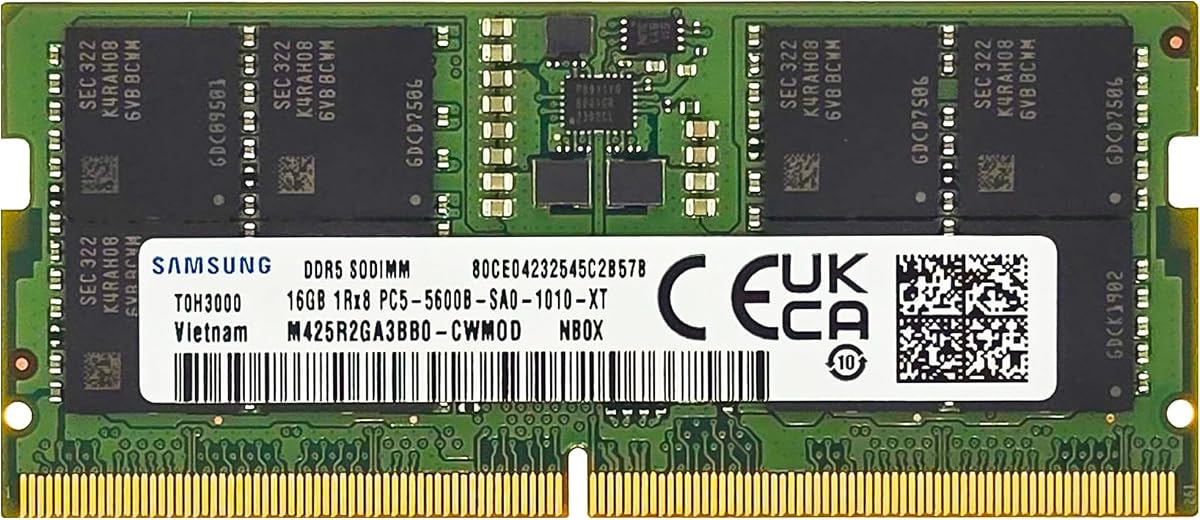
Samsung memory is known for its high reliability and performance. This 16GB DDR5 module offers a reliable path to increasing your laptop's available memory resource for better performance and reduced bottlenecks.
We may earn a commission when you buy through this link, at no additional cost to you.
Operating at 5600MHz it ensures fast data access which is crucial for modern applications. The single rank design helps with compatibility on systems that may have limitations with dual rank modules.
Users should check their laptop's maximum supported capacity to see if two modules are needed for higher total storage. It is a standard 1.1V module ensuring power efficiency during operation.
Great for OEM replacements or targeted single module upgrades. The reputable brand ensures you are getting a genuine quality product backed by rigorous testing standards.
This RAM module increases your system's available memory resources. This expansion improves overall performance and reduces bottlenecks during heavy usage scenarios.
Samsung is a leading manufacturer of memory components. Choosing this product ensures you are using a high quality component designed for longevity.
We may earn a commission when you buy through this link, at no additional cost to you.
This Samsung 32GB kit provides a robust upgrade for laptops needing more memory. It expands your system's available memory resource improving performance and increasing workload capacity for heavy users.
We may earn a commission when you buy through this link, at no additional cost to you.
The 5600MHz speed ensures your system keeps up with modern demands. The single rank design helps ensure compatibility with a wide range of laptop architectures without issues.
Buyers should note that part numbers may be substituted with equivalent models. Always verify the specifications match your requirements before purchasing to ensure the best fit for your system.
Ideal for users wanting a known brand with solid specs. The kit format ensures you have dual channel performance right out of the box for maximum efficiency.
This memory works with select laptop notebook and all in one computers. It is a versatile solution for expanding the capabilities of various modern devices.
With 32GB you can run more applications simultaneously. This is vital for users who handle large files or complex multitasking workflows daily.
We may earn a commission when you buy through this link, at no additional cost to you.
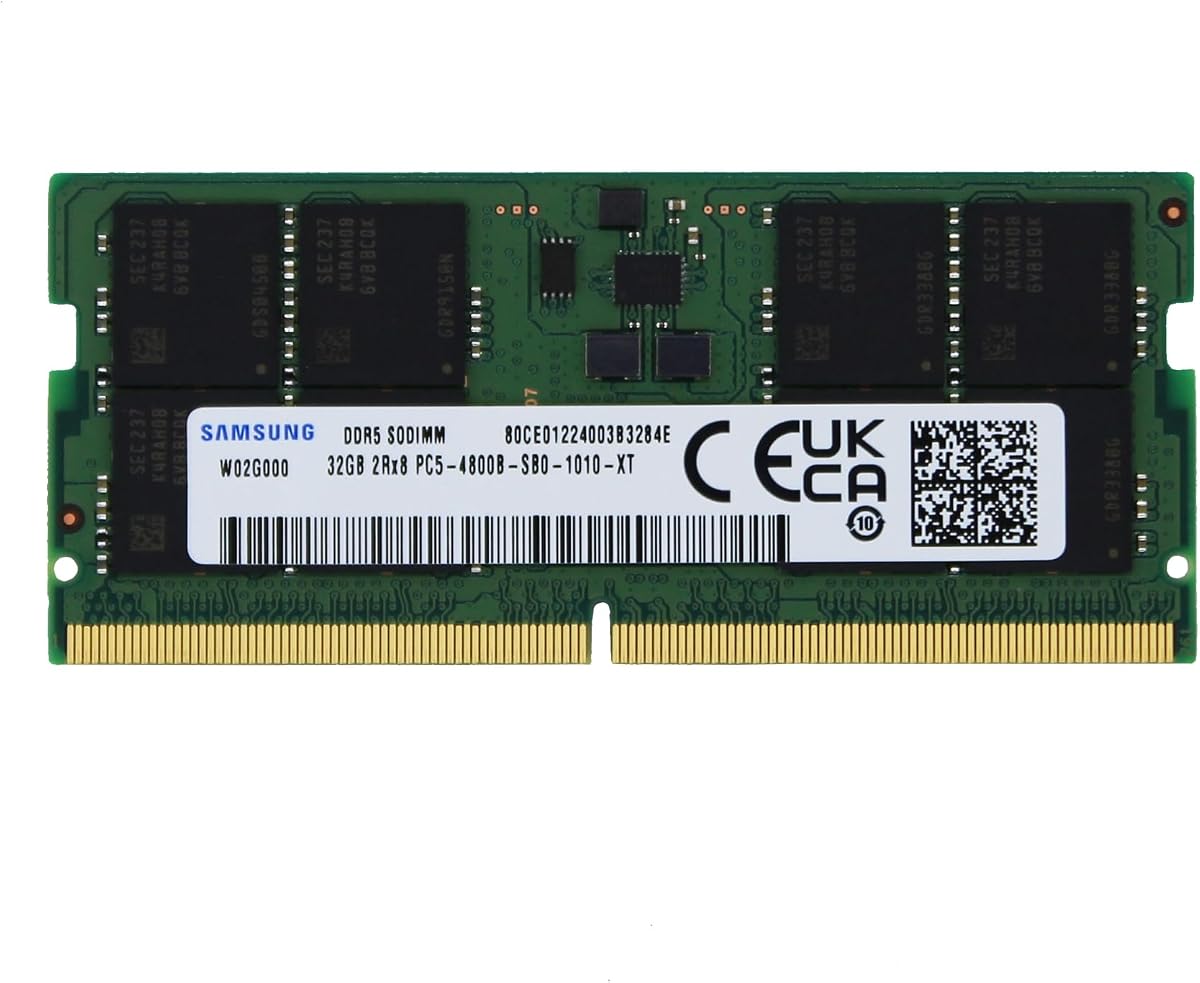
This Samsung 32GB module offers a single high capacity stick for users who need a massive jump in memory. It is ideal for systems where one slot is occupied or for those needing a simple upgrade.
We may earn a commission when you buy through this link, at no additional cost to you.
Operating at 4800MHz it provides a steady baseline for performance. The Dual Rank design ensures high data throughput which can help reduce bottlenecks in demanding workloads.
While the speed is slightly lower than 5600MHz it is a standard JEDEC speed which ensures stability. This makes it a reliable choice for laptops that prioritize reliability over max speed.
Best for users needing a single 32GB module to reach higher totals. The 5.0 rating highlights its reliability and effectiveness in supporting heavy workloads.
This module is unbuffered which is standard for consumer laptops. It ensures compatibility with a wide range of laptop motherboards and systems.
A single 32GB module simplifies upgrades for specific laptop slots. It is perfect for users needing to add capacity without replacing existing modules.
We may earn a commission when you buy through this link, at no additional cost to you.
This Samsung 16GB kit provides a solid entry level performance boost for laptops. It offers dual channel performance right out of the box ensuring better bandwidth than a single stick.
We may earn a commission when you buy through this link, at no additional cost to you.
Operating at 5600MHz it matches the speed of higher capacity kits ensuring consistent performance. The 1Rx16 rank configuration helps with compatibility on systems that may not support denser modules.
Users should verify their laptop supports dual channel configurations for maximum benefit. This kit is perfect for those moving from older 8GB systems to modern standards.
Ideal for users needing a reliable brand with good speed. It ensures your system keeps up with modern applications and multitasking demands effectively.
This kit works with DDR5 laptop notebook and All-in-One systems. It is a versatile solution for expanding the capabilities of various computer types.
Two 8GB modules provide dual channel bandwidth. This ensures better data throughput and smoother system performance during heavy multitasking.
We may earn a commission when you buy through this link, at no additional cost to you.
Selecting the right DDR5 Laptop RAM requires understanding key factors like speed capacity and compatibility to ensure your laptop upgrade delivers the performance boost you need.
Choose a capacity that matches your workload needs. 16GB is often sufficient for general use but 32GB is recommended for video editing gaming and heavy multitasking.
Higher capacity ensures you can run multiple applications simultaneously without slowdowns and bottlenecks during intense usage sessions.
Look for modules operating at 5600MHz or higher for maximum performance. Ensure your laptop BIOS supports these speeds to avoid throttling and reduced efficiency.
Higher frequency leads to faster data transfer rates and improves overall system responsiveness and load times for applications.
Verify that the RAM is DDR5 and SODIMM form factor. Confirm your laptop supports DDR5 as older systems may not be compatible with the new standard.
Checking the Qualified Vendor List or QVL on the manufacturer site ensures the memory is validated for your specific model.
Lower latency numbers like CL40 or CL46 indicate faster access times. However higher speed often offsets higher latency so prioritize frequency over latency for general performance.
Understanding latency helps you balance speed and cost for your specific budget requirements.
Opt for reputable brands like Crucial Samsung or Corsair. These companies often provide better reliability and customer support compared to generic manufacturers.
Trusted brands ensure you receive genuine components backed by quality testing and standard industry compliance.
DDR5 typically uses 1.1V which is efficient for mobile devices. Look for modules with Power Management Integrated Circuits for better battery life.
Low voltage designs reduce heat and extend the operational life of your laptop components.
Ensure the RAM supports XMP 3.0 if you plan to maximize speed. Not all laptops support overclocking so verify if the module will run at JEDEC default speeds.
This factor affects how much manual configuration is needed to achieve peak performance.
Check for lifetime warranties or long term coverage. This adds security against defects and ensures you can replace faulty modules easily.
A strong warranty provides peace of mind and protects your investment against unexpected hardware failures.
Power off your laptop and unplug it from any power source before opening the back panel. Use a screwdriver to remove the screws and gently slide the memory slots open to access the RAM area.
Align the notch on the RAM module with the slot in your laptop and press down firmly until the clips snap into place. Ensure the module is seated evenly to prevent connection issues.
After installing close the panel and boot your laptop. Enter the BIOS to confirm the new capacity and enable XMP settings if available to reach maximum speeds.
It is not recommended to mix different kits as they may have different timings or densities. This can lead to system instability or failure to boot so always replace both sticks if you need to upgrade.
Check your laptop manufacturer specifications to find the maximum supported capacity. Most modern DDR5 laptops support up to 32GB or 64GB but some may be limited by the motherboard design.
Updating your BIOS is often recommended to ensure compatibility with new memory speeds. It helps the system recognize the new modules correctly and apply the correct speed and voltage settings.
32GB is ideal for modern gaming especially if you stream or run background apps. While 16GB works for many games 32GB ensures smoother multitasking and future proofing.
Check your laptop specifications on the manufacturer site or in the BIOS. Look for mentions of DDR5 or the CPU generation like Intel 12th Gen or AMD Ryzen 7000 series which support it.
Higher speed RAM may consume slightly more power but DDR5 is designed to be efficient. Modern systems balance power and performance so impact on battery life is usually minimal.
We highlighted ten top rated options with the Crucial 32GB Kit leading as the best overall choice for performance and reliability.
Prioritize capacity and speed based on your specific usage needs whether for gaming or professional workloads to get the most out of your upgrade.
Always check current stock and prices as they can vary so verify the details on the retailer site before making your final purchase decision.