
PowerA Solo Charging Stand
4.6Editor score
Includes rechargeable battery pack
Officially licensed for Xbox
Compact single controller stand
This guide compares the top controller charging stations for Xbox to help you find the perfect docking solution for your gaming setup without extra costs.
Finding the right charging station keeps your controllers ready for action. A good dock offers reliable power and neat storage for your gaming sessions.
We compared ten top models based on battery life and design. Each pick includes unique features to match different player needs and budgets.
Every review highlights strengths and weaknesses clearly. Prices may change over time so check current listings before you decide on a purchase.
4.6Editor score

4.6Editor score

4.4Editor score
This side-by-side comparison lists every top model with key specs. It helps you see differences at a glance before you choose your next dock.

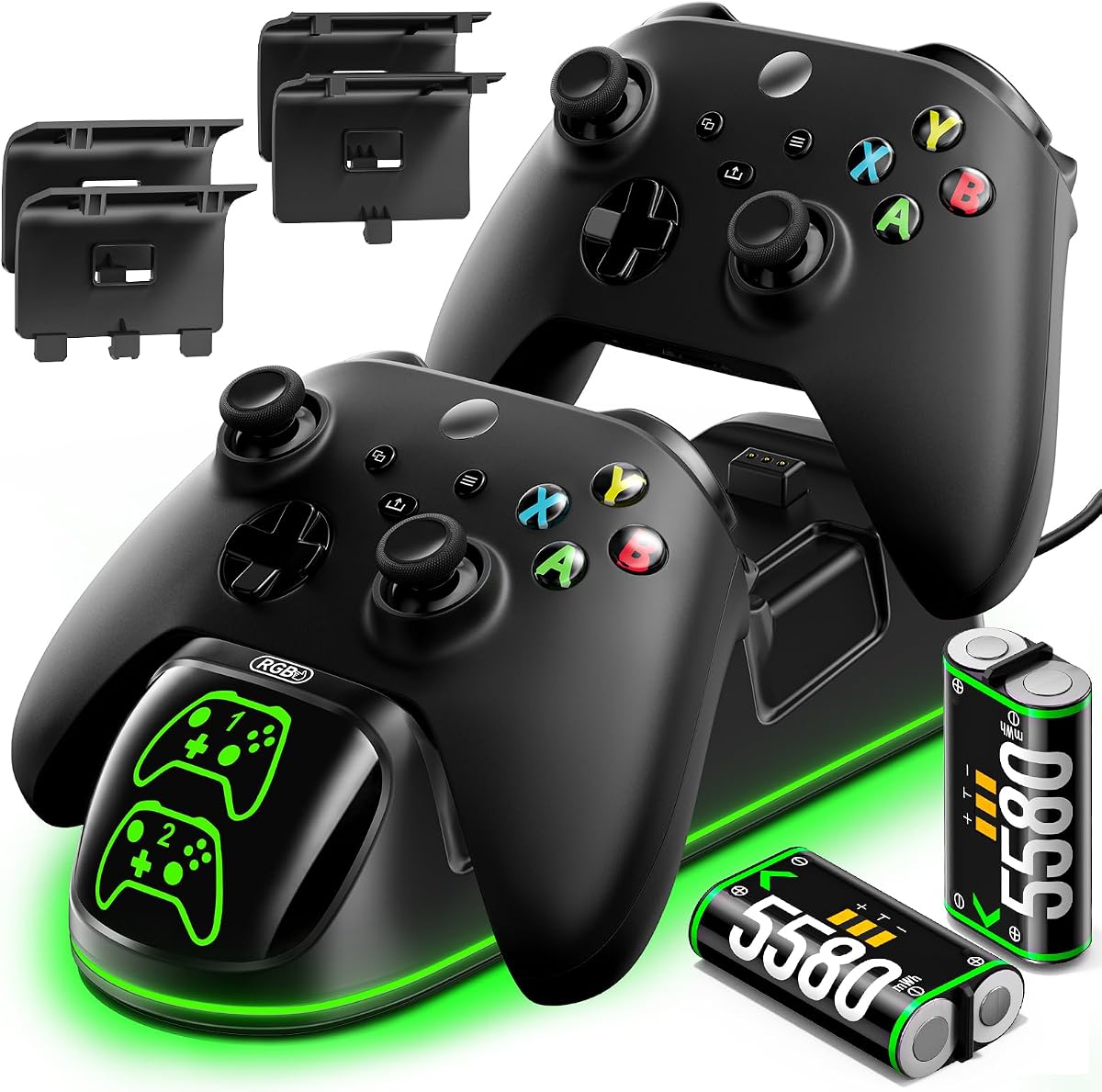


This charging station stands out with its high capacity battery packs and dual dock design. It has a strong rating from users who value extended play sessions.
We may earn a commission when you buy through this link, at no additional cost to you.
The 6200mWh batteries provide long gaming times without frequent recharging. The unique X shape LED indicators show status clearly without being distracting.
It only works with official controllers and leaves batteries at the bottom which some might find less convenient. These trade-offs are acceptable for the power it provides.
Gamers who play for hours will appreciate the reliability. This station is a top choice for those needing serious power for their Xbox setup.
The high capacity batteries allow for hours of continuous play without interruption.
LED lights show exactly when your controller is charging or fully charged.
We may earn a commission when you buy through this link, at no additional cost to you.
This station offers great value with its SGS certification and smart charging features. It is a reliable choice for keeping controllers ready for action.
We may earn a commission when you buy through this link, at no additional cost to you.
The NiMH batteries provide long play time and the smart board prevents overheating. It automatically stops when fully charged to protect your hardware.
It does not support the Elite 2 controller and the design is simple. These limits are minor for most users seeking a safe charging dock.
Players who want safety and value will find this a strong pick. It keeps your gear charged and ready without extra worries.
SGS certification ensures the product meets high safety standards for charging.
The smart charging board protects against overheating and short circuits.
We may earn a commission when you buy through this link, at no additional cost to you.
This single stand is officially licensed by Xbox and comes with a battery pack. It is perfect for players who need a simple solution for one controller.
We may earn a commission when you buy through this link, at no additional cost to you.
The official license ensures compatibility and the two year warranty gives peace of mind. It includes a rechargeable battery to save on disposables.
It only charges one controller at a time and has a smaller battery than some options. This is fine for solo players or those with spare stands.
If you need a trusted single dock this is a great choice. It keeps your controller powered and neatly stored on your desk.
Being officially licensed means it is designed specifically for your Xbox controller.
The solo stand takes up minimal space on your gaming desk or shelf.
We may earn a commission when you buy through this link, at no additional cost to you.
This dock stands out for its incredibly fast charge time of under three hours. It has a perfect rating from users who want controllers ready quickly.
We may earn a commission when you buy through this link, at no additional cost to you.
The NiMH batteries recharge fully in 2.5 hours and offer long play time. LED indicators make it easy to see when charging is complete.
It does not support the Elite 2 controller and looks fairly simple. These are minor points for a dock that charges so fast.
Gamers who need quick turnaround between sessions will love this. It keeps your gear powered up without long waits.
Fully charge two controllers in just 2.5 hours for rapid readiness.
LED lights clearly show red for charging and green when done.
We may earn a commission when you buy through this link, at no additional cost to you.
This dock offers a secure magnetic connection that holds your controller firmly. It is officially licensed and designed to match Xbox aesthetics perfectly.
We may earn a commission when you buy through this link, at no additional cost to you.
The magnetic system ensures charging never gets interrupted and it includes storage for spare parts. The LED shows status clearly and the design is sleek.
It only supports one controller and comes with a single battery. This is fine for those who prefer a clean minimalist look.
Players who want a premium feel and secure connection will like this. It keeps your controller safe and charged with style.
Magnetic charging keeps the controller firmly in place during use.
The dock includes a compartment to store extra battery doors easily.
We may earn a commission when you buy through this link, at no additional cost to you.
This station features a unique robot helmet inspired design that stands out visually. It offers dual charging and high capacity batteries for long sessions.
We may earn a commission when you buy through this link, at no additional cost to you.
The LED lights can be turned on or off with a top switch. The USB C cable ensures fast charging and the bottom stores spare batteries.
It takes up more space and the switch is on top which might catch on things. These do not affect performance but are worth noting.
Gamers who want a cool look for their setup will love this. It combines style with solid charging power for your controllers.
The robot helmet design adds a superhero feel to your gaming area.
Turn off the LEDs when you want a dark room experience.
We may earn a commission when you buy through this link, at no additional cost to you.
This dock offers two controller slots and an extra USB port for other devices. It is a solid budget option for players who need multiple charges.
We may earn a commission when you buy through this link, at no additional cost to you.
The green LEDs look cool in dark rooms and the drop in design is simple. It includes batteries and a cable so you can start right away.
It has a lower rating than some rivals and lacks advanced features. It is a good choice if you want two docks and a spare port.
Players who want basic functionality at a fair price will find it useful. It keeps two controllers ready and adds a USB connection.
The extra USB port lets you charge other devices at the same time.
Charge two controllers simultaneously so you are never waiting.
We may earn a commission when you buy through this link, at no additional cost to you.
This stand is made to match the Pulse Red Xbox controller with identical color and material. It uses a magnetic dock for secure placement.
We may earn a commission when you buy through this link, at no additional cost to you.
You can navigate the dashboard with one hand while the other controller charges. The official license ensures quality and fit with your gear.
It only holds one controller and has a smaller battery than others. This is perfect if you have a Pulse Red controller and want a match.
Fans of the Pulse Red color will love this seamless look. It combines style with solid charging for your special edition gear.
The stand is built with the exact material and color as your controller.
Navigate menus with one hand while your second controller charges.
We may earn a commission when you buy through this link, at no additional cost to you.
This stand offers universal compatibility with most Xbox controllers including old and new models. It features a magnetic dock and premium materials for a high end feel.
We may earn a commission when you buy through this link, at no additional cost to you.
The magnetic system ensures a secure charge and you can navigate with one hand. Overcharge protection keeps your controller safe from heat or damage.
It is more expensive than other options and only holds one controller. The build quality and design justify the cost for many users.
Players who want a premium single dock with broad compatibility will like this. It provides reliable charging with a sleek and secure design.
Works with almost all Xbox controllers from different generations.
Built in protection prevents overheating and short circuits.
We may earn a commission when you buy through this link, at no additional cost to you.
This station stands out with nine RGB lighting modes that let you customize your setup. It includes dual charging and high capacity batteries for long use.
We may earn a commission when you buy through this link, at no additional cost to you.
You can switch colors or turn lights off with a simple touch. The high capacity batteries last for many hours and can recharge thousands of times.
The light control is basic and offers only single or multi color options. This is a small trade-off for the visual appeal and power.
Gamers who love colorful setups will enjoy the lighting options. It provides both style and reliable power for your controllers.
Switch between nine different lighting modes to match your style.
Batteries can be recharged up to 3000 times for lasting use.
We may earn a commission when you buy through this link, at no additional cost to you.
Choosing a controller charging station involves more than just picking a dock. You must consider battery capacity and compatibility to ensure long term value.
Look for packs with high mAh or mWh ratings to extend your play sessions. Higher capacity means fewer charges and more uninterrupted gaming time.
Choose high capacity batteries if you play long sessions often.
Decide if you need a single dock or a dual dock. Dual models let you charge two controllers at once which is great for multiplayer.
Pick dual docks for shared play and single docks for personal use.
Some stations charge in under three hours while others take longer. Faster charging gets you back to gaming sooner after a session.
Choose fast charge models if you need quick turnaround times.
Ensure the dock works with your specific controller model including Elite or Series X. Some units exclude Elite 2 or third party controllers.
Verify compatibility with your controller before you buy the dock.
Look for built-in protection like overcharge and overheating guards. Certifications like SGS show the product meets safety standards.
Prioritize docks with safety features to protect your controllers.
Consider the look and size of the dock to fit your space. Some have RGB lights or unique shapes while others are simple and compact.
Choose a design that matches your setup and desk space.
Check what comes in the box such as battery covers or cables. Having all parts included saves you from buying extras separately.
Look for full kits that include covers and charging cables.
A longer warranty shows confidence in product quality. It can save you money if parts fail or stop working after a while.
Prioritize models with longer warranties for better peace of mind.
Place the station on a flat stable surface near your console or desk. Plug the USB cable into a power source and connect it to the dock.
Drop your controller into the slot so metal contacts align. The LED will show red when charging and green when fully done.
Keep the dock dry and dust free to ensure good connection. Wipe the contacts gently with a dry cloth if they get dirty.
Most stations come with batteries included in the package. Some single docks may include one pack while dual docks include two. Always check the product details to be sure.
Charging time varies by model but most take between three and five hours. Some fast models can fully charge in under three hours for quick use.
Most official stations are designed for official Xbox controllers. Some may not support third party or Elite 2 models so check compatibility first.
Most stations change the LED color to green or white when fully charged. Some allow you to turn the lights off to avoid disturbance during sleep.
Yes most modern docks stop charging when batteries are full to prevent overcharging. Built-in protection systems keep your controllers safe while stored.
Rechargeable batteries can usually be recharged thousands of times. This reduces waste and saves money compared to buying disposable AA batteries.
Yes you can use the dock to store controllers even when not charging. Many docks are designed to hold controllers securely as a display stand too.
Most stations use a standard USB connection to a console or wall adapter. Check the included cable type to ensure it matches your power source.
You have reviewed ten top charging stations for Xbox controllers with detailed features. Each offers unique benefits like high capacity batteries or unique designs.
Prioritize battery capacity and safety features to get the most value. Match the dock to your specific controller model for best compatibility.
Remember to check current listings before you buy to confirm details. Prices and availability can change so keep your choice flexible.