
Learning Resources Code & Go Robot Mouse
4.5Editor score
Intro coding for ages four plus
Sequencing and logic building
Maze grids and walls
Discover the top coding toys for kids in 2026. This guide compares screen-free and app-based STEM robots to help you choose the best educational tech.
Coding toys offer a hands-on way for children to learn programming logic without staring at a screen. These educational tools transform abstract concepts like sequencing and loops into physical play that sparks curiosity and creativity in young minds.
We evaluated the market based on build quality, educational value, and ease of use. Our list covers everything from simple button-based robots for preschoolers to advanced kits for older kids ready to tackle complex engineering challenges.
Each pick highlights specific strengths such as screen-free operation or app integration to suit different learning styles. Prices and availability can change frequently, so check current listings before making your final purchasing decision.
4.5Editor score

4.1Editor score

4.6Editor score
This side-by-side comparison highlights key features across ten top-rated coding toys to help you find the perfect match for your child's age and skill level.






This robotic chameleon kit stands out as a top choice for kids who want to learn coding without a screen. With a rating of 4.1 stars it offers an engaging way to explore robotics through hands-on assembly and playful interaction.
We may earn a commission when you buy through this link, at no additional cost to you.
The kit allows children to build a 15-inch robotic reptile that moves reacts to touch and changes color based on its surroundings. Using physical colored action cards kids can program movements fostering logical thinking and sequential planning skills effectively.
While the assembly process can take time and requires adult supervision for younger children the educational value is substantial. The learning curve associated with understanding how sensors work might be challenging for some but it teaches patience and problem solving.
Families looking for a STEM toy that encourages creativity and engineering exploration should consider this kit. It is particularly well-suited for children aged eight and up who are ready to engage with mechanical components and coding concepts actively.
Three unique modes including coding wild and pet mode keep kids engaged by allowing different ways to interact with the robot.
The comprehensive 48-page manual guides users through assembly and explains how nature inspires engineering designs for deeper learning.
We may earn a commission when you buy through this link, at no additional cost to you.
The Makeblock mBot is an excellent entry-level robot for kids aged eight to twelve who are interested in electronics and programming. It scores a 4.6 rating for its ability to teach coding step-by-step through interactive software and building resources.
We may earn a commission when you buy through this link, at no additional cost to you.
Kids can assemble this robot in about fifteen minutes and then start programming it to avoid obstacles or follow lines. The open-source system allows for expansion with hundreds of electronic modules and LEGO parts making it a versatile long-term learning tool.
One trade-off is that batteries are not included which means you need to purchase them separately to get started. Additionally the learning curve can be steep for very young children without parental guidance through the software environment.
This kit is ideal for parents who want a gift that grows with their child's skills. Whether building a remote control car or tackling complex coding challenges the mBot provides a solid foundation for future engineers.
The open-source nature allows you to connect over one hundred electronic modules and five hundred parts from the platform.
Three free apps and mBlock software help children enjoy remote control and programming games with their robot.
We may earn a commission when you buy through this link, at no additional cost to you.
The Sphero Mini packs a ton of fun into a tiny ball that fits in your hand. With a rating of 4.6 stars it serves as a perfect entry into robotics for beginners who want to learn coding through gaming.
We may earn a commission when you buy through this link, at no additional cost to you.
Powered by the free Sphero Edu app you can code the robot by drawing on your screen or using drag and drop blocks. It also comes with traffic cones and bowling pins to create obstacle courses right out of the box.
While the interactive games are engaging the battery life is limited to about one hour which might not be enough for long play sessions. It also relies heavily on a smartphone for coding which limits screen-free options.
This robot is best for tech-savvy families who want to introduce coding concepts through play. It is suitable for kids aged eight and up and offers a fun way to explore motion programming and sensor data.
You can drive using joystick slingshot or tilt modes to make play more interactive and exciting for kids.
The Sphero Play app lets you use the robot as a controller for arcade-style games like shooting through space.
We may earn a commission when you buy through this link, at no additional cost to you.
This robot mouse is designed specifically for young learners aged four and up who are just starting to understand sequencing and logic. It has a solid rating of 4.5 stars for being a robust introductory tool for coding basics.
We may earn a commission when you buy through this link, at no additional cost to you.
The mouse uses physical buttons to send commands like forward turn or beep allowing kids to solve mazes without a tablet. It comes with twenty maze grids and walls to build a large board for various coding challenges.
One limitation is that the complexity might be too simple for older kids who want more advanced programming features. Additionally the reliance on AAA batteries means you need to keep spares handy for uninterrupted play time.
It is an ideal choice for parents and teachers looking for an affordable and effective way to teach logic. The durable design makes it suitable for classroom use or home play centers where multiple children might use it.
Helping emerging programmers build confidence through playful trial-and-error that strengthens sequencing and logic skills.
Teachers can set up repeatable coding activities for rotations and small-group work using the included grid mats.
We may earn a commission when you buy through this link, at no additional cost to you.
The Mech-5 is a one-of-a-kind mechanical coding robot that allows kids to throw lift kick and draw by snapping coding buttons onto a coding wheel. It is well-rated at 4.5 stars for its focus on mechanical engineering and building skills.
We may earn a commission when you buy through this link, at no additional cost to you.
This mission-based robot is designed to inspire young engineers to learn about how machines work through hands-on assembly. The kit requires time and patience to build but the result is a robot that performs specific physical actions effectively.
Younger kids might find the build process challenging without adult supervision which could be a barrier if they want to play alone. The specialized coding buttons limit flexibility compared to app-based robots but they simplify the interface for beginners.
Families interested in mechanical engineering should consider this kit as it offers a tactile approach to coding. It is best suited for children aged ten and up who enjoy building and want to see physical results from their code.
The robot can perform actions like kicking and lifting which adds a physical dimension to the coding experience.
Detailed instructions guide users through building ensuring a true STEM experience that teaches proper assembly techniques.
We may earn a commission when you buy through this link, at no additional cost to you.
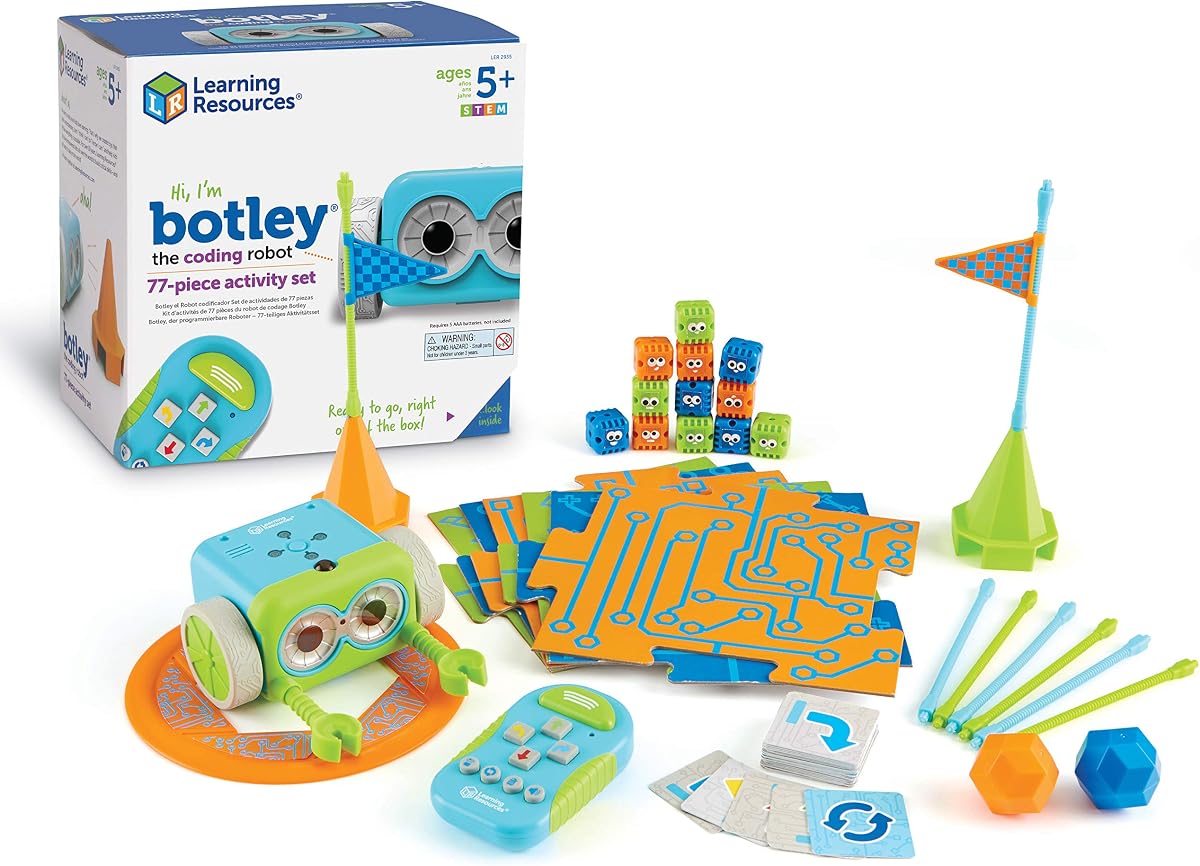
Botley is a popular screen-free coding robot that helps children learn early STEM skills through active play. With a rating of 4.6 stars it is praised for its ease of use and ability to teach coding concepts without a screen.
We may earn a commission when you buy through this link, at no additional cost to you.
This 77-piece set comes with a remote programmer that sends commands and allows for looping and object detection. Kids can build obstacle courses and follow black-line paths without needing a phone or tablet to control the robot.
The main drawback is the battery requirement which is quite high with five AAA batteries needed for operation. The physical buttons on the remote can be small and require dexterity which might be frustrating for very young children.
Botley is an excellent choice for parents who want to limit screen time while still teaching technology skills. It is best for kids aged five and up and offers a fun way to explore programming logic in a tactile way.
The robot can detect objects in front of him and avoid them which adds an advanced layer to basic coding.
Kids can program looping commands to create repetitive sequences that help them understand loop logic in coding.
We may earn a commission when you buy through this link, at no additional cost to you.
The Ozobot Evo is an innovative coding robot that introduces children to coding through creative play and interactive lessons. It has a 4.6 rating for its comprehensive educational resources and ability to adapt to different skill levels.
We may earn a commission when you buy through this link, at no additional cost to you.
The Evo Entry Kit includes a robot and color code markers that let kids program the robot with lines and colors on paper. It also supports online coding with Blockly which provides a smooth transition from physical to digital programming.
A potential downside is the higher price point compared to other kits which might be a barrier for some families. Additionally the screen-free features require markers which can be messy if not managed properly during play.
This kit is ideal for schools and homes seeking a long-term educational tool that grows with the child. It is suitable for grades K to twelve and offers a robust platform for teaching core science and math concepts.
Access to over seven hundred free lessons enhances critical thinking and problem-solving skills for students and teachers.
Five skill levels ranging from beginner to master coding ensure the kit grows with the child's abilities.
We may earn a commission when you buy through this link, at no additional cost to you.
Botley 2.0 upgrades the original with multi-step coding paths and object-sensing reactions that add depth to play. It holds a 4.5 rating for its engaging features that build confidence and curiosity for young future coders.
We may earn a commission when you buy through this link, at no additional cost to you.
The set includes a robot programmer coding cards and stackable obstacle pieces to build custom mazes. It features lights sounds and secret code combinations to make the coding experience more interactive and exciting for kids.
One thing to note is that the price is higher than the original version which might not justify the upgrade for all families. The complexity is also greater so it may not be suitable for very young children without guidance.
This kit is best for children who have already tried basic coding and want a bigger challenge. The open-ended nature encourages creativity and planning making it a great option for home or classroom adventures.
The robot has object-sensing reactions that encourage kids to design longer routes and refine strategies.
Sixteen secret code combinations offer open-ended play for curious young creators to unlock hidden features.
We may earn a commission when you buy through this link, at no additional cost to you.
Dash is a programmable robot that is ready to go right out of the box making it one of the easiest to use. It has a 4.6 rating for its ability to teach coding concepts through hands-on play and fun challenges.
We may earn a commission when you buy through this link, at no additional cost to you.
This robot can sing dance and respond to voice commands while you teach sequencing and loops using five different apps. It is used in over forty thousand schools globally so it has been proven to teach STEM skills effectively.
The main trade-off is that it requires a smartphone or tablet to code which limits screen-free play. The price is also higher than other options so it is a bigger investment for families looking for a learning toy.
Dash is perfect for kids aged six to eleven who want a friend that interacts with them. It offers a fun and engaging way to master coding without the need for assembly which is great for busy parents.
Five apps for Apple Android and Fire OS provide varied ways to code and play with the robot.
With longer battery life this kid's robot toy offers up to five hours of active play on one charge.
We may earn a commission when you buy through this link, at no additional cost to you.
TaleBot Pro is designed for toddlers aged three to five and offers a screen-free way to learn early coding concepts. With a high rating of 4.7 stars it helps kids develop critical thinking and problem-solving skills through stories.
We may earn a commission when you buy through this link, at no additional cost to you.
The robot uses an interactive map where kids press buttons to make it walk sing and dance. It also has a recording function so children can record their voice commands and bring imaginative tales to life on the map.
While it is great for very young kids the features might be too limited for older children seeking more complex coding. The battery life and reliance on markers for the map could also be minor inconveniences during extended play.
This is an ideal choice for parents of toddlers who want a robot that grows with their child's early development. It is safe and accessible for autistic children and supports multiple languages which adds extra value for diverse families.
Kids can record their voice and use the robot to bring their imaginative tales to life on the map.
Ten languages are supported including English French German and Spanish to accommodate diverse households.
We may earn a commission when you buy through this link, at no additional cost to you.
Choosing the right coding toy depends on your child's age and learning style.
Look for toys designed for your child's developmental stage. Toys for toddlers focus on cause and effect while those for older kids introduce complex coding logic.
Always check the manufacturer's age recommendations to ensure safety and usability.
Decide if you want a toy that requires a tablet or one that works independently. Screen-free toys are great for limiting screen time while app-based ones offer more advanced features.
Consider your family rules on screen usage before making a purchase decision.
Check if the toy comes with lessons or activities that teach specific skills like sequencing and loops. A comprehensive guide helps children get the most out of the play.
Prioritize toys that offer structured learning alongside free play options.
Select durable materials that can withstand drops and rough play. High-quality kits last longer and are more cost-effective over time.
Inspect product reviews for feedback on durability and sturdiness.
Consider if the robot supports add-ons or can be modified. Open-source kits allow children to grow their projects as they learn more.
This ensures the toy remains interesting as skills improve.
Set a budget but look for long-term value rather than just the lowest price. Kits with more features or educational content often provide better value.
Check for included accessories that might save you from buying extra parts.
Check if the toy uses common batteries or requires a rechargeable pack. This affects ongoing maintenance and costs over time.
Ensure batteries are included to avoid delays in starting to play.
Look for intuitive controls and clear instructions that make setup easy for parents. If it takes too long to set up kids may lose interest.
Simple interfaces help children focus on the coding rather than assembly.
Always start by reading the manual carefully to understand how to operate the buttons and assemble the parts correctly.
Keep small parts and magnets away from younger siblings to prevent choking hazards or swallowing accidents.
Store the robot in a dry and cool place to protect the electronic components from damage and wear.
Yes coding toys teach fundamental computer science concepts like sequencing and logic. They provide a tangible way for children to understand abstract ideas which improves critical thinking skills.
Some do but many offer screen-free options. Check the product details to see if it needs an app or can be controlled with physical buttons and cards.
Children as young as four can start with simple block-based toys. Older children benefit from more complex kits that introduce real programming languages.
Yes most coding toys are designed for independent play. However parental guidance may be needed for setup and understanding complex instructions.
Most high-quality coding toys are built to withstand active play. Look for reviews mentioning sturdiness to ensure the robot lasts for a long time.
Most electronic toys require batteries. Check the product page to see if batteries are included or if you need to purchase them separately.
Our top picks include the Thames & Kosmos robotic pet for screen-free fun and the Makeblock mBot for advanced building.
Consider your child's age and tech comfort level to select the most suitable toy from this list.
Prices and availability change so verify current listings before making your purchase decision.