
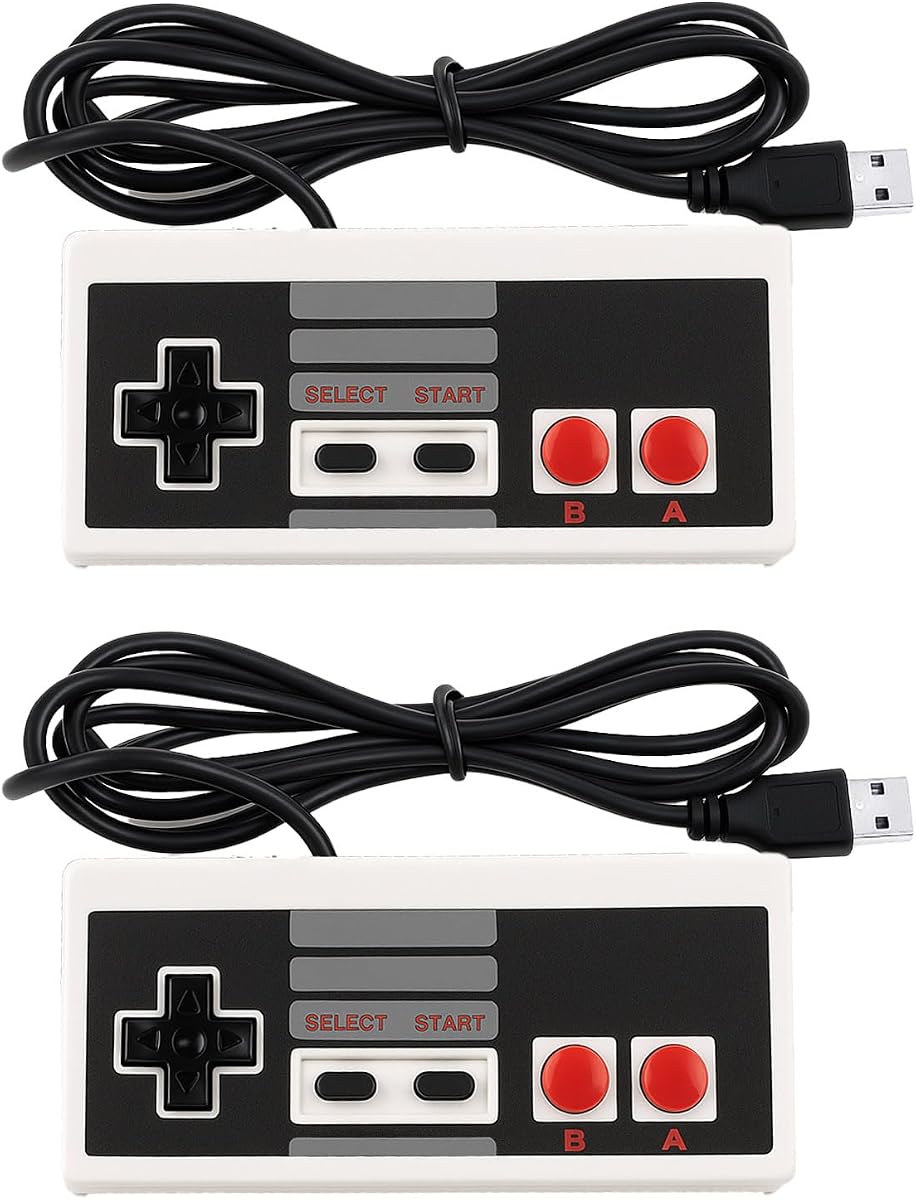
happymaxplus Retro Classic Controller Design
4.8Editor score
9 Pin Port Compatibility
4 Button Design
Continuous Fire Feature
Discover the top Classic Nes Controller Replacement options for retro gaming enthusiasts comparing wired and wireless models for performance and durability.
Finding the right Classic Nes Controller Replacement is essential for preserving your retro gaming setup. Whether your original controller has worn out or you want a backup, selecting a high-quality replacement ensures smooth gameplay and comfort during long sessions.
We evaluated ten top-rated replacement controllers based on build quality, cable length, compatibility, and user feedback. Our analysis covers wired and wireless options designed specifically for the NES Classic Edition and compatible systems to help you make an informed choice.
Each pick in this guide highlights unique features and potential trade-offs to match your specific needs. Please note that prices and availability change frequently, so verify the latest details before purchasing to ensure you get the best deal available today.
4.8Editor score

3.7Editor score

4.5Editor score
This side-by-side comparison examines all ten products to highlight their unique specifications and suitability for different gaming setups. Use this overview to quickly identify which controller matches your console type and feature requirements.




The NGHTMRE controller set is designed for the Nintendo Classic Edition 2016 model with HDMI. It offers a 10ft cable for greater freedom and includes two controllers for shared play. Users appreciate the sensitive buttons and sturdy build quality.
We may earn a commission when you buy through this link, at no additional cost to you.
The primary strength lies in the 10ft cable which lets players sit further from the screen. This reduces eye strain and radiation exposure while maintaining comfort. The pack includes two units so both players can enjoy a relaxed experience simultaneously.
Some users note that these controllers only work with the 2016 HDMI model not the original 1985 console. This limits compatibility for collectors with older hardware. Additionally the rating suggests occasional quality issues in production batches.
This set is ideal for modern NES Classic owners wanting extra reach and multiplayer capability. It balances affordability with functional features like long cables and responsive inputs. Verify your console model before purchasing to ensure compatibility.
The 10ft cable provides significant movement range reducing discomfort during long gaming sessions.
Two controllers are included allowing immediate multiplayer gaming without extra purchases.
We may earn a commission when you buy through this link, at no additional cost to you.
The ZAMPAM controllers offer wireless freedom for PC Mac and Linux systems using a 2.4GHz adapter. They include a rechargeable battery with around 100 hours of playtime. Turbo functions allow rapid button input for specific games.
We may earn a commission when you buy through this link, at no additional cost to you.
Key strengths include the wireless range and battery life which eliminate cable clutter during gaming. The turbo feature adds versatility for action games requiring fast inputs. Setup requires downloading joystick mapper software for key configuration on PC.
Important to note these are not compatible with NES Classic Edition Mini NES or Super Nintendo consoles. Users must check their system compatibility before buying. Manual configuration via software adds a step before first use.
Ideal for retro PC gamers wanting wireless convenience and long battery life. The turbo function and broad OS support make it versatile for emulation. Confirm it fits your console needs as it excludes Nintendo systems.
Operate up to 10 meters away from your console or PC without physical wires.
Set custom rapid button inputs for enhanced performance in action-heavy games.
We may earn a commission when you buy through this link, at no additional cost to you.
The XYAB controller offers a classic retro design for PC and Mac users seeking NES style gameplay. It connects via USB with no drivers needed and features a 6 foot cable. The ergonomic design aims to provide comfort during extended sessions.
We may earn a commission when you buy through this link, at no additional cost to you.
Strengths include the plug and play convenience and broad OS support for Windows and macOS. The 6 foot cable offers flexibility in positioning. Collectors and retro gamers may appreciate the nostalgic look and feel.
However the product holds a very low customer rating indicating potential quality issues or compatibility problems. Users should proceed with caution as performance may vary significantly between units. Check recent reviews before purchasing.
This option suits users prioritizing design aesthetics and basic PC compatibility. It is not recommended for those needing reliable performance given the low ratings. Consider higher rated alternatives if stability is your priority.
Simply plug into USB ports on your PC or Mac to start playing immediately.
Designed with a classic D pad and responsive buttons for comfortable long sessions.
We may earn a commission when you buy through this link, at no additional cost to you.
The happymaxplus controllers feature a 9 Pin DB9 plug compatible with retro consoles like AV 620 HD 621 and HD 821. They include continuous fire and a 4 button layout for enhanced control. Users appreciate the high rating and straightforward plug and play setup.
We may earn a commission when you buy through this link, at no additional cost to you.
Key strengths include the continuous fire capability for rapid action and the 9 Pin port compatibility. The high customer rating suggests reliable quality. Two controllers allow immediate multiplayer gaming without extra accessories.
Note that these are not for NES Classic Edition but for specific AV HD retro consoles. As third party items confirm compatibility with your setup before purchasing. They offer a quality alternative without first party manufacturing.
Best for owners of AV HD retro consoles needing high quality reliable replacements. The continuous fire adds gameplay value beyond standard controllers. Verify your console port type to ensure perfect fit.
Compatible with AV 620 HD 621 and HD 821 retro game consoles for authentic connection.
Engage rapid button inputs for competitive edge in action and shooter games.
We may earn a commission when you buy through this link, at no additional cost to you.
The ZENANBiBi set includes two wired controllers compatible with Windows Mac Linux Raspberry Pi and RetroPie. They connect via USB with no drivers and feature a 5.6ft cable. The design aims to replicate the classic NES feel for nostalgic gameplay.
We may earn a commission when you buy through this link, at no additional cost to you.
Strengths include broad OS support especially for RetroPie and Linux users. The 5.6ft cable allows comfortable distance from the console. Two units are provided for shared gaming experiences at home.
Note these are not compatible with NES Classic Mini Wii or Switch systems. Some users report minor issues reflected in the moderate rating. Always confirm your system compatibility before purchase to avoid returns.
Ideal for retro PC Raspberry Pi emulation setups needing multiple controllers. The plug and play feature simplifies setup. Verify your console type to ensure the controllers work as expected.
Works seamlessly with Raspberry Pi and RetroPie systems for retro emulation.
Two controllers in the package enable immediate shared gaming with friends.
We may earn a commission when you buy through this link, at no additional cost to you.
The MAYFLASH adapter allows NES Classic and SNES controllers to work on NES Classic Wii U and Wii systems. It includes built in turbo and plug and play functionality. Users can exchange D pad and left stick for custom control setups.
We may earn a commission when you buy through this link, at no additional cost to you.
Strengths include the ability to use SNES controllers on NES Classic and vice versa. The turbo feature enhances gameplay without extra hardware. No drivers are needed for quick setup on supported consoles.
Some users report mixed experiences reflected in the moderate rating. Ensure compatibility with your specific system before buying. The adapter adds flexibility but costs extra compared to direct controllers.
Best for users wanting to repurpose existing NES or SNES controllers on multiple systems. The turbo feature and plug and play ease of use add value. Confirm system support before purchase.
Connect your existing SNES controllers to NES Classic and Wii U systems easily.
Built in turbo function allows rapid button firing for competitive games.
We may earn a commission when you buy through this link, at no additional cost to you.
The eXtremeRate housing is a replacement shell for Switch Joycons featuring a classic NES style. It includes a soft touch grip and ergonomic d pad for intensive games. The package provides screws and tools for installation requiring moderate electronic experience.
We may earn a commission when you buy through this link, at no additional cost to you.
Key strengths include the soft touch material that prevents slipping during long sessions. The NES design adds personalization to standard Switch controllers. Users appreciate the anti slip and sweat free benefits.
Note this is not a functional controller but a housing case for existing Joycons. Installation requires tools and moderate electronics experience as shown in video guides. Without electronics this item cannot function alone.
Ideal for Switch owners wanting a unique look and improved grip. The soft touch material enhances comfort. Follow installation guides carefully to avoid damage during modification.
Anti slip sweat free soft touch material provides secure handling during gameplay.
Enhanced d pad design improves control for platformers and action games.
We may earn a commission when you buy through this link, at no additional cost to you.
This bundle offers one controller one power supply and two 6ft extension cables for the NES Classic Edition. It aims to provide essential accessories in one package. Users receive power and extended reach options immediately.
We may earn a commission when you buy through this link, at no additional cost to you.
Strengths include the inclusion of a power supply and extension cables for setup. Having a controller included helps replace lost or broken original units. It simplifies purchasing separate parts.
However the product has a very low customer rating indicating potential quality concerns. Some users report issues with durability or functionality. Review feedback carefully before investing in this bundle.
Suitable for those needing basic power and extension access alongside a controller. Consider higher rated alternatives if reliability is your main concern. Verify current quality before purchase.
Complete package with power adapter ensures console is ready to use immediately.
Two 6ft extension cables allow flexible console placement on your TV setup.
We may earn a commission when you buy through this link, at no additional cost to you.
The RDS Action Grip controller is a licensed accessory designed for the NES Classic Edition. It features textured silicone for a comfortable grip and precise control. The product maintains a high customer rating for its quality and comfort.
We may earn a commission when you buy through this link, at no additional cost to you.
Strengths include the licensed status ensuring compatibility with NES Classic Edition. The textured silicone reduces slipping and enhances control during intense sessions. Users find it affordable and reliable.
This controller is specifically for the NES Classic Edition not the original 1985 console. Limited color options may restrict choice for some buyers. Verify your system compatibility before purchasing.
Best for budget conscious buyers seeking a licensed comfortable grip accessory. The textured material improves handling significantly. Check your console model to ensure proper fit.
Licensed by Nintendo ensuring reliable compatibility and quality for NES Classic Edition.
Material provides a secure comfortable grip reducing hand fatigue during play.
We may earn a commission when you buy through this link, at no additional cost to you.
The KIWITATA controllers offer SNES style layouts for PC Windows Mac and Raspberry Pi emulation. They connect via USB with a 5 foot cable and feature frosted concave keys. Two units are provided for local multiplayer gaming.
We may earn a commission when you buy through this link, at no additional cost to you.
Strengths include the ergonomic design and anti slip keys for comfortable gameplay. They work with popular emulators like RetroArch and OpenEmu. The frosted design prevents sweat during long sessions.
Note these are not for the original SNES console but for PC emulation. Manual button mapping is required within your emulator for proper configuration. Confirm your OS compatibility before buying.
Best for retro gamers using PC emulators needing SNES style controls. The ergonomic design and dual pack add value. Set up button mapping in your emulator for optimal performance.
Works with major emulators like RetroArch and OpenEmu for retro PC gaming.
Frosted concave design prevents sweating and slipping during extended play.
We may earn a commission when you buy through this link, at no additional cost to you.
Selecting the right replacement involves matching your console type comfort needs and budget. Understanding key features helps you avoid incompatibility and ensures a smooth gaming experience.
Verify that the replacement controller works with your specific console model. The NES Classic Edition has a unique connector that differs from the original 1985 console. Some products explicitly state they are for the 2016 HDMI model only. Using an incompatible controller will result in it not functioning at all. Always check the product details for system support before purchasing.
Confirm your console model matches the product requirements to avoid returns.
Cable length affects your comfort during gameplay. Longer cables allow you to sit further from the screen reducing eye strain and improving posture. Some options include extension cables or extended cords up to 10 feet. If you prefer sitting on a couch rather than close to the TV this factor is critical. Shorter cables may limit seating options and cause discomfort over time.
Choose longer cables for comfortable distance from your display during sessions.
Responsive buttons are essential for precise control during gameplay. High quality controllers use durable membranes or switches that register inputs without delay. Cheap replacements may have mushy buttons that cause missed inputs or double presses. Look for reviews that mention button sensitivity and responsiveness for reliable performance. Consistent input is key to enjoying retro titles fully.
Prioritize controllers with reviews confirming responsive and durable button performance.
The materials used determine how long the controller lasts. Sturdy plastic and reinforced cables resist wear from frequent use. Textured grips prevent slipping and improve comfort during extended play. Avoid products with flimsy construction or reported cable fraying issues. Good build quality ensures the controller withstands regular gaming sessions without failure.
Look for sturdy materials and reinforced cables to ensure long term durability.
If you play with friends or family consider packages that include multiple controllers. Some options offer two controllers at a better price than buying individually. Having extra controllers ready eliminates the need for additional purchases later. This is especially useful for local co-op games or competitive play. Check the quantity included before finalizing your purchase.
Purchase packs with multiple controllers to enable immediate multiplayer gaming.
Wired controllers typically offer lower latency and do not require charging. Wireless options provide freedom from cables but need battery management and may have lag. Consider your setup and preference for convenience versus reliability. Some wireless controllers are limited to PC or specific consoles. Choose the connection type that suits your gaming style best.
Decide between wired reliability and wireless convenience based on your setup.
Price should be weighed against features and quality. Cheaper options may lack durability or compatibility. Premium options might include extra features like turbo or extended cables. Determine your budget but do not compromise on essential compatibility. Read reviews to see if the price matches the expected longevity and performance.
Balance your budget with essential features to find the best value option.
Customer feedback provides real world insights into product performance. Look for patterns in reviews regarding connectivity durability and comfort. High ratings suggest consistent quality while low ratings indicate potential issues. Detailed reviews help you understand potential trade-offs before buying. Use this information to make an informed decision.
Check recent user reviews to gauge actual performance and reliability.
Plug the controller into your console securely and ensure the connection is tight. If using an extension cable attach it firmly to both the controller and console to avoid signal loss. Check that your system recognizes the input by testing basic buttons in a menu.
Store your controller in a cool dry place when not in use to prevent damage. Avoid bending or twisting the cable sharply as this can cause internal wire breakage over time. Use cable ties or organizers to prevent tangling and strain on the connector.
No, the NES Classic Edition uses a proprietary proprietary that is not standard USB. You must purchase a controller specifically designed for the NES Classic Edition or use a compatible adapter. Standard PC USB controllers will not connect directly to the console ports.
Generally no, the NES Classic Edition does not natively support SNES controllers. However, third party adapters exist that allow SNES controllers to connect to the NES Classic. These adapters require a separate purchase and may have compatibility limitations.
Always check the product description for explicit mentions of your console model. The NES Classic Edition 2016 model with HDMI is distinct from the original 1985 console. Confirm with the seller if your specific system is supported before purchasing to avoid compatibility issues.
Most USB controllers for PC are plug and play and do not need drivers. However, some may require software for specific features like turbo or button mapping. Always read the product details for any setup software requirements before connecting to your system.
Quality varies by brand and model so check user reviews for durability reports. Reputable brands often use stronger cables and better materials than generic options. Proper care and storage can extend the lifespan of any controller significantly.
Intermittent connection often results from a loose port or damaged cable. Ensure the controller is fully inserted into the console port. If the cable is frayed or bent it may disrupt the connection. Trying a different port or controller helps identify the issue.
Third party accessories are generally safe when they meet quality standards. Choose products with positive reviews and compatibility guarantees. Avoid using damaged or extremely cheap accessories as they may cause connection issues. Licensed products often offer better reliability.
We explored ten top options ranging from extended cable packs to licensed grips. Each offers different features to suit your console type and comfort needs. Selecting the right one ensures your retro gaming experience remains smooth and enjoyable.
Prioritize compatibility and build quality to avoid frustrating connection issues. Consider how much reach you need and if multiplayer access is essential. The best choice balances performance reliability with your specific setup requirements.
Prices and availability change frequently so verify current details before buying. Check for any updates or reviews to ensure the product still meets expectations. This guide helps you narrow down the best fit for your gaming setup.