
ATTACK SHARK X8 Ultra
4.3Editor score
55g Lightweight Build
8K Polling Rate Wireless
PixArt PAW3950MAX Sensor
This guide compares the top 8kHz polling rate mouse for esports including wireless and wired models with high DPI sensors and lightweight designs for competitiv
Competitive gaming demands precision and speed that standard peripherals simply cannot provide. Players looking to gain an edge need hardware that minimizes latency and maximizes tracking accuracy during intense matches.
We evaluated ten top-tier mice featuring 8kHz polling rates to find the best options for serious competitors. Our analysis covers sensor performance, build quality, ergonomics, and connectivity features across various price points.
Each pick highlights specific strengths like ultra-light weight, carbon fiber construction, or advanced optical switches. Prices fluctuate frequently so always verify current deals before making your final purchase decision for your setup.
4.3Editor score
4.6Editor score

4.2Editor score
The following table provides a side-by-side overview of the leading 8kHz polling rate mice available today. Each entry lists key specifications to help you quickly identify the model that best fits your specific gaming needs.



The ATTACK SHARK R5Ultra stands out as a top contender for players seeking minimal weight without sacrificing structural integrity. Rated 4.3 stars by users, it delivers impressive performance through its unique injection-molded carbon fiber construction.
We may earn a commission when you buy through this link, at no additional cost to you.
Its PixArt PAW3950 MAX sensor offers 42000 DPI and 750 IPS tracking which ensures flawless movement even during rapid flicks. The wireless 8kHz polling rate eliminates lag while the tri-mode connectivity allows seamless switching between Bluetooth and wired modes.
While the weight is fantastic the white finish might require more frequent cleaning to maintain a pristine look. The cloud driver simplifies customization but some users prefer local software for offline adjustments.
This mouse is ideal for competitive FPS players who prioritize speed and precision above all else. If you want a durable ultra-light mouse that feels like an extension of your hand this model is a strong recommendation.
The hollow carbon fiber design reduces weight significantly while maintaining resistance to drops and wear compared to standard plastic shells.
You can customize DPI and button mapping through a web interface without installing heavy software locally on your system.
We may earn a commission when you buy through this link, at no additional cost to you.
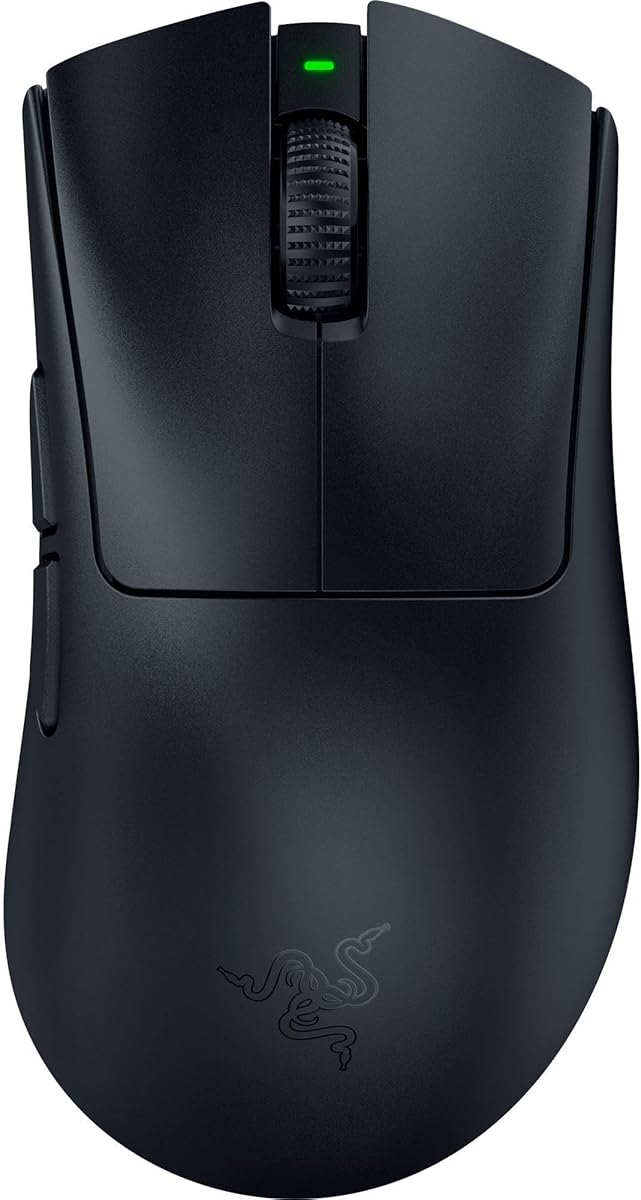
The Razer DeathAdder V3 brings the iconic ergonomic design into the modern era with ultra-lightweight materials and advanced optical technology. Users praise its comfort during long sessions thanks to the refined shape developed with esports professionals.
We may earn a commission when you buy through this link, at no additional cost to you.
Featuring the Focus Pro 30K sensor and Gen-3 optical switches this mouse ensures zero double-clicking issues and precise tracking on various surfaces including glass. The 8K HyperPolling technology delivers near-zero input latency crucial for competitive play.
The absence of wireless connectivity might deter some players but the Speedflex cable minimizes friction significantly. While it lacks onboard memory the Synapse app allows for detailed customization of sensitivity and lighting effects.
Best suited for gamers who prefer a traditional ergonomic shape and do not need wireless freedom this mouse offers premium performance at a reasonable price point. It remains a top choice for wired enthusiasts seeking speed and reliability.
Optical switches use light to register clicks reducing latency and increasing durability to 90 million clicks without mechanical wear.
The Focus Pro 30K sensor includes intelligent functions to enhance aim and prevent spinouts even on difficult surfaces.
We may earn a commission when you buy through this link, at no additional cost to you.
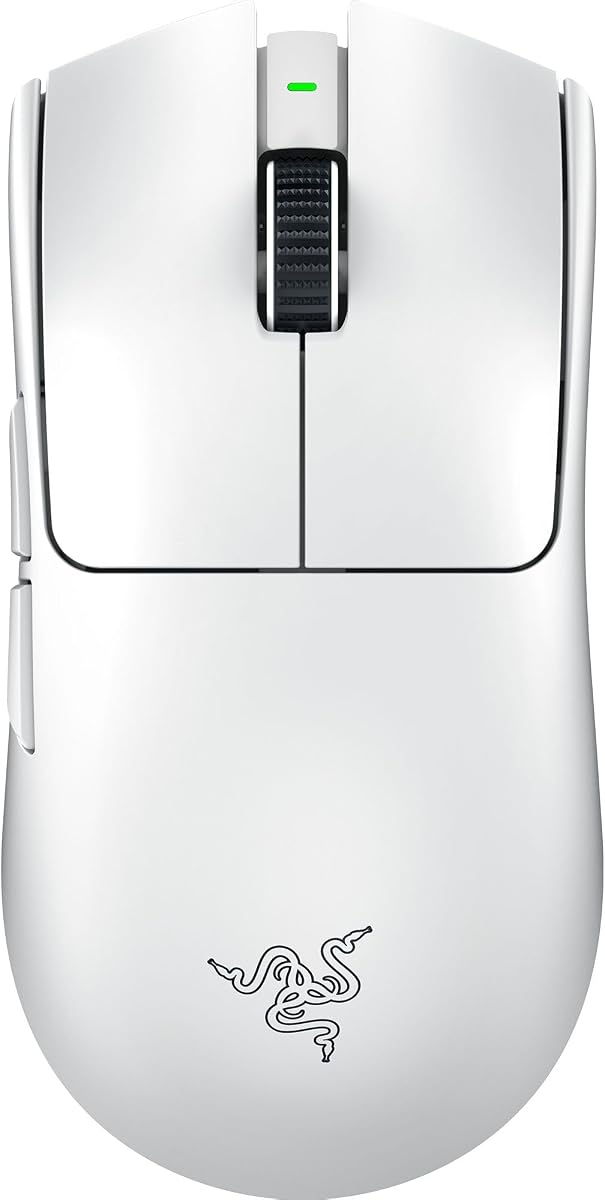
The Razer Viper V3 Pro combines lightweight design with high-end wireless technology to create a top-tier option for competitive gamers. Its 55g weight and symmetrical shape make it suitable for a wide range of grip styles and hand sizes.
We may earn a commission when you buy through this link, at no additional cost to you.
Powered by the Focus Pro 35K Gen-2 sensor this mouse tracks movements with exceptional accuracy up to 95 hours of battery life ensures you can play uninterrupted through multiple tournament sessions or intense practice routines.
The HyperPolling technology provides a true 8000 Hz connection which eliminates the lag often associated with wireless peripherals. However the premium price point might be a barrier for budget conscious buyers looking for similar performance.
If you need a reliable wireless mouse that performs as well as a wired one this model is an outstanding investment. It is highly recommended for players who value freedom of movement without compromising on speed or precision.
The optimized dongle design ensures a smooth and reliable connection even in noisy tournament environments with minimal interference.
Up to 95 hours of battery life allows for extended usage without frequent recharging which is vital for tournament preparation.
We may earn a commission when you buy through this link, at no additional cost to you.
The Razer Viper 8KHz was one of the first mainstream mice to feature a true 8000Hz polling rate offering near-zero input latency for serious competitors. Its ambidextrous shape appeals to left and right-handed users seeking a balanced feel.
We may earn a commission when you buy through this link, at no additional cost to you.
With the Focus+ 20K optical sensor and 2nd Gen optical switches this model delivers crisp execution and zero unintended double-clicks. The advanced on-board memory allows you to carry your settings to any computer without needing installed software.
While newer models are lighter this mouse remains a solid choice for those who prefer a more substantial feel in hand. The Speedflex cable ensures minimal drag though the wired design inherently limits your range of movement.
This is a great option for players who want high performance without the cost of wireless technology. Its official ESL gaming design adds a professional touch that many competitive gamers appreciate in their setup.
Officially licensed by ESL Gaming this mouse meets the standards set by one of the world's largest esports companies.
Store up to 5 profiles directly on the mouse so you can access your settings anywhere without relying on driver software.
We may earn a commission when you buy through this link, at no additional cost to you.
The Razer Viper V4 Pro pushes the boundaries of lightweight design at just 49g while maintaining robust performance for high-level play. This model builds on the success of previous generations with improved efficiency and reliability features.
We may earn a commission when you buy through this link, at no additional cost to you.
Powered by HyperSpeed Wireless Gen-2 it delivers true 8000Hz polling with lower latency than ever before. The optical scroll wheel adds tactile feedback for precise control and the Focus Pro 50K sensor ensures accuracy across a wide range of surfaces.
With up to 180 hours of battery life at 1000Hz you can game for weeks without charging. However the price is higher than many competitors and the small size may not suit everyone comfortably.
Ideal for competitive players who demand the lightest wireless option available this mouse offers industry leading speed and control. It is a top choice for those willing to invest in top tier hardware for their gaming setup.
Optical actuation instead of mechanical parts ensures consistent tracking and increased durability for precise in-game control.
You can choose between extended battery life at 1000Hz or ultra-low latency performance at 8000Hz depending on your needs.
We may earn a commission when you buy through this link, at no additional cost to you.
The Logitech G PRO X Superlight 2 is a refined version of the legendary championship winning mouse. It offers enhanced performance with 8kHz polling and improved battery life while maintaining the iconic form factor that pros love.
We may earn a commission when you buy through this link, at no additional cost to you.
Its HERO 2 optical sensor delivers tracking over 888 IPS with zero smoothing or filtering for pure accuracy. The Lightforce hybrid switches provide pro-level precision and tactile feedback ensuring reliability during intense competitive matches.
While it lacks RGB lighting which some gamers enjoy the zero-additive PTFE feet ensure seamless gliding. The USB-C charging and POWERPLAY compatibility add convenience for those wanting a setup free from cables.
This mouse is perfect for players who value simplicity and proven performance over flashy features. It remains a top recommendation for anyone seeking a reliable wireless option that performs consistently across all game genres.
The most advanced optical sensor in gaming offers precise calibration with zero acceleration or filtering for accurate tracking.
You can charge your mouse continuously while playing without lifting it off the mouse pad for uninterrupted performance.
We may earn a commission when you buy through this link, at no additional cost to you.
The ATTACK SHARK X8 Ultra delivers impressive performance at a very accessible price point making it a great option for budget conscious gamers. It features a 55g weight and 8K polling rate similar to much more expensive competitors.
We may earn a commission when you buy through this link, at no additional cost to you.
The PixArt PAW3950MAX sensor provides up to 42000 DPI and 750 IPS tracking ensuring high precision during gameplay. A cloud driver allows easy customization without heavy software installation which simplifies setup for new users.
While some may find the build quality slightly less refined than top tier models it offers excellent value for money. The nano-ice coating helps keep your grip cool during intense sessions reducing fatigue over time.
This mouse is highly recommended for players who want high specs without breaking the bank. It is suitable for FPS games and general use providing a competitive edge through fast response times and reliable tracking.
The innovative coating keeps your grip cool during intense gaming sessions ensuring comfort even during long play.
Switch seamlessly between Bluetooth 2.4GHz wireless and wired connections for maximum flexibility across different devices.
We may earn a commission when you buy through this link, at no additional cost to you.
The Razer DeathAdder V4 Pro updates the classic ergonomic design with modern wireless tech and ultra-light materials. At 56g it allows faster swipes and precise tracking while maintaining comfort for extended gaming sessions.
We may earn a commission when you buy through this link, at no additional cost to you.
Featuring a Focus Pro 45K Gen-2 sensor and Gen-4 optical switches it ensures reliable tracking and up to 100 million clicks of durability. The HyperSpeed Wireless Gen-2 provides stable connectivity even in high interference environments.
While the price is high the dual wireless and wired flexibility adds significant value. You can play wirelessly or use the cable for tournament setups without switching devices which simplifies your workflow.
This model is ideal for players who prefer an ergonomic shape and need wireless freedom. Its customizable features through Synapse allow you to tune performance to your exact playstyle for a competitive advantage.
Gen-4 optical switches provide tactile feedback and durability up to 100 million clicks for consistent control during matches.
Up to 150 hours at 1000Hz lets you game longer without interruptions ideal for long sessions or tournament play.
We may earn a commission when you buy through this link, at no additional cost to you.
The ATTACK SHARK R11Ultra features a full-body carbon fiber shell that delivers extreme durability and a lightweight feel. With a weight of only 49g it offers effortless control and precise movement for competitive gaming sessions.
We may earn a commission when you buy through this link, at no additional cost to you.
Its PixArt PAW3950MAX sensor ensures unbeatable accuracy with 750 IPS and 50G acceleration for flawless responsiveness. The AI-enhanced cloud driver allows intuitive customization of DPI and button mapping without needing traditional software installation.
The nano-metallic ice-cool coating provides a sweat-resistant grip which is vital during intense matches. While the battery is smaller the fast charging and low power consumption ensure it stays ready for action.
This mouse is perfect for players who want premium materials at a competitive price. It is a great choice for FPS players seeking a durable and lightweight option that performs reliably across various surfaces.
The smart cloud-driven interface automatically detects your device and allows customization through an open-source online driver.
This coating provides a sweat-resistant comfortable grip ensuring control even during extended and intense sessions.
We may earn a commission when you buy through this link, at no additional cost to you.
The ASUS ROG Harpe Ace Extreme stands out with its precision engineered carbon fiber shell and pro-tested shape designed for stability. At 47g it is one of the lightest wireless options available for serious competitors.
We may earn a commission when you buy through this link, at no additional cost to you.
Its ROG Aimpoint Pro sensor tracks up to 42000 DPI with glass-on-glass technology ensuring accuracy on any surface. The optical micro switches offer instant actuation and a 100-million-click lifespan for long-term reliability.
While the price is steep the inclusion of glass skates adds a unique advantage for smooth movement. This premium build quality justifies the cost for those seeking the absolute best materials in their peripherals.
Recommended for elite players who demand top tier specs and design the ASUS ROG Harpe Ace Extreme delivers performance that matches its high price. It is a worthy investment for those building a professional grade gaming station.
Glass skates provide superior glide and durability ensuring smooth movement across various mouse pad surfaces.
The carbon fiber structure keeps weight down to a minimum while maintaining exceptional structural integrity.
We may earn a commission when you buy through this link, at no additional cost to you.
Selecting the right 8kHz polling rate mouse requires understanding several key factors that influence performance and comfort. This section breaks down the most important aspects to consider before you buy.
Polling rate determines how often your mouse sends data to the computer. An 8kHz rate means updates happen 8000 times per second reducing latency significantly for competitive advantage. Ensure your PC can handle the load to see full benefits.
Look for mice that support true 8kHz rates in both wireless and wired modes. High-end models often allow you to switch between 1kHz and 8kHz based on battery needs or performance demands.
A high-quality optical sensor is essential for tracking accuracy. Look for top tier sensors like PixArt PAW3950 MAX or Focus Pro which offer high IPS and acceleration capabilities without spinouts. DPI steps should be adjustable to suit your preference.
Prioritize sensors with zero smoothing or filtering as this ensures raw data is captured faithfully. This is critical for precise aiming in FPS games where small movements matter significantly.
Lightweight mice reduce fatigue and allow faster movement during gameplay. Carbon fiber shells offer durability without adding bulk while keeping the weight under 60 grams. Hollow designs are common but ensure the structure remains rigid.
Choose a weight that feels balanced in your hand. A mouse that is too light might feel cheap while one that is too heavy can slow you down. Aim for between 40 and 60 grams for optimal control.
The shape of the mouse must fit your hand size and grip style. Ergonomic designs suit palm grippers while ambidextrous ones work well for claw or fingertip grips. Testing before buying is ideal but reading reviews helps.
Consider the height and curve of the backrest. A mouse that supports your palm comfortably reduces strain during long sessions. Symmetrical designs offer more flexibility but may lack specific comfort features.
Optical switches are becoming standard for esports mice as they eliminate debounce delay and double-clicking. Look for switches rated for 70 to 100 million clicks to ensure longevity. Traditional mechanical switches are also durable but may have slightly higher latency.
Check the click feel whether you prefer a tactile or linear response. Some models offer customizable switch tension or feel which adds to the personalization options for competitive play.
Wireless mice need reliable connections to prevent lag. Check if the model uses a dedicated 2.4GHz dongle rather than just Bluetooth. 8kHz polling in wireless mode often reduces battery life so check the estimated hours.
Tri-mode connectivity allows you to switch between wired wireless and Bluetooth. This flexibility is useful if you need a backup connection or want to use the mouse on different devices without pairing.
On-board memory lets you store settings directly on the mouse which is handy for tournaments. Software suites should be intuitive and not resource heavy. Cloud drivers are a newer feature that simplifies access without installation.
Ensure the software supports DPI adjustments and macro recording. Being able to save multiple profiles ensures you can quickly switch between games or setups without reconnecting software every time.
PTFE feet with zero additives provide the smoothest glide. Some premium models include glass skates for better durability and consistency. The size of the feet affects how the mouse balances on the pad.
Look for models that come with extra feet or high quality replacements. Good skates reduce friction and ensure consistent movement over time which is vital for muscle memory and precision.
To get the most from your 8kHz polling rate mouse ensure your USB port or dongle is secure. Avoid placing the receiver near other wireless devices to prevent interference that could affect performance during games.
Keep the surface clean and free of dust. PTFE feet and glass skates can degrade if dirt accumulates so wipe the mouse pad regularly. Also clean the optical sensor lens with a microfiber cloth to maintain accuracy.
Update firmware through the official software to ensure compatibility with new games. Adjust DPI settings to match your playstyle and test them in training maps before tournaments. Proper care extends the life of switches and skates.
While not strictly necessary 8kHz polling rate offers lower latency which can give you a slight edge in fast-paced games. It ensures every click and movement is registered instantly. Most pros use it to maintain consistency in competitive environments.
Yes enabling 8kHz wireless polling reduces battery life compared to standard 1kHz rates. However many modern mice allow you to switch between modes so you can conserve power when not competing. Always carry a charger for long events.
Optical switches generally offer faster actuation and higher durability. They avoid mechanical wear and reduce double-clicking issues which are common with mechanical switches. Many top tier mice now use optical switches for these performance benefits.
Most competitive gamers prefer mice weighing between 40 and 60 grams. Lighter weights allow faster flicks and reduced fatigue. However the best weight depends on your grip style and personal comfort so try different options before buying.
High-end sensors support various surfaces including glass but performance is best on a dedicated mouse pad. Ensure the mouse has lift-off distance settings to avoid tracking errors. Most optical sensors work well on most high-quality pads.
Yes most 8kHz mice require drivers or software to enable the feature. Always check compatibility with your OS. Cloud-based drivers simplify installation but you may still need to configure settings manually for optimal performance.
Gently wipe the PTFE feet with a microfiber cloth. For stubborn residue use a small amount of isopropyl alcohol on a cloth. Avoid abrasive cleaners that could scratch the surface or reduce smoothness over time.
Yes most 8kHz mice work with laptops via USB ports or Bluetooth. Ensure your laptop has a fast USB 3.0 port for best wireless performance. Some mice come with a USB-C to USB-A adapter for compatibility with newer devices.
We have reviewed ten top options ranging from ultra-light carbon fiber models to ergonomic wired choices. The ATTACK SHARK R5Ultra and Razer Viper V3 Pro stand out for their balance of weight and performance in competitive settings.
Consider your grip style and budget when making a decision. Wireless freedom is great but wired options provide consistent power and lower latency. Prioritize the sensor and switch quality as they have the biggest impact on gameplay accuracy.
Prices change frequently so always check current listings before purchasing. Investing in a quality mouse can improve your skills and comfort significantly. Choose the model that fits your needs and enjoy the performance boost it provides.