Discover the top audio converters for Mac to enhance your listening experience with high-resolution sound, seamless connectivity, and professional-grade audio
As an Amazon Associate we earn from qualifying purchases. We may earn a commission when you buy through links on this page, at no additional cost to you. Read our affiliate disclosure.As an Amazon Associate we earn from qualifying purchases.Purchases through our links may earn us a commission, at no extra cost to you. Read our affiliate disclosure.
Finding the right audio converter for your Mac can transform your digital listening experience. Whether you need to upgrade analog sources or interface high-resolution files, the right device ensures clarity and fidelity across all your media.
We compared ten leading audio converters based on compatibility, audio quality, build quality, and ease of use. Our analysis focuses on devices that offer robust support for macOS systems while delivering exceptional sound performance for diverse audio needs.
Each pick highlights unique strengths, from budget-friendly capture cards to premium DACs for audiophiles. Remember that prices and availability change frequently, so verify current details before purchasing to ensure you get the best value for your setup.
Top 3 Picks for Best Audio Converters for Mac
Best Budget
PROZOR 192KHz Digital to Analog Audio Converter DAC Digital Optical to RCA Analog L/R Converter, SPDIF Toslink Optical to 3.5mm Jack Adapter for PS3 HD DVD PS4 Amp Apple TV Home Cinema -Aluminum Alloy
Fosi Audio K5 Pro Gaming DAC Headphone Amplifier Mini Hi-Fi Stereo Digital-to-Analog Audio Converter USB Type C/Optical/Coaxial to RCA/3.5MM AUX for PS5/PC/MAC/Computer
SMSL PO100 PRO MQA DDC XMOS XU316 Digital to Analog Audio Converter, Type-C USB Input IIS/Optical/Coaxial Output Mini Portable USB Interface for Phone/PS5/Switch/TV
Top 10 Best Audio Converters for Mac in 2026 Compared
This side-by-side comparison evaluates the top audio converters compatible with Mac systems. We examine key specifications like supported sample rates, input/output options, and build materials to help you find the perfect match for your audio workflow.
ProductsSpecificationsEditor scorePrice
1
Best Budget
DriverGenius AudioXfer USB Audio Capture Card Device
Fosi Audio K5 Pro Gaming DAC Headphone Amplifier Mini Hi-Fi Stereo Digital-to-Analog Audio Converter USB Type C/Optical/Coaxial to RCA/3.5MM AUX for PS5/PC/MAC/Computer
PROZOR 192KHz Digital to Analog Audio Converter DAC Digital Optical to RCA Analog L/R Converter, SPDIF Toslink Optical to 3.5mm Jack Adapter for PS3 HD DVD PS4 Amp Apple TV Home Cinema -Aluminum Alloy
Douk Audio USB to Optical Adapter: XMOS XU316 Digital Interface | DDC Reclocker with Opt/Coax/HDMI I2S Output for Digital to Analog Converter/DAC / PS5 / Switch (U2PRO)
SMSL PO100 PRO MQA DDC XMOS XU316 Digital to Analog Audio Converter, Type-C USB Input IIS/Optical/Coaxial Output Mini Portable USB Interface for Phone/PS5/Switch/TV
iFi Audio Go Link Max – Portable Headphone Amp/DAC Dongle USB-C to 3.5/4.4mm – Plug and Play Hi-res Audio with Dynamic Range Enhancement – PCM 384kHz/DSD256
Fosi Audio Q6 Mini Desktop DAC, USB-C Digital to Analog Audio Converter for Home Stereo Amplifier & Headphone Amp, AK4493S XMOS XU316, Optical/Coaxial-in, RCA/Sub-Out, High-Res 32Bit/768kHz DSD512
DriverGenius AudioXfer USB Audio Capture Card Device
44.1 and 48kHz Sampling
3.5mm and RCA Inputs
Audacity Software Included
Mac 15 Compatible
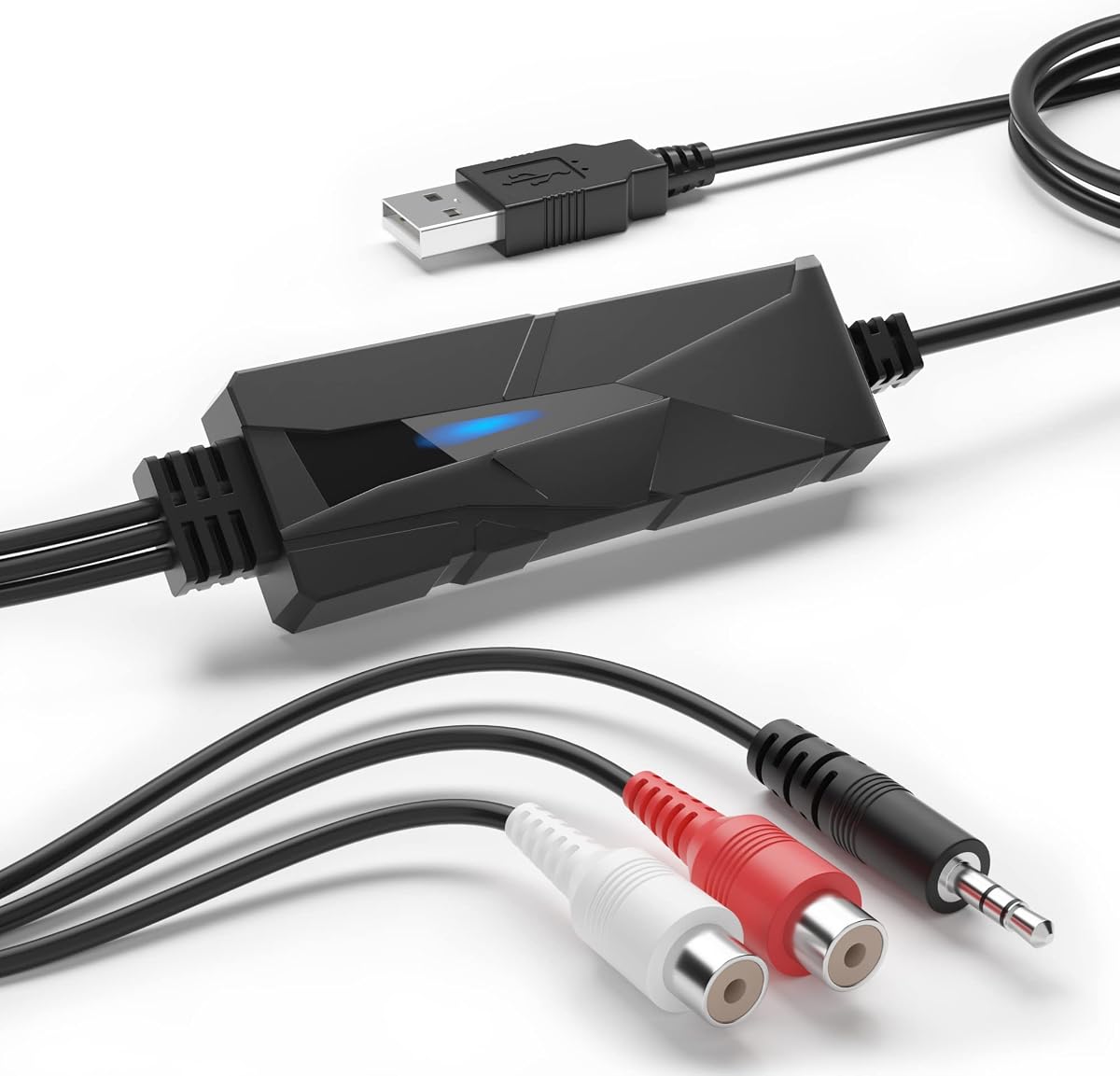
The DriverGenius AudioXfer is designed primarily for capturing analog audio sources like cassette tapes or vinyl and converting them to digital formats. It features a straightforward interface with 3.5mm and RCA inputs, making it ideal for digitizing old media libraries. The included Audacity software simplifies the editing process for users looking to preserve memories.
Pros
Simple analog to digital transfer
Includes free editing software
LED indicator for status
Compatible with macOS 15
Affordable entry-level option
Cons
Windows focused design
Requires driver updates for 64-bit
We may earn a commission when you buy through this link, at no additional cost to you.
Its compatibility with macOS 15 ensures that Mac users can integrate it into their workflow without significant hurdles. The LED indicator provides visual feedback during recording, ensuring you know when the device is active. With sample rates of 44.1 and 48kHz, it meets standard requirements for MP3 and WAV conversion.
However, potential buyers should note that the software support is heavily weighted towards Windows environments. Users on Mac may need to manually update the Lame encoder to ensure optimal performance with 64-bit systems. This adds a layer of technical setup compared to fully plug-and-play solutions.
This converter is best suited for hobbyists looking to digitize physical media on a budget. If you have a collection of tapes or records and want to preserve them digitally, this device offers a cost-effective path forward with sufficient quality for personal listening.
Digitizing Your Music Collection
Ideal for converting cassette tapes and vinyl records into digital MP3 or WAV files for modern playback.
Software Compatibility
Includes Audacity for editing but requires specific updates for 64-bit Mac users to function correctly.
Fosi Audio K5 Pro Gaming DAC Headphone Amplifier Mini Hi-Fi Stereo Digital-to-Analog Audio Converter USB Type C/Optical/Coaxial to RCA/3.5MM AUX for PS5/PC/MAC/Computer
Texas Instruments NE5532 Op-Amp
1000mw@16 Ohm Power
24-bit/96kHz USB Support
Microphone Input Compatible
The Fosi Audio K5 Pro stands out as a versatile desktop DAC and headphone amplifier combo. It accepts USB Type-C, optical, and coaxial inputs, converting them to RCA and 3.5mm outputs. Its Texas Instruments NE5532 op-amp chip ensures low distortion and a clean sound signature suitable for gaming and music.
Pros
Multiple input options included
High power output for headphones
Low noise floor design
Combined volume and power button
Includes optical cable
Cons
No separate power supply
Microphone input not for all cases
We may earn a commission when you buy through this link, at no additional cost to you.
With an output power of 1000mw at 16 Ohms, it can drive a wide range of headphones from 16 to 300 Ohms. The device features a unique combined volume and power button that simplifies controls. It also supports microphone input, making it suitable for communication while gaming.
The main trade-off is the lack of a dedicated power adapter, relying instead on USB power which might limit output slightly in some scenarios. Additionally, the microphone function might not be needed for pure audio enthusiasts, adding bulk to the setup.
For Mac users seeking a high-quality audio upgrade for their desktop setup, the K5 Pro delivers exceptional performance. It bridges the gap between gaming and audiophile needs with robust build quality and versatile connectivity options.
Superior Sound Quality
Uses the NE5532 op-amp for a low noise floor and clean sound reproduction.
Versatile Connectivity
Connects via USB-C, optical, or coaxial to support various audio sources.
PROZOR 192KHz Digital to Analog Audio Converter DAC Digital Optical to RCA Analog L/R Converter, SPDIF Toslink Optical to 3.5mm Jack Adapter for PS3 HD DVD PS4 Amp Apple TV Home Cinema -Aluminum Alloy
192kHz/24bit Sampling Rate
Aluminum Alloy Housing
Gold-Plated RCA Connectors
Includes Optical Cable
The PROZOR 192KHz DAC offers high-resolution digital to analog conversion at a budget-friendly price. It accepts optical and coaxial digital signals and outputs analog L/R RCA and 3.5mm Jack audio simultaneously. The aluminum alloy housing provides better heat dissipation and shielding than plastic alternatives.
Pros
Affordable price point
High resolution audio support
Durable aluminum build
Supports multiple sample rates
Detachable DAC box design
Cons
Requires specific power adapter
TV volume adjustment needed
We may earn a commission when you buy through this link, at no additional cost to you.
It supports sample rates up to 192kHz/24bit ensuring high-fidelity audio for compatible content. The gold-plated RCA connectors ensure stable connections and the detachable box design allows for easier cable management. It is an excellent choice for home cinema or basic desktop setups.
Users must ensure they use a specific 5V 1A power adapter as TV USB ports may not provide enough power. Additionally adjusting volume via TV settings is required which can be inconvenient for some users. These minor limitations do not outweigh the value provided.
This unit is perfect for users looking to upgrade TV or console audio without spending much. Its robust construction and high-resolution support make it a reliable choice for enhancing home listening experiences.
High-Resolution Audio Support
Handles PCM digital audio up to 192kHz/24bit for clear and detailed sound.
Durable Construction
Aluminum alloy housing improves heat dissipation and electromagnetic shielding.
Douk Audio USB to Optical Adapter: XMOS XU316 Digital Interface | DDC Reclocker with Opt/Coax/HDMI I2S Output for Digital to Analog Converter/DAC / PS5 / Switch (U2PRO)
XMOS XU316 Chip
Supports DSD512
32-bit/768kHz PCM
Optical and Coaxial Output
The Douk Audio U2PRO is a digital-to-digital converter that transforms USB signals into optical, coaxial, and I2S outputs. It is ideal for feeding classic DACs that lack USB inputs. The XMOS XU316 chip ensures high-resolution support up to 32-bit/768kHz and DSD512.
Pros
High-end chip included
Supports DSD audio formats
Jitter reduction design
USB-C cable included
Real-time indicators
Cons
No driver on Mac
Compact size may feel fragile
We may earn a commission when you buy through this link, at no additional cost to you.
It features a UAC mode switch allowing driver-free use on consoles and high-resolution modes on PCs. The expandable oscillator design lets enthusiasts upgrade the clock further reduce jitter. Indicators show real-time sample rates for monitoring.
While powerful, the device does not include a driver for macOS which might complicate setup for some users. Its small size is convenient but may feel less robust than desktop units. It is best used as an intermediate step in a complex audio chain.
Audiophiles looking to bypass USB noise from Macs will appreciate its capabilities. It unlocks high-quality playback for dedicated DACs by cleaning up the digital signal before it reaches the converter.
High-End Chipset
XMOS XU316 ensures stable signal transmission and exceptional sound clarity.
Expandable Design
Internal space allows for future crystal oscillator upgrades to reduce jitter.
The SMSL SU-1 is a compact DAC focusing on MQA and high-resolution PCM decoding. It uses the AKM AK4493S chip for ultra-low distortion. It supports 32-bit/768kHz PCM and DSD512 making it a powerful tool for critical listening.
Pros
High-end AKM chip
MQA decoding included
High sample rates supported
Linux and Mac compatible
Minimal distortion specs
Cons
Driver required for Windows
No headphone amp
We may earn a commission when you buy through this link, at no additional cost to you.
MQA support restores studio-quality signals from digital sources like CDs. The device is compatible with macOS 10.6 and later ensuring broad support. Its small size makes it suitable for desk setups without taking much space.
It lacks a headphone output meaning it must be paired with an amplifier or active speakers. Windows users need drivers but Mac users enjoy plug-and-play functionality via Linux mode. These limitations are minor for desktop setups.
This DAC is ideal for audiophiles who want high-resolution audio in a compact form. It excels at decoding MQA files and delivering precise sound for critical listening sessions.
MQA Decoding
Restores high-resolution studio signals from MQA digital sources.
Low Distortion
Achieves distortion lower than 0.00013% for clear audio reproduction.
SMSL PO100 PRO MQA DDC XMOS XU316 Digital to Analog Audio Converter, Type-C USB Input IIS/Optical/Coaxial Output Mini Portable USB Interface for Phone/PS5/Switch/TV
XMOS XU316 Chip
32-bit/768kHz PCM
MQA Decoding Support
Type-C USB Input
The SMSL PO100 PRO is a highly portable digital interface offering high-resolution conversion. It accepts Type-C USB input and provides I2S, optical, and coaxial outputs. With the XMOS XU316 chip it supports PCM up to 32-bit/768kHz and DSD native.
Pros
Supports MQA playback
Portable and compact
High sample rate support
I2S and Optical outputs
No additional software needed
Cons
Small form factor limits controls
Requires correct mode switch
We may earn a commission when you buy through this link, at no additional cost to you.
It supports MQA decoding without additional software making it easy to use on Macs. The device is designed to be stowed in bags making it perfect for travel. Users can adjust UAC modes via switches for specific audio needs.
Because it is so small controls are minimal and switching modes requires attention to avoid setup errors. It does not include a built-in DAC for headphones so external equipment is required. These trade-offs are acceptable for portable high-res audio.
This device is perfect for users needing a high-quality interface for travel or compact setups. It delivers excellent performance in a small package suitable for modern digital audio workflows.
MQA Decoding
Supports MQA playback natively without needing extra software installations.
Portable Design
Compact size allows easy stowage in bags for light travel use.
Sound Blaster Play! 3, USB Audio Adapter, 24-bit 96kHz Plug & Play
24-bit/96kHz Support
No Drivers Needed
Headphone Connectivity
Downloadable Software
The Sound Blaster Play! 3 offers a simple solution for users needing basic audio conversion. It supports 24-bit/96kHz audio and connects via USB to Macs. No drivers are needed allowing immediate use straight out of the box.
Pros
Plug and play setup
Compatible with all headsets
No drivers required
Downloadable control software
Compact USB design
Cons
Basic feature set
Limited sample rate options
We may earn a commission when you buy through this link, at no additional cost to you.
It is compatible with all analog headsets including split mic connectors without needing Y-splitters. Downloadable software provides audio enhancements and optimized profiles for different earphone brands. This makes it versatile for casual listening.
While it lacks high-end specs like 768kHz support or MQA decoding its reliability and ease of use are strong. It is not designed for audiophiles but for those needing a quick upgrade to Mac audio ports.
This adapter is best for students or casual users looking for improved audio output. Its simplicity ensures that anyone can use it immediately without technical setup steps.
Plug and Play
No drivers needed for immediate use with Mac systems.
Headphone Compatibility
Works with all analog headsets from earbuds to studio headphones.
iFi Audio Go Link Max – Portable Headphone Amp/DAC Dongle USB-C to 3.5/4.4mm – Plug and Play Hi-res Audio with Dynamic Range Enhancement – PCM 384kHz/DSD256
Dual ESS Sabre DACs
384kHz/32-bit PCM
Balanced 4.4mm Output
Dynamic Range Enhancement
The iFi Audio Go Link Max is a high-end portable dongle for serious audiophiles. It features dual ESS Sabre DAC chips in a balanced circuit delivering high power output. It supports PCM up to 32-bit/384kHz and native DSD256.
Pros
Dual DAC chip setup
Supports DSD256
Balanced output available
Silver-plated copper conductors
Gold-plated connectors
Cons
Higher price point
Flexible cable may tangle
We may earn a commission when you buy through this link, at no additional cost to you.
It includes a balanced 4.4mm output providing up to 241mW power for demanding headphones. Dynamic Range Enhancement technology and THD compensation ensure clear sound. The build includes silver-plated copper conductors and gold-plated connectors for durability.
The flexible cable aids portability but may tangle more than rigid designs. Its premium features come at a higher price but justify the cost for quality seekers. Mac users can plug it directly into USB-C ports.
This is the ultimate choice for mobile hi-res audio. It delivers audiophile-grade performance in a pocket-sized package suitable for Mac users with high-end headphones.
Balanced Output
Balanced 4.4mm output provides increased power for headphones.
High Resolution
Supports 384kHz PCM and DSD256 for lossless playback.
Fosi Audio Q6 Mini Desktop DAC, USB-C Digital to Analog Audio Converter for Home Stereo Amplifier & Headphone Amp, AK4493S XMOS XU316, Optical/Coaxial-in, RCA/Sub-Out, High-Res 32Bit/768kHz DSD512
AKM AK4493S DAC
32-bit/768kHz PCM
Aluminum Alloy Build
RCA and Sub-Out Outputs
The Fosi Audio Q6 is a high-performance desktop DAC designed for home stereo integration. It accepts optical coaxial and USB-C inputs providing RCA and Sub-Out outputs. It uses the AKM AK4493S chip and supports 32-bit/768kHz PCM.
Pros
High-fidelity sound specs
Multiple digital inputs
Solid aluminum build
Supports DSD512
Subwoofer output included
Cons
No direct headphone drive
Desktop size only
We may earn a commission when you buy through this link, at no additional cost to you.
With SNR above 121dB and low distortion it delivers clean accurate signal conversion. The aluminum alloy housing ensures durability and heat dissipation. It is compact enough to fit any desktop while adding a sophisticated look.
It does not drive headphones directly meaning you must connect it to an amplifier. This limits its use as an all-in-one solution but improves focus on signal purity. It is best for users building a dedicated audio system.
This DAC excels at feeding amplifiers and active speakers with clean digital signals. It is an ideal upgrade for Mac users seeking a premium desktop listening experience.
High-Fidelity Specs
Delivers clean accurate signal conversion with high SNR and low distortion.
The Shure MVX2U Gen 2 is an audio interface designed for recording streaming. It converts XLR signals to USB-C ensuring clean audio for Macs. It features onboard DSP including Auto Level Mode and Real-Time Denoiser.
Pros
XLR microphone input
48V phantom power included
Onboard DSP processing
Zero-latency monitoring
MOTIV app support
Cons
Recording focused design
Higher price than DACs
We may earn a commission when you buy through this link, at no additional cost to you.
It provides 48V phantom power for condenser microphones and up to +60 dB gain. The MOTIV app allows detailed customization of tone and EQ. It is plug-and-play on desktop and tablet devices.
It is optimized for input rather than playback meaning it is not ideal for simple audio output upgrades. The price is higher than standard DACs but justified by its professional features. Mac users will find the drivers reliable.
This interface is perfect for podcasters and streamers. It ensures professional-quality audio capture directly from XLR microphones on any Mac setup.
XLR Input
Streamline your recording setups with XLR-to-USB-C connectivity.
DSP Processing
Auto Level Mode and Denoiser provide consistent output quality.
We may earn a commission when you buy through this link, at no additional cost to you.
Buying Guide – How to Choose the Best Audio Converters for Mac
Selecting the right audio converter depends on your specific needs whether you want to digitize old tapes or upgrade modern playback. Understanding key factors helps narrow down the options effectively.
Input and Output Types
Check if your device supports optical coaxial USB or analog inputs. Ensure outputs match your speakers or headphones such as RCA or 3.5mm jack.
Verify inputs and outputs align with your source and destination devices before purchasing.
Sample Rates and Bit Depth
Higher sample rates like 96kHz or 192kHz and bit depth like 24-bit ensure high-resolution audio. Match these to your music files for best quality.
Look for 24-bit/96kHz or higher support for hi-res playback.
Operating System Compatibility
Ensure the device explicitly supports macOS. Some units may require drivers which complicates setup on Mac.
Choose plug-and-play devices for hassle-free Mac integration.
Build Quality and Materials
Metal housings like aluminum alloy offer better shielding and heat dissipation than plastic. This improves long-term reliability and sound stability.
Select aluminum builds for durable and stable performance.
Power Requirements
Some devices need external power adapters while others draw power from USB. Verify your Mac ports can supply enough power or if an adapter is needed.
Check power needs to avoid connectivity issues.
Intended Use
Define whether you need recording or playback. DACs focus on output while interfaces focus on input. Avoid buying a DAC for recording tasks.
Choose playback devices for listening and interfaces for recording.
Budget and Value
Prices range widely. Budget options work fine for basic tasks while premium units offer better specs. Determine what features you truly need.
Balance cost with necessary performance specs.
Brand Reputation
Reputable brands offer better support and warranty coverage. Look for models with positive user reviews and reliable customer service.
Stick with trusted brands for better long-term support.
How to Use and Care for Your Audio Converters for Mac
Connect your audio converter to your Mac using the appropriate cable such as USB or optical. Ensure you select the correct source and destination in your system settings.
Clean the device regularly with a dry cloth to prevent dust buildup. Avoid exposing it to moisture or extreme temperatures to maintain longevity.
Check for firmware updates if available to ensure optimal performance. Store cables properly to prevent damage to connectors and ports.
Frequently Asked Questions
Do these converters work with macOS?
Most listed converters are compatible with macOS. Ensure the product page states macOS support. Some may require drivers for full functionality but many are plug-and-play.
What is a DAC?
A DAC or Digital-to-Analog Converter converts digital audio files into analog signals for headphones or speakers. This ensures Macs with limited audio outputs can play high-quality sound.
Do I need an external power source?
It depends on the device. Some DACs draw power from USB ports on your Mac. Others require an external 5V adapter. Check the product details for power requirements.
Can I use these for recording?
Only interfaces with input ports like XLR can record audio. Standard DACs only output sound. Ensure the product supports input if you need to record.
What sample rate should I choose?
For high-resolution audio choose 96kHz or higher. Standard music works fine with 44.1kHz. Match the rate to your files for best results.
How do I clean my converter?
Use a soft dry cloth to wipe the exterior. Avoid liquids or cleaning agents that may damage the casing. Store in a dry place to prevent corrosion.
Final Thoughts on Choosing the Best Audio Converters for Mac
We have reviewed ten top audio converters for Mac ranging from budget capture cards to high-end desktop DACs. Each offers unique strengths suited to different listening and recording needs.
Prioritize compatibility and sample rates when making your decision. Ensure the device supports your specific audio workflow and Mac OS version before buying.
Prices and availability may fluctuate. Check current listings and reviews to confirm the product meets your expectations before purchasing.
This guide compares ten top digital electronic stethoscopes with amplification to help healthcare professionals choose the best device for accurate auscultation