
ARCTIC P9 PWM PST
4.5Editor score
0dB Mode for silent operation
High static pressure design
Wide RPM range control
This guide compares the top 92mm case fans for quiet cooling and high performance across compact builds, ITX systems, and specialized cooling needs.
Finding the right cooling solution for compact builds requires careful consideration of airflow and noise levels. A quality 92mm case fan ensures your components stay cool without disturbing your workspace.
We analyzed leading models based on bearing technology, static pressure capabilities, and acoustic performance. Our team evaluated specs and user feedback to identify the most reliable options available.
Each pick highlights unique strengths like PWM control or slim profiles for tight spaces. Note that prices and availability may change, so verify details before purchasing.
4.5Editor score

4.8Editor score

4.8Editor score
This table provides a side-by-side look at key specifications for every model on our list, helping you quickly identify the best fit for your build constraints.




The Noctua NF-A9 PWM stands out as a premium quiet fan with a rating of 4.8 stars. It offers superior cooling performance while maintaining low noise levels ideal for HTPC or ITX builds.
We may earn a commission when you buy through this link, at no additional cost to you.
Its A-series design features Flow Acceleration Channels and an Advanced Acoustic Optimisation frame. These elements ensure efficient airflow even when mounted on radiators or CPU coolers.
The included Low-Noise Adaptor allows you to fine-tune speed for silent operation. While the price is higher, the longevity and performance justify the investment for demanding users.
Anyone seeking reliable, quiet cooling for compact systems should consider this model. It is an excellent replacement for noisy stock fans in NAS or small form factor PCs.
The low noise profile makes it perfect for living room setups where silence is paramount during media consumption.
With a mean time to failure exceeding 150,000 hours, this fan is designed to last for years of continuous operation.
We may earn a commission when you buy through this link, at no additional cost to you.
The ARCTIC P9 PWM PST is a high-performance option that delivers exceptional value. With a 4.5-star rating, it balances cost and efficiency effectively for budget-conscious builders.
We may earn a commission when you buy through this link, at no additional cost to you.
Its high static pressure ensures efficient cooling even with increased air resistance on heatsinks. The 0dB Mode allows the fan to stop completely at low loads for total silence.
The included 4-pin cable splitter lets you daisy-chain multiple fans on one header. This simplifies cable management in compact cases with limited fan headers.
This fan is ideal for those needing reliable cooling without spending premium prices. It suits cases requiring strong airflow through restrictive filters or radiators.
The PST feature allows easier control of multiple fans, reducing clutter and improving airflow consistency across your system.
Variable speed control lets you balance noise and cooling dynamically based on real-time thermal demands.
We may earn a commission when you buy through this link, at no additional cost to you.
This chromax.black.swap edition offers a sleek black design with self-adhesive anti-vibration pads in multiple colors. It maintains Noctua's reputation for quality in a slim profile perfect for tight clearances.
We may earn a commission when you buy through this link, at no additional cost to you.
The 14mm thin design fits low-profile CPU coolers like the NH-L9 series. It allows cooling in cases where a standard 25mm fan would not fit or would touch other components.
Despite its thinness, it delivers superior cooling performance with Flow Acceleration Channels. The HS-PWM version supports semi-passive operation at 0% PWM for silent idle states.
If your build has strict height constraints, this fan is a top choice. It combines aesthetic flexibility with reliable performance for specialized compact systems.
The 14mm profile ensures clearance over RAM or VRM heatsinks in dense ITX motherboard designs.
Swappable pads let you match the fan to your build color scheme without needing custom fans.
We may earn a commission when you buy through this link, at no additional cost to you.
The Noctua NF-A9x14 PWM is a standard version of the slim profile fan. It retains the same high-quality construction but without the chromax.black.swap customization options.
We may earn a commission when you buy through this link, at no additional cost to you.
Its A-Series blade geometry is optimized for both airflow and pressure. This makes it a versatile choice for various cooling tasks in restricted spaces.
The SSO2 bearing provides stable operation with minimal noise over time. Users appreciate the consistent performance and durability typical of Noctua fans.
This model suits those who prefer a simple setup without extra color options. It is reliable for daily use in compact desktops and low-profile workstations.
SSO2 bearings offer self-stabilizing oil pressure which ensures long life and low vibration noise.
Standard PWM connectivity ensures compatibility with virtually all modern motherboard headers.
We may earn a commission when you buy through this link, at no additional cost to you.
The Thermalright TL-P9 is a cost-effective option that delivers solid performance. It features S-FDB bearings and a 7-blade design optimized for heat dissipation.
We may earn a commission when you buy through this link, at no additional cost to you.
Four vibration damping pads reduce noise caused by rotation. This helps maintain a quieter environment even at higher speeds.
While not as premium as top brands, it offers reliable cooling for general case use. It works well for users needing a spare or replacement without high costs.
This fan is ideal for budget builds or secondary cases where cost matters most. It provides good airflow and silence for its price point.
The price point allows builders to equip multiple fans in a case without breaking the budget.
Soft silicone feet minimize resonance against case walls for improved acoustic experience.
We may earn a commission when you buy through this link, at no additional cost to you.
The ARCTIC P9 Silent runs at a fixed 1900 RPM speed. This simplifies setup as it does not require a PWM header or motherboard configuration.
We may earn a commission when you buy through this link, at no additional cost to you.
It is optimized for static pressure, ensuring efficient cooling on radiators. The alloy lubricant bearing reduces friction to prevent excessive heat build-up.
While lacking variable speed, it remains barely perceptible in noise during operation. It is a great choice for systems where simplicity is preferred.
Buyers wanting a simple replacement with reliable noise control should consider this. It fits well in cases requiring constant airflow without control complexity.
With no PWM requirements, this fan works on any standard power header without complex setup.
Fixed speed ensures constant airflow regardless of motherboard settings or fluctuations.
We may earn a commission when you buy through this link, at no additional cost to you.
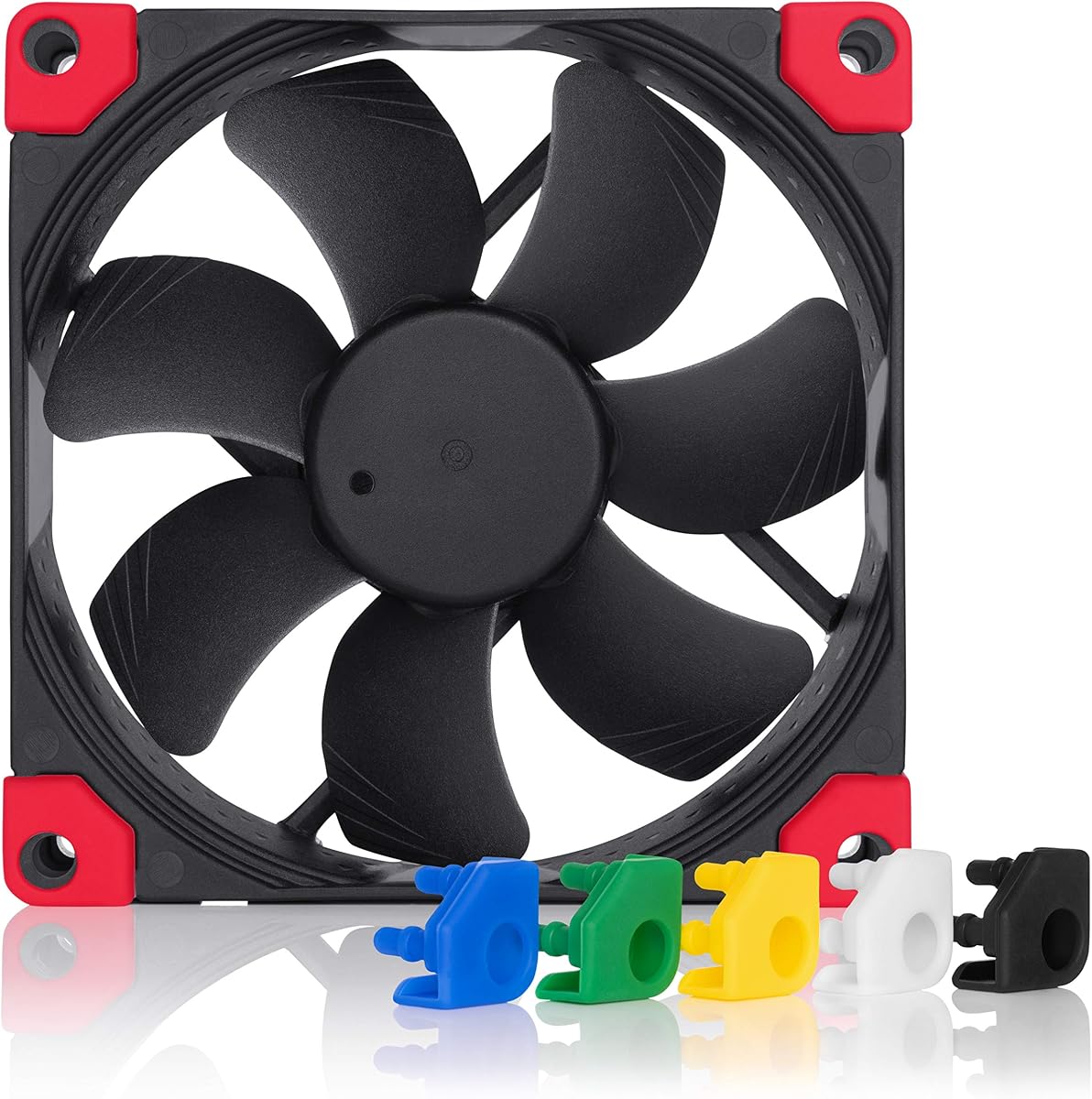
This version of the NF-A9 offers a full black design. It includes swappable anti-vibration pads in six colors for customization.
We may earn a commission when you buy through this link, at no additional cost to you.
The performance matches the original with Flow Acceleration Channels and AAO frames. It stops at 0% PWM for semi-passive systems.
The color pads allow you to personalize your build without buying custom fans. This adds value for those seeking a cohesive look.
Ideal for enthusiasts who need premium cooling and want to match specific themes. It is a top choice for aesthetic-focused builds.
The ability to swap pads means you can change your system look without replacing the hardware.
Advanced acoustic frames ensure that even at max speed, noise remains within comfortable limits.
We may earn a commission when you buy through this link, at no additional cost to you.
The TL-9015B is an ultra-thin fan that spins up to 2700 RPM. It offers higher airflow than many other slim options.
We may earn a commission when you buy through this link, at no additional cost to you.
Four vibration pads help reduce noise and friction during operation. It fits downward coolers to maximize heat dissipation in tight spaces.
The speed allows for aggressive cooling when needed. However, at max speed it may be audible depending on the case environment.
This fan is great for users needing extra cooling power in a slim profile. It balances performance and size effectively.
Reaching 42 CFM in a 15mm frame provides significant cooling for small radiators.
Ideal for CPU coolers where clearance is minimal but performance is critical.
We may earn a commission when you buy through this link, at no additional cost to you.
The FLX version uses a 3-pin connector for basic control. It includes adaptors to drop speed for quieter operation.
We may earn a commission when you buy through this link, at no additional cost to you.
It provides three speed settings for fine-tuning airflow or noise. This suits older headers or systems without PWM support.
The noise level is very low at the lowest setting. It ensures near-silent operation for sensitive environments.
Ideal for legacy systems or simple setups needing premium reliability. It works well where PWM is not required.
3-pin design ensures it works with older fans and power supplies that lack PWM headers.
Adaptors allow you to set the perfect balance between silence and cooling without software.
We may earn a commission when you buy through this link, at no additional cost to you.
The P9 Max offers extreme speed and airflow for 92mm fans. It reaches 4300 RPM for maximum cooling performance.
We may earn a commission when you buy through this link, at no additional cost to you.
Fluid Dynamic Bearing ensures silent operation at low speeds. The high static pressure makes it suitable for radiators.
At maximum speed, it generates noise but provides brute power. This is ideal for scenarios where cooling needs are critical.
This fan suits enthusiasts pushing thermal limits in small cases. It delivers unmatched performance for its size when needed.
The high RPM allows for effective cooling of hot components in densely packed systems.
Low speeds remain silent thanks to the advanced bearing design and optimized motor.
We may earn a commission when you buy through this link, at no additional cost to you.
Selecting the right fan depends on your specific thermal needs and noise preferences. This guide breaks down key factors to consider.
RPM determines how fast the fan spins and directly impacts airflow. Higher RPM usually means more cooling but also more noise. Look for fans with a wide RPM range if you want flexibility.
Choose a fan with a max speed that fits your noise tolerance.
Static pressure measures how well a fan pushes air through resistance like filters or radiators. Airflow measures volume moved in open space. High static pressure fans are better for radiators.
Prioritize static pressure for restricted spaces and airflow for open case areas.
Noise is measured in dB(A). Lower numbers mean quieter operation. Some fans offer 0dB modes to stop at low loads. Always check the maximum and minimum noise ratings.
Look for fans with low dB ratings for quiet builds or home theatre PCs.
PWM fans use a 4-pin connector for precise speed control via motherboard. DC fans use 3-pin and control via voltage. PWM offers better efficiency and automation.
Prefer 4-pin PWM if your motherboard supports it for dynamic control.
Bearings affect longevity and noise. Fluid Dynamic and SSO2 bearings are high quality. Avoid basic sleeve bearings in high heat or continuous use environments.
Check the bearing type to ensure long-term reliability and minimal vibration.
Standard 92mm fans are 25mm thick. Slim versions are 14mm or 15mm to fit tight clearances. Ensure your case or cooler supports the specific thickness.
Measure your space carefully to avoid clearance issues with RAM or VRMs.
Premium fans include better materials and anti-vibration mounts. Color options like chromax.black.swap add aesthetic value. Good mounts reduce resonance noise.
Invest in quality mounts for better noise performance in sensitive locations.
Premium fans cost more but offer better value over time. Warranty length indicates manufacturer confidence. Check if the fan includes extra adaptors or cables.
Balance your budget against the expected lifespan of your system.
Install the fan with anti-vibration mounts to minimize noise transmission. Ensure the airflow direction points where you need it for optimal cooling.
Periodically check for dust accumulation on blades. Clean gently with compressed air to maintain performance and prevent overheating.
Monitor fan speeds via BIOS or software to ensure proper operation. Adjust PWM curves to balance noise and cooling needs effectively.
92mm fans can be quiet or loud depending on RPM and design. Premium models focus on low noise with high-quality bearings. At full speed, even good fans may become audible.
Most cases support 92mm mounting points especially for intake or rear exhaust. However, check specific motherboard or cooler clearance before buying slim models.
Slim fans fit in tight spaces where standard thickness won't clear components. They are ideal for low-profile CPU coolers in compact ITX builds.
Fluid Dynamic and SSO2 bearings are generally the best for long life and low noise. They reduce friction effectively and handle heat better than standard sleeves.
Yes, if the fan has high static pressure. Look for fans optimized for static pressure to push air through radiator fins efficiently without losing performance.
PWM allows automatic speed adjustment based on temperature. This reduces noise at idle while providing cooling when needed, saving energy and extending fan life.
High-quality fans often last over 100,000 hours. This equals many years of daily use. Always check the MTTF rating provided by the manufacturer.
Most use standard 4-pin PWM connectors. Some include cable splitters for daisy-chaining multiple fans to reduce cable clutter and simplify connections.
We highlighted ten excellent options ranging from budget picks to premium solutions. The Noctua NF-A9 PWM and ARCTIC P9 PWM PST stood out for quality and value.
Consider your clearance needs and noise tolerance before buying. Slim fans help with tight fits while static pressure fans excel on radiators.
Prices and stock change often, so check current listings before purchasing. Verify compatibility with your specific case and motherboard to ensure a smooth install.