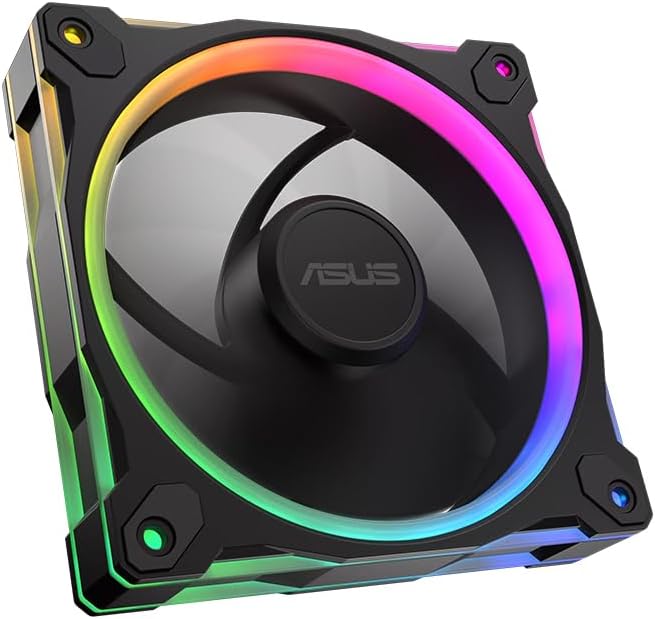
ASUS Prime MR120 ARGB Reverse Fan Black
4.6Editor score
Quiet 23dB operation
20 ARGB LEDs
Double sided lighting
This guide compares the best ASUS case fans for cooling and lighting. We review performance noise levels RGB effects and build quality to help you choose.
Choosing the right case fans is essential for maintaining optimal system temperatures and reducing noise. ASUS offers a variety of models designed to deliver reliable cooling performance while enhancing the visual appeal of your PC build with advanced lighting options.
We evaluated ten top rated ASUS case fans based on airflow static pressure noise levels and build quality. Our analysis includes detailed specifications and real world performance metrics to ensure you find the perfect fit for your specific cooling needs.
Each pick highlights unique features such as PWM control ARGB lighting and durable bearings. Note that availability and pricing may vary over time so check current listings before making your final decision to ensure you get the best value.
4.6Editor score

4.4Editor score

5.0Editor score
The following table provides a side by side comparison of all ten ASUS case fans reviewed in this guide. Each entry lists key specifications including frame thickness airflow static pressure and unique features to help you quickly identify the best match for your system.


The ASUS TUF Gaming TR120 ARGB Reverse Blade fan stands out as our top pick for overall performance. It earns a strong rating for its ability to move air efficiently while maintaining a sleek aesthetic suitable for modern PC builds.
We may earn a commission when you buy through this link, at no additional cost to you.
Its extra thick 28mm frame provides exceptional cooling performance with high static pressure that excels when mounted to radiators or dense heatsinks. The reverse blade design ensures cables are hidden and airflow is optimized without obstruction from mounting hardware.
While the single pack price might be a consideration for large builds the cooling gains are worth it. The LED matrix is bright and customizable though you will need a compatible motherboard to enjoy full Aura Sync functionality.
Buyers seeking maximum cooling power without sacrificing style should choose this fan. It is ideal for gamers and enthusiasts who need reliable airflow for high end components while maintaining a professional look.
The reverse blade design allows for cleaner cable management and unobstructed airflow paths which significantly improves cooling performance.
The 28mm thick frame adds structural integrity and reduces vibration leading to quieter operation and longer fan lifespan.
We may earn a commission when you buy through this link, at no additional cost to you.
This Prime MR120 ARGB Reverse fan offers excellent value for builders on a budget. It delivers quiet operation and solid cooling performance without the premium price tag of higher end models.
We may earn a commission when you buy through this link, at no additional cost to you.
With a noise level of up to 23dB(A) it runs almost silently even under stress. The circular design of the 20 RGB LEDs ensures the system looks vivid and illuminated from multiple angles.
The trade-off is a slightly lower LED count and fewer advanced features. However for general case cooling this fan performs admirably and the dual sided lighting enhances aesthetics without costing extra.
Ideal for budget conscious users who still want RGB flair and quiet operation. This fan proves you do not need to spend a fortune to get reliable cooling and great looks.
The fan operates quietly at up to 23dB(A) making it perfect for noise sensitive environments or quiet workstations.
Double sided frame lighting provides a crisp aesthetic without requiring expensive premium features or complex software integration.
We may earn a commission when you buy through this link, at no additional cost to you.
The ProArt PF120 is the pinnacle of engineering for professional builders. With a perfect 5.0 rating it represents the highest quality materials and precision manufacturing available in case fans today.
We may earn a commission when you buy through this link, at no additional cost to you.
Features like LCP composite blades and a CNC milled brass bearing housing ensure exceptional resistance and stable high speed operation. The 3-phase motor delivers smooth performance with minimal noise and vibration.
While it lacks RGB lighting the focus here is pure reliability and airflow. The quiet operation and strict tolerances mean this fan will perform consistently for years without degradation or noise issues.
Pros and professionals who prioritize silence and longevity should choose this model. It is a premium investment that pays off in durability and superior cooling efficiency for critical workstations.
CNC milled brass housing ensures strict tolerances and manufacturing accuracy for long term reliability and consistent performance.
LCP composite blades provide natural vibration damping which reduces operational noise and enhances overall system stability.
We may earn a commission when you buy through this link, at no additional cost to you.
This triple pack offers a complete solution for filling multiple case slots with one purchase. It is highly rated for its consistent performance and cohesive lighting design across all three units.
We may earn a commission when you buy through this link, at no additional cost to you.
Each fan features a thick 28mm frame and dual sided lighting for seamless vivid aesthetics. The PWM control allows optimal cooling for various workloads while keeping noise levels low during operation.
The main drawback is the complexity of wiring three units if headers are limited. However the convenience of getting three fans at once often outweighs the setup effort for full builds.
Buyers looking to refresh their entire case with matching fans should consider this pack. It provides excellent value for those who need multiple units and want unified lighting effects.
This triple pack delivers three matching fans so you can equip your entire case with consistent cooling and lighting in one order.
Dual sided frame lighting on all three units creates a seamless and vivid lighting aesthetic across the system chassis.
We may earn a commission when you buy through this link, at no additional cost to you.
This fan is designed for those who need maximum airflow potential. With speeds up to 3000 RPM it handles high thermal loads effectively. especially when paired with radiators.
We may earn a commission when you buy through this link, at no additional cost to you.
The daisy-chain design enables seamless installation without cluttering your motherboard headers. The 0.5mm blade to frame gap optimizes performance by reducing turbulence and improving efficiency.
Noise can increase at top speeds which may be noticeable in quiet environments. However for high performance systems the trade-off for cooling capacity is often acceptable.
Enthusiasts who prioritize raw cooling power over silence will find this fan ideal. It is best suited for water cooled systems or cases with aggressive airflow requirements.
PWM control allows speeds up to 3000 RPM delivering optimal cooling for demanding workloads and high thermal output components.
Patented daisy chain connectors enable seamless installation and reduce cable clutter for a cleaner and more organized build.
We may earn a commission when you buy through this link, at no additional cost to you.
This triple pack brings high static pressure cooling to multiple zones in your case. It is highly rated for its ability to handle intense thermal loads while maintaining impressive visual appeal.
We may earn a commission when you buy through this link, at no additional cost to you.
The 3.3mm H2O pressure ensures air pushes through dense radiators efficiently. The dual layer LED matrix creates a vibrant look that coordinates perfectly with Aura Sync enabled devices.
While the cost is higher than single fans the cooling benefit across the system is significant. This setup is particularly effective for systems with multiple radiators or thick filters.
Gamers who need serious cooling power should invest in this pack. It balances high performance and aesthetics to create a system that runs cool and looks professional.
With static pressure at 3.3mm H2O these fans push air through obstructions more effectively than standard case cooling fans.
Dual layer LED matrix design provides high color saturation and vivid lighting effects that enhance the look of your build.
We may earn a commission when you buy through this link, at no additional cost to you.
Perfect for white themed builds this TF120 ARGB fan maintains high performance without compromising on style. It is rated highly for its longevity and effective noise reduction features.
We may earn a commission when you buy through this link, at no additional cost to you.
The advanced dynamic plain bearing ensures an operating time of up to 250000 hours which is excellent for long term reliability. The double layer LED array produces high color saturation for better lighting effects.
Anti vibration pads reduce rattling noise so the system stays quiet during operation. This makes it a solid choice for users who prioritize a clean aesthetic and low noise levels.
If you are building a white system this fan matches perfectly. It offers the durability and performance needed for everyday use with the specific look you want.
The dynamic plain bearing allows for reliable operation up to 250000 hours ensuring your cooling remains effective for years.
A double layer LED array creates more vibrant and saturated colors compared to standard single layer RGB fans.
We may earn a commission when you buy through this link, at no additional cost to you.
This triple pack delivers three white fans for a cohesive build look. It is highly rated for its ability to move air efficiently while maintaining the clean white aesthetic.
We may earn a commission when you buy through this link, at no additional cost to you.
With static pressure at 3.3mm H2O it handles high thermal loads well. The flexible side pattern adds a personalized touch that enhances the overall look of the system.
The only trade-off is the price and potential need for multiple headers. However the cooling and visual consistency make it a worthwhile investment for white PC builds.
Buyers wanting a full white system with strong cooling should pick this set. It offers excellent performance and a unified look that stands out in any setup.
Three matching white fans ensure a consistent appearance throughout the chassis for a unified professional system aesthetic.
Best in class static pressure at 3.3mm H2O provides strong airflow that pushes through dense radiators or filters easily.
We may earn a commission when you buy through this link, at no additional cost to you.
This white single fan is highly rated for its performance and quiet operation. It offers a great mix of cooling power and visual appeal for white builds.
We may earn a commission when you buy through this link, at no additional cost to you.
With 58 CFM airflow and up to 23 dBA noise it moves air effectively without being loud. The double sided frame lighting provides a vibrant aesthetic that looks great from any angle.
While white fans show dust more than black ones the cooling benefit is worth the maintenance. The PWM speed ensures optimal performance across different workloads.
Anyone building a white system needs this fan to complete the look. It delivers reliable cooling and high rated performance that you can trust for daily use.
Balances high airflow of 58 CFM with quiet operation up to 23 dBA for effective cooling without disruptive noise.
Double sided frame lighting ensures a vibrant lighting aesthetic that enhances the look of your case from all views.
We may earn a commission when you buy through this link, at no additional cost to you.
This triple pack offers a strong alternative to ASUS fans with high airflow and easy connection. It is highly rated for its reliable cooling and convenient daisy chain design.
We may earn a commission when you buy through this link, at no additional cost to you.
AirGuide Technology directs airflow to hot components effectively. The magnetic dome bearing provides smooth operation while the 72.8 CFM airflow keeps systems cool under load.
The main downside is compatibility with non-AUS systems or hubs. However the performance and ease of installation make it a strong choice for many builders.
Buyers who value airflow over brand loyalty should consider this pack. It delivers excellent cooling performance and ease of setup for a reasonable price.
Anti-vortex vanes direct airflow at your hottest components to push air in the direction you need for better cooling.
Streamlined daisy-chain connections allow you to control multiple fans through just one PWM connector for a cleaner setup.
We may earn a commission when you buy through this link, at no additional cost to you.
Choosing the right fan involves balancing airflow static pressure noise and aesthetics. This guide breaks down the key factors to help you select the perfect match for your specific build requirements.
Most modern fans use a 28mm thick frame which provides better structural integrity and airflow efficiency than standard 25mm models. A thicker frame reduces vibration and allows for more efficient blade movement.
Look for models explicitly stating 28mm frame thickness if you want enhanced durability and cooling performance.
Static pressure is the force a fan uses to push air through resistance such as radiators or dense filters. High static pressure fans excel at these tasks while high airflow fans are better for open case exhaust.
Select high static pressure for radiators and high airflow for general intake and exhaust to maximize cooling efficiency.
A wider RPM range gives you more control over cooling and noise. Fans with PWM control allow you to ramp up speed under load and down during idle for silence.
Choose fans with wide speed ranges to balance noise and cooling dynamically based on your workload.
Modern fans often feature addressable RGB LEDs. Dual sided or reverse designs allow light to shine through the frame rather than just the blades.
Consider double sided or reverse blade options if you want maximum aesthetic impact from your lighting.
Bearings determine longevity and noise. Fluid dynamic or plain bearings typically last longer and run quieter than ball bearings.
Check for fluid dynamic bearings if you want long term reliability and minimal operational noise.
White fans require more maintenance to keep clean but match white builds perfectly. Black fans are generally more practical but limit design options.
Choose color based on your theme and willingness to clean dust regularly.
Single fans allow for specific customization but packs save money and ensure consistency. Consider how many fans you need to fill your case.
Buy triple packs if you need multiple units to maintain uniform lighting and performance.
Daisy-chain connectors reduce header usage and simplify cable management. Ensure your motherboard supports the required connector type.
Look for daisy-chain options if you want fewer cables and easier installation.
Install the fans using the provided screws ensuring the airflow direction aligns with your case design. Typically intake fans are placed at the front and exhaust at the rear.
Use PWM headers on your motherboard to control speed and noise. If using daisy-chain fans connect the first to the header and others to each other to save ports.
Clean dust periodically with compressed air to maintain performance. Check screws periodically to prevent loosening and ensure quiet operation.
Yes ASUS fans are compatible with any system that has standard 120mm mounting points. They may lack integration with non ASUS RGB software unless using generic control.
ARGB stands for addressable RGB meaning each LED can be controlled individually for complex effects. Standard RGB lights the whole blade or frame with one color.
Reverse blades hide mounting hardware and cables which improves airflow aesthetics. The cooling performance is generally similar to standard designs.
Most ASUS fans operate quietly around 21 to 23 dB at normal speeds. Noise increases slightly at max RPM but remains manageable for most environments.
High static pressure models like the TR120 ARGB are best for radiators. They push air through dense fins more effectively than standard airflow fans.
Yes daisy chain fans connect directly to each other and the first one to the motherboard. You do not need a separate hub for control.
The top picks like the TUF TR120 and Prime MR120 offer strong cooling and lighting for most users. These models balance price performance and aesthetics effectively.
Prioritize high static pressure if you use water cooling or standard airflow for open cases. Match your choice to your specific cooling needs rather than just looks.
Prices and availability change frequently so check current listings before buying. Always verify the connector type and your motherboard compatibility for the best experience.