
ARCTIC P12 Pro A-RGB
4.7Editor score
High static pressure design
Up to 3000 RPM speed
Low vibration manufacturing
This guide compares the top addressable RGB fans for PC builds, evaluating cooling performance, lighting sync, bearing quality, and value to help you choose
Building a high performance PC requires balancing thermal efficiency with visual appeal. Addressable RGB fans offer both by delivering customizable lighting while ensuring your system stays cool under load.
We evaluated ten leading models based on airflow, static pressure, noise levels, and lighting control features. Each product was analyzed for compatibility with modern motherboards and ease of installation.
Every pick highlights specific strengths like daisy chaining, reverse blades, or silent bearings. Note that prices fluctuate frequently, so verify current deals before making your final purchase decision.
4.7Editor score

4.7Editor score
4.8Editor score
The following table provides a side-by-side technical comparison of all ten selected fans, highlighting key specifications like airflow, speed range, bearing type, and special features.




This five-pack offers exceptional value for builders needing multiple fans without breaking the bank. With a high rating of 4.7 stars, users praise its balance of performance and silence. The S-FDB bearings ensure long term reliability while the 1550 RPM speed delivers robust cooling.
We may earn a commission when you buy through this link, at no additional cost to you.
The ARGB lighting is soft and evenly distributed across the blades due to atomizing tech. You can choose from 17 light modes managed through your motherboard. Cable management is simplified with up to 55cm of PWM cable included for daisy chaining.
While the cable length can be tricky in very large cases, the performance outweighs this minor inconvenience. Noise stays below 25.6 dBA even at full speed. The static pressure supports radiator use making it versatile beyond standard case intake.
Ideal for budget conscious gamers and office users alike this pack covers standard 120mm slots perfectly. Whether you need it for a CPU cooler or case vent it adapts well. We recommend it as the top pick for general PC builds.
The S-FDB bearing reduces vibration significantly ensuring operation remains near silent during daily tasks.
Seamless sync with motherboard headers allows unified lighting effects across your entire system setup.
We may earn a commission when you buy through this link, at no additional cost to you.
The RS120 triple pack stands out with impressive airflow reaching 72.8 CFM. Users report it handles heat well in demanding gaming rigs. The Magnetic Dome Bearing is a premium feature that reduces noise and extends fan life significantly over standard models.
We may earn a commission when you buy through this link, at no additional cost to you.
Daisy chaining simplifies wiring by using one PWM and one ARGB connector for all three fans. This reduces cable clutter inside the case. AirGuide technology directs flow exactly where needed improving cooling efficiency on radiators or heatsinks.
It requires Corsair software to unlock full lighting customization which may limit users with non-Corsair ecosystems. The price is higher but the performance per watt is excellent. Static pressure helps push air through dense radiator fins effectively.
If you prioritize airflow and have the budget this pack delivers top tier results. It suits high performance systems needing consistent cooling without loud operation. We consider it a strong contender for enthusiasts wanting reliable RGB fans.
Anti-vortex vanes prevent air turbulence maximizing directed airflow to critical components.
Daisy-chain connections drastically reduce cable count keeping your PC interior cleaner.
We may earn a commission when you buy through this link, at no additional cost to you.
At a low cost this fan punches above its weight in performance metrics. It reaches 3000 RPM for extreme cooling needs when necessary. The Fluid Dynamic Bearing ensures smooth operation while minimizing noise during normal use.
We may earn a commission when you buy through this link, at no additional cost to you.
Static pressure is high allowing it to push air through tight spaces like radiators. Precision manufacturing reduces gaps and vibrations for consistent performance. Lighting is present but focuses on utility rather than complex RGB effects.
You trade elaborate lighting effects for raw cooling power and value. It fits perfectly into budget builds where temperature control is priority. Despite the lower price the build quality remains robust for long term use.
We recommend this for cost conscious buyers needing reliable ventilation. It works well for radiators or case exhaust where silence is less critical. It is our top budget choice for pure functional performance.
Wide PWM range allows fine tuning between quiet idle and aggressive cooling speeds.
Premium bearing design extends service life beyond many competing budget options.
We may earn a commission when you buy through this link, at no additional cost to you.
This three pack features a magnetic connection system that simplifies chaining fans together. You avoid loose connectors which reduces clutter. The nine LEDs provide vibrant lighting synchronized via 5V motherboard sync software.
We may earn a commission when you buy through this link, at no additional cost to you.
Hydraulic bearings ensure silent operation ideal for quiet office setups. Anti-vibration mounts dampen noise from contact with the chassis. Static pressure and airflow are balanced well for general case cooling purposes.
The magnetic connectors can be finicky if ports misalign during installation. You must ensure your motherboard supports 5V sync headers for full function. However once installed the system is stable and visually impressive.
Best for users seeking a clean install with good visual flair. It suits mid-range builds needing reliable fans. We suggest checking your motherboard compatibility before purchase to ensure full functionality.
MagForce 2.0 design allows quick daisy chaining without complex cable routing.
Millions of colors supported via sync software for customizable aesthetics.
We may earn a commission when you buy through this link, at no additional cost to you.
Unique to this list is the inclusion of reverse blade fans for better aesthetics. Intakes on bottom or side keep lighting visible from front. It offers 4 forward and 2 reverse fans in a single package for flexible setups.
We may earn a commission when you buy through this link, at no additional cost to you.
Each fan has 28 LEDs providing bright uniform lighting. A combined hub reduces cable clutter by managing both PWM and RGB signals. This hub simplifies control for users without many motherboard headers.
The hub adds some bulk requiring careful space planning inside small cases. Mixed blade types mean verifying direction before install. However airflow balance is optimized for three dimensional cooling efficiency.
Perfect for builds prioritizing front panel aesthetics without sacrificing cooling. We recommend for cases needing extra intake airflow. It is a strong option for those wanting a turnkey RGB solution.
Optimized for bottom intake while keeping lighting visible from front of case.
Integrated controller centralizes lighting and speed management efficiently.
We may earn a commission when you buy through this link, at no additional cost to you.
A scaled down version of the 5 pack this model offers three fans. It keeps the same high performance specs with 1550 RPM and 66 CFM. Users appreciate the reliability of the S-FDB bearing technology again.
We may earn a commission when you buy through this link, at no additional cost to you.
It covers smaller case configurations needing just three fans. The lighting matches the larger pack with 17 modes. This allows consistency across builds without needing excess fans for storage.
Cable length remains standard but might be short for large chassis layouts. The price scales down slightly making it accessible for smaller builds. It maintains the same build quality and cooling output.
We recommend for minimalists or those building compact systems. It balances cost and performance effectively for limited slots. We pick it as a versatile choice for standard case setups.
Ideal for smaller cases needing limited fan count for cooling.
Same high standards as larger packs ensuring reliability across all units.
We may earn a commission when you buy through this link, at no additional cost to you.
This is a simplified five pack focusing on core cooling and silent operation. It delivers consistent 66 CFM airflow per fan at 1550 RPM. The S-FDB bearing ensures durability and smooth spinning over long periods.
We may earn a commission when you buy through this link, at no additional cost to you.
It offers straightforward PWM control adjusting speed automatically by temperature. Lighting is present but relies on motherboard sync without extra hubs. This keeps costs low while providing essential visual appeal.
The value per fan is very competitive for budget builders. It may lack flashy lighting effects but performs its job well. Installation is simple with standard connectors fitting most motherboards.
We recommend for pure functional builds needing multiple cooling points. It is a solid choice for silent PCs where RGB is secondary. We consider it a reliable workhorse for general PC cooling.
Designed to run quietly even under load for comfortable usage.
Low cost per fan makes it ideal for extensive cooling setups.
We may earn a commission when you buy through this link, at no additional cost to you.
This dual pack reaches 2000 RPM for stronger airflow than standard 1550 models. The seven blade design optimizes both CFM and pressure for versatile use. Hydraulic bearings keep operation quiet even at higher speeds.
We may earn a commission when you buy through this link, at no additional cost to you.
Daisy chaining supports clean installation reducing cable clutter in smaller cases. Lighting syncs via 5V headers for unified effects across your system. Anti-vibration mounts help prevent resonance on case panels.
It is a great supplement when extra airflow is needed for specific zones. The speed allows better pressure for radiator use. However lighting is standard without unique visual features.
Best for enthusiasts needing higher speed in specific spots. It offers reliable performance with decent aesthetics. We recommend checking RPM compatibility with your motherboard headers.
2000 RPM offers better cooling potential than slower standard fans.
Hydraulic bearing ensures smooth rotation minimizing noise at high speeds.
We may earn a commission when you buy through this link, at no additional cost to you.
The LE120 brings solid performance with 66.1 CFM airflow per unit. It features a hydraulic bearing for quiet running and a splitter for easy install. The 9 blade design balances noise and cooling efficiency well.
We may earn a commission when you buy through this link, at no additional cost to you.
It supports PWM control allowing variable speeds between 500 and 1500 RPM. Lighting syncs with motherboard headers for vibrant 16.8 million colors. The included splitter simplifies connecting multiple fans without complex wiring.
The speed cap is lower than some competitors but suffices for case cooling. Users enjoy the plug and play setup with included accessories. It is a reliable option for standard PC builds.
We recommend for builders needing a ready to install RGB pack. It offers a solid balance of performance and ease of use. We consider it a safe pick for general case ventilation.
3-way PWM splitter simplifies connecting multiple fans to one header.
Nine blades optimize airflow while keeping noise levels manageable.
We may earn a commission when you buy through this link, at no additional cost to you.
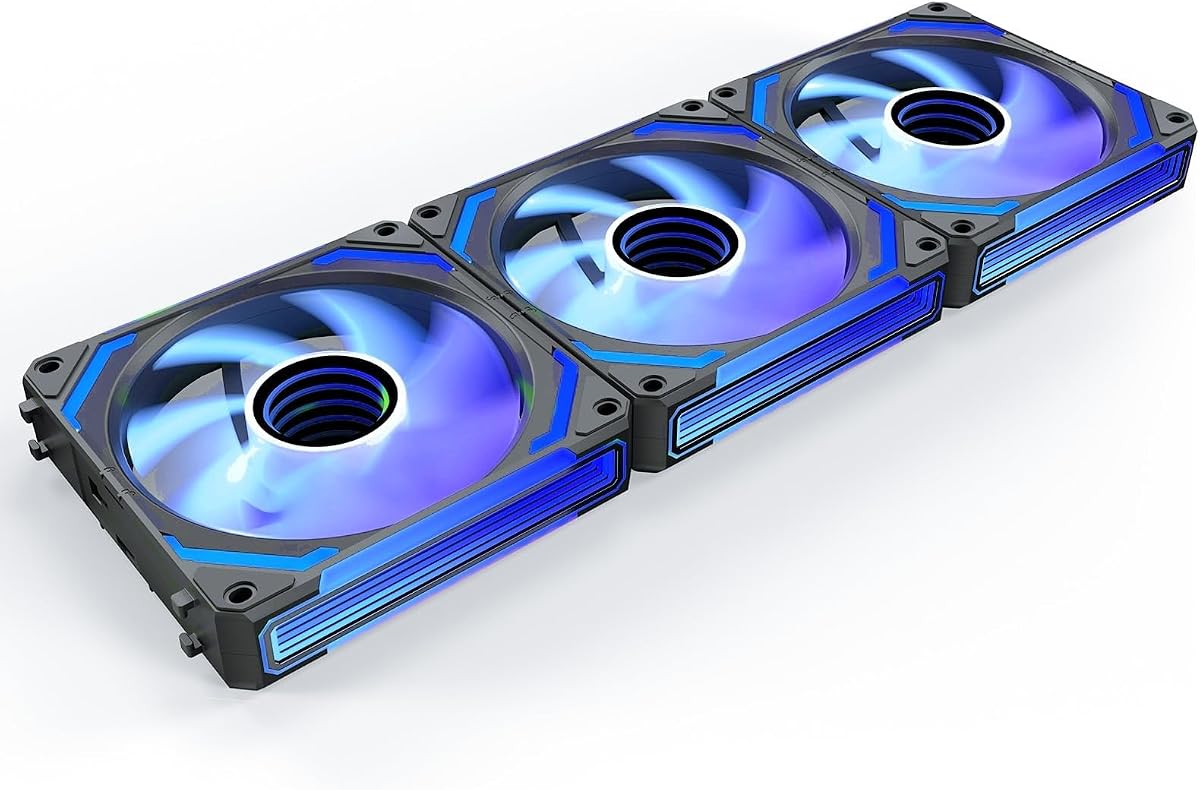
This pack delivers stunning visuals with infinity mirror reverse blades. It combines high airflow of 68.5 CFM with premium features like music sync. The hydraulic bearing keeps noise low even at 2000 RPM speeds.
We may earn a commission when you buy through this link, at no additional cost to you.
The lighting module supports sound reactive modes for immersive setups. Daisy chain wiring keeps cables tidy and installation straightforward. It balances performance and style better than most standard options.
The premium price reflects advanced tech and unique looks. You gain aesthetic impact and cooling power in one package. It may be overkill for basic builds but suits modders well.
We recommend for those wanting show-stopping aesthetics and high performance. It suits gaming PCs and showcase builds best. We consider it a top pick for premium enthusiasts.
Infinity mirror design creates deep vibrant lighting effects unique in the market.
Music sync modes react to audio for dynamic lighting experiences.
We may earn a commission when you buy through this link, at no additional cost to you.
Selecting the right addressable RGB fans involves balancing airflow, lighting capabilities, and noise levels. This guide covers key factors to consider for your build.
Airflow measured in CFM dictates how much air moves through your case. Static pressure determines its ability to push through restrictive barriers like radiators.
Choose high static pressure for radiators and high CFM for intake vents.
The bearing type determines how long the fan lasts. Fluid Dynamic Bearings are superior to sleeve bearings for quiet and long term use.
Opt for FDB or S-FDB bearings for silent operation and durability.
Check if your motherboard supports 5V ARGB sync. Some fans use proprietary software while others sync directly with motherboard headers.
Ensure compatibility with your existing ecosystem for unified lighting effects.
PWM control allows speed adjustment via 4-pin headers providing precise temp control. DC uses voltage control which is less precise but common in simpler setups.
Prefer PWM for better automatic speed adjustments based on temperature.
The number of blades affects airflow and noise. Reverse blades hide motor hubs for cleaner looks on intake sides.
Choose reverse blades if front aesthetics are a priority for your build.
Buy packs of 3 or 5 to save money per fan compared to single units. Ensure your case fits the size and quantity chosen.
Pack deals offer better value and ensure visual consistency across the system.
Daisy chain connectors reduce cable clutter by linking fans together. Check the length of included cables to ensure they reach your headers.
Look for daisy chain options to simplify installation and improve airflow.
Noise is measured in dBA with lower numbers indicating quieter fans. High RPM fans usually produce more noise.
Balance speed needs with noise tolerance based on your case type.
First ensure you connect both PWM and RGB cables securely to compatible motherboard headers. Verify polarity before powering on to avoid lighting issues.
Second use BIOS or software to set custom fan curves. This balances cooling needs with noise levels automatically.
Third keep dust filters clean to maintain airflow. Check fans periodically for debris that could cause noise or vibration.
No they require 5V ARGB headers. Standard 12V RGB headers are incompatible and can damage the fan. Check your motherboard specs before buying.
Yes you can mix brands if they share 5V headers but lighting sync may fail. Stick to one brand for seamless visual consistency.
ARGB allows individual LED control for complex effects. RGB changes all LEDs to the same color simultaneously.
Not necessary but they improve aesthetics by hiding hubs. Choose based on whether you prioritize looks or standard airflow.
Set a static color in your lighting software or BIOS. Avoid default modes that cycle colors rapidly for less distraction.
Keep RPM under 1000 for quiet use. High RPM is for high heat loads not daily idle.
They work if you have compatible PWM and ARGB headers. Ensure your ports support the chain length required.
The Thermalright 5 Pack TL-C12C-S leads our list for its balance of performance and affordability. It offers reliable cooling and soft lighting for most builds.
For those prioritizing aesthetics the AsiaHorse COSMIQ delivers premium visuals with high performance. Budget buyers should consider the ARCTIC P12 Pro for raw cooling value.
Always check your motherboard compatibility and current deals before purchasing. Prices change often so verify the latest offers for the best experience.