
VIMIN 10G PCI-E Network Card
4.5Editor score
Dual 10Gbps RJ45 ports
Intel X540-T2 chipset controller
Supports standard and slim brackets
This guide compares the top 10GB Ethernet Cards for speed and reliability to help you choose the best network adapter for your PC or server.
Upgrading your network hardware is essential for modern computing tasks that demand high bandwidth and low latency. A 10GB Ethernet Card transforms your standard connection into a high-speed highway, enabling faster file transfers and smoother streaming experiences.
We evaluated ten leading network adapters based on chipset performance, compatibility, and real-world speed capabilities. Our analysis focuses on reliability, ease of installation, and support for various operating systems to ensure you get the best value.
Each pick highlights specific strengths like budget friendliness or premium features for professional workstations. Please note that product availability and pricing may change frequently, so verify current details before making your final purchasing decision.
4.5Editor score

4.2Editor score

4.6Editor score
The following table provides a side-by-side comparison of the top network adapters to help you quickly identify the right model for your specific hardware and performance needs.




The TP-Link TX401 is a top-tier choice for users needing fast and reliable network connectivity. With a solid rating of 4.2 stars, it is praised for its ability to deliver extreme speeds up to 10 Gbps which is ten times faster than typical Gigabit adapters.
We may earn a commission when you buy through this link, at no additional cost to you.
This card uses the latest 10GBase-T technology to ensure smooth data transmission for both internet access and local file transfers. It is versatile compatible and backwards compatible with multiple data rates allowing automatic negotiation between higher and lower speed connections seamlessly.
Quality of Service technology prioritizes performance for gamers to avoid network congestion during PC gaming sessions. While it offers comprehensive system support for Windows and Linux, users on older versions might need to check for specific driver availability before installation.
If you need a reliable upgrade for your desktop or server the TX401 offers excellent value with its included accessories. The inclusion of a CAT6A cable and low-profile brackets makes it a practical choice for both new builds and existing systems.
Delivers up to 10 Gbps speeds while remaining backwards compatible with 5 Gbps, 2.5 Gbps, 1 Gbps, and 100 Mbps connections.
Comes with standard and low-profile brackets and offers a two-year warranty with free 24/7 technical support.
We may earn a commission when you buy through this link, at no additional cost to you.
The VIMIN 10G PCI-E Network Card stands out as an affordable option for high-speed networking needs. With a high rating of 4.5 stars, users appreciate its dual 10Gbps RJ45 ports and reliable performance driven by the Intel X540-T2 chipset controller.
We may earn a commission when you buy through this link, at no additional cost to you.
This adapter is designed for high-speed data transmission requirements in servers and high-end devices. It offers wide compatibility with operating systems including Windows Windows server Linux and VMware meeting the network needs in various environments effectively.
The card features a heat sink to maintain optimal temperature levels during heavy usage ensuring device stability. However note that 2.5Gbps and 5Gbps speeds are not supported so it will only operate at 1Gbps if your network device is 2.5G or 5G.
For budget-conscious buyers needing dual ports the VIMIN card provides a robust solution with flexible PCIe options. It supports both standard and slim brackets making it suitable for different heights of servers and devices for diverse installation requirements.
Delivers up to 10Gbps network connection speed with two RJ45 ports for balanced and reliable data transmission.
Includes a well-designed gold finger interface and heat sink to reduce interruption risks and ensure consistent performance.
We may earn a commission when you buy through this link, at no additional cost to you.
The Synology 2-Port 10GbE RJ-45 PCIe Network Adapter is designed for professional storage applications. With an impressive rating of 4.6 stars, it offers two 10GbE ports that support high-performance storage applications and automatic negotiation between 10 Gbps and 1 Gbps.
We may earn a commission when you buy through this link, at no additional cost to you.
This adapter is purpose-built for use with Synology systems ensuring optimal performance with DSM 7.1.1-42962 Update 5 or above. It allows users to upgrade their NAS storage capabilities efficiently and maintain high data transfer speeds for large files.
The product comes with a robust 5-year warranty which highlights the manufacturer confidence in its reliability and durability. While it is highly recommended for Synology users, those with other brands should verify compatibility lists before purchasing to avoid issues.
If you need a premium storage solution the Synology adapter is a top choice for its stability and support. It ensures your NAS system can handle demanding tasks with ease and provides peace of mind with extensive warranty coverage.
Supports high-performance storage applications with dual ports and automatic negotiation for seamless data flow.
Includes a 5-year warranty and requires specific DSM updates for full compatibility and functionality.
We may earn a commission when you buy through this link, at no additional cost to you.
The Asus NADACA0140 Network Card delivers hyper-fast 10Gbps networking to meet bandwidth-demanding tasks effectively. With a rating of 4.1 stars, it is recognized for full compatibility with current network standards including 10/5/2.5/1Gbps and 100Mbps for seamless backward compatibility.
We may earn a commission when you buy through this link, at no additional cost to you.
This card supports both Windows and Linux operating systems offering flexible OS integration for diverse user needs. The RJ45 port allows you to easily upgrade your desktop to 10Gbps networking using standard copper network cables without complex setup steps.
Prioritize your data with built-in Quality-of-Service technology which allows you to prioritize bandwidth and supported data packets. This ensures a smooth online experience during critical tasks by managing traffic priorities automatically without manual intervention required.
For users seeking reliable upgrades with strong OS support the Asus card is a solid option. It balances speed and compatibility well making it suitable for both professional workstations and home setups that require stable network performance.
Delivers up to 10X-faster data-transfer speeds and is fully compatible with all standard network speeds.
Features built-in QoS technology to prioritize data packets for a smoother online experience.
We may earn a commission when you buy through this link, at no additional cost to you.
The 10Gtek 10Gb Dual RJ45 Port Network Card is equipped with an original Intel X540 controller chip which supports Intelligent Offloads. With a rating of 4.1 stars, it aims to make servers more stable and efficient for data center environments.
We may earn a commission when you buy through this link, at no additional cost to you.
This adapter is compatible with a wide range of systems including Windows Server 2003/2008/2012 and Linux. Dual copper RJ45 ports let you connect to Category-6A and up to 100m for meeting the demands of data center environments and storage over Ethernet.
It includes both standard and additional low profile brackets to make installation easy in small form factor computer cases or servers. Note that this card does not support hot swapping and may need manual setup for Windows 11 users before initial use.
For server environments needing dual ports this card provides a cost-effective solution with strong performance. The 30-day free return policy and 3-year free warranty add value for buyers concerned about long-term reliability and support.
Uses an original Intel X540 controller to support intelligent offloads and increase server stability.
Dual copper ports allow connections up to 100m for Category-6A cables in data center setups.
We may earn a commission when you buy through this link, at no additional cost to you.
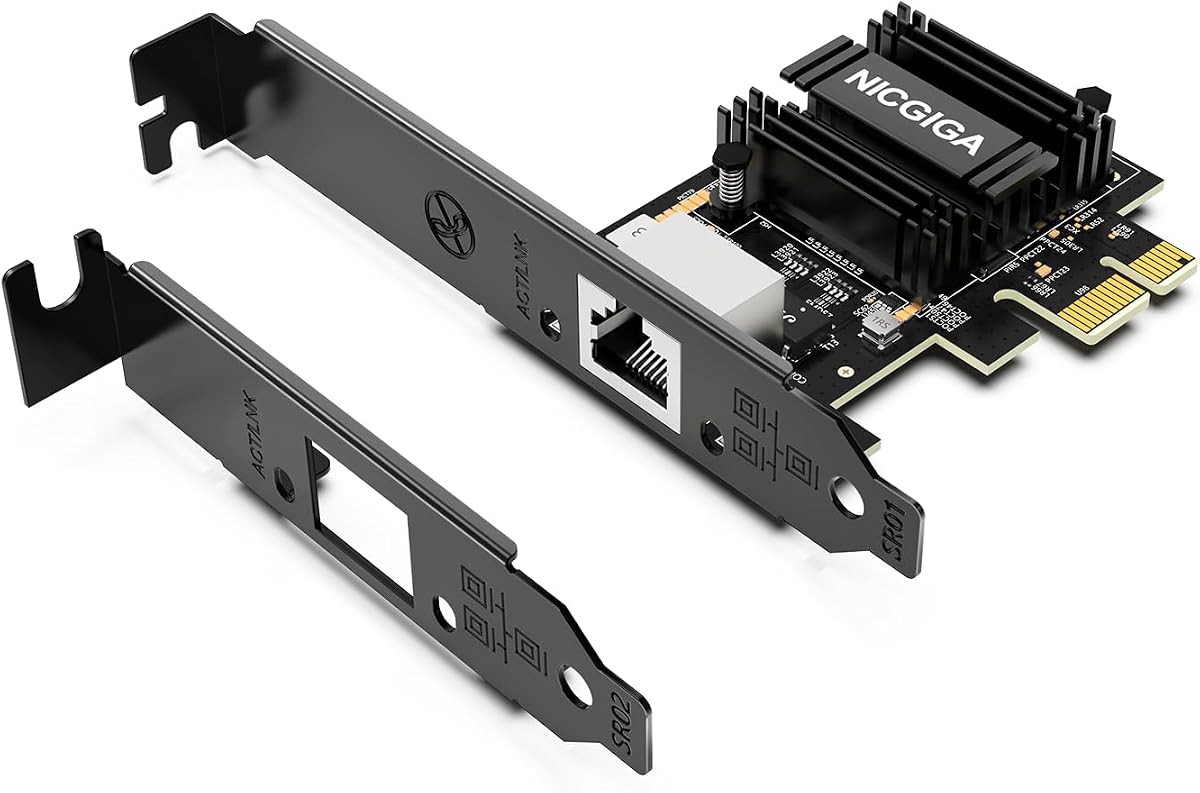
The NICGIGA 10Gb PCIe 4.0 x1 Network Card adopts the latest Realtek RTL8127 controller to deliver blazing-fast speeds up to 10Gbps. With a rating of 4.3 stars, it provides extreme stability for local data transmission and internet access effectively preventing packet loss.
We may earn a commission when you buy through this link, at no additional cost to you.
This adapter is seamlessly backward compatible with 10Gbps, 5Gbps, 2.5Gbps, 1Gbps, and 100Mbps. It automatically negotiates the optimal speed to match your routers, switches, or NAS systems for a smooth integration into existing network setups.
It features a high-bandwidth PCIe 4.0 x1 interface that easily converts a standard x1 slot into a 10G RJ45 Ethernet port. This design avoids occupying your GPU's lanes making it ideal for Mini PCs, ITX builds, and compact workstations needing extra speed.
For compact builds the NICGIGA card offers efficient cooling and broad OS support including Windows Server and modern Linux. The ultra-efficient chipset consumes minimal power and generates significantly less heat than older 10G chips for non-stop stability.
Fits into PCIe x1, x4, x8, and x16 slots without occupying GPU lanes for Mini PCs and ITX builds.
Consumes minimal power and generates less heat than older chips ensuring non-stop stability.
We may earn a commission when you buy through this link, at no additional cost to you.
The VunLink 10GbE Network Card is powered by the latest Realtek RTL8127 chipset to deliver up to 10Gbps Ethernet connectivity. With a rating of 4.3 stars, it is built for stable, low-latency, and reliable network performance for NAS and workstations.
We may earn a commission when you buy through this link, at no additional cost to you.
This adapter supports 10Gbps, 5Gbps, 2.5Gbps, 1Gbps, and 100Mbps speeds with automatic negotiation. It integrates seamlessly with routers, switches, desktop PCs, servers, and existing network infrastructure without requiring manual configuration for most users.
Designed with a PCIe 4.0 x1 interface it maximizes slot efficiency while providing full-featured 10GbE networking. It is compatible with PCIe x1, x4, x8, and x16 slots making it ideal for Mini PCs, ITX builds, and desktop computers.
The energy-efficient design ensures lower power consumption and reduced heat output compared to traditional solutions. Includes both standard and low-profile brackets for flexible installation in full-height and compact desktop systems.
Supports 10Gbps, 5Gbps, 2.5Gbps, 1Gbps, and 100Mbps speeds with automatic negotiation.
Engineered for lower power consumption and reduced heat output compared with traditional solutions.
We may earn a commission when you buy through this link, at no additional cost to you.
The Asus XG-C100F offers blazing FAST 10 Gbps speeds capable of 10x the speeds of Gigabit Ethernet for networking tasks. With a rating of 4.3 stars, it stands out for its compatibility with the latest fiber optic technology for longer transmission distances.
We may earn a commission when you buy through this link, at no additional cost to you.
This adapter features an aluminum heatsink to keep the card cool during high-performance tasks. The SFP+ cage allows for both fiber optic and Direct-Attach copper connections providing flexibility for different network setups and environments.
Automatic prioritization via built-in QoS technology boosts bandwidth to important streams or games ensuring a smooth experience. It supports PCIe 2.0/3.0 x4 interface and operates within a specific temperature range suitable for most server rooms.
For users needing fiber connectivity this card provides a reliable option with built-in cooling. While it may require additional SFP+ modules it is a solid choice for long-distance connections and high-bandwidth applications.
Compatible with fiber optic technology to carry high-speed transmissions over greater distances.
Built-in aluminum heatsink keeps the card cool during high-performance tasks.
We may earn a commission when you buy through this link, at no additional cost to you.
The TRENDnet TEG-10GECTX is a 10G PCIe Network Adapter designed for reliable connectivity. With a rating of 4.1 stars, it features a 1 x 10Gbps RJ-45 Ethernet port supporting speeds up to 10Gbps and is NDAA + TAA COMPLIANT for government customers.
We may earn a commission when you buy through this link, at no additional cost to you.
This adapter is backed by MANUFACTURER PROTECTION with 3 years of support and RELIABLE TECH SUPPORT from English-speaking advisors. It converts a PCIe 3.0 x4 slot into a 10G Ethernet Port and is compatible with Windows and Windows Server systems.
It supports 2.5G BASE-T specification for 2.5G and 5G speeds over standard Cat5e cables at distances up to 100m. The network adapter supports most installations and standard and low-profile brackets are included for flexible mounting options.
For government and enterprise users requiring compliance this adapter is an excellent choice. It offers strong support and protection with flexible speed options to meet diverse network requirements effectively.
NDAA + TAA compliant for US and Canada government customers with 3 years of manufacturer protection.
Supports 2.5G BASE-T and 10Gbps speeds with a PCIe 3.0 x4 interface for versatile setups.
We may earn a commission when you buy through this link, at no additional cost to you.
The Cable Matters USB C to 10Gb Ethernet Adapter offers 10GbE Performance with USB-C Requirements for fast wired networking. With a rating of 3.9 stars, it supports auto-negotiation for broad compatibility and is great for NAS access and large backups.
We may earn a commission when you buy through this link, at no additional cost to you.
This adapter features Real-World macOS Speed compatible with Thunderbolt 3/4/5 and USB4 ports. Powered by the Realtek RTL8159 USB 10G controller it provides efficient power use and minimal heat in typical operation for stable performance.
It has a Premium and Durable Design with a rugged aluminum housing and integrated thermal silicone. The braided USB-C pigtail cable adds strength and flexibility to help prevent fraying and reduce port strain making it ideal for travel kits.
Easy Setup and Wide Compatibility make this adapter plug-and-play on the latest macOS and Windows. Works with USB-C, USB4, and Thunderbolt devices including MacBook and Dell XPS though drivers may be needed for older releases.
Features a rugged aluminum housing and braided cable to prevent fraying and reduce port strain.
Plug-and-play on latest macOS and Windows with optional driver installation for older versions.
We may earn a commission when you buy through this link, at no additional cost to you.
Choosing the right 10GB Ethernet Card requires considering several technical factors to ensure compatibility and performance for your specific needs.
The chipset determines the overall speed and reliability of your network adapter. Look for models with proven controllers like Intel X540 or Realtek RTL8127 which offer stable performance for both consumer and server environments.
Prioritize chips known for low latency and high throughput to ensure your network runs smoothly.
Some cards offer single ports while others provide dual connections for link aggregation or redundancy. Decide if you need one high-speed port or two for balancing traffic and improving overall network throughput.
Dual ports are ideal for servers needing high availability while single ports suit standard desktop upgrades.
Ensure the card matches your motherboard's PCIe slots. Most modern cards use PCIe 3.0 or 4.0 interfaces but check your system specifications to confirm it supports the x1, x4, x8, or x16 lanes required.
Mismatched interfaces can lead to reduced speeds or installation issues so verify slot availability before purchasing.
Different adapters support different operating systems. Windows and Linux are generally well-supported but check for specific kernel versions or server editions if you are using specialized environments like ESX or NAS.
Always verify driver availability for your current OS version to avoid installation problems.
To achieve 10Gbps speeds you may need specific Ethernet cables such as Cat6a or Cat7. Cheaper cables might limit your speed to 1Gbps so invest in quality cabling to maximize the performance of your new adapter.
Check if the card includes a cable or if you need to purchase one separately.
A strong warranty indicates manufacturer confidence and protects your investment. Look for brands offering at least 2 years of coverage and responsive technical support for troubleshooting issues during installation or use.
Good support ensures you get help quickly if driver or hardware issues arise.
Prices vary based on features like port count and chipset quality. Balance your needs with your budget to find a card that offers the best value for your specific use case whether it is home use or a business server.
Avoid overly cheap models that may sacrifice reliability or support quality.
Some cases require low-profile brackets to fit properly. If you have a mini-tower or small form factor PC ensure the card includes a low-profile bracket to avoid mounting problems.
Always check the physical dimensions and bracket options before finalizing your purchase.
Install the card by powering off your computer and inserting it into the correct PCIe slot. Secure it with screws and connect a compatible Ethernet cable to the port before turning the system back on.
After installation download the latest drivers from the manufacturer website to ensure full functionality. Check your operating system settings to confirm the connection speed is recognized as 10Gbps.
Keep the card free of dust and ensure good airflow in your case to prevent overheating. Regularly update drivers to maintain stability and security for your network connection.
A 10GB Ethernet card offers speeds up to 10 gigabits per second which is ten times faster than a standard Gigabit card. This difference is crucial for handling large data transfers and high-bandwidth applications like 4K streaming or file servers.
Yes, to achieve full 10Gbps speeds you typically need Cat6a or Cat7 cables. Standard Cat5e cables may only support lower speeds like 1Gbps or 2.5Gbps so using the right cabling is essential for performance.
Most modern 10GB Ethernet cards are compatible with Linux but driver support can vary. Check the product specifications for specific kernel requirements and ensure drivers are available for your Linux distribution.
You can use the card but your router must support 10Gbps ports to achieve the full speed. If your router is Gigabit only the connection will be limited to 1Gbps regardless of the card's capability.
Basic technical skills are needed to open your PC case and insert the card securely. However many adapters are plug-and-play with easy driver installation making the process manageable for most users.
The card must match your motherboard's PCIe slot type. Older systems may not have the required slots or sufficient bandwidth so verify your hardware compatibility before buying.
Check if the drivers are installed correctly and the cable is connected. Also verify that your BIOS settings allow PCIe devices to function properly and restart your system after installation.
Most 10GB cards are silent as they do not have moving parts. They rely on heat sinks for cooling so they operate without fan noise if your case airflow is adequate.
We reviewed ten top 10GB Ethernet Cards ranging from budget-friendly options to premium adapters for NAS storage. The TP-Link TX401 leads as the best overall due to its balance of speed and affordability for general users.
For those seeking dual ports or specific compatibility like Synology NAS support choose options that align with your hardware and performance needs. Prioritize cards with strong warranty support and verified OS compatibility for smooth installation.
Remember to check current prices and availability before purchasing as deals change frequently. Ensure you have the right cabling and motherboard slot to fully benefit from the speeds these adapters offer.