
QNAP TL-D1600S
4.5Editor score
SATA 6Gbps JBOD Enclosure
Includes PCIe SATA Interface Card
Supports Mix of Drive Sizes
This guide compares the top 16 bay NAS enclosures for 2026, evaluating performance, scalability, and reliability for enterprise and home storage needs.
Choosing the right storage solution is critical for modern data management. A 16 bay NAS enclosure offers significant capacity and flexibility for growing businesses and power users. These systems allow you to house multiple drives in a secure, organized chassis with robust cooling and connectivity options.
We evaluated ten top-rated models based on performance, build quality, and feature sets. Our analysis focuses on scalability, networking capabilities, and ease of use. Each product was reviewed for its ability to handle demanding workloads while maintaining data integrity and operational efficiency over time.
Each pick highlights key strengths and potential trade-offs to help you decide. Note that prices and availability can change frequently due to market conditions. Always verify current specifications and warranty terms before purchasing to ensure the best fit for your specific infrastructure requirements.
4.5Editor score
4.3Editor score

4.0Editor score
The following table provides a side-by-side comparison of the top ten 16 bay NAS enclosures. Reviewing these specifications side by side allows you to quickly identify which model aligns best with your performance needs and budget constraints.


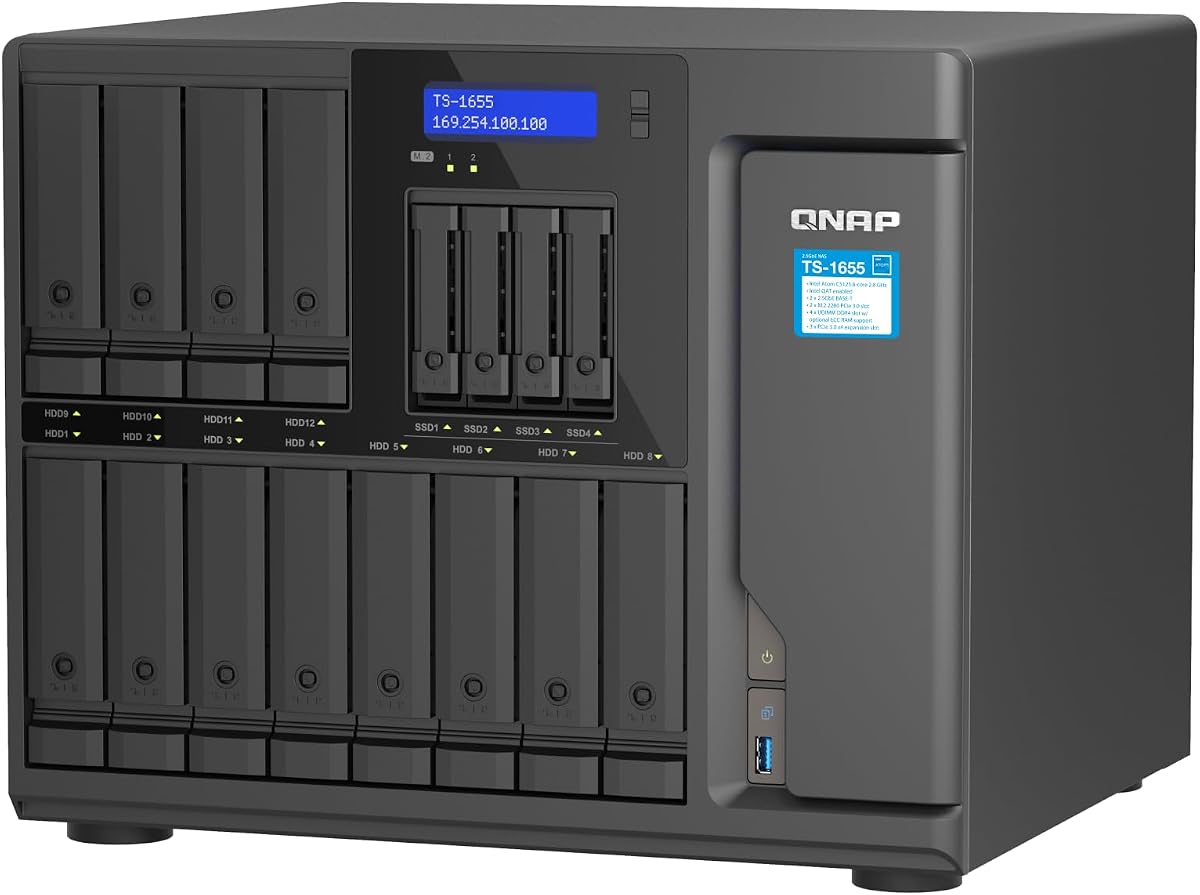
The QNAP TS-1655-8G-US stands out as a top contender in the 16 bay NAS enclosure market. With a solid 4.3 rating, it offers a compelling balance of power and flexibility for hybrid storage needs. Its architecture supports a mix of drive sizes and includes robust processing capabilities to handle multiple tasks simultaneously without bottlenecks.
We may earn a commission when you buy through this link, at no additional cost to you.
At the heart of this system is the Intel Atom C-5125 8-core processor, which bursts up to 2.8GHz. This processing power ensures that virtualization, multimedia transfer, and intensive file access run smoothly. The inclusion of dual 2.5GbE RJ45 ports accelerates data transfer rates significantly compared to standard Gigabit connections, making it ideal for large backup and restoration tasks.
While the base comes with 8GB of RAM, the system is highly upgradable to 128GB with ECC support. This scalability is crucial for enterprise environments where data integrity and memory capacity are paramount. However, the initial setup can be complex for users unfamiliar with NAS configurations, and the default RAM might feel limiting for heavy virtualization workloads right out of the box.
This NAS enclosure is best suited for IT professionals and power users who need reliable long-term availability and high expandability. Whether you are managing virtual machines or requiring fast image recognition via M.2 accelerators, this model delivers the necessary infrastructure. We recommend it for those who prioritize performance and customization over plug-and-play simplicity.
The ability to upgrade to 128GB of RAM allows this system to grow with your data demands, ensuring longevity for your investment.
ECC memory support ensures that data remains accurate during critical operations, protecting against corruption in sensitive workloads.
We may earn a commission when you buy through this link, at no additional cost to you.
The Synology 16 bay RackStation RS4021xs+ represents the pinnacle of enterprise storage solutions. Although listed as diskless, its architecture is designed for massive scalability and high-performance computing. With an impressive rating, it proves its worth in demanding business environments where uptime and speed are non-negotiable requirements for daily operations.
We may earn a commission when you buy through this link, at no additional cost to you.
Powered by an 8-core Intel processor, this unit can host multiple compute-intensive services simultaneously. It delivers up to 234,698 random read IOPS and 6,258 MB/s sequential read performance, which is critical for databases and virtual machines. Two PCIe expansion slots allow for further customization with M.2 NVMe cache adapters or high-bandwidth network cards to tailor the system to specific needs.
Ensuring business continuity is a key feature, supported by two redundant power supplies. Additionally, the system supports up to 40 drive bays when connected with two RX1217(RP) expansion units, offering incredible growth potential. The primary drawback is the high initial cost, which may be prohibitive for smaller setups, and the base unit requires expansion to fully utilize a 16-bay configuration.
This rackstation is ideal for large organizations that require robust redundancy and the ability to scale storage without replacing the entire system. The five-year warranty provides peace of mind for long-term deployments. If your priority is maximum performance and reliability in a professional setting, this model is a strong investment despite the premium price tag.
Redundant power supplies ensure that your data remains accessible even during power failures, maintaining continuous operations during critical times.
The ability to expand to 40 bays means this system can grow with your business, protecting your initial hardware investment over time.
We may earn a commission when you buy through this link, at no additional cost to you.
The QNAP TL-D1600S offers a highly rated budget-friendly option for expanding storage capacity without the need for a full NAS controller. With a 4.5 rating, it serves as an effective high-performance desktop storage enclosure. It is particularly useful for users who already have a host server and need additional JBOD storage space at a lower price point.
We may earn a commission when you buy through this link, at no additional cost to you.
This enclosure supports 16 bays with a mix of 3.5-inch and 2.5-inch SATA 6Gb/s drives, providing flexibility for different form factors. It comes with a QXP-1600eS PCIe SATA interface card, ensuring you have everything needed for quick installation. The four SFF-8088 ports allow for multiple connection paths, enhancing versatility when connecting to various host systems like Windows or Linux servers.
The main trade-off is that this is a JBOD enclosure, meaning it lacks built-in intelligence or management features. You rely on your host system for RAID and file management, which might not suit users looking for a standalone NAS experience. However, for those who just need raw capacity and reliability, the simplicity is often a benefit rather than a drawback for infrastructure integration.
We recommend this enclosure for IT managers and tech enthusiasts who need to add massive capacity to existing servers cost-effectively. The high speed of SATA 6Gbps ensures that data transfer is not bottlenecked by the enclosure itself. It is a practical choice for backups, archives, or media storage where cost per gigabyte is the primary concern.
Including the PCIe SATA card ensures you can get started immediately without purchasing additional hardware components or adapters separately.
Supporting both 3.5 and 2.5 drives allows you to utilize different drive technologies efficiently within a single enclosure unit.
We may earn a commission when you buy through this link, at no additional cost to you.
The Synology 12 Bay DiskStation DS3622xs+ is a powerful unit designed for consolidated storage and virtualization needs. Despite a lower user rating, it packs a capable 6-core Intel Xeon processor that supports over 260,000 4K random read IOPS. This makes it well-suited for hosting backup systems, video management, and virtual machines that demand consistent high-performance throughput.
We may earn a commission when you buy through this link, at no additional cost to you.
Its ability to leverage up to 48 GB of memory allows for smooth multitasking and efficient handling of large data sets. With NVMe SSD cache support, you can boost read and write speeds significantly for frequently accessed data. The system is designed to scale up to 36 drive bays using expansion units, offering a clear path for future growth as storage needs increase.
Users should note that the base unit is 12 bays, requiring expansion to reach a 16-bay equivalent, which adds to the total cost. The lower rating might reflect the complexity of configuration or specific expectations around performance. However, the 5-year warranty provides strong support backing for business deployments looking for a reliable and scalable storage foundation.
This DiskStation is best for businesses needing a centralized hub for backups or virtualization without compromising on performance. It is a solid middle ground between consumer NAS and high-end enterprise racks. If you value the Synology ecosystem and need expandable memory and cache options, this model remains a strong candidate for professional environments.
The Xeon processor and high memory limit make this system ideal for running multiple virtual machines concurrently with stable performance.
Scaling up to 36 bays ensures your infrastructure can evolve alongside your data growth without needing a complete system replacement.
We may earn a commission when you buy through this link, at no additional cost to you.
The QNAP TS-1655-8G-US Hybrid NAS appears again in our review as a consistent performer in the high-capacity market. With a 4.3 rating, it balances performance and capacity effectively for users needing a hybrid approach. The Intel Atom 8-core processor ensures that you can handle various tasks including virtualization and multimedia transfer without significant slowdowns under load.
We may earn a commission when you buy through this link, at no additional cost to you.
Dual 2.5GbE RJ45 ports provide fast networking options that exceed standard Gigabit speeds, essential for large backup restoration tasks. The drive configuration includes 12 bays for 3.5-inch drives and 4 for 2.5-inch, allowing for flexible drive utilization. Additionally, dual M.2 NVMe PCIe Gen 3 slots offer opportunities for SSD cache acceleration to speed up database operations and image recognition.
While it offers long-term availability and strong specs, the base 8GB RAM can be a limiting factor for heavy workloads. The interface is powerful but may require a learning curve for non-technical users. However, the upgradability to 128GB RAM with ECC support mitigates these concerns for professional users who need robust data integrity and system stability over time.
This model is recommended for users who need a robust hybrid NAS that supports both traditional HDDs and SSDs efficiently. It is particularly well-suited for home labs or small offices requiring high throughput and reliable performance. If you plan to leverage cache acceleration, this unit provides the necessary hardware foundation to build a fast and reliable storage environment.
Supporting both 3.5 and 2.5-inch drives allows you to mix capacity and speed in a single enclosure efficiently.
The inclusion of 2.5GbE ports ensures your network is not a bottleneck for data transfers and backups.
We may earn a commission when you buy through this link, at no additional cost to you.
The Asustor Lockerstor 10 Gen3 AS6810T is an enterprise-grade NAS designed for modern workloads. With a 4.1 rating, it stands out for its advanced specs including AMD Ryzen V3C14 processing and 16GB of ECC DDR5 RAM. While it offers 10 bays, it fits the theme of high capacity and performance for enthusiasts who need fast connectivity and AI readiness.
We may earn a commission when you buy through this link, at no additional cost to you.
This unit features dual 10GbE and dual 5GbE networking ports, ensuring ultra-high bandwidth for enterprise environments. It supports four M.2 NVMe SSD slots for caching, which dramatically improves performance for databases and video editing workflows. The inclusion of USB4 40Gbps ports provides professional connectivity for external storage expansion, making it versatile for creative studios and IT departments.
The main consideration is that it is a 10-bay unit, which may not meet strict 16-bay requirements without expansion. Additionally, the premium features come with a higher price point. However, the performance gains from DDR5 RAM and 10GbE networking make it a future-proof investment for those who prioritize speed and advanced capabilities in their storage infrastructure.
We recommend this NAS for creative professionals and small businesses that need high throughput for video production and AI applications. The DDR5 memory and robust networking ensure it remains relevant for years. If you need a powerhouse for data-intensive tasks and can accommodate 10 bays with potential expansion, this model offers excellent value for performance.
Dual 10GbE ports eliminate network bottlenecks, allowing for rapid file transfers and efficient multi-user access.
DDR5 RAM provides faster data processing and better power efficiency, ensuring your system handles heavy workloads efficiently.
We may earn a commission when you buy through this link, at no additional cost to you.
The Generic ZhenLoong Full Tower offers a unique take on storage chassis for DIY NAS builders. With a 4.6 rating, it stands out for its versatility in supporting everything from ITX to EATX motherboards. This case allows you to build a custom server that fits your exact needs for power and bays, providing flexibility that pre-made units often lack.
We may earn a commission when you buy through this link, at no additional cost to you.
It supports up to 15 hot swap bays for 3.5 or 2.5 drives, with a robust backplane featuring 15x SATA3. The inclusion of eight PCI full-height expansion slots gives you plenty of room for network cards, HBA cards, or GPUs. Redundancy PSU support ensures that your build can maintain uptime even if one power supply fails, which is critical for server applications.
The primary drawback is the long shipping cycle of 30 to 40 days by sea, which requires patience. Also, the generic branding means less direct manufacturer support compared to established NAS brands. However, for technical users who want a high-quality chassis to build their own enterprise-grade system, this case offers superior expandability and hardware support at a competitive price point.
This tower is best suited for hardware enthusiasts and server builders who need maximum control over their components. It provides the physical infrastructure to create a powerful system with redundant power and extensive expansion. If you are willing to wait for shipping and have the technical skill to assemble it, this chassis offers a solid foundation for a custom NAS project.
This chassis provides the flexibility to choose every component inside, allowing you to tailor performance and redundancy to your needs.
Eight PCI slots ensure you can add as many expansion cards as your application requires without running out of space.
We may earn a commission when you buy through this link, at no additional cost to you.
The Synology 12 Bay Disk Expansion DX1222 is designed to seamlessly extend the storage of compatible Synology diskstation units. With a high 4.7 rating, it is trusted by users for its reliability and integration. While not a standalone NAS, it plays a critical role in scaling storage capacity efficiently without losing the simplicity of the Synology ecosystem.
We may earn a commission when you buy through this link, at no additional cost to you.
This expansion unit can be configured in minutes using Synology DSM's unified tools, ensuring that adding capacity does not disrupt existing workflows. It includes a five-year warranty, reflecting its build quality and the confidence Synology has in its products. Being diskless, it allows you to choose the drives that best fit your budget and capacity needs from the start.
The limitation is that it requires specific base units to function, meaning it cannot operate independently. This restricts its use to those already invested in the Synology platform or willing to buy a compatible host. However, the seamless integration and high reliability make it the best way to scale storage for existing Synology users who need more space for backups or media.
We recommend this expansion unit for any business or home lab running a Synology DS3622xs+ or similar unit. It is the most straightforward way to increase capacity while maintaining system stability. If you value ease of use and strong warranty support, this expansion is the ideal partner for your existing NAS setup.
The unified DSM tools allow for instant configuration, ensuring minimal downtime when expanding your storage array.
A five-year warranty provides peace of mind, ensuring your expansion investment is protected against hardware failures.
We may earn a commission when you buy through this link, at no additional cost to you.
The CENMATE Aluminum 12 Bay Hard Drive Enclosure is a straightforward DAS solution for individuals and small enterprises. With a 4.3 rating, it provides a reliable way to connect multiple drives without needing a full NAS system. It supports both 2.5 and 3.5-inch drives and features a hot-swappable design for easy drive maintenance and replacement.
We may earn a commission when you buy through this link, at no additional cost to you.
Built with aluminum-alloy materials, it helps dissipate heat, supported by three 2.7-inch fans to maximize data security. The USB 3.0 interface offers speeds up to 5Gbps, which is ten times faster than USB 2.0, making transfers quick for large files. It also supports daisy chain expansion, allowing you to connect up to three devices to expand total capacity to 720TB.
One notable trade-off is the fan noise, which sits around 40 to 50 decibels. This might be too loud for quiet office environments but acceptable for a server room. Additionally, being a 12-bay unit, it does not reach the 16-bay threshold but serves well for users who need slightly less capacity. It is plug and play, requiring no drivers for Windows or Mac.
We recommend this enclosure for users who need a simple, affordable external storage array for backups or media. It is ideal for those who want to avoid complex RAID configurations and prefer a direct-attached setup. If noise is not a primary concern and you value ease of use, this enclosure offers excellent value for personal storage needs.
Aluminum construction combined with active fans ensures your drives stay cool, protecting data longevity during continuous operation.
Connecting up to three devices allows for significant total capacity without needing separate power or data connections.
We may earn a commission when you buy through this link, at no additional cost to you.
The QNAP TL-R1600PES-RP-US is a robust rackmount JBOD designed for professional storage environments. With a 4.0 rating, it offers 16 bays for 3.5 drives in a 3U short depth chassis. This design is ideal for media cabinets or places with tight cabling where depth is a constraint but high capacity is needed for enterprise storage expansion.
We may earn a commission when you buy through this link, at no additional cost to you.
It supports Mini-SAS HD connectivity, ensuring high bandwidth for data transfers. The inclusion of redundant power supplies ensures service continuity even if one unit fails. This redundancy is a critical feature for businesses that cannot afford downtime. The short depth design makes it easier to install in small media cabinets or places with a lot of cabling compared to standard depth racks.
The short depth design can limit the use of certain long controllers, and it requires a host QNAP NAS for management. However, for expanding existing QNAP storage to petabyte levels, it provides an economically flexible way to grow capacity. The 5-year warranty adds confidence for long-term enterprise deployments where reliability is paramount for critical business data.
We recommend this enclosure for enterprises needing to expand storage in space-constrained rack environments. It is best suited for IT departments that already use QNAP systems and want to scale capacity without replacing controllers. If space is at a premium and you need redundancy, this unit offers a practical solution for high-capacity storage in a compact footprint.
The short depth chassis ensures your storage fits into compact server cabinets without sacrificing drive capacity or reliability.
Redundant power supplies and a five-year warranty ensure that your storage infrastructure remains stable and supported.
We may earn a commission when you buy through this link, at no additional cost to you.
Selecting the right 16 bay NAS enclosure requires considering several key factors beyond just capacity. This guide outlines the essential elements to ensure you choose a system that fits your technical requirements and budget.
The processor and RAM define how well a NAS can handle multiple simultaneous tasks like virtualization or transcoding. Look for multi-core CPUs like Intel Xeon or Atom, and ensure the RAM is upgradable to meet future needs.
Prioritize systems with ECC memory support if data integrity is critical for your workloads.
High-speed networking is crucial for accessing large files quickly. Ensure your enclosure supports at least 2.5GbE or 10GbE ports to prevent bottlenecks in your network.
Look for additional interfaces like USB3 or Thunderbolt for fast local backups and external drive connections.
A good NAS should allow you to grow storage without replacing the entire unit. Check if the system supports expansion units or daisy chaining to increase total bay count.
Choose models with PCIe slots to add network cards or cache drives as your performance needs evolve.
For enterprise use, redundant power supplies are essential to maintain uptime during power failures. A dual PSU system ensures that if one supply fails, the other takes over immediately.
Always verify if the unit supports redundancy options if you require continuous availability for your data.
Ensure the physical size of the enclosure fits your available space. Rackmount units are standard for server rooms, but desktop units may be better for home offices.
Check if the chassis supports hot-swappable drives for easy maintenance without powering down the system.
The interface used to manage your NAS significantly impacts usability. Look for intuitive software that supports easy configuration and remote management.
Support for containerized applications and virtualization features can enhance the versatility of your storage solution.
A solid warranty indicates manufacturer confidence in the product. Aim for at least a five-year warranty for business-grade equipment to protect your investment.
Verify the availability of technical support channels to resolve issues quickly if they arise.
When setting up your enclosure, ensure all drives are securely seated in their trays to avoid connection issues. Configure your RAID levels according to your redundancy needs before installing data to prevent loss during setup.
Keep the enclosure in a well-ventilated area to maintain optimal operating temperatures. Regularly check fans and vents to prevent dust buildup, which can lead to overheating and hardware failure over time.
Update the firmware of your NAS regularly to ensure security and performance. Back up critical data to an external location to protect against unexpected drive failures or system corruption.
Yes, many modern 16 bay enclosures support a mix of 3.5 and 2.5-inch drives. Check the specifications to ensure the bays are compatible with your desired drive formats. Some models allow you to use adapters to fit 2.5 drives into 3.5 slots for mixed setups.
Most units listed are diskless, meaning they do not include hard drives. You must purchase drives separately to use the enclosure effectively. This allows you to choose drive capacity and speed based on your specific needs and budget constraints.
NAS (Network Attached Storage) includes its own OS and management tools for network access. JBOD (Just a Bunch of Disks) is an expansion enclosure that relies on a host system for management and control. Choose NAS for standalone functionality or JBOD for server expansion.
Look for enclosures with built-in fans or active cooling systems to maintain safe operating temperatures. Ensure the unit is placed in a well-ventilated space to allow air to flow freely through the chassis and around the drives.
Many models support RAM upgrades to enhance performance and allow for more virtual machines or heavy workloads. Check the manual or specifications for the maximum supported memory and ensure you use compatible modules for your specific model.
A warranty is crucial for protecting your investment and ensuring access to support. Look for units with at least a 5-year warranty for business-grade reliability. Extended warranties can also provide peace of mind for long-term data storage needs.
Choosing the right 16 bay NAS enclosure depends on your specific performance and scalability requirements. Whether you need the enterprise reliability of Synology or the flexible expansion of QNAP, each model offers distinct advantages for different use cases and environments.
Prioritize factors like processor power, RAM upgradability, and networking speed to ensure your system can handle future growth. Consider your current budget against long-term value, as investing in robust hardware now can save costs on replacements later.
Remember to check current prices and availability as market conditions change frequently. Verify specifications and warranty terms with the retailer to ensure you get the exact model you need for your storage infrastructure.