
M-AUDIO Keystation 49 MK3
4.5Editor score
Full-size velocity-sensitive keys
Plug-and-play USB connection
Includes MPC Beats software
Discover the best 49 Key MIDI Keyboards for music production. This guide compares top controllers featuring keybeds, DAW integration, and creative tools.
Choosing the right 49 Key MIDI Keyboard is essential for producers who need a balance between portability and playability. These controllers offer enough range for chords and melodies without consuming excessive desk space. Whether you are scoring films or producing beats, a reliable input device transforms your workflow.
We evaluated ten leading models based on key response, software inclusion, and integration capabilities. Our analysis considers velocity sensitivity, aftertouch availability, and the quality of bundled production tools. This list ensures you find a controller that matches your specific creative needs and budget constraints effectively.
Each pick highlights unique strengths like premium keybeds or specialized DAW mapping. While features vary, all options deliver professional control for your digital audio workstation. Please note that availability and bundle offers can change over time so verify current details before purchasing.
4.5Editor score

4.7Editor score

4.5Editor score
This side-by-side comparison details the core specifications of every selected model. You will see differences in key count, pad types, and included software packages at a glance.




The M-AUDIO Keystation 49 MK3 stands out as a reliable entry point for musicians seeking full-size keys without complexity. It carries a strong rating for its straightforward USB connectivity and natural feel under the fingers. This controller is designed to get you playing immediately without technical hurdles.
We may earn a commission when you buy through this link, at no additional cost to you.
Its 49 velocity-sensitive keys capture the dynamics of your performance effectively. The included software suite offers a robust start for production with tools like MPC Beats and Ableton Live Lite. Transport controls and modulation wheels provide essential real-time adjustment capabilities.
While it lacks advanced features like aftertouch, the trade-off ensures a lower cost and simpler interface. This makes it ideal for beginners who prioritize key feel over extensive mixing controls. The compact form factor allows it to fit into tight home studio spaces.
If you need a basic controller to start making music right away, this model delivers excellent value. It is highly recommended for those who want a no-fuss connection to their computer for recording and playback purposes.
This controller requires no external power or drivers. It connects directly via USB to Mac or PC systems for immediate use.
You receive access to multiple production tools including MPC Beats and virtual instruments. These resources help you build tracks immediately.
We may earn a commission when you buy through this link, at no additional cost to you.
The Novation Launchkey 49 MK4 is celebrated for its seamless integration with major digital audio workstations. It receives high marks for its responsive FSR pads and intuitive workflow design. This model bridges the gap between keyboard playing and track arrangement effectively.
We may earn a commission when you buy through this link, at no additional cost to you.
Its standout feature is the ability to trigger clips and sequence drums with precision. The scale mode helps users avoid wrong notes while experimenting with melodies. You get extensive control over software parameters without needing to use a mouse constantly.
The compact key size is a trade-off for the included pad functionality and portability. However, many producers find the flexibility outweighs the reduced key span. The included software package adds significant value for new creators.
This controller is perfect for producers who want to manage their entire project from one device. It is the top recommendation for anyone serious about modern beat making and arrangement workflows.
It works with major software like Ableton Live and Logic. You can control mixers and launch clips effortlessly.
Scale mode ensures you play in key. Chord triggers let you build complex harmonies with single fingers.
We may earn a commission when you buy through this link, at no additional cost to you.
The Nektar SE49 offers a straightforward solution for those needing full-size keys on a strict budget. It is recognized for its compatibility with various MIDI software applications. This controller provides the essential tools needed to start composing without unnecessary complexity.
We may earn a commission when you buy through this link, at no additional cost to you.
Its integration features allow you to control basic transport and mixing functions within your DAW. The velocity-sensitive keys respond well to dynamic playing. You also receive a sound package to begin creating music immediately.
While it lacks advanced knobs or pads, it excels in simplicity and affordability. It is suitable for users who primarily want a keyboard input for virtual instruments. The design focuses on core functionality rather than flashy additions.
For students or hobbyists looking for a cost-effective way to input MIDI data, this model is a solid choice. It delivers reliable performance for basic recording tasks.
This controller works with most popular DAWs and music apps. It supports Mac, PC, and iOS connections.
It includes basic controls for octave shifting and sustain. These features ensure you can play comfortably.
We may earn a commission when you buy through this link, at no additional cost to you.
The M-AUDIO Oxygen 49 MKV provides extensive tactile control for producers who like to tweak parameters physically. It is rated highly for its balance of keys and assignable controls. This model serves as a comprehensive hub for a virtual studio.
We may earn a commission when you buy through this link, at no additional cost to you.
You get eight knobs and nine faders to manage effects and mixer channels directly. The included NKS bundle gives you access to premium sound libraries instantly. Smart modes help you create complex harmonies and arpeggios easily.
Some users may find the faders less durable than expected over time. However, the feature set justifies its position in the mid-range market. The software package includes everything needed to start producing professional tracks.
This controller is ideal for producers who need hands-on control over their software instruments. It offers a robust set of tools that exceed typical entry-level offerings.
Eight knobs and nine faders allow you to mix and shape sounds manually. This reduces reliance on mouse clicks.
Smart scale and chord modes simplify composition. You can trigger complex patterns with minimal effort.
We may earn a commission when you buy through this link, at no additional cost to you.
The Arturia KeyLab Essential mk3 is distinguished by its inclusion of Analog Lab V software. This controller is praised for its bright LCD screen and responsive pads. It offers a high level of integration for those using Arturia synths.
We may earn a commission when you buy through this link, at no additional cost to you.
The 2000 presets available in the software provide a vast palette of sounds. The pads are velocity and pressure sensitive for expressive drumming. You can customize DAW scripts for deep control over your recording software.
The keybed is not weighted which may feel less realistic to pianists. However, the software bundle compensates for this with powerful sound generation. The interface is modern and easy to navigate during production.
This model is perfect for sound designers and producers who want access to high-quality synths immediately. It stands out as a strong contender for those prioritizing software value.
You get access to over 2000 presets including orchestral and modern synth sounds. These sounds are ready to use instantly.
A large LCD screen displays parameter changes clearly. This helps you see what you are adjusting in real time.
We may earn a commission when you buy through this link, at no additional cost to you.
This generic 49-key controller provides a no-frills solution for basic input needs. It is valued for its low cost and simple design. This option is suitable for users who just need a keyboard without extra features.
We may earn a commission when you buy through this link, at no additional cost to you.
The ABS construction keeps it durable enough for regular handling. It fits easily on smaller desks due to its compact profile. The black finish blends well with standard home studio setups.
It lacks advanced features like velocity sensitivity or extensive mapping. However, it serves its purpose for simple practice or MIDI sequencing. It is a good choice for very limited budgets.
For those who need a basic input device for simple tasks, this offers the most budget-friendly option. It gets the job done without adding unnecessary complexity.
This controller focuses on essential functionality. It is easy to set up and use for basic recording.
Its small footprint makes it ideal for tight spaces. You can store it away easily when not in use.
We may earn a commission when you buy through this link, at no additional cost to you.
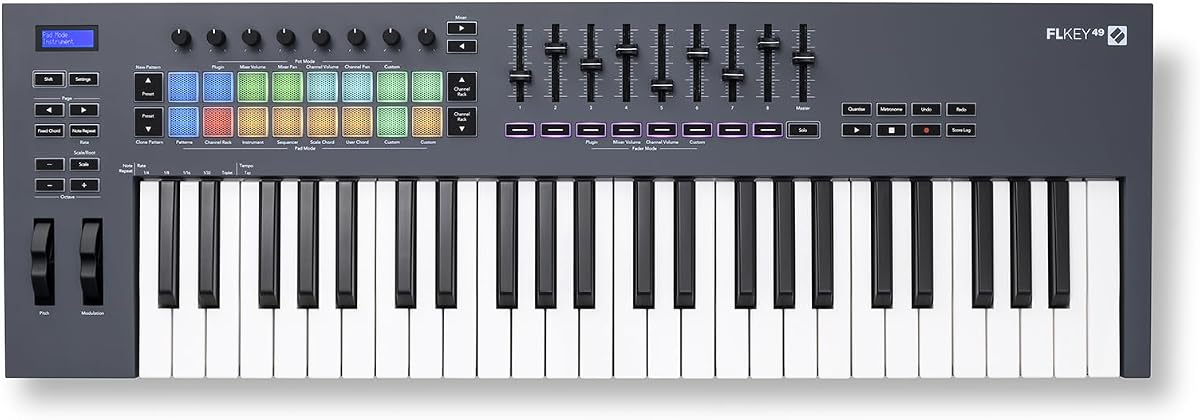
The Novation FLkey 49 is designed specifically for producers working within FL Studio. It offers dedicated control over the mixer and channel rack. This controller eliminates the need for manual mapping of common functions.
We may earn a commission when you buy through this link, at no additional cost to you.
You can manage volumes and pans directly with the physical faders. The sequencer mode pads let you program beats quickly from the keyboard. This keeps your workflow fluid without needing to look at the screen.
While it is optimized for FL Studio it still offers general utility. The scale mode ensures you hit the right notes during composition. The dedicated controls save significant time during mixing sessions.
If you primarily use FL Studio this controller is an essential addition to your setup. It provides a tailored experience that enhances production efficiency significantly.
It maps controls for the mixer and channel rack instantly. You can automate and tweak settings without mouse interaction.
The pads act as a step sequencer for beats. This allows you to program rhythms directly from the keys.
We may earn a commission when you buy through this link, at no additional cost to you.
The M-AUDIO Oxygen Pro 49 brings professional-grade features to the home studio. It is rated for its semi-weighted keys and full MIDI output. This controller is built for serious producers who need comprehensive control.
We may earn a commission when you buy through this link, at no additional cost to you.
The 16 RGB backlit pads allow for dynamic beat creation and clip launching. With a 5-pin MIDI output you can connect to hardware synthesizers easily. The software bundle includes premium instruments and effects.
Its size might be too large for very small desks but it offers great utility. The build quality is robust enough for touring or heavy use. It is a top choice for professional setups.
For users who need to integrate with hardware and require advanced control this is the best option. It provides everything needed to manage complex music productions.
The 5-pin MIDI output lets you connect to external synths. This bridges your computer and physical gear effectively.
Included software offers premium sound libraries for tracks. You get tools used by professionals for high-quality audio.
We may earn a commission when you buy through this link, at no additional cost to you.
The midiplus AK490 is a straightforward controller for users needing basic input. It features standard pitch and modulation wheels for expression. This model is often chosen for its simple functionality and low cost.
We may earn a commission when you buy through this link, at no additional cost to you.
It includes octave buttons to extend the range beyond the 49 keys. The DIN MIDI output allows for connection to older hardware gear. It provides a clean solution for essential recording tasks.
Lacking modern features like aftertouch limits its advanced use. However, it remains a functional tool for simple MIDI entry. It is easy to set up for immediate use.
For those needing a budget-friendly option with basic MIDI output this works well. It is suitable for hobbyists who do not require extensive controls.
It includes essential wheels for pitch and modulation. These are standard features for adding expression to your playing.
Octave buttons allow you to play higher and lower notes. This expands the usable range without extra keys.
We may earn a commission when you buy through this link, at no additional cost to you.
The Arturia KeyLab mk3 offers a premium experience with its white finish and high-end build. It is praised for its responsive aftertouch and modern USB-C power. This controller combines style with professional functionality for advanced creators.
We may earn a commission when you buy through this link, at no additional cost to you.
It includes 12 performance pads and 9 encoders for deep mixing control. The keybed offers a satisfying feel for both keys and chords. It is designed to look good on any desk while performing at a high level.
The price reflects its premium nature compared to budget options. It requires care to maintain the white finish. However, the feature set and aesthetics make it a top-tier choice.
For users who value both look and feel this is an excellent choice. It stands out as a high-quality option for professional studios.
The white finish provides a modern look for your setup. It stands out as a premium aesthetic choice among black controllers.
Aftertouch allows for expressive dynamic control while playing. The encoders give you precise control over sound parameters.
We may earn a commission when you buy through this link, at no additional cost to you.
Selecting the right controller depends on your specific workflow and software needs. We break down the most important factors to consider before buying.
Key type impacts how your music feels and plays during sessions. Full-size keys offer realistic piano playability while mini keys save space. Consider if you need weighted keys for realism or lightweight keys for portability.
Choose full-size keys for serious piano work and mini keys for space-saving.
Velocity sensitivity allows the controller to detect how hard you press keys. This translates to dynamic volume changes in your software instruments. Without it your tracks may sound flat and robotic to listeners.
Ensure your controller is velocity sensitive for expressive and dynamic playing.
Some controllers come with custom scripts for specific software like Logic or FL Studio. This saves hours of setup time by automating common controls. Look for models that support your preferred recording software out of the box.
Select a controller with built-in scripts for your specific digital audio workstation.
Knobs faders and buttons give you hands-on control over effects and mixing. More controls reduce reliance on mouse adjustments during live sessions. Consider how many parameters you need to tweak frequently.
Prioritize models with enough knobs and faders to match your workflow needs.
Many keyboards come bundled with DAWs and virtual instruments. This can save significant money compared to buying software separately. Check if the software meets your production standards before buying.
Value controllers with robust software bundles like Ableton or Komplete Select.
Standard controllers use USB but some offer 5-pin MIDI for hardware synths. USB-C is becoming common for better power and data transfer. Ensure the controller connects to your computer and peripherals easily.
Check for USB or MIDI outputs to match your gear connectivity requirements.
A 49-key controller is a balance between size and range. Ensure it fits on your desk if you have limited space. Consider if you need to transport it to live gigs frequently.
Choose a compact model if you have a small workspace or travel often.
Prices vary based on build quality and included software. Determine if you need professional features or just basic functionality. Investing in a reliable controller can prevent frustration during long sessions.
Balance your budget with the features that actually support your creative process.
Connect your controller to your computer via USB to start using it. Most modern operating systems will detect it automatically without installing drivers. Open your digital audio workstation and ensure the MIDI input is enabled.
Install any required software provided by the manufacturer for advanced features. This may include mapping scripts or control center applications. Keep your firmware updated to fix bugs and improve performance over time.
Keep your keys clean by dusting them regularly with a soft cloth. Avoid eating or drinking near the controller to prevent spills from damaging the electronics. Store it in a dry place when not in use to maintain longevity.
Most modern 49 key MIDI keyboards are class compliant and do not require drivers. They work directly via USB on Mac and PC systems. However, specific features or mapping scripts may need additional software installed by the manufacturer.
Velocity sensitivity detects how hard you hit a key to change volume. Aftertouch detects pressure applied after the key is pressed to change effects. Both features add expression but aftertouch is a premium feature found on higher-end models.
Yes many 49 key keyboards work with FL Studio via standard MIDI protocols. Some models like the FLkey are specifically optimized for FL Studio workflows. Check the compatibility list to ensure full control over your software parameters.
Forty-nine keys offer a balance between range and desk space. They are large enough for most musical chords and melodies without overwhelming small workspaces. This makes them ideal for home studios where space is at a premium.
Many USB MIDI keyboards can connect to iOS devices using an adapter. Android support depends on the specific model and OS version. Check if your keyboard supports mobile connectivity if you plan to use it on the go.
Most manufacturers include a software bundle with their keyboards. This often includes a lite version of a DAW and several virtual instruments. These tools are useful for beginners to start producing music immediately.
Try reconnecting the USB cable and restarting your computer. Check your DAW settings to ensure the device is recognized and enabled. If issues persist try updating the firmware or installing the manufacturer's utility software.
Yes many models are portable enough for live use. Look for controllers with sturdy build quality and enough controls for your set. Features like scale mode help simplify live playing without complex arrangements.
Choosing a 49 Key MIDI Keyboard depends on your balance of features and budget. The Novation Launchkey 49 MK4 offers excellent workflow for modern producers. For beginners the M-AUDIO Keystation 49 MK3 provides reliable basic functionality.
Prioritize features that support your specific style of music creation. Key feel and software integration are often more important than extra controls. Ensure the controller matches your digital audio workstation for seamless operation.
Always verify current pricing and software availability before making a purchase. Bundles and deals can change which affects the value of the package. Check the latest specs to ensure it meets your current studio needs.