
SanDisk Professional G-RAID Shuttle 8-Bay Thunderbolt 3 RAID Array
5.0Editor score
Thunderbolt 3 40Gbps interface
Pre-configured RAID 5 support
Removable Ultrastar hard drives
This guide compares the top 8 bay hardware RAID enclosures for high capacity storage needs including performance reliability and connectivity options for
Selecting the right storage solution is critical for professionals managing large media libraries or enterprise data. An 8 bay hardware RAID enclosure offers a robust way to scale capacity while maintaining speed and reliability for demanding workloads.
We evaluated ten leading models based on interface speed drive compatibility cooling efficiency and ease of use. Our analysis covers both Thunderbolt and USB options to help you find the perfect fit for your specific workflow requirements.
Each pick below highlights key strengths and potential trade-offs so you can make an informed decision. Note that product availability and specifications may vary over time so always verify details before purchasing your next storage array.
5.0Editor score

3.9Editor score

4.3Editor score
The following table provides a side-by-side comparison of all ten reviewed models highlighting their core specifications and unique features to simplify your selection process for high capacity storage needs.
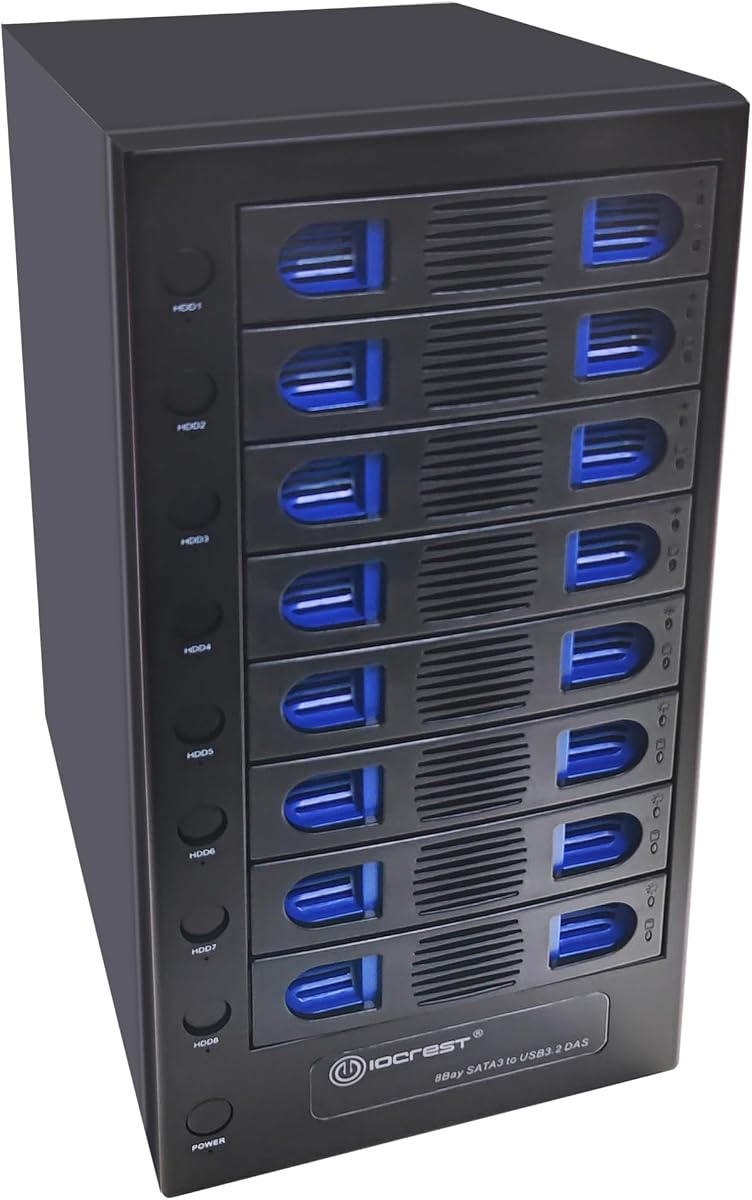


The CENMATE Aluminum 8 Bay Hard Drive RAID Enclosure offers a cost-effective solution for users needing significant storage capacity without breaking the bank. It supports both 2.5 and 3.5 inch drives and provides multiple RAID modes for data redundancy or performance optimization.
We may earn a commission when you buy through this link, at no additional cost to you.
Its standout features include support for up to 160TB total capacity and a USB 3.0 interface delivering speeds up to 5Gbps. The aluminum alloy construction helps dissipate heat while two built-in fans maintain stable operating temperatures even under heavy loads.
However users should note that the device requires a minimum of two drives to be inserted for proper operation and the fan noise ranges around 40 to 50 decibels which may be distracting in quiet environments. Additionally RAID switching requires a manual reset process.
This enclosure is ideal for home users or small businesses looking to expand storage affordably. While it lacks the premium build of higher end models it delivers solid functionality for basic RAID needs and general file storage tasks.
This model provides an affordable way to scale storage without investing in enterprise grade hardware making it accessible for smaller operations.
Compatibility with both 2.5 and 3.5 inch SATA drives allows flexibility in choosing existing or new storage media.
We may earn a commission when you buy through this link, at no additional cost to you.
The SanDisk Professional G-RAID Shuttle 8-Bay Thunderbolt 3 RAID Array delivers top-tier performance for demanding creative workflows. With read speeds up to 1900MB/s and write speeds up to 2000MB/s it handles multi-stream 4K and 8K editing with ease.
We may earn a commission when you buy through this link, at no additional cost to you.
It comes pre-configured with RAID 5 for balanced performance and protection but supports switching to RAID 0 1 6 10 50 60 or JBOD for flexibility. The removable Ultrastar hard drives ensure enterprise class reliability and make maintenance straightforward.
While the price is steep this unit is justified for professionals who need maximum speed and capacity. The dual Thunderbolt 3 ports allow daisy chaining up to five additional devices and USB-C Power Delivery can power your MacBook reducing cable clutter.
This array is perfect for video editors graphic designers and studios requiring fast reliable portable storage. If you need high capacity and bandwidth without compromise this model stands out as a premium industry standard solution.
Thunderbolt 3 connectivity ensures you can handle the most demanding media workflows without bottlenecking your system performance.
Removable Ultrastar drives provide robust data protection while maintaining a transportable design for on-location work.
We may earn a commission when you buy through this link, at no additional cost to you.
The OWC ThunderBay 8 Eight-Bay Thunderbolt 40Gb/s External Storage Enclosure is a versatile choice for users needing fast connectivity and flexibility. It supports universal 2.5 or 3.5 inch SSDs and HDDs making it adaptable to various storage needs.
We may earn a commission when you buy through this link, at no additional cost to you.
Key strengths include dual Thunderbolt 3 ports allowing daisy chaining up to six units for massive storage capacity. The plug-and-play design requires no drivers and the included Thunderbolt cable ensures you are ready to use it out of the box.
While it lacks built-in hardware RAID this enclosure focuses on raw connectivity speed. For users managing RAID via software or those needing simple DAS functionality it offers excellent performance for Mac and Windows systems alike.
This unit is best suited for creative professionals and power users who prioritize speed and scalability. Its robust build and reliable Thunderbolt certification make it a strong candidate for critical workflows needing stable high bandwidth storage.
Daisy chaining multiple units allows you to build a massive storage network without complex networking setups.
Plug and play compatibility with Mac and Windows ensures easy integration into existing workstations.
We may earn a commission when you buy through this link, at no additional cost to you.
The CENMATE Aluminum 8 Bay 10Gbps Hard Drive Enclosure offers fast connectivity and hot swap convenience for users who need flexible storage. It supports up to 160TB capacity and uses USB 3.2 Gen 2 interfaces delivering speeds up to 10Gbps.
We may earn a commission when you buy through this link, at no additional cost to you.
Its hot swappable feature allows replacing drives without powering off the device which enhances workflow efficiency. The aluminum alloy build with dual fans helps manage heat effectively ensuring stability during extended file transfers or data backups.
While it does not support RAID or NAS functionality it is an excellent DAS solution for straightforward storage expansion. Users should be aware of the fan noise which is around 40 to 50 decibels but acceptable for most workspaces.
This enclosure is ideal for users needing a balance of speed and capacity without complex RAID setups. The plug and play compatibility with Windows Mac and Linux makes it a versatile addition to any professional or home setup.
USB 3.2 Gen 2 interface ensures fast file transfers suitable for large media files and datasets.
Hot swap capability lets you replace drives on the fly reducing downtime during maintenance or expansion.
We may earn a commission when you buy through this link, at no additional cost to you.
The 8 Bay Tool Less Tray Hot Swapable Hard Drive Enclosure stands out for its independent drive controls and flexible thermal management. It supports USB 3.2 with 10Gbps transfer speeds and allows drives to be powered off individually for added convenience.
We may earn a commission when you buy through this link, at no additional cost to you.
Key strengths include the smart fan function with thermal sensor support offering auto and manual modes at three speed levels. The tool less trays simplify drive installation and the steel housing dissipates heat efficiently for reliable performance.
Although it lacks RAID support the unit is perfect for users needing simple DAS expansion. Independent power switches allow precise control over drive states which is useful for managing specific tasks without impacting the whole array.
This enclosure is suitable for home users and small businesses needing straightforward scalable storage. Its wide compatibility with Windows macOS and Linux ensures it fits into diverse computing environments seamlessly.
Independent power switches for each drive allow granular control over which drives are active at any time.
Built-in thermal sensors adjust fan speed automatically to maintain optimal temperatures without excessive noise.
We may earn a commission when you buy through this link, at no additional cost to you.
The OWC ThunderBay Flex 8 0TB Storage Dock PCIe Expansion Enclosure is designed for users needing more than just storage. It includes a PCIe x16 connector slot for audio video capture networking or I/O cards alongside drive bays.
We may earn a commission when you buy through this link, at no additional cost to you.
Its top four bays support U.2 SSDs and M.2 NVMe drives offering real-world speeds up to 2750MB/s. Front mounted USB-C and USB-A ports along with SD and CFexpress card readers provide convenient access to peripherals.
SoftRAID software allows creation and management of advanced RAID sets for Mac users. The unit supports Thunderbolt 3 connectivity and allows hot swapping which is crucial for professional workflows requiring constant uptime.
This enclosure is perfect for advanced users needing a combined solution for storage and expansion. The flexibility to add PCIe cards and use high speed NVMe drives makes it a versatile tool for creative and technical professionals.
The integrated PCIe slot lets you expand your system with capture cards or networking without internal modifications.
U.2 and M.2 NVMe compatibility delivers blazing fast speeds for intensive content creation tasks.
We may earn a commission when you buy through this link, at no additional cost to you.
The QNAP TL-D810TC4-US 8-Bay Desktop DAS JBOD Storage Expansion Enclosure provides an efficient way to expand existing storage networks. It supports high-capacity 3.5 and 2.5 inch SATA drives with fast 10Gbps USB connectivity.
We may earn a commission when you buy through this link, at no additional cost to you.
Key strengths include the free QNAP JBOD Manager utility for monitoring drive health and managing configurations. It acts as a straightforward hardware solution to expand storage for media libraries backup repositories without purchasing a new NAS system.
While optimized for QNAP NAS systems it works with Windows MacOS and Linux workstations as DAS. The tower design saves space and the plug-and-play nature ensures easy integration into existing setups without complex networking.
This enclosure is ideal for users needing scalable storage within a NAS ecosystem. Its robust management tools and fast interface make it a reliable choice for businesses needing additional capacity for backups and media archiving.
Designed to work with QNAP NAS systems for unified storage management and expanded capacity.
Tower form factor optimizes desk space while supporting high capacity drives for scalable storage.
We may earn a commission when you buy through this link, at no additional cost to you.
The 8 Bay Mini ITX Micro ATX NAS Case Hot Swap Drive Bays is perfect for users building custom network attached storage systems. It supports both 3.5 and 2.5 inch drives with hot swap capability for easy maintenance.
We may earn a commission when you buy through this link, at no additional cost to you.
Dual independent air channels ensure heat from drives and motherboard dissipate separately reducing thermal interference. The steel chassis offers solid shockproof performance while dedicated indicator lights let you monitor drive status in real time.
While you must supply your own motherboard and CPU this case offers exceptional flexibility for customization. Front USB 3.0 ports and power buttons add convenience for daily peripheral plug and play use.
This case is best suited for tech enthusiasts and small businesses needing a tailored storage solution. Its robust build and thoughtful cooling design make it a reliable foundation for home media servers or private cloud drives.
Broad motherboard and CPU support allows you to build a NAS system tailored to your performance needs.
Independent air ducts ensure components stay cool even under continuous operation for better longevity.
We may earn a commission when you buy through this link, at no additional cost to you.
The ICY DOCK MB998SK-B 8 Bay 2.5 SATA HDD SSD Backplane Cage offers dense storage in a compact internal form factor. It supports 2.5 inch SATA and SAS drives within a full metal structure designed for durability.
We may earn a commission when you buy through this link, at no additional cost to you.
Locking trays prevent accidental drive removal ensuring data security during transport or operation. The backplane design allows easy installation of multiple drives without complex cabling making it ideal for server or workstation use.
While installation requires a spare 5.25 inch drive bay it is a powerful solution for expanding internal storage significantly. The metal construction aids heat dissipation and maintains structural integrity under continuous loads.
This cage is best for users building custom servers or workstations needing high drive density. Its reliable build and locking mechanism make it a secure option for environments where drive security is critical.
Locking mechanisms prevent accidental ejection ensuring drives remain secure during operation and transport.
Eight drives in a single 5.25 inch bay maximize internal storage space efficiently.
We may earn a commission when you buy through this link, at no additional cost to you.
The CENMATE Aluminum 8 Bay Hard Drive RAID Enclosure provides significant RAID versatility at an accessible price. It supports up to 160TB total capacity and offers eight different RAID modes for flexible data management.
We may earn a commission when you buy through this link, at no additional cost to you.
Tool-free drive installation simplifies setup making it easy to swap drives without additional equipment. The aluminum alloy design with cooling fans helps maintain stable temperatures ensuring reliable performance during extended use.
Users should note the requirement to insert at least one drive per two groups and the fan noise which may be noticeable. However for those needing multiple RAID options without high cost it delivers solid value.
This enclosure is suitable for small businesses and individuals needing redundant storage options. Its straightforward implementation and robust cooling make it a practical choice for users wanting RAID functionality without enterprise complexity.
Eight RAID modes allow customization of data redundancy and performance to match your needs.
Tool-free trays let you replace or add drives quickly without additional tools or downtime.
We may earn a commission when you buy through this link, at no additional cost to you.
Choosing the right enclosure depends on your budget data needs and existing hardware ecosystem. Below are key factors to consider when evaluating models.
Consider whether USB 3.0 USB 3.2 or Thunderbolt fits your workflow needs. Thunderbolt offers highest speeds for professional media editing while USB is sufficient for general file storage.
Match the interface to your computer ports to avoid bottlenecks and ensure optimal transfer performance.
Decide if you need hardware RAID for data redundancy or Direct Attached Storage for simple expansion. RAID enclosures offer protection but add complexity and cost compared to DAS models.
Choose RAID if data safety is critical and DAS if you need maximum flexibility and lower cost.
Verify that the enclosure supports both 2.5 and 3.5 inch drives if you plan to use mixed sizes. Also check maximum per drive capacity to ensure it meets your future storage needs.
Confirm drive type support such as SATA vs SAS to ensure your selected drives will work correctly.
Look for enclosures with effective fan systems that prevent overheating without excessive noise. Quiet fans are important if you work in office environments or shared spaces.
Check fan noise ratings to ensure it fits your tolerance for background sound during use.
Aluminum alloy or steel chassis help dissipate heat and protect drives from physical damage. A solid build ensures longevity especially when used frequently or in demanding conditions.
Invest in durable materials to protect valuable data and extend the lifespan of your investment.
Hot swap features allow replacing drives without powering down which is useful for maintenance or expansion. This convenience saves time and reduces system downtime significantly.
Prioritize hot swap if you plan to change drives frequently or need continuous uptime.
Daisy chaining lets you connect multiple enclosures to a single port expanding total capacity easily. This is ideal for growing storage needs without adding more ports.
Check if your model supports daisy chaining to future-proof your storage setup.
Some enclosures come with management software for monitoring drive health and configuring RAID. Easy to use software simplifies maintenance and protects your data from potential failures.
Evaluate included software quality to ensure it meets your administrative needs effectively.
Begin by inserting drives one at a time and powering on the unit to verify each works properly before finalizing setup. This prevents data loss and ensures compatibility with the enclosure.
Use software backups before configuring RAID modes since setting up RAID will format all inserted drives and erase existing data. Always ensure you have copies of critical files beforehand.
Regularly clean fans and vents with compressed air to maintain cooling efficiency and prevent overheating. This simple maintenance extends the life of your enclosure and protects your storage drives.
Most enclosures support both drive sizes but you must ensure the drive fits securely in the tray. Some models may require adapters for 2.5 inch drives so verify compatibility before purchasing.
RAID 5 provides data redundancy allowing one drive failure without data loss while RAID 0 maximizes speed without protection. Choose RAID 5 if data safety is more important than raw speed.
Yes Thunderbolt enclosures require certified Thunderbolt cables to achieve full speed and functionality. These cables are different from standard USB-C so ensure you use the included cable.
Check the product specifications for supported drive sizes and capacities. Most enclosures support standard SATA drives but some may have limits on drive size or type.
In RAID 5 you can replace a failed drive without losing data. The enclosure will rebuild data onto the new drive automatically once you insert it and configure the system.
Most models are compatible with Mac systems especially those with USB or Thunderbolt ports. Verify that your Mac OS version is supported by the enclosure manufacturer for plug and play use.
Most 8 bay enclosures are sold without drives so you must purchase drives separately. Check if drives are included before ordering to avoid unexpected costs.
The top three picks offer strong choices for different budgets and performance needs from affordable USB options to premium Thunderbolt solutions for professionals.
Prioritize your specific workflow requirements such as speed redundancy needs and port availability to find the ideal match for your setup.
Always verify current availability and compatibility before purchasing since model details and features may change over time.