
MX3 Pro
3.8Editor score
2.4G wireless connection
Built-in mini keyboard
Motion sensor navigation
Discover the top air mouse for Android TV Box devices compared by experts. This guide reviews wireless remotes with keyboards and voice control for smart
Finding the right air mouse for Android TV Box can transform your streaming experience. These devices combine gesture control with typing capabilities for seamless navigation.
We evaluated ten leading models based on connectivity, sensor accuracy, and build quality. Each option offers unique features like voice search or IR learning for broader control.
Every pick highlights key strengths and potential trade-offs to help you decide. Prices and availability may change, so check current listings before purchasing your new remote.
3.8Editor score

4.2Editor score

4.5Editor score
This side-by-side comparison outlines the core specifications of each model to help you identify the most suitable remote for your specific Android TV Box setup needs.
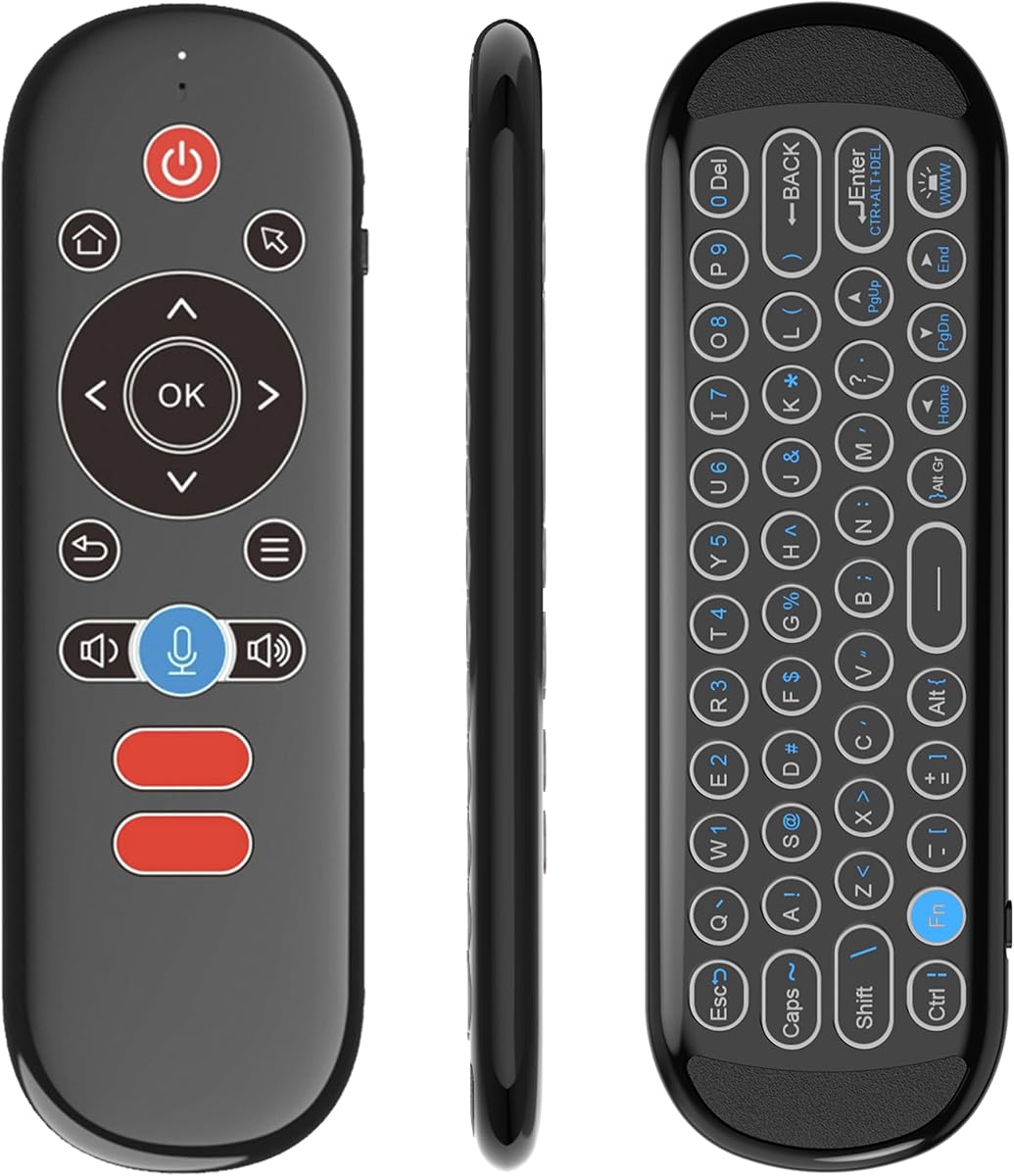


The MX3 Pro offers an affordable entry point for users seeking an air mouse for Android TV Box. It combines basic motion control with a functional mini keyboard for text entry.
We may earn a commission when you buy through this link, at no additional cost to you.
Its 2.4G wireless connection ensures stability without complex drivers. The built-in 6-Axis somatosensory system allows cursor control through hand movement.
While it lacks advanced features like voice search, the IR learning function lets it control up to five keys from your original TV remote. This reduces device clutter.
Budget-conscious buyers will appreciate the value. It is ideal for casual streaming or basic navigation where high precision is not the primary requirement.
Simply plug the USB receiver into your TV Box port. No software installation is needed for immediate use.
The mini keyboard on the back enables quick text input. This is useful for searching titles or logging into accounts.
We may earn a commission when you buy through this link, at no additional cost to you.
The BOXPUT BPR1S Plus stands out for its dual connectivity and robust control features. It supports both Bluetooth and 2.4G RF for versatile device pairing.
We may earn a commission when you buy through this link, at no additional cost to you.
Users can utilize full IR learning to control most AOSP devices. The built-in voice assistant allows quick program searches via voice commands.
The 6-axis gyroscope provides smooth cursor movement. However, note that it does not work with Fire Stick or Apple Box devices.
This model balances performance and versatility. It is best for users needing a reliable remote that handles both Android TV and PC tasks.
Voice commands work within supported apps for smoother interaction. This helps navigate large media libraries efficiently.
Switch between TV Box and PC modes easily. This adds value for dual-purpose entertainment centers.
We may earn a commission when you buy through this link, at no additional cost to you.
The BOXPUT BPR2S Plus delivers premium performance with broad compatibility. It works with 99% of Android TV boxes and streaming devices.
We may earn a commission when you buy through this link, at no additional cost to you.
Its electronic manual on the back of the remote simplifies setup. The IR learning covers all buttons for complete control over TV and box.
The Bluetooth and 2.4G modes offer flexible connectivity. Voice search works well in supported apps for fast content discovery.
Investors in smart setups will find this model robust. Its high rating reflects consistent reliability and feature richness for demanding users.
Control two devices simultaneously using IR and wireless modes. This maximizes convenience for home theater systems.
The included electronic manual offers troubleshooting tips. This ensures long-term usability without needing external guides.
We may earn a commission when you buy through this link, at no additional cost to you.
This model focuses on typing comfort with its backlit QWERTY keyboard. Users can type in low-light environments without straining their eyes.
We may earn a commission when you buy through this link, at no additional cost to you.
The 6-Axis gyroscope ensures precise cursor control. It also supports Bluetooth and 2.4G for flexible connectivity options.
The rechargeable battery eliminates frequent battery changes. However, the device may feel heavier than minimalist remotes.
Typing-heavy users will benefit from this design. It is ideal for smart home centers where text entry is frequent.
The LED backlight makes navigation easy at night. You can adjust or turn it off to save power.
Switch between BT and 2.4G as needed. This adaptability supports various device ecosystems.
We may earn a commission when you buy through this link, at no additional cost to you.
The EASYTONE Air Mouse provides a straightforward solution for basic navigation. It connects via 2.4GHz RF with a plug-and-play receiver.
We may earn a commission when you buy through this link, at no additional cost to you.
Its voice input function allows chat or word input. However, search functionality is limited to built-in boxes or apps.
The 6-axis gyroscope detects direction changes accurately. This supports motion-sensory games and smooth cursor movement.
Ideal for beginners needing a simple remote. It works across Windows, Android, and Mac systems for broad utility.
Voice commands work for general search tasks. It avoids complex app-specific commands for simplicity.
Compatible with most devices having USB input. This covers a wide range of entertainment hardware.
We may earn a commission when you buy through this link, at no additional cost to you.
The iPazzPort Mini is designed for portability. It pairs with Smart Android TV Boxes and laptops using Bluetooth and 2.4GHz dual-mode.
We may earn a commission when you buy through this link, at no additional cost to you.
The 6-Axis Gyroscope ensures precise cursor control. The vibrant RGB backlight enhances visibility during dark use.
It uses Type-C charging for long life. However, IR learning is limited to one blank button for basic functions.
This model suits travelers needing a versatile remote. Its compact size makes it easy to carry and store.
The light helps in dark rooms. Cycle colors easily to match your mood.
Only one key learns TV functions. Ensure you pick the right function to program.
We may earn a commission when you buy through this link, at no additional cost to you.
The Rii MX3 is a classic choice for Android TV navigation. It offers 2.4G wireless connection and an Infrared remote control.
We may earn a commission when you buy through this link, at no additional cost to you.
Its motion sensor allows gaming and cursor control. The IR learning supports five keys for essential TV functions.
The pairing process is straightforward via USB dongle. Some keys may not apply to every specific device.
Buyers preferring reliable simplicity will enjoy this unit. It remains a staple for HTPC and set-top box control.
Game controllers work well with the sensor. It detects hand movement accurately for games.
Ensure TV remote supports NEC protocol. This is required for key learning to function.
We may earn a commission when you buy through this link, at no additional cost to you.
This model adds a backlight for easy typing. It includes 38 keys for efficient character entry on Android TV Box.
We may earn a commission when you buy through this link, at no additional cost to you.
The 6-Axis motion system supports games. Five IR learning keys let you control basic TV functions.
Note that it may not work with Samsung TVs. Ensure your device is listed in compatibility charts.
Typing-focused users will find this effective. It balances light control with keyboard utility.
The layout allows quick text entry. Alt key switches to punctuation for varied input.
Check device lists before purchase. Some smart TVs remain incompatible with this model.
We may earn a commission when you buy through this link, at no additional cost to you.
The G20S PRO BT offers a clean single-sided design. It features a gyroscope core for accurate gesture identification.
We may earn a commission when you buy through this link, at no additional cost to you.
Buttons are permanent and wear resistant. Anti-tremor features reduce jitter during movement.
Bluetooth mode requires disconnecting the USB receiver. Pairing is done via specific button holds.
Users preferring a minimalist look will appreciate this. It focuses on basic navigation without extra bulk.
The gyroscope compensates for hand shake. This helps maintain cursor stability on screen.
Buttons resist wear over time. This ensures long-term usability for frequent remote
We may earn a commission when you buy through this link, at no additional cost to you.
The Rock&Rown MX3 Pro provides a standard wireless keyboard setup. It connects via 2.4G for stable control.
We may earn a commission when you buy through this link, at no additional cost to you.
Five key learning simplifies device integration. The sensor combo ensures accurate cursor movement in multiple directions.
Note that power control requires IR learning. This extra step ensures compatibility with original remotes.
This model is a solid choice for general users. It covers most Android systems without complexity.
Learning power is required for on/off. Follow instructions to match your original remote.
A one-year no-reason return is offered. This adds confidence to your purchase decision.
We may earn a commission when you buy through this link, at no additional cost to you.
Selecting the right air mouse involves evaluating connectivity, sensors, and extra features like keyboards or voice control.
Check if the remote uses 2.4G RF, Bluetooth, or both. Some devices require specific receivers or Bluetooth pairing modes.
Choose dual mode remotes for maximum flexibility across devices.
Look for 6-Axis Gyroscope or Motion Sensor technology. These ensure precise cursor movement and reduce tracking errors.
Higher accuracy improves navigation and gaming experiences on your screen.
Decide between mini keyboards and full QWERTY layouts. Some users prefer compact designs while others need full typing support.
Ensure the keys are comfortable for your hand size and frequent use.
IR learning allows the mouse to control other devices like your TV. Check how many keys can be programmed.
This feature reduces the need for multiple remotes in your home setup.
Voice search adds convenience for finding content quickly. Verify which apps and systems support voice commands.
Useful for users who prefer speaking over typing for search.
Remotes use either replaceable batteries or rechargeable units. Rechargeable options reduce waste and long-term costs.
Check charging methods like Type-C for modern convenience.
Confirm the remote works with your specific TV Box model. Some devices like Fire Stick or Roku may not be supported.
Always verify your system against the manufacturer compatibility list.
Durable materials ensure longevity. Look for wear-resistant buttons and sturdy casing.
High-quality remotes handle frequent use without mechanical failure.
To begin setup, insert the USB receiver into your Android TV Box port or pair via Bluetooth settings. Ensure the batteries are correctly installed.
Practice gentle wrist movements to control the cursor smoothly. Avoid jerky motions to prevent tracking errors on the screen.
Store the remote in a dry place away from direct sunlight to protect internal components and ensure battery longevity.
Many air mice do not support Fire Stick due to proprietary software. Check the product compatibility list before purchasing to ensure it works with your specific device model.
Enter pairing mode by holding specific buttons like OK and Back for a few seconds. Go to your TV Box Bluetooth settings to search and connect the device.
Ensure the USB receiver is properly connected or Bluetooth is enabled. Check if you need to switch between modes or update firmware for correct operation.
Yes, most remotes with keyboards allow you to type directly into input fields. The cursor moves independently using motion sensors for easy navigation.
IR learning copies infrared signals from your old remote. This lets the new remote control functions like power and volume with one device.
Most work plug-and-play via USB. Some advanced features may need specific app installation, but basic navigation usually requires no extra software.
Rechargeable batteries typically last several weeks on a single charge. Usage frequency and backlight settings may affect this duration.
Air mice offer cursor navigation similar to a computer mouse. This makes searching and selecting items faster than directional buttons alone.
We reviewed ten top air mice ranging from budget-friendly to premium features. Each model offers unique benefits for different user preferences.
Prioritize connectivity and compatibility when selecting your device. Ensure it matches your specific TV Box ecosystem for best performance.
Remember to check current prices and deals before buying. The right air mouse can significantly improve your daily streaming experience.