
Rosewill Helium NAS Duo
2.6Editor score
Supports up to 8 HDD drives
Includes four 140mm PWM fans
Features USB 3.2 Type-C port
Building a reliable home server requires a solid foundation. The right ATX NAS Computer Case ensures your drives stay cool and organized. It protects your hardware while offering easy access for maintenance and upgrades.
We evaluated ten top models based on drive capacity, airflow, and compatibility. Our analysis covers budget-friendly options and premium chassis designed for enterprise needs. Each entry offers unique features for different storage demands.
Every pick includes detailed specs, pros, and cons to simplify your decision. Prices fluctuate frequently so verify current listings before purchasing. This guide helps you find the perfect balance of performance and value.
2.6Editor score

4.7Editor score
4.6Editor score
As an Amazon Associate we earn from qualifying purchases.
This side-by-side comparison highlights key specifications across all ten selected chassis. Use this table to quickly identify drive bays, motherboard support, and cooling options for your specific build requirements.


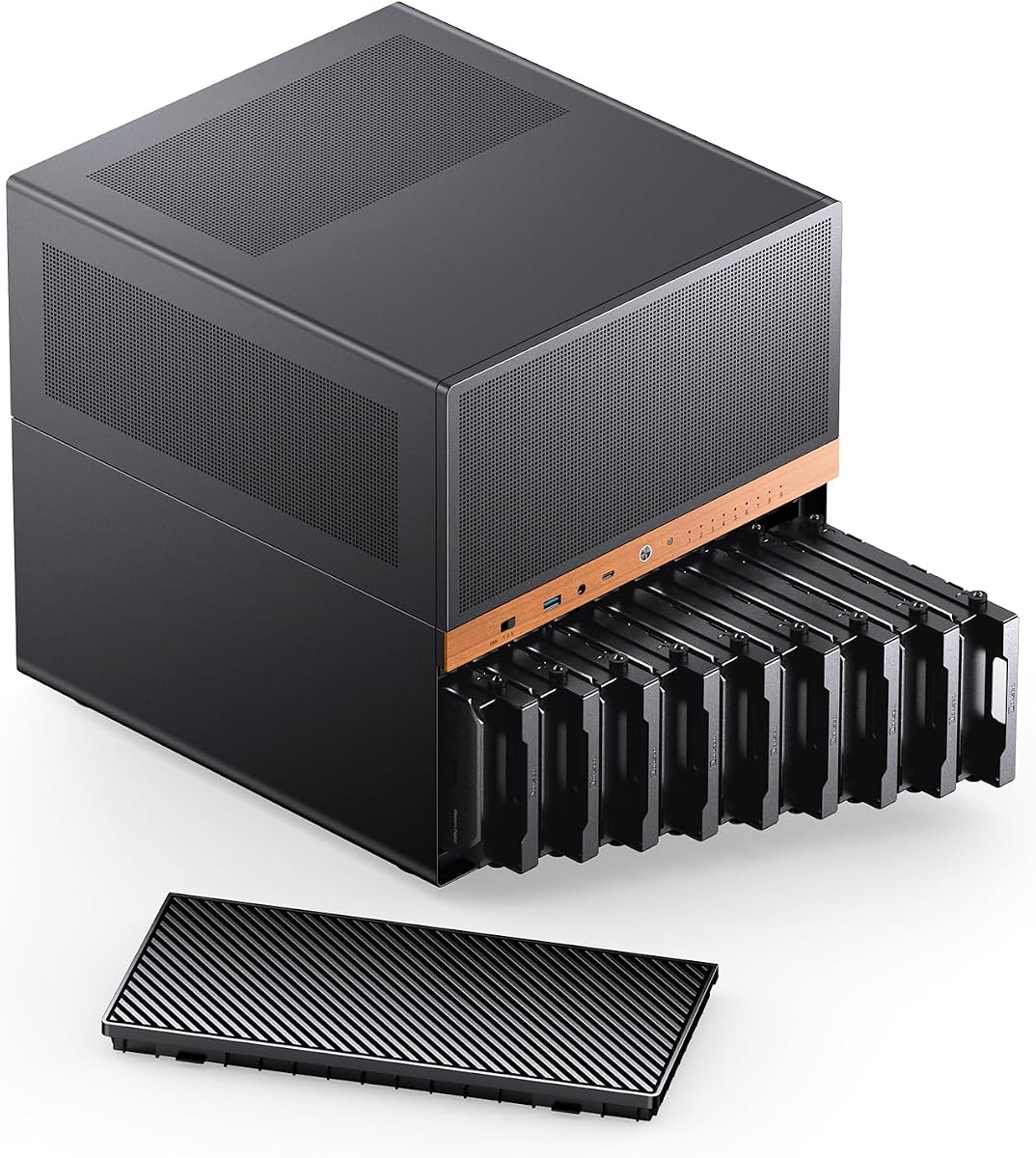
The JONSBO N5 stands out as the top choice for serious home server builders. With a 4.7 rating it delivers exceptional build quality and storage versatility. The combination of 12 hot-swap HDD bays and 4 SSD slots makes it ideal for media servers.
We may earn a commission when you buy through this link, at no additional cost to you.
Its solid wood veneer front panel adds a premium aesthetic rarely found in server chassis. The interior supports E-ATX motherboards allowing for powerful computing alongside storage. Cooling is handled by multiple fan mounts ensuring drives stay cool under load.
While the size is substantial it fits neatly in dedicated server areas. The removable top cover simplifies drive installation significantly. Power supply constraints require attention but overall the flexibility is unmatched in this category.
Choose this case if you need maximum capacity without sacrificing style. It bridges the gap between industrial server racks and home office decor. The investment pays off in reliability and ease of use over time.
With 16 total drive bays you can mix HDDs and SSDs freely. This configuration supports complex storage pools and caching strategies efficiently.
The North American black walnut veneer transforms a utilitarian case into a design piece. It complements living spaces better than standard steel enclosures.
We may earn a commission when you buy through this link, at no additional cost to you.
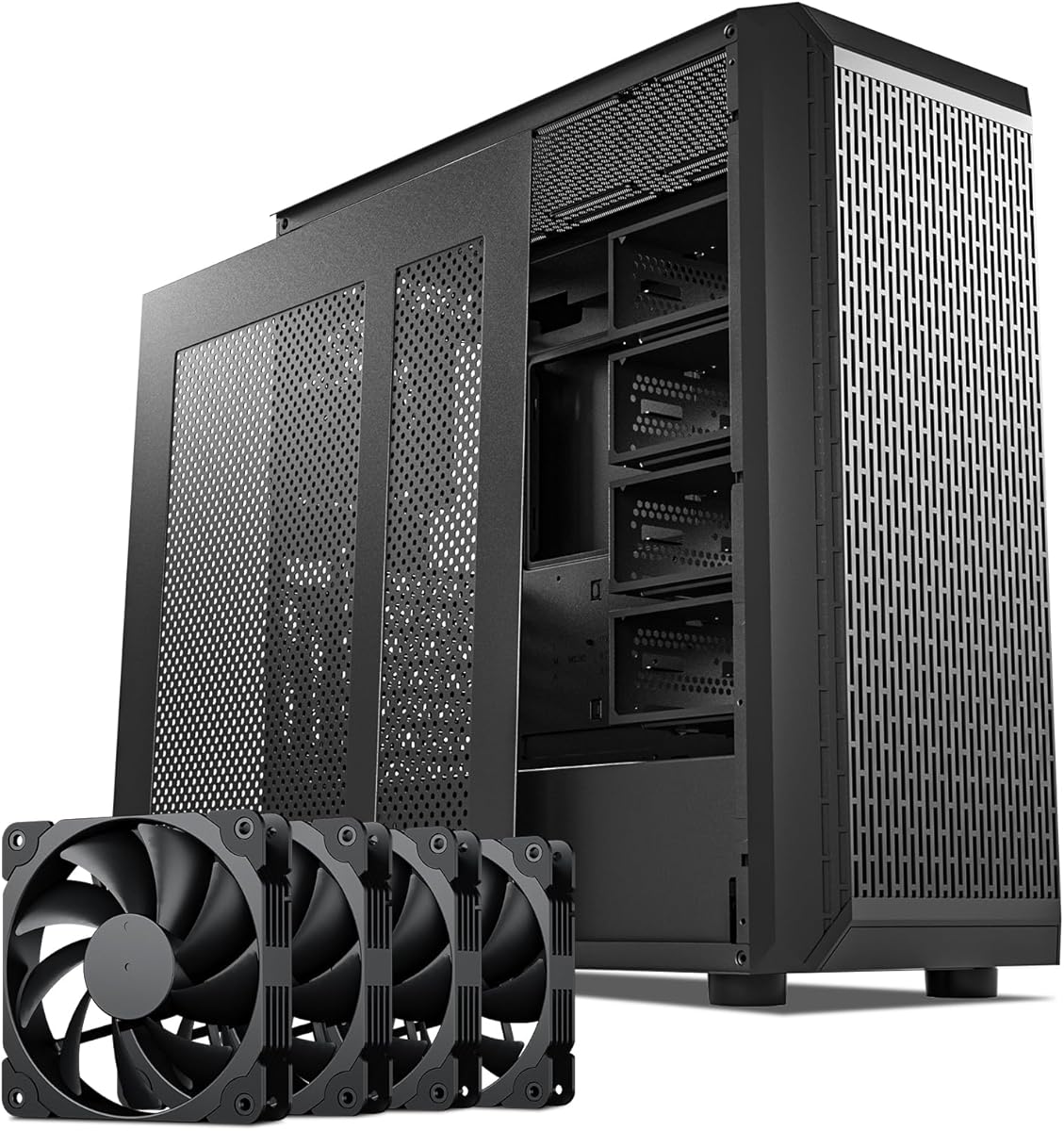
The Rosewill Helium NAS Duo offers an accessible entry point for DIY NAS builds. Despite a lower rating it provides essential features for home storage. The mesh panels and included fans help maintain airflow without extra costs.
We may earn a commission when you buy through this link, at no additional cost to you.
Supporting up to 8 HDDs makes it suitable for small to medium media libraries. The front USB 3.2 Type-C port is a welcome modern touch for quick data transfers. Compatibility with ATX and Micro ATX boards adds build flexibility.
Build quality reflects its budget nature with simpler assembly mechanisms. Users should plan cable management carefully for optimal airflow. It remains a cost-effective solution for those prioritizing function over form.
Ideal for beginners needing reliable storage without breaking the bank. Verify current stock and compatibility before ordering. It serves well as a secondary server or media center unit.
Four pre-installed PWM fans ensure consistent airflow at a low price. This setup reduces the need for additional cooling purchases.
The USB 3.2 Type-C front port allows direct drive docking or peripheral access. This convenience enhances daily usability for file transfers.
We may earn a commission when you buy through this link, at no additional cost to you.
The JONSBO N6 combines premium aesthetics with robust NAS functionality. Rated 4.6 it impresses with its solid walnut veneer and nine hot-swap bays. The micro ATX chassis keeps footprint small while maximizing storage efficiency.
We may earn a commission when you buy through this link, at no additional cost to you.
Support for both ATX and SFX power supplies offers unique flexibility. This allows customization based on available components and space constraints. The build quality ensures durability for long-term server operations.
Thermal management is robust with multiple fan positions available. Cable routing requires planning especially with multiple drive bays active. It fits well in living rooms or home offices needing silent operation.
Select this for a balance of style and performance in compact spaces. It is perfect for home users wanting a server that looks good. The investment ensures years of reliable storage management.
Supporting SFX and ATX power supplies allows tailored build options. This adaptability helps users utilize existing components effectively.
The dark walnut wood panel blends seamlessly with modern furniture. It reduces the industrial look often associated with server hardware.
We may earn a commission when you buy through this link, at no additional cost to you.
The DARKROCK Classico Storage Master offers exceptional capacity with 13 drive bays. Its unique vertical GPU mount adds value for workstation builds. Mesh panels ensure unrestricted airflow for high-performance components.
We may earn a commission when you buy through this link, at no additional cost to you.
Support for a 360mm radiator highlights its cooling potential. This makes it suitable for CPU-intensive tasks alongside data storage. The design prioritizes thermal efficiency which is crucial for server uptime.
Installation may require careful cable management due to space. The size limits placement options but delivers on performance. It is a strong contender for those needing both storage and compute power.
Choose this for mixed-use setups requiring graphics acceleration. It stands out in a sea of standard NAS cases. Verify your GPU dimensions before committing to the vertical mount option.
The vertical mount prevents sagging and improves cooling for graphics cards. This feature is rare in NAS specific cases.
Mesh on front and sides allows air to enter freely. This design prevents heat buildup during heavy loads.
We may earn a commission when you buy through this link, at no additional cost to you.
This 8 Bay NAS Case has earned a perfect 5.0 rating from users. Its dual-chamber design isolates heat and noise effectively. The hot-swap bays allow easy drive management without shutting down.
We may earn a commission when you buy through this link, at no additional cost to you.
Supporting both SATA and SAS drives offers versatility. The compact size fits on a desk or shelf easily. Magnetic front panels provide quick access to internals.
Constraints on GPU length limit graphics usage significantly. Cable management is straightforward due to the layout. It is ideal for dedicated storage servers without heavy compute needs.
Pick this for reliability and ease of use in small spaces. The positive feedback suggests high build quality. Ensure motherboard compatibility fits before assembly.
Separating drive and motherboard areas reduces heat transfer. This improves drive longevity and system stability.
Measuring under 300mm wide it fits comfortably on most desks. This space efficiency is rare for multi-bay units.
We may earn a commission when you buy through this link, at no additional cost to you.
The KM7B offers massive 13 HDD capacity plus two SSD slots. Its full tower design supports E-ATX motherboards for advanced builds. The magnetic front panel simplifies access to drive bays.
We may earn a commission when you buy through this link, at no additional cost to you.
Liquid cooling support allows for high-performance CPU setups. This makes it suitable for rendering or compute tasks. The layout prioritizes storage density without compromising airflow.
Ratings are currently unavailable so verify vendor reputation. Dimensions are significant requiring dedicated floor space. Cable routing must be managed carefully for optimal cooling.
Select this for maximum storage in a workstation environment. It balances raw capacity with modern cooling options. Check dimensions before purchasing to ensure fit.
With 13 drive bays you can build large storage pools. This is ideal for media archives and backups.
Support for 360mm liquid radiators keeps CPU temps low. This is critical for heavy multi-threaded tasks.
We may earn a commission when you buy through this link, at no additional cost to you.
This tower boasts 15 hot-swap drive bays for massive capacity. It supports redundancy power supplies for critical uptime needs. The build quality feels robust with 1.0mm steel construction.
We may earn a commission when you buy through this link, at no additional cost to you.
Compatibility spans from ITX to EATX motherboards. This flexibility suits various workstation requirements. The weight ensures stability on server racks or shelves.
Shipping delays can be significant with sea freight options. This is a consideration for urgent builds. Verify availability and delivery times with the vendor.
Ideal for enterprise or serious home lab setups. The redundancy support adds value for mission-critical data. Plan your timeline carefully to account for shipping.
Supporting 1+1 redundancy power supplies ensures continuous operation. This prevents data loss during power supply failure.
WAN LEDs and backplane integration mimic enterprise gear. This facilitates easy monitoring and management.
We may earn a commission when you buy through this link, at no additional cost to you.
The Silverstone Temjin is renowned for its durable aluminum build. Positive pressure design keeps dust out effectively. The built-in hard drive cooler adds unique value for storage.
We may earn a commission when you buy through this link, at no additional cost to you.
Classic styling with a thick aluminum front elevates aesthetics. It supports eight expansion slots for extensive I/O needs. Cable routing is smartly designed for clean setups.
Modern connectivity like USB-C is missing compared to newer cases. This may require adapters for current devices. The premium price reflects the high-quality materials.
Choose this for a long-lasting stylish build. It appeals to users valuing heritage design. Verify port needs before purchasing to ensure compatibility.
Positive pressure keeps dust from settling on components. This extends hardware life and reduces cleaning.
The thick aluminum front resists wear and looks great. It maintains its appearance over many years.
We may earn a commission when you buy through this link, at no additional cost to you.
This case combines 6 HDD and 2 SSD bays in a small form. The walnut wood front adds a refined home look. USB 3.2 Type-C ensures fast external device access.
We may earn a commission when you buy through this link, at no additional cost to you.
Compact design fits on desks or shelves without crowding. It supports Micro ATX boards effectively for standard builds. The split top and bottom compartments organize cables well.
Two non-hot-swap drives require system shutdown for changes. This may inconvenience frequent data swaps. GPU limits are strict so check expansion needs.
Ideal for living room setups needing quiet operation. The wood finish makes it blend into decor. Verify expansion limits before building to avoid issues.
Its small footprint fits in media centers easily. This is rare for multi-drive units.
The walnut veneer helps the case look like furniture. It reduces the tech look in living spaces.
We may earn a commission when you buy through this link, at no additional cost to you.
The CS382 supports both SAS and SATA drives for versatility. This allows high-speed SAS integration for critical workloads. LED indicators show drive status clearly at a glance.
We may earn a commission when you buy through this link, at no additional cost to you.
Built for performance it supports liquid cooling options effectively. The chassis is sturdy enough for enterprise environments. Compatibility with Micro-ATX simplifies power supply options.
SAS compatibility may be overkill for home users. Ensure your drives match the supported interface. The price reflects the professional-grade build quality.
Select this for high-performance storage needs. It bridges consumer and enterprise requirements well. Check drive types carefully before purchasing.
Supporting SAS drives boosts data transfer speeds significantly. This benefits database and high-load applications.
LED indicators track drive health easily without software. This simplifies monitoring and maintenance tasks.
We may earn a commission when you buy through this link, at no additional cost to you.
Selecting the right ATX NAS Computer Case involves balancing storage needs with physical constraints. This guide breaks down the essential factors to consider before making your final decision.
The primary reason for choosing a NAS case is storage volume. Look for cases supporting your target number of 3.5 inch hard drives. Many models also include 2.5 inch SSD bays for caching. Ensure hot-swap features match your maintenance preferences.
Prioritize cases that offer flexible drive mixes. This future-proofs your setup for changing storage demands.
Check if the case supports your motherboard size. While ATX is standard many NAS cases limit you to Micro ATX. If you plan on using large servers boards verify dimensions before buying. This ensures enough room for cabling.
Always confirm motherboard specs against case dimensions. Mismatches can lead to costly returns or unusable builds.
Hard drives generate significant heat which can reduce lifespan. Mesh panels and multiple fan mounts improve thermal performance. Liquid cooling support adds extra options for high-performance CPUs. Ensure intake and exhaust paths are clear.
Proper airflow is critical for stable server uptime. Neglecting cooling can lead to data loss or crashes.
Materials like steel and aluminum impact durability and noise reduction. Thicker metal reduces vibrations from spinning drives. Premium finishes like wood veneer offer aesthetic benefits. Check panel thickness for long-term stability.
Investing in a sturdy case protects expensive hardware. Thin plastics may warp or damage drives over time.
Power requirements vary by case size and drive count. Some support standard ATX units while others need SFX. Verify PSU length compatibility to avoid clearance issues. Redundancy options exist for critical enterprise applications.
Ensure the case fits your power supply type. Mismatched PSUs can limit performance or prevent assembly.
Front panel ports enhance daily usability for data transfers. USB 3.2 Type-C offers fast speeds for external drives. Audio and reset buttons provide convenience during setup. Check which ports match your peripheral needs.
Modern connectivity options save time and effort. Look for cases with Type-C for future compatibility.
Measure your available space before purchasing. Large towers may not fit on standard desks. Consider height width and depth carefully. Floor or rack mounting may be required for big cases.
Accurate measurements prevent frustration during installation. Ensure enough clearance for ventilation around the case.
Prices vary widely based on features and materials. Budget cases offer basics while premium ones add wood and cooling. Determine your must-have features to find the right balance. Consider long-term value over upfront cost.
A higher price often means better durability. Weigh this against your specific storage goals.
Start by installing drives carefully in the hot-swap bays. Ensure cables are secured to prevent rattling during operation. Use included screws to mount drives firmly in place.
Clean dust regularly from fans and vents using compressed air. Maintain good airflow by keeping the case in a ventilated area. Check LED indicators periodically for drive status.
Update firmware on any integrated controllers regularly. Monitor temperatures during heavy usage to ensure cooling is effective. Perform backups to verify data integrity and stability.
NAS cases feature drive bays that support multiple hard drives with good ventilation. They often include hot-swap capability for easy maintenance. Robust build quality ensures drives stay cool and vibration-free.
Yes but you lose dedicated drive mounting points. Standard cases may require mounting brackets or adapters. This can lead to higher noise and vibration issues over time.
Hot-swap bays save time when replacing failed drives. They eliminate the need to open the case often. This adds convenience and reduces wear on internal connectors.
Most ATX NAS cases hold between 8 to 13 drives. Premium options may support up to 15 hot-swap bays. Always check the case specs for drive limits and dimensions.
Yes NAS cases need strong airflow to manage heat. Multiple fans and mesh panels help dissipate heat effectively. Overheating drives can lead to failure and data loss.
Wood veneers add style but may affect airflow slightly. Most cases use steel frames with decorative wood panels. This blends aesthetics with functional server requirements well.
Most support Micro ATX or ATX sizes. High-end models may accommodate E-ATX boards. Always verify clearance for CPU coolers and I/O ports.
Use compressed air to blow dust out of fans. Remove drive trays to clean behind them regularly. Avoid direct contact with electronics to prevent static damage.
We explored ten top models ranging from budget to premium tiers. Each offers unique advantages for different storage needs and aesthetics. The JONSBO N5 stands out for capacity and style.
Prioritize cooling and drive compatibility for long-term reliability. Ensure the case supports your motherboard and power supply correctly. This prevents installation issues and hardware problems.
Prices and availability change frequently so check listings before buying. Verify dimensions match your space to avoid returns. With careful selection your home server will run smoothly for years.