
NetumScan USB 1D Barcode Scanner
4.4Editor score
Plug and play USB connectivity
Durable anti-shock ABS design
Scans deformed and reflective codes
Compare the top 10 barcode scanners for library use. We review connectivity, battery life, durability, and scan accuracy to help you pick the right model.
Libraries need reliable tools to manage collections efficiently. A good barcode scanner handles worn ISBN labels, reads from screens, and lasts all day without charging. This guide explores models built for frequent checkout and inventory tasks.
We compared ten real products based on connectivity options, battery capacity, and decoding ability. Our focus is on stability, ease of setup, and durability in high-traffic environments. Each entry includes verified specs and real-world use cases.
Every pick shows key strengths, pros, cons, and ideal users. Prices change often so check the link before buying. These devices range from wired basics to wireless powerhouses with advanced features for busy library workflows.
4.4Editor score

4.4Editor score

4.3Editor score
This side-by-side comparison covers all ten models with key specs like connection type, battery life, scan mode, and durability features. Use this table to quickly identify which scanner matches your library workflow and budget needs.




This Bluetooth scanner earns our Editor's Choice for libraries seeking flexibility and endurance. With a 4.4 rating and strong specs, it handles ISBNs, damaged labels, and screen codes seamlessly. Its 2600mAh battery supports massive scan counts without frequent charging.
We may earn a commission when you buy through this link, at no additional cost to you.
Key strengths include its triple-mode connection: Bluetooth, 2.4G wireless, and USB. This ensures compatibility across PCs, tablets, and mobile devices. The CCD sensor reads tightly spaced and worn codes, common in high-use library books. Storage mode keeps 100,000 barcodes offline if range is lost.
Trade-offs involve initial setup needing manual barcode scans for configuration. It also lacks 2D QR decoding. These are acceptable for most libraries focused on ISBN and 1D codes. Quiet buzzer settings and customizable prefixes make daily checkout tasks smoother and faster.
Librarians managing high volumes will appreciate its balance of power and portability. Use it for checkout, inventory, or returns. Its durability and battery life mean fewer interruptions. For a reliable workhorse that adapts to various library setups, this model is a top recommendation.
The 2600mAh battery supports up to 200,000 scans per charge. For daily operations, this often means weeks of use before needing a recharge, reducing downtime significantly.
Three connection modes plus offline storage ensure you never lose data. Even if the receiver fails or goes out of range, scanned items are saved locally until reconnected.
We may earn a commission when you buy through this link, at no additional cost to you.
For libraries on a tight budget, this NetumScan USB reader delivers excellent value with a 4.4 rating. It uses CCD technology to capture 1D codes quickly, including ISBNs and EANs. Setup is instant—just plug into a USB port and start scanning.
We may earn a commission when you buy through this link, at no additional cost to you.
Its sturdy ABS design withstands drops from two meters, making it ideal for busy circulation desks. Auto-induction mode removes the need to pull triggers constantly. The CCD sensor handles reflective and damaged labels better than many laser models, reducing errors.
The main trade-off is the lack of wireless or battery power. This limits portability to desk use. For stationary stations or fixed inventory tasks, this doesn't matter. Its simplicity and low cost make it a practical choice for small libraries.
Purchase this if you need reliable, no-fuss scanning for fixed locations. It pairs well with standard POS or library management software. Its durability and ease of use ensure smooth daily operations without hidden costs or complex configuration.
Designed to withstand repeated drops on concrete, this scanner survives accidental mishaps. Its ABS build guarantees a long service life even in busy circulation areas.
Plug and play connectivity means no drivers are needed. Just connect the USB cable, and the scanner works immediately with supported software on most operating systems.
We may earn a commission when you buy through this link, at no additional cost to you.
This Pro model stands out with a built-in screen, earning it a best premium badge. Rated 4.3, it scans both 1D and 2D codes, including PDF417 and QR. The screen allows instant configuration without manual barcode sequences, saving time and effort.
We may earn a commission when you buy through this link, at no additional cost to you.
Features include a 2500mAh battery, charging cradle, and triple-mode connectivity. It handles silver or reflective materials and underwater scans. For libraries managing DVDs with QR codes or complex barcodes, this decoding ability is unmatched. The cradle ensures the device stays charged.
The screen and added features increase bulk and cost. It is less pocketable than mini models. However, for complex workflows requiring 2D support, these trade-offs are justified. It is a professional tool for libraries needing advanced capabilities.
Buy this if you need robust decoding and easy configuration. Use it for returns, inventory audits, or managing mixed media collections. The on-screen menus simplify updates, and the charging dock ensures consistent performance all day without interruption.
Support for PDF417, QR, and Data Matrix makes this scanner ideal for media collections. It reads challenging materials like silver paper or reflective labels that other models miss.
The built-in screen lets you change language, volume, and connection settings directly. This eliminates the need for manual barcode configuration sequences, streamlining setup and adjustments.
We may earn a commission when you buy through this link, at no additional cost to you.
Rated 4.5, this Tera model excels with a unique battery indicator light. It removes guesswork about charge levels, ensuring scans never stop unexpectedly. Wireless range reaches 328 feet, offering great flexibility for scanning large stacks or remote sections.
We may earn a commission when you buy through this link, at no additional cost to you.
Features include IP54 dust protection, an ergonomic handle, and anti-shock silicone. It reads damaged, fuzzy, or reflective codes easily. The curved handle reduces hand strain during long shifts. Plug and play setup ensures quick deployment at checkout counters.
It does not support 2D codes and relies on a USB receiver. Libraries focused on ISBNs or standard 1D labels won't face issues. The wireless freedom and battery visibility make it ideal for mobile inventory checks or busy circulation areas.
Choose this if battery anxiety affects your workflow. Its visibility ensures you charge before running out. The robust build and quiet scanning support daily tasks. For reliable wireless performance in demanding environments, this model is a solid contender.
The indicator light shows remaining charge without software or apps. This ensures staff can manage recharging efficiently, avoiding sudden shutdowns during busy periods.
IP54 technology protects against dust, and the silicone cover reduces shock damage. This durability ensures consistent performance even when drops or debris occur regularly.
We may earn a commission when you buy through this link, at no additional cost to you.
Weighing only 35 grams, this Eyoyo model is the ultimate portable scanner. Rated 4.3, it connects via Bluetooth or 2.4G wireless. Its small footprint makes it perfect for librarians moving through stacks or attending offsite events.
We may earn a commission when you buy through this link, at no additional cost to you.
Features include auto-off to save power, vibration mode for quiet scanning, and multi-mode connectivity. It scans common 1D codes, including damaged or reflective ones. The battery lasts up to ten days with occasional daily scanning, reducing charging frequency.
Its small size may make extended use uncomfortable for some hands. Battery capacity is lower than bigger models. For short tasks or mobile rounds, these are minor issues. It shines where portability is the highest priority.
Use this for quick audits or mobile checkout. It fits in pockets without weighing staff down. The vibration setting keeps environments quiet. For staff who need a scanner they can carry everywhere, this lightweight tool is ideal.
Despite its mini size, the scanner supports Bluetooth up to 164 feet. This range lets you scan items across shelves while keeping the device in your hand or pocket.
Vibration mode replaces audible beeps. This allows scanning in quiet study or reading areas without disturbing patrons. The feature supports mindful operations during library hours.
We may earn a commission when you buy through this link, at no additional cost to you.
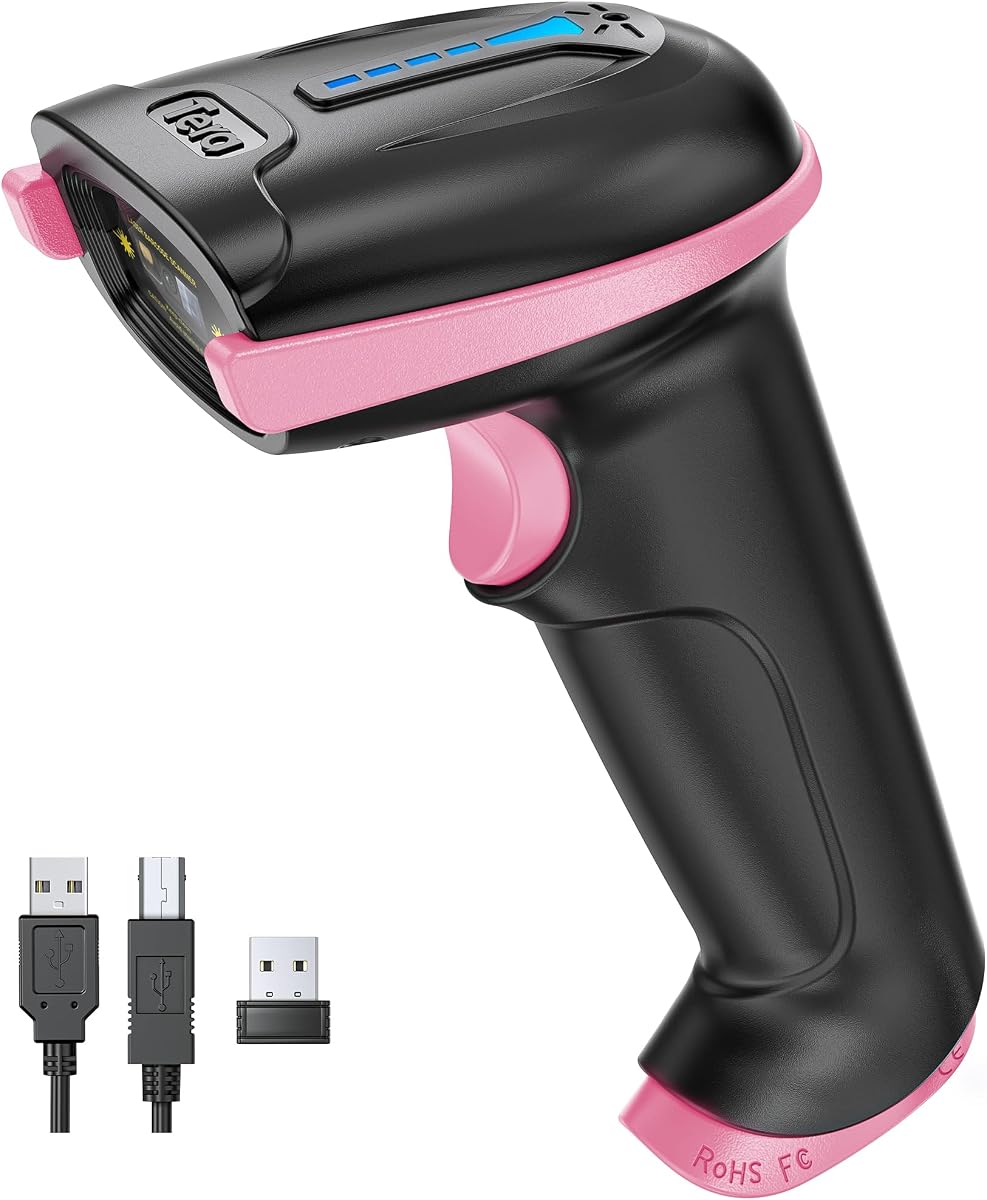
This pink variant offers the same trusted specs as the purple model. With a 4.5 rating, it features a battery indicator, IP54 protection, and 328-foot wireless range. It adds a stylish touch to circulation desks while performing reliably.
We may earn a commission when you buy through this link, at no additional cost to you.
The ergonomic handle and anti-shock cover support heavy use. It handles damaged or smudged codes effectively. Setup is plug and play, and the wireless connection ensures mobility within the building. Ideal for libraries wanting both function and form.
It lacks 2D support and requires a USB receiver. For standard 1D codes, this is irrelevant. The color option can make devices easier to identify visually on desks. Otherwise, its specs mirror the purple version.
Choose this if aesthetics matter for your team. It provides the same wireless freedom and battery visibility. For mixed collections or staff who prefer visible tools, this scanner offers dependable performance with a distinct look.
The pink color makes this unit easy to locate among other tools. This can reduce time searching for devices in busy workstations where multiple scanners may exist.
Aside from color, it shares the same durability and wireless range. It ensures consistent workflow for teams where visual variety supports identification or preference.
We may earn a commission when you buy through this link, at no additional cost to you.
This laser scanner earns a 4.5 rating for speed and reliability. It scans 200 codes per second, ideal for fast checkout lines. The visible laser beam locks onto codes quickly. Plug and play setup makes it easy to integrate into any system.
We may earn a commission when you buy through this link, at no additional cost to you.
It supports a wide range of 1D formats and offers 300 configurable settings. The ergonomic shape and shock resistance support daily use. For libraries with high traffic, this speed helps reduce queues. It works with common software without drivers.
Wired connectivity limits mobility. Laser beams struggle with reflective or screen-based codes. For fixed desks and printed ISBNs, this is fine. Its low cost and speed make it a practical choice for entry-level setups.
Use this for high-volume checkout stations. It minimizes wait times and handles continuous scanning. For budget-conscious libraries needing reliable performance, this model offers consistent results. It is a workhorse for routine scanning tasks.
At 200 scans per second, this model reduces wait times. For busy libraries, faster processing keeps lines moving and improves patron satisfaction during peak hours.
No drivers are needed for installation. It connects directly via USB and works with Windows, Mac, or Linux. This simplicity minimizes downtime when deploying new devices.
We may earn a commission when you buy through this link, at no additional cost to you.
Rated 4.4, this Symcode model supports one-to-one and multi-unit modes. This lets multiple staff scan simultaneously to a single receiver. It includes storage for 100,000 offline codes and a 2000mAh battery for days of use.
We may earn a commission when you buy through this link, at no additional cost to you.
Transmission reaches 100 meters indoors, ideal for large facilities. Setup is automatic and plug and play. It scans common 1D codes and handles damaged ones. For warehouses or large library stacks, this network capability increases efficiency.
It does not support 2D codes or screens. Battery life is good but slightly less than top models. For multi-staff inventory or large floor scans, its network features are a major plus. It balances cost and wireless freedom well.
Choose this if multiple staff scan at once. Its network mode avoids data loss and allows parallel work. For large spaces where wired scanners limit mobility, this model enables faster operations. It is practical for inventory-heavy workflows.
Multiple scanners can transmit to a single receiver. This supports teams conducting simultaneous inventory checks without needing separate dongles or complex network setups.
Transmission extends 100 meters indoors. This reaches across large library stacks or warehouses. It ensures staff can move freely without losing signal during remote scanning.
We may earn a commission when you buy through this link, at no additional cost to you.
This pink mini scanner mirrors the original Eyoyo model with a 4.3 rating. It weighs only 35 grams, supports Bluetooth, 2.4G, and USB. It offers vibration mode, configurable settings, and multi-day battery life for mobile tasks.
We may earn a commission when you buy through this link, at no additional cost to you.
Its small size makes it ideal for personal use or gifts. The scanner captures common 1D codes, including damaged ones. For libraries where staff prefer colorful tools or portable options, this model adds practicality with style.
Battery life is shorter than larger models. It lacks 2D decoding. For ISBN and standard barcode tasks, this is sufficient. Its portability and customization features suit daily light scanning. It fits easily in pockets or bags.
Use this for mobile inventory or staff who value aesthetics. Its silent vibration helps keep quiet spaces peaceful. For small libraries or teams prioritizing portability and design, this scanner is a thoughtful and functional choice.
This device combines portability with customizable settings. It suits individual preferences for operation while keeping scanning tasks easy to manage in small spaces.
It handles standard 1D tasks efficiently without bulk. For tasks requiring minimal movement and silent scanning, it provides the necessary capabilities without heavy weight or cost.
We may earn a commission when you buy through this link, at no additional cost to you.
This scanner includes an adjustable stand for hands-free operation. Rated 4.0, it supports both 1D and 2D codes. Auto-sensing triggers scanning automatically. The USB connection ensures stability. It is perfect for self-service stations or fixed kiosks.
We may earn a commission when you buy through this link, at no additional cost to you.
The stand allows adjusting the angle for best scanning. It supports QR codes, unlike many cheaper models. Plug and play setup ensures quick integration. For libraries wanting self-checkout options or quick item passes, this adds convenience.
It requires a wired connection, limiting movement. The stand takes up desk space. For fixed setups, this is acceptable. The 2D support and hands-free design justify these constraints. It suits environments where staff scan many items quickly.
Choose this for kiosks or fixed desks. Its auto-sensing feature reduces staff effort. For patrons handling their own checks, it provides an intuitive experience. It balances convenience and decoding power for stationary use cases.
The adjustable stand allows automatic scanning without holding the device. This reduces workload for staff and speeds up transactions at self-service or fixed stations.
It decodes QR, Datamatrix, and other 2D formats. This expands compatibility to modern labels and digital codes that some models cannot read easily.
We may earn a commission when you buy through this link, at no additional cost to you.
Selecting the right scanner depends on your library's workflow, connectivity needs, and budget. This guide breaks down critical factors to help you compare models confidently.
Libraries use wired, Bluetooth, or 2.4G wireless. Wired models are stable but limit movement. Bluetooth offers portability for mobile tasks. 2.4G wireless gives long range without pairing issues. Choose based on desk vs. mobile workflows.
Fixed desks favor wired; mobile teams prefer wireless. Hybrid options exist for maximum flexibility.
Long battery life reduces interruptions. Look for models offering at least one full workday of scans. Charging docks or USB charging add convenience. Larger batteries like 2000mAh+ support high-volume use effectively.
Prioritize battery capacity if scanning hundreds of items daily. Consider chargers included or replaceable.
Ensure the scanner reads ISBNs, damaged, and reflective codes. 1D support is standard; 2D may be needed for QR. CCD or camera sensors often read screens and damaged labels better than laser. Match this to your collection media types.
Check decoding capability for your specific barcodes. Poor read quality slows operations significantly.
Libraries see drops, dust, and heavy use. Look for shock resistance, rubberized grips, and IP ratings. Anti-shock silicone and sturdy ABS housings ensure longevity. This reduces replacement costs over time.
Choose models built to withstand frequent mishaps in busy environments.
Ensure compatibility with your library software. Most support Windows, Mac, and Linux. Verify drivers are optional. Plug and play devices minimize setup time and IT overhead.
Always test with your exact software environment before committing.
Programmable settings allow adding prefixes, suffixes, or adjusting volume. Quiet or vibration modes help maintain library ambiance. Custom setups adapt scanners to specific workflows.
Look for devices that let you disable beep or add terminators easily.
Wireless models vary in range. 100 to 300 feet ensures you can scan across large stacks. Signal stability avoids data loss during movement. Test in your actual space before buying.
Prioritize long-range wireless if scanning far from the computer.
Wired options are most affordable; wireless adds cost. Premium models offer screens or 2D support. Balance budget against required features. Long-term value includes durability and battery performance.
Invest slightly more if it means fewer replacements or downtime.
Start by charging the device fully. If wireless, pair it via the receiver or Bluetooth settings. Install any required drivers. Check the user manual to confirm your software is compatible.
Use the trigger to scan items or enable auto-sensing for continuous reads. For quiet zones, switch to vibration or mute mode. Position labels clearly for the scanner. Ensure codes are not overly reflective or damaged.
Store the scanner in a safe place after use. Clean the lens gently to maintain read quality. Charge overnight to prevent interruptions. Update firmware if available to ensure compatibility with new codes.
Not necessarily. Many modern scanners support Bluetooth or 2.4G wireless. Wired models are stable and affordable but limit movement. Choose based on whether you need to scan from fixed desks or moving around shelves.
Yes, CCD and image sensors excel at reading damaged, smudged, or worn codes. Most recommended models in this guide support worn ISBNs and tight codes. Laser scanners may struggle with reflective or damaged labels.
Most scanners act as keyboards (HID) so they work with any library software. Some features require drivers but many are plug and play. Always confirm compatibility with your existing library system before purchasing.
Battery life varies from days to weeks depending on usage. Larger batteries like 2000mAh+ support hundreds of thousands of scans. For daily use, expect days between charges. Always check the manufacturer's estimate for your scanning volume.
Yes, many support Bluetooth connection to tablets and smartphones. Verify OS compatibility with your device. Wireless models enable mobile inventory or checkout on any tablet. Some models are optimized for mobile environments.
Most models let you disable sound or use vibration mode. This ensures scans are silent. For quiet study areas, this feature is essential. Look for programmable beeps to maintain ambiance during operations.
They support 1D formats like ISBN, EAN, UPC, Code 39, and Code 128. Premium models support 2D codes like QR. Verify formats match your library labels. Avoid 1D-only models if you handle QR codes.
Plug the receiver into your computer. Power on the scanner and follow the manual's pairing barcodes. For Bluetooth, search devices on your system. Once paired, scan a test code to confirm data enters your software.
The NETUM Bluetooth model leads our list for its balance of power and flexibility. The NetumScan USB is perfect for strict budgets. The Tera screen model suits advanced workflows needing 2D codes.
Prioritize battery life and connection type based on your daily operations. Wireless mobility is valuable but consider stability needs. Choose a device that matches your scanning volume and environment.
Prices change often so verify current offers before purchase. Check compatibility with your library system. These scanners improve efficiency and reduce errors. With the right model, your library team can focus more on service and less on tech.