
Eaton Tripp Lite BC350R
4.5Editor score
350VA UPS capacity
Wall mount compatibility
Easy battery replacement
This guide compares the top 10 battery backup solutions for small offices to ensure uninterrupted power for computers routers and critical equipment during
A reliable battery backup is essential for any small office to prevent data loss and hardware damage during unexpected power outages or fluctuations that disrupt daily operations.
We have carefully evaluated ten leading UPS models based on their power capacity surge protection features outlet configurations and overall value to help you choose the right system.
Each pick highlights key strengths and potential trade-offs so you can make an informed decision while keeping in mind that product prices and availability may change over time.
4.5Editor score

4.5Editor score
4.9Editor score
The following table provides a quick side-by-side comparison of all ten top-rated battery backup units available for small office environments to help you visualize key differences.


The CyberPower CP1500PFCLCD stands out as a top contender for small offices needing reliable power protection with its robust 1500VA capacity and true sine wave output ensuring compatibility with sensitive equipment.
We may earn a commission when you buy through this link, at no additional cost to you.
Its multifunction color LCD panel provides real-time visibility into battery health and power conditions allowing users to address issues before they cause downtime while the 12 outlets offer ample connectivity.
While it is physically larger and more expensive than basic models the investment pays off in longevity and performance especially for workstations running active PFC power supplies that demand clean power.
If you need a dependable UPS that balances performance with features for a small office this model delivers exceptional value and peace of mind during power interruptions.
The PFC Sinewave output ensures that computers with active power factor correction power supplies receive clean stable power without triggering shutdowns or hardware issues.
The color LCD screen shows battery load and power status at a glance helping you manage connected devices effectively and anticipate when maintenance might be needed.
We may earn a commission when you buy through this link, at no additional cost to you.
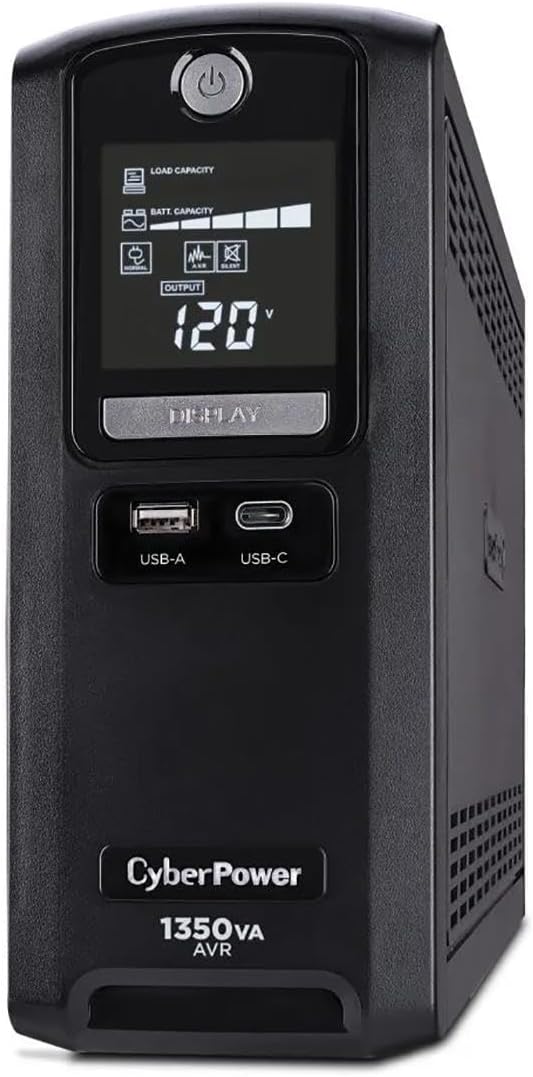
This unit offers the same high capacity as the top pick but uses simulated sine wave technology which is still sufficient for most standard office electronics and networking gear.
We may earn a commission when you buy through this link, at no additional cost to you.
The intelligent LCD panel keeps you informed about battery life and power quality while automatic voltage regulation helps correct minor fluctuations without consuming battery power unnecessarily.
Although it lacks true sine wave output the 900W load rating and extensive outlet options make it a versatile choice for offices prioritizing capacity and monitoring over niche compatibility.
Consider this model if you need to power multiple devices simultaneously and want a clear display to track system status without breaking the budget.
Automatic voltage regulation stabilizes incoming power within a safe range reducing the need to switch to battery mode and extending the overall lifespan of the internal battery.
With twelve outlets you can easily separate critical devices needing backup power from peripheral equipment that only requires surge protection keeping your setup organized and efficient.
We may earn a commission when you buy through this link, at no additional cost to you.
For small offices with minimal power needs or tight budgets this compact UPS delivers essential surge protection and battery backup for a single desktop computer or router.
We may earn a commission when you buy through this link, at no additional cost to you.
Its small size allows for flexible placement on a desk or mounted to a wall using the included keyhole slots saving valuable workspace while keeping power protection accessible.
The internal battery is easily replaceable which extends the useful life of the unit and reduces long term costs making it a smart choice for cost conscious businesses.
If you only need to protect one or two critical devices without advanced monitoring this budget friendly option provides reliable protection without unnecessary complexity.
The slim profile and wall mount capability make this UPS ideal for small workspaces where every inch of desk real estate matters for productivity.
Designed with user maintenance in mind the internal battery can be swapped out easily using a standard cartridge avoiding the need to buy a whole new unit.
We may earn a commission when you buy through this link, at no additional cost to you.
With an impressive 4.9 user rating this UPS delivers excellent performance including extended runtime at half load giving you plenty of time to save work and shut down safely.
We may earn a commission when you buy through this link, at no additional cost to you.
It includes specialized protection for network and coaxial lines which is vital for small offices relying on internet connections and cable services during power outages or surges.
Energy Star certification ensures the unit runs efficiently during normal use reducing electricity costs and environmental impact while still providing robust backup power when needed most.
Choose this model if you need a highly rated unit with network line protection and energy efficiency for a small office environment that values uptime and efficiency.
Integrated network and coax protection prevents surges from entering your system through internet or TV lines protecting modems routers and related hardware effectively.
GreenPower UPS technology minimizes power consumption during operation keeping your energy bills lower while maintaining a ready backup system at all times.
We may earn a commission when you buy through this link, at no additional cost to you.
This unit features an ECO mode that automatically cuts power to peripherals when your computer sleeps reducing energy waste and lowering costs without sacrificing protection when you need it.
We may earn a commission when you buy through this link, at no additional cost to you.
The multifunction LCD display provides clear insights into battery and power conditions helping you stay proactive about maintenance and equipment status during daily office operations.
While the capacity is mid-range the eco-friendly design and solid connectivity make it a standout for offices looking to minimize their environmental footprint without compromising performance.
If reducing energy consumption is a priority for your small office this model offers intelligent power management features that align with sustainable business practices.
When your computer turns off or sleeps the UPS detects this and cuts power to connected peripherals automatically preventing them from drawing energy unnecessarily.
Comprehensive management software is included free of charge allowing you to monitor power usage and configure settings easily from your desktop or laptop.
We may earn a commission when you buy through this link, at no additional cost to you.
This slim profile unit is ideal for tight spaces on your desk or under a table providing robust backup power for gaming consoles routers and computers without taking up much room.
We may earn a commission when you buy through this link, at no additional cost to you.
The GreenPower high efficiency design reduces power consumption during normal operation making it an eco friendly option that saves on electricity costs while keeping your gear safe.
Outlets are widely spaced to accommodate large adapters ensuring you can plug in multiple devices without adapters blocking each other which is a common frustration with compact units.
For home offices with space constraints this model delivers reliable protection and efficiency in a sleek form factor that fits seamlessly into any workspace.
The compact profile allows the UPS to sit neatly on a shelf or under a desk keeping your work area uncluttered and organized for better focus.
Efficient power conversion reduces heat and energy waste extending the life of the unit and lowering your ongoing operational costs as a small business.
We may earn a commission when you buy through this link, at no additional cost to you.
This unit offers vital data line protection that shields telephone and internet connections from surges keeping your communication and network hardware safe during storms or grid issues.
We may earn a commission when you buy through this link, at no additional cost to you.
The intelligent LCD panel keeps you updated on power status and battery health allowing you to manage your setup with confidence even when working remotely or during outages.
With 900VA capacity and AVR technology it handles minor voltage fluctuations smoothly without depleting the battery quickly ensuring longer runtime when actual power failures occur.
If your office relies heavily on internet or telephone lines this model adds an extra layer of security that standard surge protectors often miss entirely.
Surges can travel through phone and data lines damaging equipment connected to the system this feature prevents that risk to protect your networking gear fully.
The LCD screen provides clear visual cues about system status making it easy to verify that your backup power is active and ready to work.
We may earn a commission when you buy through this link, at no additional cost to you.
Designed for small devices this UPS provides a quiet and reliable backup for TVs computers and routers ensuring basic continuity during short outages without disturbing your workspace.
We may earn a commission when you buy through this link, at no additional cost to you.
Its AC mode uses sine wave output which offers better protection for electronics than many simulated options in this price range ensuring smoother performance and longer hardware life.
The battery is easily replaceable using a standard cartridge and the unit includes wall mounting tabs so you can save desk space and install it out of the way.
For offices needing a simple straightforward backup solution for limited equipment this unit delivers dependable performance without complex features or high costs.
Using sine wave output in AC mode ensures that connected devices receive clean power similar to what they would get from a standard wall outlet.
The fanless design keeps noise to a minimum making it ideal for quiet office environments where distracting hums could interfere with calls or concentration.
We may earn a commission when you buy through this link, at no additional cost to you.
APC is a well respected name in power protection and this unit delivers solid performance with a user-friendly design that makes battery replacement quick and straightforward.
We may earn a commission when you buy through this link, at no additional cost to you.
A built-in USB port allows you to keep your phone charged during an outage ensuring you stay connected even when the main power goes out which is crucial for remote workers.
The outlets are well spaced to prevent adapter conflicts and the unit provides ample runtime for saving work and safely shutting down computers and network gear.
If you value brand reputation and ease of use this model offers a straightforward reliable backup solution for small offices with basic power needs.
The battery swap process is designed for simplicity so you can replace the internal battery in minutes without needing technical expertise or special tools.
The USB charging port adds extra utility allowing you to charge mobile devices when power is unavailable keeping communication tools operational in all situations.
We may earn a commission when you buy through this link, at no additional cost to you.
As an entry level option this unit provides essential backup power and surge protection for small setups keeping essential gear running briefly during minor power interruptions.
We may earn a commission when you buy through this link, at no additional cost to you.
LED status lights give immediate feedback on power and wiring conditions helping you verify that the unit is functioning correctly without needing to interpret complex displays.
The GreenPower high efficiency design keeps energy costs low while the transformer-spaced outlets accommodate bulky adapters without blocking adjacent sockets on the strip.
For very small offices or home workstations with minimal equipment this budget friendly model offers a basic layer of security against unexpected power events.
Simple LED indicators show power on and fault conditions making it easy to confirm that your backup power system is active and ready to work.
High efficiency components reduce energy consumption during normal operation helping you save on electricity costs while maintaining a ready backup system.
We may earn a commission when you buy through this link, at no additional cost to you.
Selecting the right battery backup involves evaluating power capacity outlet types waveform quality and additional features to match your office equipment and environment needs.
Power capacity is measured in Volt Amps (VA) and Watts indicating how much load the UPS can support. For a small office ensure the total wattage of your devices does not exceed the UPS rating to avoid overloads.
Choose a unit with enough capacity to handle your critical equipment plus a buffer for future expansion.
Uninterruptible power supplies come with either simulated sine wave or pure sine wave output. Pure sine wave is safer for devices with active power factor correction power supplies while simulated sine wave works for most basic electronics.
If your office uses modern computers with PFC power supplies opt for a pure sine wave model to ensure compatibility and prevent unexpected shutdowns.
Consider how many outlets you need and whether some should be battery backed while others are surge only. Look for models with enough widely spaced outlets to fit large adapters without blocking other sockets.
A mix of backup and surge only outlets helps you prioritize protection for essential devices while saving battery life for non-critical gear.
Runtime depends on the load connected to the UPS. Higher loads drain the battery faster so check manufacturer charts to see how long the unit can power your specific equipment during an outage.
If you need time to shut down work safely choose a model with enough capacity to provide at least a few minutes of runtime under your expected load.
Beyond battery backup look for surge protection ratings EMI RFI filtering and data line protection. These features safeguard your hardware from power spikes and network surges that can occur even without full outages.
Ensure the surge protection rating is high enough for your area and consider data line protection if you use phone or internet cables.
Modern UPS units often include LCD panels or software for monitoring battery health and power quality. These tools help you stay informed about system status and configure settings remotely.
If you manage multiple devices choose a unit with intuitive monitoring features to make maintenance and troubleshooting easier for your team.
A solid warranty covers the battery and electronics giving you peace of mind. Many manufacturers also offer connected equipment guarantees that compensate for damage to your devices if the UPS fails.
Look for models with at least a three-year warranty and a strong equipment guarantee to protect your investment over the long term.
Consider the physical footprint and mounting options of the UPS. If space is tight choose a slim or wall mountable unit that fits comfortably without cluttering your workspace.
Ensure the unit has adequate ventilation and can be placed on a stable surface to maintain optimal operating temperature.
Plug the UPS into a grounded wall outlet and allow it to charge fully before connecting any devices to ensure optimal battery performance and longevity from day one.
Connect your critical equipment to battery backed outlets and peripherals to surge only outlets if available keeping your power management organized and efficient for daily use.
Perform periodic self-tests as recommended by the manufacturer replace the battery when needed and avoid overloading the unit to maintain reliable protection over time.
The size depends on the total wattage of your devices. Calculate the sum of wattages for all computers and equipment then choose a UPS with at least 20 percent more capacity than that total to ensure safe operation.
Runtime varies based on load size. A full load may provide just a few minutes while a half load can extend runtime significantly. Check manufacturer runtime charts to estimate for your specific setup.
Yes many UPS models include network line protection to shield modems and routers from surges. Ensure the unit has enough outlets and capacity to support your networking gear properly.
Pure sine wave provides clean power identical to wall outlets which is essential for sensitive electronics with PFC power supplies. Simulated sine wave is acceptable for standard devices but may cause issues with advanced hardware.
Batteries typically last three to five years depending on usage and environment. Follow manufacturer recommendations and monitor battery status indicators to know when a replacement is necessary.
Many UPS units include keyhole mounting slots or brackets for wall installation. Check the product specifications to confirm if wall mounting is supported for your chosen model.
While UPS units provide surge protection they are not lightning arresters. For areas with frequent lightning you may need additional external surge protectors or specialized lightning protection systems.
Most modern UPS systems include free management software that allows you to monitor battery health and shut down computers safely during extended outages. Download and install this tool for optimal control.
The CyberPower CP1500PFCLCD leads our list with its pure sine wave output and comprehensive features ideal for offices needing robust protection for sensitive equipment and reliable uptime.
Prioritize power capacity waveform type and outlet configuration that match your office setup to ensure your backup system performs when you need it most during unexpected outages.
Prices and availability change frequently so check current listings before purchasing to find the best deal for your budget and specific requirements.