
Brailliant BI 40X Braille Display
5.0Editor score
40-cell refreshable display
Bluetooth 5 stable wireless
32GB internal storage capacity
Supports multiple online libraries
This guide compares the top braille displays for blind users in October 2026, evaluating refreshable panels, connectivity, software features, and portability
Braille displays provide essential tactile access to digital content for blind and visually impaired users. A quality device offers reliable connectivity, durable construction, and seamless integration with screen readers to support daily tasks.
We evaluated ten products based on build quality, cell count, battery life, and software compatibility. Our selection includes premium refreshable displays, portable slates, and learning tools designed for various user needs.
Each pick highlights specific strengths such as multi-device pairing, compact design, or educational value. Prices and availability change frequently, so verify current details before purchasing to ensure the best fit for your setup.
5.0Editor score

4.5Editor score

3.4Editor score
The following table provides a side-by-side comparison of all ten products, highlighting key specifications such as cell count, connectivity options, material build, and unique features to aid your decision process.




The Brailliant BI 20X offers a compact solution for blind users needing reliable braille access. Its 20-cell refreshable display provides clear tactile feedback with cursor routing keys for efficient reading and writing tasks.
We may earn a commission when you buy through this link, at no additional cost to you.
This device stands out for its robust connectivity, supporting up to five Bluetooth devices and one USB connection simultaneously. Users can switch between phones, tablets, and computers seamlessly. The included KeySoft Lite apps enhance functionality with editors, calculators, and library access.
While the 20-cell width suits general use, users needing wider content may prefer larger models. However, the portability and extensive battery life make it suitable for daily commutes or work sessions without frequent recharging.
Ideal for students and professionals who need a portable yet powerful tool, this display balances features and size well. It is a strong recommendation for those prioritizing versatility and ease of access across multiple platforms.
The ability to maintain connections with five Bluetooth devices ensures users can move between work and personal devices without re-pairing, enhancing productivity and convenience.
KeySoft Lite apps like Editor and Braille Editor allow for self-contained document creation, reducing reliance on external apps for basic tasks.
We may earn a commission when you buy through this link, at no additional cost to you.
The Brailliant BI 40X delivers a premium experience with its expansive 40-cell refreshable braille display. This width allows for reading full lines of text with ease, reducing the need for constant scrolling and navigation.
We may earn a commission when you buy through this link, at no additional cost to you.
Equipped with Bluetooth 5 technology, the device ensures faster and more stable wireless connections compared to earlier versions. The 32GB internal storage is a significant upgrade, allowing users to store large libraries of documents and books locally.
The primary trade-off is the increased size and price, which may not suit all budgets or travel needs. However, for heavy readers or professionals managing complex documents, the wider display offers substantial productivity gains.
Recommended for power users who prioritize content visibility and storage, this model excels in reliability and performance. It remains a top-tier choice for those seeking the most comprehensive refreshable braille experience available.
Bluetooth 5 technology reduces dropouts and latency, ensuring a smooth connection even in environments with multiple wireless signals.
With 32GB of space, users can keep thousands of pages of braille content offline, ideal for areas with limited internet access.
We may earn a commission when you buy through this link, at no additional cost to you.
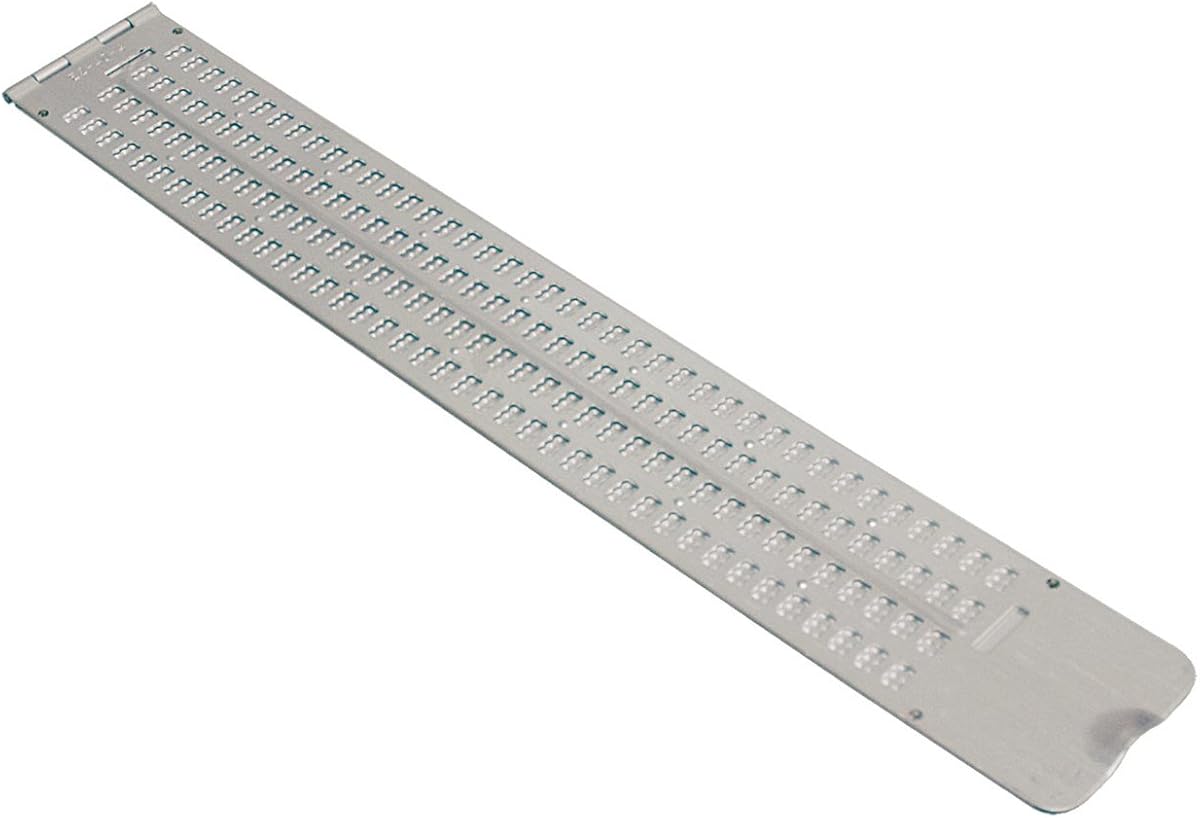
This Braille Slate offers an affordable and mechanical alternative to electronic displays. With 13 lines and 36 cells across, it provides ample space for handwritten notes and drafting documents without needing power.
We may earn a commission when you buy through this link, at no additional cost to you.
Constructed from durable aluminum, the slate withstands daily wear and tear. The thumb notch facilitates easy opening and closing, while the pins-down configuration keeps the writing surface flat and stable during use.
The main limitation is the manual nature of the tool, which requires tactile skill to emboss dots. It does not connect to computers or screen readers, making it best for offline note-taking or education.
Best for beginners learning braille or those needing a low-cost reference tool, this slate is practical and reliable. It serves well as a backup option for situations where electronic devices are unavailable or restricted.
The aluminum hinge and thumb notch ensure the slate opens smoothly and stays secure, providing a consistent writing surface.
Ideal for students practicing tactile literacy, the slate allows for repetitive writing practice without battery concerns.
We may earn a commission when you buy through this link, at no additional cost to you.
Designed for precision tasks, this ultra-thin aluminum slate focuses on creating braille on business cards or labels. Its compact size fits easily in wallets or pockets, making it a handy tool for professionals.
We may earn a commission when you buy through this link, at no additional cost to you.
The built-in signature guide helps users emboss straight lines, ensuring neat and professional results. This feature is particularly useful for those who need to sign documents or create consistent braille tags.
Due to its limited four-line capacity, this slate is not suitable for general writing. It is a specialized tool meant for short messages and identification tasks rather than full documents.
Recommended for users needing to produce short braille labels, this slate offers quality and convenience. It complements larger writing tools by providing a dedicated option for portable, precise braille embossing.
The signature guide ensures straight embossing, which is essential for maintaining professional appearance on business cards.
The slim profile allows users to carry the slate discreetly, ready for spontaneous labeling or note-taking.
We may earn a commission when you buy through this link, at no additional cost to you.
This full-page slate is designed to accommodate standard letter-size paper, allowing users to write entire pages of braille without frequent adjustments. It is an excellent tool for students and professionals who produce long documents.
We may earn a commission when you buy through this link, at no additional cost to you.
Constructed from durable plastic, the slate operates quietly, reducing noise in libraries or offices. Embossed line numbers on the right side help users keep track of their position when returning to a document.
While the size is beneficial for content volume, the plastic material may show wear with heavy use. Additionally, it requires a relatively flat surface to function optimally, which might limit use in some travel scenarios.
Best for users needing to draft essays or reports in braille, this slate offers efficiency and simplicity. It is a practical choice for educational settings where large volumes of tactile writing are required.
The plastic construction dampens sound, making it suitable for shared spaces where metal slates might be disruptive.
The ability to snap a full sheet in place eliminates constant repositioning, saving time during long writing sessions.
We may earn a commission when you buy through this link, at no additional cost to you.
This pocket slate offers a balance between portability and writing capacity. Its lightweight aluminum build makes it easy to carry in a briefcase or backpack, suitable for on-the-go note-taking.
We may earn a commission when you buy through this link, at no additional cost to you.
The four-line layout with 40 cells per line provides ample space for short messages or lists. Pins-up configuration ensures that the dots remain accessible for reading immediately after writing.
Because it is manual, it does not offer digital features like connectivity or audio feedback. However, for quick drafts or reminders, it provides a reliable and straightforward solution.
Ideal for commuters or travelers who need a portable writing tool, this slate combines durability with convenience. It serves as a practical addition to an accessibility toolkit for users who prefer tactile input.
The compact dimensions allow the slate to slip into small pockets or bags, ensuring readiness for any situation.
Pins-up setup means users can read what they just wrote without flipping the slate, speeding up the process.
We may earn a commission when you buy through this link, at no additional cost to you.
The Hable One transforms smartphones into accessible typing devices with its 8 tactile buttons. It allows blind users to type accurately without relying on voice commands, offering a more private input method.
We may earn a commission when you buy through this link, at no additional cost to you.
Compatible with both iPhone and Android, it connects via Bluetooth and works seamlessly with built-in screen readers. The intuitive design allows users to master it quickly, even without prior braille knowledge.
Battery life exceeds one month on a single charge, ensuring reliability during travel. However, its primary focus is mobile devices, which may not suit desktop-centric workflows.
Best for mobile users seeking a discreet and efficient input method, this keyboard bridges the gap between touch and voice. It empowers users to manage private information with confidence and accuracy.
Typing directly on the device allows users to compose messages without speaking aloud, preserving privacy in public spaces.
Support for both major mobile platforms ensures that most smartphone users can utilize this tool effectively.
We may earn a commission when you buy through this link, at no additional cost to you.
This handheld label maker simplifies organizing by creating braille labels for personal items. It embosses both letters and numbers on vinyl tape, making it versatile for identifying household or office supplies.
We may earn a commission when you buy through this link, at no additional cost to you.
The spin dial selects characters, and a squeeze trigger embosses the symbol. The included roll of tape allows for immediate use without needing to purchase additional accessories right away.
While the process is manual and requires a steady hand, the results are durable and clear. The plastic body ensures it is lightweight and easy to hold during extended labeling tasks.
Ideal for home organization or workspace management, this tool provides a straightforward way to label belongings. It helps maintain independence by enabling users to identify items quickly through touch.
The ability to emboss numbers allows for precise identification of files or containers with coded systems.
The combination of dial selection and squeeze trigger makes the embossing process intuitive for beginners.
We may earn a commission when you buy through this link, at no additional cost to you.
These transparent overlays provide an economical way to add braille markings to existing computer keyboards. Made of durable Lexan material, the stickers adhere securely and allow original key legends to remain visible.
We may earn a commission when you buy through this link, at no additional cost to you.
The 3M adhesive ensures that the labels do not slip or ooze over time. This makes them reliable for daily use on Windows PCs, especially for users transitioning between tactile and low-vision modes.
Since they rely on an existing keyboard, they do not offer feedback independent of the machine. However, they are effective for those who need tactile cues alongside screen reader support.
Best for budget-conscious users seeking to enhance their current setup, these stickers offer a simple accessibility upgrade. They help users locate keys quickly without needing a separate hardware device.
Transparency ensures the original letters remain visible, supporting users who rely on partial vision.
High-quality adhesive prevents curling at the edges, maintaining a flat surface for consistent typing.
We may earn a commission when you buy through this link, at no additional cost to you.
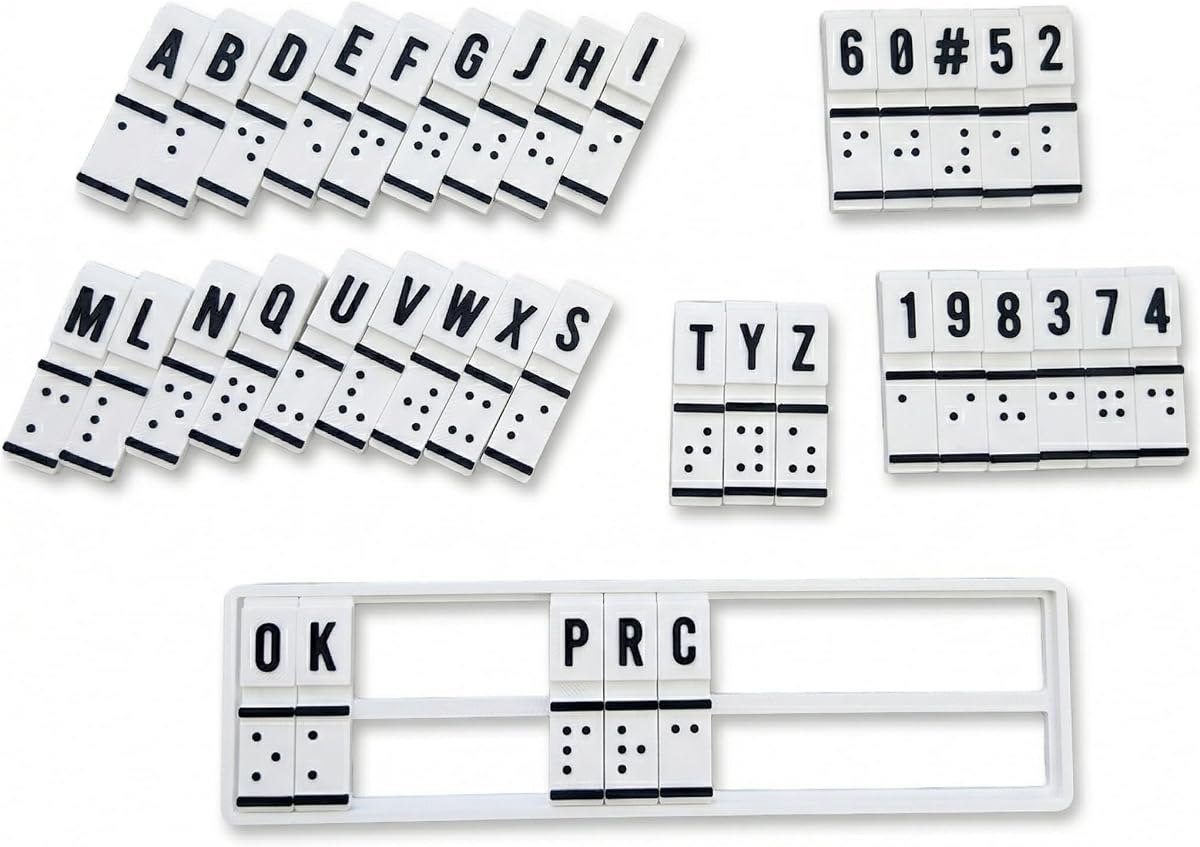
This translation machine serves as a specialized educational device for learning braille. It combines tactile input and translation functions, allowing users to convert text to braille manually without relying on digital interfaces.
We may earn a commission when you buy through this link, at no additional cost to you.
Designed for beginners and educators, the device features raised cells and mechanisms that build muscle memory. It supports rehabilitation specialists and teachers in guiding students through fundamental braille literacy skills.
The manual nature requires patience and practice to master the mechanical processes. While it lacks electronic connectivity, its focus is purely on tactile literacy and understanding braille patterns.
Best for schools or home study settings focused on foundational skills, this tool provides a structured way to practice. It complements electronic aids by reinforcing the tactile mechanics essential for reading.
By removing digital shortcuts, the device forces active engagement with braille patterns, deepening comprehension.
Ideal for teachers needing a standalone tool for classroom instruction without relying on screen readers.
We may earn a commission when you buy through this link, at no additional cost to you.
Selecting the right braille display or tool requires considering your daily needs, technical environment, and budget. Understanding key factors ensures you invest in a device that offers long-term value and accessibility.
The number of braille cells determines how much text is visible at once. Refreshable displays with 40 cells offer wider text lines than 20-cell models, reducing navigation. For slates, cell count dictates line length. Choose a size that balances reading comfort with portability.
A 40-cell display is ideal for complex documents, while 20 cells suffice for general mobile use.
Modern displays should connect via Bluetooth and USB to work with phones, tablets, and computers. Ensure the device supports multiple simultaneous connections if you switch between devices often. Stable protocols like Bluetooth 5 reduce dropouts.
Check compatibility with your screen reader software to ensure seamless integration.
For portable use, battery life is critical. Look for models offering at least 15 to 20 hours of continuous operation. Some manual tools like slates require no power but depend on user endurance. Consider charging needs based on your daily routine.
Long battery life ensures uninterrupted work during travel or school days.
Refreshable displays often include internal storage for books and documents. Higher capacity allows users to keep larger libraries offline. This is beneficial for users without constant internet access or those who download content in bulk.
32GB storage is a significant advantage over 16GB for heavy readers.
Durability depends on materials. Aluminum slates are sturdy but heavy, while plastic slates are quiet and lightweight. For electronic displays, casing quality and key resistance matter for long-term use. Evaluate wear resistance based on your usage frequency.
Aluminum offers ruggedness; plastic reduces noise in shared spaces.
Integrated apps for editing or libraries add value to displays. KeySoft Lite apps allow offline document creation. Ensure the device supports popular library formats like DAISY for audio compatibility. Software updates also impact longevity.
Native apps reduce the need for third-party tools.
Refreshable displays are high-cost investments compared to manual tools. Budgets vary from under fifty dollars for slates to thousands for premium displays. Weigh the cost against features and frequency of use to find the best value.
Consider if the tool replaces other accessories to justify the price.
Electronic displays have a learning curve for keyboard shortcuts and routing. Manual slates require tactile skill. Look for devices with intuitive layouts or tutorials. For beginners, tools with guided onboarding are essential.
User-friendly interfaces save time and frustration.
Start by charging your electronic device fully and pairing it with your preferred smartphone or computer. Ensure Bluetooth is enabled and follow the manufacturer's instructions to establish a secure connection.
For refreshable displays, adjust the braille dots if your model allows customization. Use cursor routing keys to navigate text efficiently. Keep keys clean to prevent dust from affecting dot movement.
For manual slates, ensure the stylus is sharp enough to emboss dots but not too sharp to damage the surface. Store slates in a protective case when not in use to avoid scratches and warping.
Most modern refreshable braille displays support both Windows and Android through Bluetooth or USB drivers. Always verify specific model compatibility with the device's operating system before purchase. Screen reader software like NVDA or TalkBack may require configuration.
Pins typically last several years with proper care and occasional dusting. If pins stick or fail, contact the manufacturer for repair or replacement. Some units allow self-replacement of specific cells depending on the design.
No, manual slates are for embossing paper or labels. They cannot interact with digital files directly. To read digital documents, use a refreshable braille display or screen reader combined with a braille keyboard.
High-quality portable displays often offer between 15 to 20 hours of battery life on a single charge. Some advanced models extend this further. Usage intensity and connectivity settings can slightly impact total runtime.
Some displays work as basic input devices but offer better functionality with dedicated apps. For example, the Brailliant series uses KeySoft Lite apps for enhanced editing and library access. Check compatibility before installing third-party tools.
Buying new ensures durability and warranty coverage, which is crucial for sensitive equipment. Used slates can be cost-effective but may have worn hinges or dull pins. Inspect condition carefully if opting for second-hand options.
The Brailliant BI 20X and 40X lead the market for connectivity and reliability, offering robust features for professional use. For budget-conscious users, various slate options provide effective alternatives for manual writing tasks.
Prioritize your specific needs such as cell count, portability, and digital compatibility. A larger display suits complex reading tasks, while a compact keyboard enhances mobility and privacy for phone users.
Prices for braille displays fluctuate based on availability and promotions. Check current listings before purchasing to ensure you get the best deal on your chosen device.