
Corded Landline Phone for Seniors
4.2Editor score
Photo dialing buttons
110dB loud ringer
Hands-free calling
This guide compares the top captioned telephone models for hearing impaired seniors, featuring real-time captions, amplified sound, and easy dialing features
Captioned telephones provide essential support for individuals with hearing loss by displaying text of phone calls in real time. These devices transform voice conversations into readable text, ensuring no word is missed during important discussions with family and friends.
We evaluated ten leading models based on screen size, caption accuracy, sound amplification, and ease of use. Our comparison includes traditional landline options, VoIP compatible units, and specialized devices designed for seniors with cognitive impairments.
Each product entry highlights key specifications, pros, cons, and ideal user scenarios. Please note that availability and pricing may fluctuate over time, so verify current details before making a final purchase decision for your home or care facility.
4.2Editor score

4.3Editor score
4.5Editor score
The following table presents a side-by-side comparison of all ten products reviewed in this guide. Each entry includes the product name, visual reference, direct purchase link, and key technical specifications to help you quickly identify the most suitable option for your specific needs.


This captioned telephone stands out as the leading choice for users needing reliable real-time transcription during calls. With a rating of 4.3, it balances advanced features with user-friendly design for hearing impaired seniors.
We may earn a commission when you buy through this link, at no additional cost to you.
The large touchscreen displays captions clearly, allowing you to listen and read simultaneously. It supports both auto captions and assisted captions with live operator backup. The built-in voicemail feature displays text of messages for easier review.
While it offers exceptional clarity, the device requires a high-speed internet connection and standard electrical power. Service is restricted to US residents with hearing loss, which may limit international users or those without broadband access.
Ideal for seniors who want a seamless experience combining traditional calling with modern accessibility features. The Hamilton CapTel 2400iSPNBT is the top recommendation for those prioritizing clarity and ease of use in daily communication.
The system transcribes spoken words into text instantly, reducing misunderstandings during conversations with family members or healthcare providers.
Users can adjust caption size and tone control to match their comfort level, making the phone accessible for various degrees of visual and auditory sensitivity.
We may earn a commission when you buy through this link, at no additional cost to you.
This device offers an affordable solution for seniors needing simplified dialing and loud sound. While it lacks direct captioning, it supports hearing and memory impairments effectively through visual and auditory aids.
We may earn a commission when you buy through this link, at no additional cost to you.
Eight customizable photo speed-dial buttons let users call family members instantly without memorizing numbers. The 110dB ringer ensures calls are never missed even in noisy environments or when hearing is significantly impaired.
The lack of captioning means it does not transcribe voice to text like dedicated captioned telephones. However, it remains a solid choice for users who prioritize ease of dialing and reliability over text transcription.
Best for seniors on a budget who need a reliable landline with large buttons and loud volume. Its simplicity makes it suitable for assisted living facilities or homes where basic communication is the primary goal.
Family photos on buttons remove the cognitive load of remembering numbers, reducing frustration for those with dementia or memory loss.
Powered by the phone line itself, it continues to work during electrical outages, ensuring connectivity when other devices fail.
We may earn a commission when you buy through this link, at no additional cost to you.
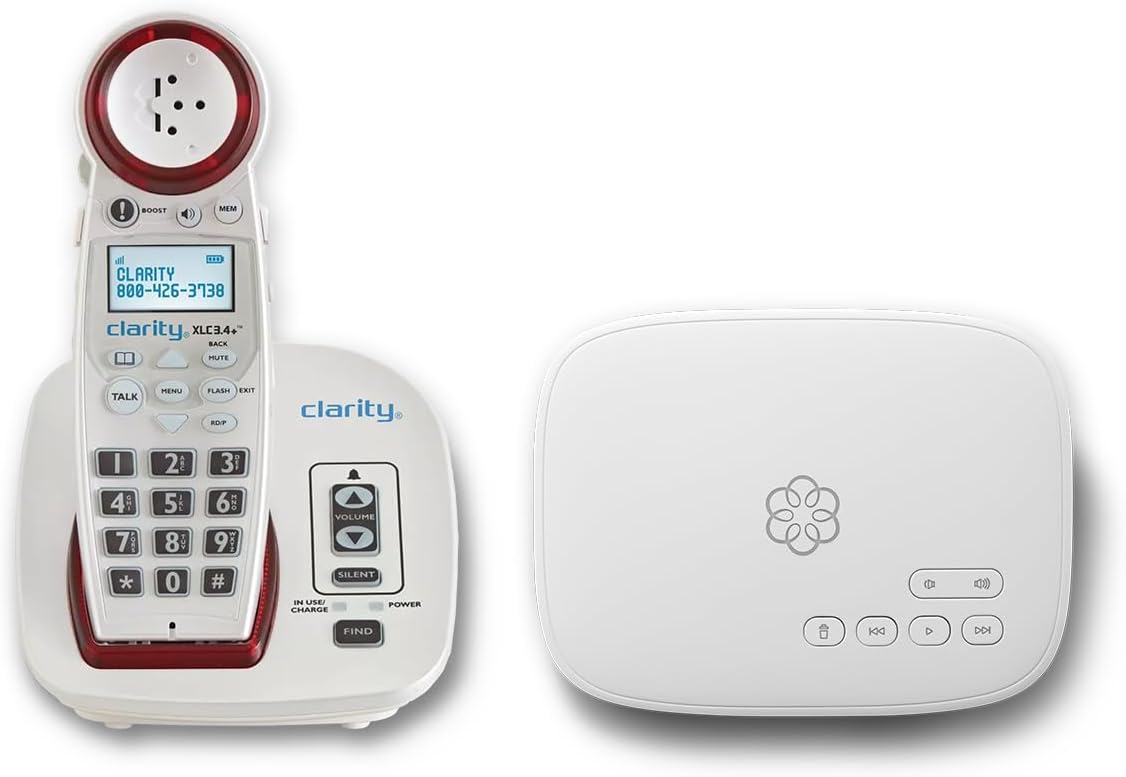
This bundle combines hardware and service for a comprehensive communication solution. With a 4.5 rating, it offers premium features like a concierge plan and robust call management tools tailored for hearing impaired users.
We may earn a commission when you buy through this link, at no additional cost to you.
The visual ringer and adjustable speaker volume ensure calls are noticed even if audio cues are missed. The talking keypad announces caller ID and menu options, supporting users with vision or hearing difficulties during navigation.
The subscription requirement means ongoing costs beyond the initial device purchase. Additionally, the system relies on internet connectivity, which may not be stable in all rural areas compared to traditional phone lines.
Ideal for users seeking a full-service package with advanced security and convenience features. The Ooma Telo bundle is recommended for those who value unlimited calling and professional setup support alongside accessibility.
24/7 concierge plan provides personalized assistance, helping users troubleshoot issues or configure settings without technical expertise.
Address-based 911 ensures emergency dispatchers know the exact location, while text alerts notify loved ones if 911 is dialed from home.
We may earn a commission when you buy through this link, at no additional cost to you.
This hybrid system allows flexibility with both a corded base and a cordless handset. It is designed specifically for seniors needing mobility and amplified sound without direct captioning features.
We may earn a commission when you buy through this link, at no additional cost to you.
The one-touch volume boost reaches up to 50dB, providing significant amplification for hard-of-hearing users. The base works during power outages, and visual indicators flash to alert users when a call arrives.
Since it does not offer real-time text captions, it may not suit users who rely on reading conversation content. However, it effectively addresses auditory barriers through sound amplification and visual cues.
Best for households needing multiple handsets or mobility. The expandable system supports family homes where different rooms need phone access, ensuring everyone stays connected with clear audio and alerts.
Having both corded and cordless options ensures reliability during outages while offering freedom to move around the house during conversations.
The smart call blocker filters up to 1,000 robocalls, reducing interruptions and enhancing peace of mind for seniors.
We may earn a commission when you buy through this link, at no additional cost to you.
This phone relies entirely on voice commands to answer, dial, and end calls. It is designed for users with limited mobility or dexterity who cannot press buttons effectively.
We may earn a commission when you buy through this link, at no additional cost to you.
The active listening mode keeps the phone ready to receive commands at all times. Users can say simple phrases to perform actions, removing physical barriers associated with traditional phone interfaces.
However, it may not work well for users with speech impairments or in noisy environments where voice recognition struggles. Additionally, it depends on the home phone line quality for clear command processing.
Recommended for seniors with arthritis or weakness in hands who prefer speaking to dialing. It offers a unique accessibility solution for those unable to manipulate physical controls comfortably.
Using natural language for dialing eliminates the need for complex keypad inputs, making communication more intuitive for many users.
The ability to operate without touching the device supports users with physical limitations who need independent communication tools.
We may earn a commission when you buy through this link, at no additional cost to you.
Designed for users with low vision, this phone features oversized buttons and customizable picture keys. It simplifies dialing by allowing visual cues instead of numeric memorization.
We may earn a commission when you buy through this link, at no additional cost to you.
The adjustable volume reaches up to 40dB, offering clear sound for hearing impaired seniors. Stored numbers are protected even if the phone line is unplugged, ensuring contacts are never lost.
While it lacks advanced captioning or smart features, its simplicity is a strength for users overwhelmed by complex technology. It focuses on reliability and basic accessibility for everyday calling.
Suitable for seniors needing a straightforward device with large visual elements. The wall-mountable option adds flexibility for placement in kitchens or bedrooms for easy access.
Large, high-contrast buttons reduce eye strain and make dialing easier for those with declining eyesight or arthritis in fingers.
Stored contacts remain safe during power or line interruptions, reducing the risk of losing important family numbers unexpectedly.
We may earn a commission when you buy through this link, at no additional cost to you.
This device is designed specifically for VoIP networks, offering large buttons and customizable image keys for seniors with cognitive issues. It stands out with high sound amplification and visual alerts.
We may earn a commission when you buy through this link, at no additional cost to you.
The image keys allow family photos to be inserted, making identification easy for those with dementia. A dedicated HELP key provides instant access to emergency contacts, enhancing safety in daily use.
It is not compatible with standard analog phone lines, which requires an active internet telephony setup. Users must ensure their internet service provider supports SIP or PBX systems before purchasing.
Best for modern homes using internet calling services. The combination of visual cues and high volume makes it ideal for nursing homes or facilities using digital phone systems.
Inserting photos into keys helps users with memory loss recognize contacts quickly, reducing confusion and anxiety during calls.
The HELP key offers a direct line to emergency contacts, ensuring quick help is available without navigating complex menus.
We may earn a commission when you buy through this link, at no additional cost to you.
This model focuses on delivering high-quality audio performance for users who struggle with low sound clarity. It is built to enhance the listening experience without complex digital features.
We may earn a commission when you buy through this link, at no additional cost to you.
The product is designed for performance, prioritizing sound amplification and transmission quality. It aims to make conversations easier by boosting volume and clarity on standard landline connections.
However, detailed specifications are sparse, and user ratings are moderate. This suggests it may not meet the needs of those seeking advanced accessibility tools like captioning or visual alerts.
Suitable for users needing basic sound amplification without extra features. It remains an option for those with reliable landlines who require clear audio transmission for daily calls.
The design prioritizes clean signal transmission to minimize distortion, ensuring voices sound natural and loud enough for hearing aid users.
With fewer digital options, it reduces the learning curve for seniors who prefer straightforward functionality over complex menus.
We may earn a commission when you buy through this link, at no additional cost to you.
This phone includes voice dialing and talking features to assist users with memory and vision challenges. It offers 17 programmable memories for voice-activated dialing and caller announcements.
We may earn a commission when you buy through this link, at no additional cost to you.
The visual LED ring indicator and 40dB volume options support hearing and vision impairments. However, the low user rating indicates potential issues with reliability or voice recognition accuracy.
Voice activation may struggle with accents or background noise, leading to frustration for some users. It is older technology compared to modern smartphones or captioned telephones with AI assistance.
Best considered if traditional voice dialing is needed without internet dependence. For most seniors, newer models offer better accuracy and support for daily communication.
Up to 17 programmable names allow users to store contacts for voice dialing, reducing the need for manual number entry.
A bright LED indicator alerts users visually to incoming calls, complementing auditory alerts for better awareness.
We may earn a commission when you buy through this link, at no additional cost to you.
This phone features nine picture memory keys for instant dialing without memorizing numbers. It supports seniors with memory loss through visual cues and high volume audio.
We may earn a commission when you buy through this link, at no additional cost to you.
The LED call flash provides a visual alert for incoming calls, ensuring they are not missed in noisy environments. Hands-free calling allows for comfortable use without holding the handset.
It does not support internet-based features like caller ID or voicemail, keeping the device simple and reliant on traditional phone lines. This can be a limitation for modern communication needs.
Ideal for caregivers seeking a simple, affordable device for dementia care. The combination of picture buttons and loud sound makes it a reliable tool for maintaining family connections.
Nine photo memory slots allow easy storage of key contacts, enabling seniors to connect quickly without searching for numbers.
LED flashing ensures calls are noticed even when hearing is impaired, providing peace of mind for users and their families.
We may earn a commission when you buy through this link, at no additional cost to you.
Selecting the right captioned telephone requires understanding your specific needs regarding hearing loss, vision, and technical setup. This guide breaks down the key factors to help you make an informed decision.
Many captioned phones require a subscription to a captioning service that transcribes calls in real time. Ensure your internet connection meets the speed requirements for smooth transcription without delays.
Look for models offering both automated and assisted captioning. Assisted options provide operator support if captions fail, adding a layer of reliability for important calls.
A larger screen makes reading captions easier, especially for users with vision impairments. High contrast displays reduce eye strain during long conversations or nighttime use.
Consider adjustable text sizes. Being able to change the font size ensures the captions remain readable as your needs change over time.
Check the maximum volume and decibel output to ensure it matches the level of hearing loss. Phones with 40dB or higher amplification are often necessary for severe impairments.
Adjustable volume settings allow you to fine-tune audio to suit different environments. This prevents feedback or distortion that might occur at maximum settings.
For users with dementia or memory issues, picture dialing or large buttons simplify the process of making calls. Avoid models with complex menus that require extensive programming.
Look for phones that are easy to set up, such as plug-and-play devices. Complicated installation can be a barrier to using the phone effectively.
Features like visual ringers, SOS buttons, and hearing aid compatibility add value beyond captioning. These extras can provide safety and convenience in daily use.
Consider phones that support hands-free calling. This helps users with arthritis or limited grip strength who may struggle to hold a handset.
Some models work during power outages by using phone lines, while others require internet or mains electricity. Choose based on your reliability needs during emergencies.
Check if the phone requires Wi-Fi or a standard phone line. Traditional landlines offer stability, while VoIP models offer flexibility for modern networks.
Captioned voicemail allows users to read messages instead of listening to them, enhancing clarity. Look for built-in answering machines if this feature is not standard.
Call blocking features reduce unwanted interruptions from robocalls or telemarketers, improving peace of mind for seniors living independently.
Select models with accessible customer support, especially if technical setup is involved. Some brands offer concierge help or dedicated lines for seniors.
Verify warranty terms and return policies. A flexible return period allows you to test the device at home before committing fully.
Start by connecting the phone to a reliable internet or landline source depending on its requirements. Ensure the power supply is stable and all cables are secure to prevent interruptions during calls.
Register your device with the captioning service provider. This usually involves verifying your hearing loss status through documentation to activate the transcription features legally and effectively.
Regularly update the phone's settings to ensure software remains current. Clean the screen and buttons gently to maintain visibility and responsiveness over time for optimal performance.
Some models rely on traditional landlines and do not require internet. However, real-time captioning typically needs a data connection for transcription services. Always check the specific product details.
The telephone hardware often has a cost, but captioning services are frequently subsidized or free for qualifying users with hearing loss in the US. Verify eligibility and registration requirements with your provider.
Most captioned services are restricted to domestic calls due to language and legal regulations. International calls may not display captions. Contact the provider for exceptions.
Modern systems use human-assisted fallback options. If captions fail, you can request assisted captioning through an operator. Adjusting settings may also improve accuracy over time.
Many models are designed to be hearing aid compatible, reducing interference. Look for T-coil support or Bluetooth connectivity to pair with modern hearing devices.
Most phones allow assigning numbers to buttons through a simple menu or dialing sequence. Some support photo keys for easier identification by those with memory impairments.
We reviewed ten top models offering unique features for hearing impaired seniors. From the Hamilton CapTel 2400iSPNBT for real-time clarity to budget-friendly landline options, there is a choice for every need.
Prioritize screen size, captioning accuracy, and volume controls based on your specific hearing loss. Consider additional features like SOS buttons or photo dialing if memory or safety is a concern.
Always check the current availability and terms of service before purchasing. Technology and regulations may change, so confirm that the chosen device meets your requirements today.