
Moezuti 20-Port Charging Station
4.8Editor score
20 mixed USB-C/A ports
600W total power output
Included charging cables included
This guide compares the top charging stations for Chromebooks to help schools and offices organize device storage and power efficiently with safety features.
Finding the right charging station for Chromebooks is essential for schools and offices managing multiple devices. A good unit keeps tablets and laptops organized while providing safe power delivery for daily use.
We compared ten leading models based on capacity, safety features, build quality, and ease of use. Each option offers unique benefits for classrooms, libraries, or shared workspaces needing reliable device management.
Every pick shows key specs and real user ratings to help you choose confidently. Prices and availability change frequently so check current listings before making your final decision today.
4.8Editor score

4.7Editor score
4.7Editor score
This side-by-side comparison highlights the key specifications and capabilities of each model to help you identify the perfect fit for your specific charging and storage needs.


This POCHAR unit stands out as a top choice for educators and office managers needing reliable device storage. With a strong 4.7 rating it delivers consistent performance for daily charging needs in busy environments.
We may earn a commission when you buy through this link, at no additional cost to you.
Its wide-angle slots accommodate Chromebooks up to 14 inches and 1.4 inches thick ensuring your specific devices fit securely. The built-in surge protection keeps equipment safe from voltage spikes while the compact design fits on any standard desk.
While it holds fewer devices than larger carts the convenience of no assembly saves valuable setup time immediately. The durable construction ensures it withstands high-traffic use without showing signs of wear or deformation over time.
Buy this if you need a quick reliable solution for under ten Chromebooks in a classroom or shared workspace. It balances safety convenience and organization better than most competitors on the market today.
The slots are specifically engineered to hold various laptop sizes including Chromebooks without needing adjustable dividers.
Surge protection is integrated into the power strip to shield your expensive electronics from electrical damage during use.
We may earn a commission when you buy through this link, at no additional cost to you.
The Moezuti station offers exceptional value for anyone needing to charge many devices at once without expensive AC adapters. Its 4.8 rating reflects high user satisfaction with its speed and reliability in home or small office settings.
We may earn a commission when you buy through this link, at no additional cost to you.
Two high-speed PD 65W ports can charge laptops like Chromebooks directly while the remaining ports handle phones and tablets efficiently. The included cables eliminate the clutter of finding specific cords for each device on your desk.
While it lacks AC outlets for traditional plugs the USB-C versatility covers most modern Chromebook needs effectively. The GaN chip ensures safe operation by preventing overheating even when all ports are in use simultaneously.
Choose this if you want a cost-effective solution that charges twenty devices simultaneously with minimal cable mess. It is ideal for shared spaces where flexibility and speed matter most for daily tech use.
Advanced safety technology monitors temperature in real time to prevent overheating and protect connected devices from damage.
Ten short mixed cables come included in the box to simplify setup and reduce the need for extra purchases.
We may earn a commission when you buy through this link, at no additional cost to you.
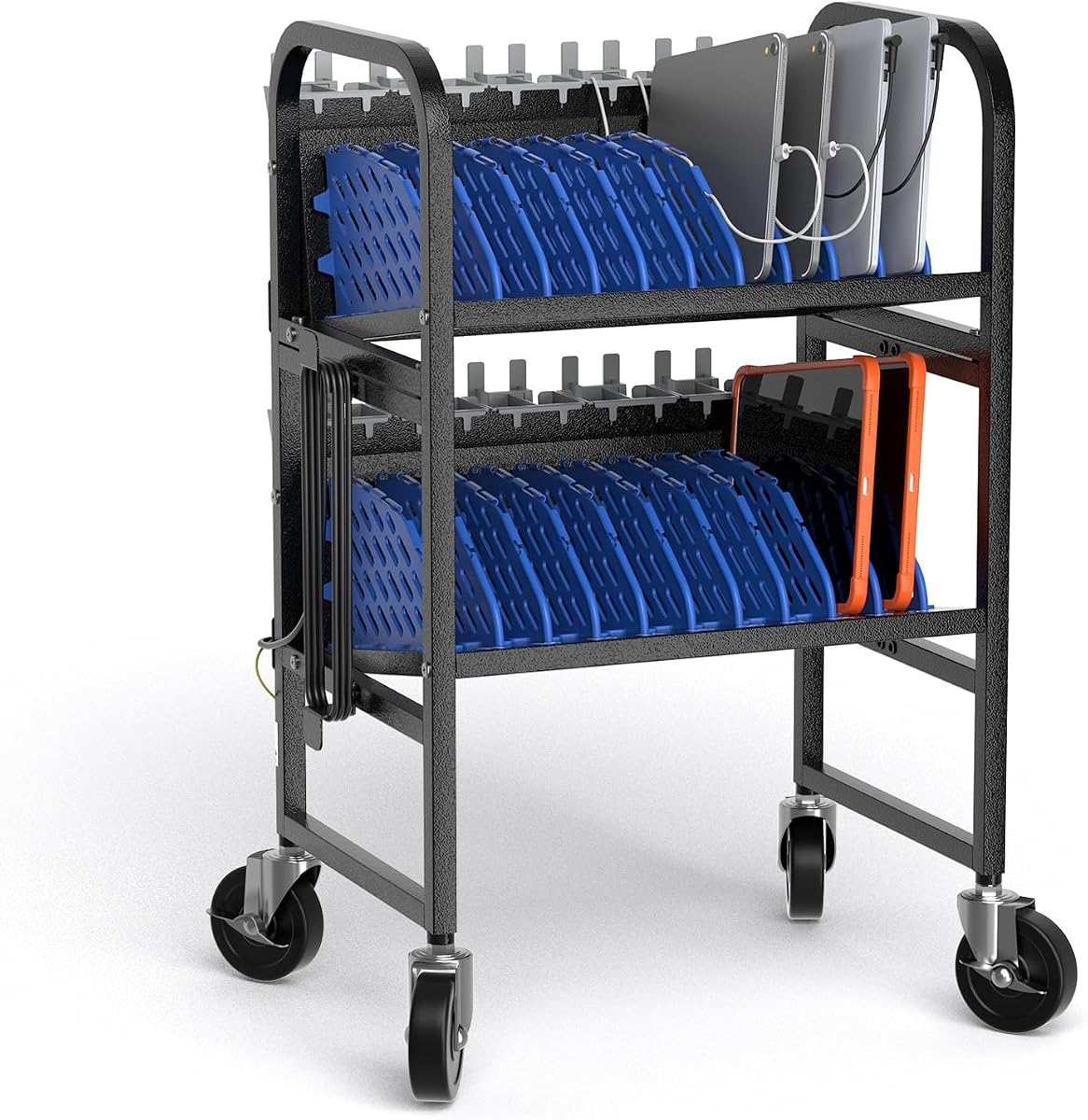
This mobile cart is a premium choice for schools needing to move large fleets of Chromebooks between rooms easily. Its industrial-grade build quality ensures it lasts through years of daily use in high-traffic educational environments.
We may earn a commission when you buy through this link, at no additional cost to you.
Twenty individual slots keep devices separated and organized while the open-frame design allows airflow to prevent overheating during charging. Locking casters provide stability when parked so devices remain secure during lessons or meetings.
While it requires more floor space than desk models its mobility makes it essential for dynamic classrooms. The adjustable dividers let you customize the layout for various tablet or laptop sizes as needed.
Buy this if you need a robust solution for twenty Chromebooks in a busy school setting. Its durability and mobility make it worth the investment for long-term device management.
Ergonomic side handles and durable swivel casters make it easy to transport the unit between classrooms or offices.
A dedicated rear system keeps charging cords neatly arranged to prevent tangling and maintain a tidy workspace.
We may earn a commission when you buy through this link, at no additional cost to you.
This station is designed for offices needing organized charging for both laptops and phones simultaneously. The 4.4 rating indicates solid performance for shared workspaces where cable management is a priority.
We may earn a commission when you buy through this link, at no additional cost to you.
Six AC outlets support Chromebook adapters while four USB ports handle phones and accessories. The integrated cable routing system helps keep cords tidy on desks or countertops to reduce clutter effectively.
Although it lacks cabinet doors for security the open rack allows quick access for users throughout the day. The surge-protected strip rated for 110V provides reliable power management for all connected electronics.
Choose this if you need a compact vertical solution for ten mixed devices in an office or library. Its design prioritizes accessibility and cable organization for daily workflow efficiency.
Having both AC and USB options allows you to charge traditional laptops and modern tablets without needing extra adapters.
The vertical rack maximizes storage while minimizing the footprint on your desk or countertop space.
We may earn a commission when you buy through this link, at no additional cost to you.
With a perfect 5.0 rating this rack is praised for its robust build and effective design for high-density charging. It is ideal for users who already have adapters and need secure storage for fourteen devices.
We may earn a commission when you buy through this link, at no additional cost to you.
The open-frame design allows natural ventilation to prevent overheating during extended charging sessions. Solid steel construction ensures the rack remains stable even when fully loaded with heavy laptops or tablets.
While you must supply your own power strip this unit focuses purely on structural integrity and organization. Leveling feet help the rack sit perfectly on uneven surfaces so devices remain secure without tipping.
Buy this if you need a durable storage frame that does not require assembly of electronic components. It offers exceptional value for schools needing a simple reliable storage solution.
The open structure promotes airflow around devices to keep them cool and safe during long charging periods.
Robust steel materials provide enhanced load-bearing capacity to handle daily high-frequency usage demands.
We may earn a commission when you buy through this link, at no additional cost to you.
This cart is designed specifically for school environments needing a simple safe charging solution for Chromebooks. While it has no official rating its UL-approved power strip makes it a reliable choice for educators prioritizing safety.
We may earn a commission when you buy through this link, at no additional cost to you.
Padded shelves protect devices from scratches while plastic cord clips keep cables organized during charging. Removable dividers let you adjust the slots for larger laptops or tablets as your device needs change.
Although it requires assembly the process is straightforward and allows you to customize the setup. The open design ensures students and teachers can quickly access devices without struggling with doors or latches.
Choose this if you need an affordable certified solution for eight Chromebooks in a classroom. It balances safety and simplicity well for daily educational use.
Power strips inside the cart are UL approved to ensure safe electrical handling for students and staff.
Soft pads and dividers prevent accidental scratches or damage to your valuable equipment while charging.
We may earn a commission when you buy through this link, at no additional cost to you.
This station combines storage and charging into one sleek unit with a strong 4.7 rating for reliability. It is perfect for libraries or offices needing to manage ten tablets or Chromebooks neatly.
We may earn a commission when you buy through this link, at no additional cost to you.
Cable clips on the back eliminate tangling while a lower storage tray holds chargers and accessories. The open-frame structure promotes airflow to reduce overheating risks during long charging periods.
Built with industrial-strength steel this unit withstands daily use in high-traffic areas without showing wear. While the slots are fixed its compact dimensions fit easily on standard desk or counter spaces.
Buy this if you want a durable organized solution that handles cables well. Its design prioritizes both device safety and workspace tidiness for shared environments.
A lower storage tray holds chargers and supplies keeping your workspace organized and clutter-free.
Overheat prevention is built into the open structure to ensure safe operation during extended sessions.
We may earn a commission when you buy through this link, at no additional cost to you.
Belkin is a trusted brand known for quality electronics and this station reflects that reputation with a 4.3 rating. It offers solid protection and organization for ten tablets or Chromebooks in a professional setting.
We may earn a commission when you buy through this link, at no additional cost to you.
Ten surge-protected AC outlets ensure your devices charge safely from voltage spikes. Wide-angle slots accommodate various cases and sizes making it versatile for mixed device fleets in schools.
The station can be mounted on a surface for added security or placed on a standard AV cart. Labeling space allows easy identification of each device so sharing equipment remains organized.
Choose this if you prefer a well-known brand with strong protection features. It is reliable for environments where equipment safety and identification are priorities.
A $15,000 connected equipment warranty offers extra peace of mind for protecting your valuable hardware.
Small footprint and surface mounting features let you secure the unit to tables or carts easily.
We may earn a commission when you buy through this link, at no additional cost to you.
This station delivers fast charging for multiple devices with a 4.5 rating for speed and reliability. It is ideal for offices needing quick turnaround for phones and laptops using USB-C power.
We may earn a commission when you buy through this link, at no additional cost to you.
Dual 65W GaN ports can charge laptops efficiently while shorter cables keep your desk tidy. Flame-retardant ABS material ensures long life and safety against potential electrical hazards.
While it does not support traditional AC adapters its USB-C versatility covers most modern needs well. Four non-slip rubber pads protect your desktop from scratches during charging.
Buy this if speed is your top priority for charging ten devices simultaneously. It is a practical solution for busy shared workspaces needing efficient power delivery.
GaN technology allows for faster charging speeds in a smaller package compared to traditional silicon chargers.
Non-slip rubber pads protect your desk surface from scratches and keep the station in place.
We may earn a commission when you buy through this link, at no additional cost to you.
This mobile station earns a 5.0 rating for its easy setup and reliable build quality for schools. It provides a tidy solution for ten devices while allowing quick movement between classrooms.
We may earn a commission when you buy through this link, at no additional cost to you.
Tool-free assembly saves time and the smooth-rolling casters make transport easy. Integrated cable clips keep cords organized while premium steel construction resists rust and wear over years.
While capacity is lower than larger carts the design prioritizes agility and simple maintenance. Wipe-clean surfaces ensure the cart looks professional with minimal effort in busy environments.
Choose this if you need an agile unit for ten Chromebooks in a classroom setting. Its simplicity and quality make it a strong contender for shared spaces.
Straightforward tool-free setup allows you to start organizing and charging devices immediately.
Smooth wipe-clean surfaces make maintenance effortless and keep the unit looking professional.
We may earn a commission when you buy through this link, at no additional cost to you.
Selecting the right charging station involves evaluating capacity, safety features, and design to ensure your devices stay organized and powered efficiently.
Determine how many Chromebooks you need to charge simultaneously to choose the right slot count. Units range from eight to twenty devices so pick one that matches your typical classroom or office size.
Ensure the total capacity fits your daily usage without overcrowding which could lead to damage or inefficient charging.
Check whether the station includes AC outlets or only USB ports to match your Chromebook chargers. Some models offer both types providing flexibility for different devices in your inventory.
A power strip with surge protection is essential to keep your equipment safe from electrical voltage spikes.
Look for sturdy materials like steel or heavy-duty ABS that resist wear from frequent handling. High-traffic environments like schools need robust construction to withstand daily use over years.
A durable frame ensures the rack remains stable even when fully loaded with heavy laptops.
Decide between static desk units or mobile carts with wheels depending on your workflow. Open designs allow better airflow but enclosed cabinets offer more security against theft.
Choose a design that fits your space and security needs to maintain organization efficiently.
Integrated cable clips and routing holes help prevent tangles and keep your workspace tidy. Proper organization reduces wear on cords and makes it easier to troubleshoot charging issues.
Prioritize models with built-in systems to save time on manual cable organization.
Verify the width and depth of slots to ensure they fit your specific Chromebook models and cases. Some stations accommodate up to 14 or 15 inches so check your device dimensions.
Compatible slots ensure devices sit securely and charge without slipping or getting stuck.
Surge protection is a critical feature to shield your devices from voltage fluctuations during charging. Look for certifications like UL approval for added assurance of electrical safety.
Safety features protect both your hardware and users from potential electrical hazards in busy areas.
Consider whether assembly is required or if the unit is ready to use out of the box. Quick setup reduces downtime and allows you to deploy devices for classes immediately.
Choose models that align with your technical comfort level for installation to save time.
Place the station in a well-ventilated area to prevent devices from overheating during charging. Ensure there is enough space around the unit for air circulation and safe access.
Plug the power strip into a grounded outlet and connect each device securely to its designated port or AC adapter. Organize cables using built-in clips to keep the area tidy and safe.
Regularly wipe down the metal surfaces and slots with a damp cloth to remove dust and maintain hygiene. Inspect cords periodically for signs of wear and replace them as needed to ensure safe operation.
Most units accommodate Chromebooks up to 14 inches wide but check slot dimensions for larger models. Some allow adjustment for different sizes so verify your device fits before purchasing.
Many models include built-in power strips but some are storage racks only. Check the product details to confirm if power outlets come with the unit.
Yes most stations are designed to handle mixed devices like Chromebooks tablets and laptops. Adjustable dividers or wide slots help you organize different device types together.
Use an open-frame design that promotes airflow around your devices. Keep the station away from direct sunlight and ensure it has enough space for ventilation.
Look for surge protection to guard against voltage spikes and UL certification for electrical safety. Some units also include overheat prevention chips for extra device protection.
Some require basic assembly while others are ready to use out of the box. Check product specs for tool-free options if you need quick deployment in a classroom.
The POCHAR 8-Device Universal AC Station stands out as the top overall pick for its reliability and ease of use. It offers the best balance of safety and organization for most classroom needs today.
For large fleets consider the POCHAR 20-Device Laptop Charging Cart for mobility and durability in high-traffic areas. Its industrial build ensures it lasts for years of daily use without issues.
Remember that prices and availability change frequently so check current listings before buying. Evaluate your specific needs for capacity and safety to make the right choice for your school or office.