
Computer Speakers for Desktop PC
4.1Editor score
Loud clear Hi-Fi sound
Plug and play setup
Compact column design
This guide compares the top cheap PC speakers for 2026 based on sound quality, build, and features to help you find the best audio setup without overspending.
Finding the right audio solution for your desktop does not require breaking the bank. Cheap PC speakers have evolved significantly, offering crisp sound and reliable connectivity for everyday tasks. Whether you watch videos or browse the web, quality audio enhances your experience.
We analyzed ten highly rated models to compile this definitive list for 2026. Our evaluation focused on sound clarity, ease of setup, and overall build quality. Each product was reviewed against common user needs to ensure practical value.
Every pick includes detailed specifications and real-world performance notes. We highlight key strengths and potential limitations to help you decide quickly. Please note that availability and pricing can change frequently on retailer sites.
4.1Editor score

4.6Editor score
4.2Editor score
This side-by-side comparison highlights the core specifications of every selected model. You will see differences in connectivity, power source, and unique design features at a glance.




The Creative Pebble 2.0 stands out as a top choice for affordable audio. It delivers clear and balanced sound right out of the box. Its high rating reflects consistent performance across different use cases.
We may earn a commission when you buy through this link, at no additional cost to you.
These speakers use far-field drivers and passive radiators for deep bass. The 45-degree elevation ensures sound is directed straight at your ears. Setup is easy since you only need one USB cable for power.
While they lack extra volume knobs on the base, the front controls are accessible. The design fits well under monitors without taking up much desk space. They might lack a dedicated subwoofer but sound full for small rooms.
Anyone needing reliable audio for work or casual entertainment should consider this model. It offers a great balance of price and performance. This pick is ideal for users who value simplicity and clean aesthetics.
The elevated drivers aim audio directly at you for better clarity.
A single USB connection powers and connects the speakers instantly.
We may earn a commission when you buy through this link, at no additional cost to you.
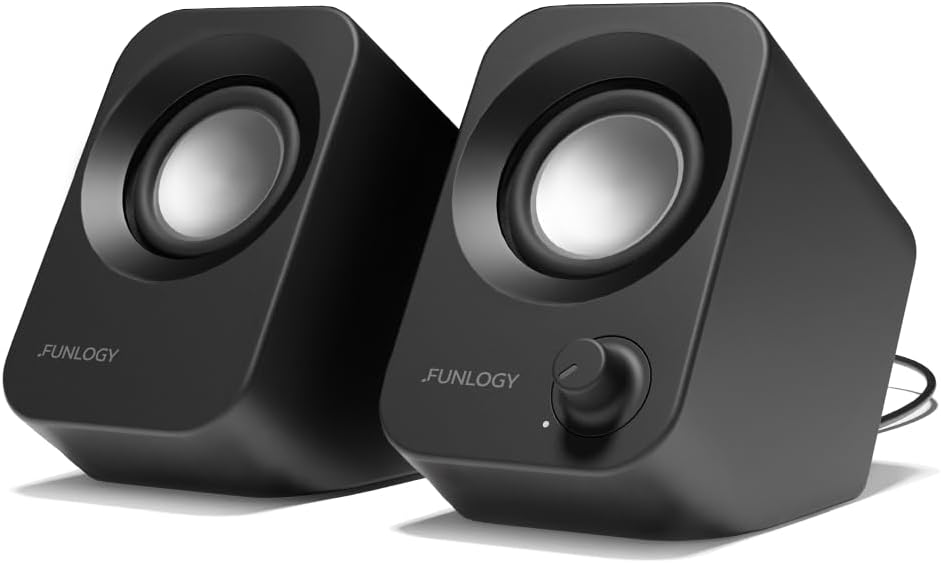
This FUNLOGY model brings premium features to a competitive price point. It delivers strong audio with clear mids and punchy bass. The 30-degree tilt ensures you hear sound clearly without moving.
We may earn a commission when you buy through this link, at no additional cost to you.
It features dual 48mm drivers and passive radiators for rich sound. The gold-plated AUX input reduces static noise during use. A 1-year warranty adds confidence in its durability and build quality.
The design is stylish and fits well on modern desks. While it costs more than basic models, the extra volume and clarity are noticeable. The lack of wireless connectivity is a minor trade-off for this price.
Buyers looking for better audio than standard PC speakers will love this. It suits gamers and media consumers who need louder, clearer sound. The tilt design makes it perfect for monitor setups.
Dual drivers and radiators provide rich bass and clear highs.
The upward tilt directs audio straight to your listening position.
We may earn a commission when you buy through this link, at no additional cost to you.
This model offers an excellent entry point for basic computer audio needs. It provides loud and distortion-free sound for videos and music. The setup is straightforward with USB power and an AUX cable.
We may earn a commission when you buy through this link, at no additional cost to you.
The column-shaped design saves desk space while looking modern. It includes anti-slip pads to keep them stable on any surface. The 30-day guarantee helps with purchase confidence for budget shoppers.
Build quality is plastic but functional for the price. The bass is not deep but adequate for general tasks. Cables are long enough to place speakers optimally near your PC.
Ideal for students or office workers needing simple audio solutions. You get reliable performance without spending much money. It is a solid choice for secondary rooms or workstations.
Plug and play setup requires no drivers for immediate use.
Slim profile keeps your desk tidy and clutter free.
We may earn a commission when you buy through this link, at no additional cost to you.
These speakers solve desk clutter by mounting directly on your monitor. The loud sound and deep bass are impressive for a small unit. Touch controls make volume adjustment quick and modern.
We may earn a commission when you buy through this link, at no additional cost to you.
Adaptive channel switching ensures left and right audio are correct. The USB-C adapter expands compatibility with newer laptops. You can clamp them on top or side of your monitor easily.
The design saves desk space effectively for tight setups. However, the clamp must be sturdy enough to hold the weight. They might not fit ultrathin monitors without a stand.
Perfect for gamers wanting sound without taking up desk area. The bass adds excitement to movies and games. This is a smart solution for modern monitor-centric workstations.
Clip-on design clears your desk for better organization.
G-sensor technology keeps stereo left and right accurate.
We may earn a commission when you buy through this link, at no additional cost to you.
Amazon Basics offers a dependable pair of speakers for daily use. The sound is amplified well for laptops and desktops. An in-line volume control makes adjustments easy without software.
We may earn a commission when you buy through this link, at no additional cost to you.
A bottom radiator helps create springy bass for the size. The metal finish adds a premium touch to a budget item. They connect easily via USB for power and Aux for audio.
They lack flashy features but perform consistently. The cable length is standard so you may need extensions for wide desks. However, the value for money remains strong here.
Recommended for users who need no-fuss audio. It is great for basic office tasks or web browsing. The sturdy base keeps them steady on your desk.
Inline knob lets you adjust volume without touching PC.
Bottom radiator improves low frequency response.
We may earn a commission when you buy through this link, at no additional cost to you.
This model focuses on portability and simple function. It uses USB power so you can plug into any port. The headphone jack lets you connect headphones directly to the speakers.
We may earn a commission when you buy through this link, at no additional cost to you.
A front volume control includes a standby switch for power. It weighs only 1.4 pounds so it is easy to move. The frequency range covers most daily audio needs well.
The small size fits anywhere but limits volume. It is best for quiet office work or personal use. You will not get loud audio but clarity is acceptable.
Great for travelers or small workspaces. The plug-and-play design ensures instant use. Choose this for basic sound in tight areas.
Lightweight design makes it easy to move around.
Headphone jack allows quick switching to private listening.
We may earn a commission when you buy through this link, at no additional cost to you.
This model simplifies your setup by combining audio and power. A single USB cable does everything so you avoid mess. Dual drivers deliver loud sound with dynamic range.
We may earn a commission when you buy through this link, at no additional cost to you.
Enhanced bass makes movies feel more immersive. It works across Windows, macOS, and Linux easily. Plug and play setup means you start listening immediately.
The sound bar style saves space. The build is plastic but functional. There is no built-in microphone for calls.
Ideal for users wanting a clean desk. The sound quality is strong for the price. Great for office work and media streaming.
Single USB cable powers the speaker and carries audio.
Supports multiple operating systems for easy use.
We may earn a commission when you buy through this link, at no additional cost to you.
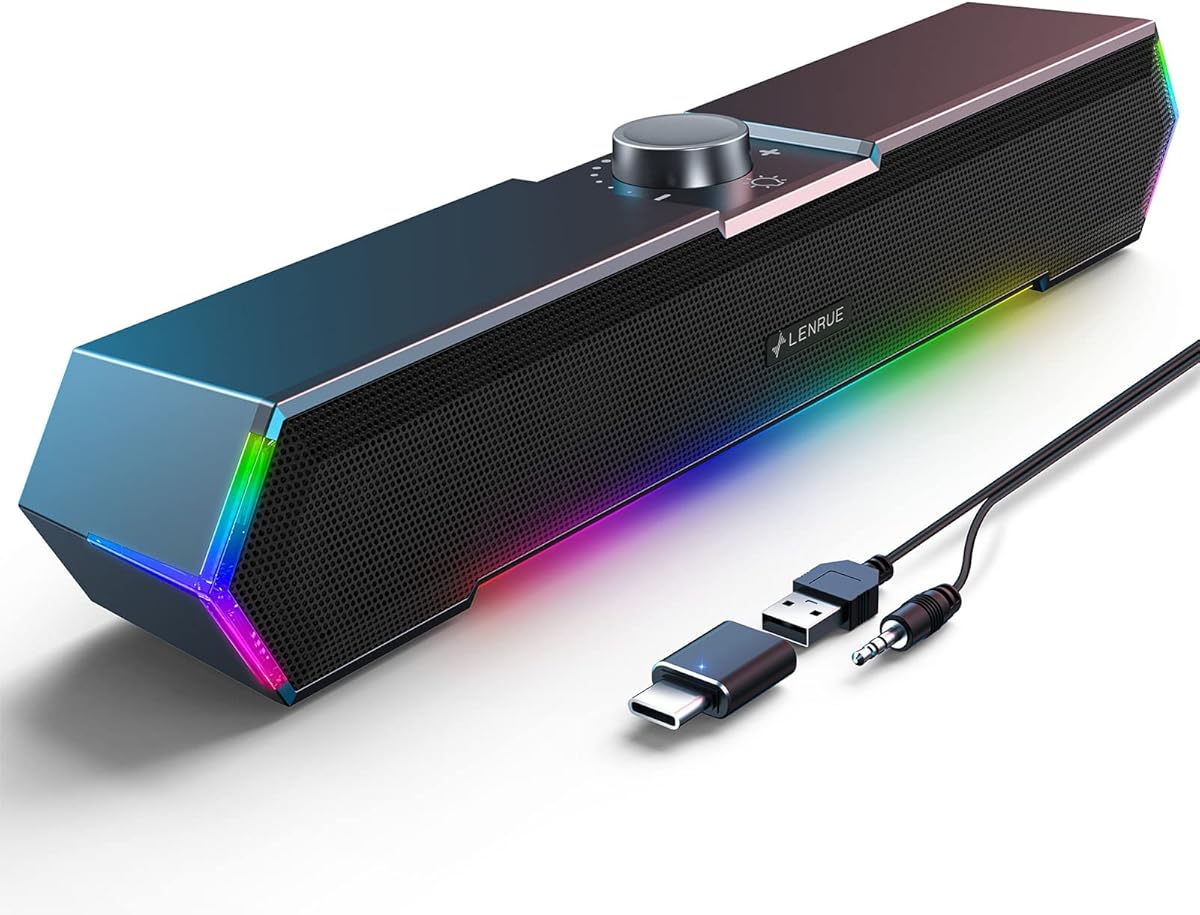
This speaker adds a cool visual vibe with its touch lights. The surge stereo sound provides clear noiseless audio. It fits under monitors perfectly without taking extra space.
We may earn a commission when you buy through this link, at no additional cost to you.
You can toggle the lights with one touch button. The included USB-C adapter works with modern devices. Cables are glued together to reduce clutter on your desk.
The design is tailored for gaming setups. Sound is loud enough for casual play. It lacks modern conveniences like Bluetooth connectivity.
Best for gamers who like RGB aesthetics. The clear sound enhances video and audio. It is a stylish budget choice for PCs.
Touch lights add a fun glow to your setup.
Glued wires keep your desk looking neat.
We may earn a commission when you buy through this link, at no additional cost to you.
This model shines with its vibrant RGB lighting effects. Dual 3W drivers produce balanced sound with deep bass. It is perfect for gamers needing color and audio.
We may earn a commission when you buy through this link, at no additional cost to you.
An inline volume knob helps adjust sound levels easily. The 7-color lighting cycles automatically for a nice look. It connects via USB and 3.5mm for simple use.
Check your system volume if sound is low. The design is ultra-compact for small spaces. The lighting might be distracting for some users.
Ideal for users wanting style on a budget. The sound is good for music and games. A solid pick for younger users.
7-color lighting enhances your gaming workspace.
Inline rotary knob offers quick sound control.
We may earn a commission when you buy through this link, at no additional cost to you.
This speaker uses 2x3W technology for clear sound. It connects easily with USB and AUX cables. The mini design fits any desktop computer well.
We may earn a commission when you buy through this link, at no additional cost to you.
Cables are glued to avoid clutter on your desk. Anti-slip pads keep them stable. A 18-month warranty offers long-term security for buyers.
The sound is loud for videos and music. Build is plastic but durable enough for home use. Controls are basic but functional.
Perfect for home offices needing clear audio. The guarantee adds value. Great for simple desktop setups.
Loud sound enhances videos and music.
Anti-slip pads keep speakers from sliding.
We may earn a commission when you buy through this link, at no additional cost to you.
Choosing the right budget speakers depends on your specific needs. We break down the most critical factors to help you pick the best model.
Most cheap PC speakers use USB for power which simplifies your setup. Some models might also accept AC power but USB is standard for portability. Check that your computer has free USB ports before buying.
USB power is usually sufficient for desktop use and reduces cable clutter.
Look for a 3.5mm Aux input if your device has a headphone jack. USB-only models are convenient but may lack audio control options. Ensure compatibility with your specific laptop or desktop ports.
A 3.5mm input offers flexibility if you switch devices frequently.
Higher wattage often means louder output and deeper bass. Speakers with passive radiators tend to have better low frequencies. Read reviews to confirm the sound matches your expectations.
Prioritize models with bass features if you watch movies.
Compact speakers save valuable desk space in small setups. Consider how they fit under your monitor or beside it. Design should match your office aesthetic to look good.
Choose a size that fits your available desktop area.
Volume knobs or buttons make adjusting sound easy. Inline controls on cables are handy but less durable. Touch controls on modern speakers are sleek and easy.
Physical knobs are reliable for daily volume changes.
Many budget speakers include a 1-year warranty. Longer support like 18 months adds peace of mind. Check return policies in case of defects.
Look for at least a 1-year warranty coverage.
Glued or bundled cables keep your desk neat. Long cables allow better speaker placement flexibility. Short cables might limit your setup options.
Longer cables offer better placement for desk layouts.
Ensure speakers work with Windows macOS or Linux. Some models have special features for gaming consoles. Universal compatibility is safest for mixed use.
Verify OS support before purchasing to avoid issues.
Plug the USB cable into your PC first to power the speakers. Then connect the audio cable to your headphone jack. Adjust volume on the speakers and computer system for best output.
Keep speakers away from direct sunlight to protect the finish. Dust them regularly with a soft cloth to maintain sound quality. Avoid liquid spills near the control knobs.
If you stop using them for a while turn the volume down. Unplug USB when not in use for a long period. Store them in a dry place when not needed.
No, most models work via plug and play. You do not need drivers for Windows or macOS. Just connect the USB and audio cables to start.
Most models produce clear audio for casual listening. However, they are not meant for high-volume rooms. They are great for desktop and office use.
Yes, all models listed support laptops. USB power allows use with USB ports. The AUX input works with most laptop jacks.
Most of these budget speakers do not include Bluetooth. They use wired connections for reliability. Some may have adapters but Bluetooth is rare.
Check your computer system volume is at 100 percent. Adjust the inline volume knob on the speaker cable. Ensure the USB port is providing enough power.
Yes, if your monitor has a headphone jack. Some models mount directly on monitors. Check compatibility before mounting to avoid issues.
Most models offer at least a 1-year warranty. Some brands provide 18 months of protection. Always check the specific item details for warranty length.
We have reviewed ten excellent options for affordable audio needs. The Creative Pebble 2.0 and FUNLOGY Speaker stand out for quality. Budget models like Amazon Basics offer reliability too.
Focus on your specific needs like size and sound preference. Look for good support and warranty options to stay safe. Prioritize features that match your daily tasks.
Always check the latest availability on retailer sites. Prices can change and stock levels may vary. Enjoy better sound without overspending with these top picks.