
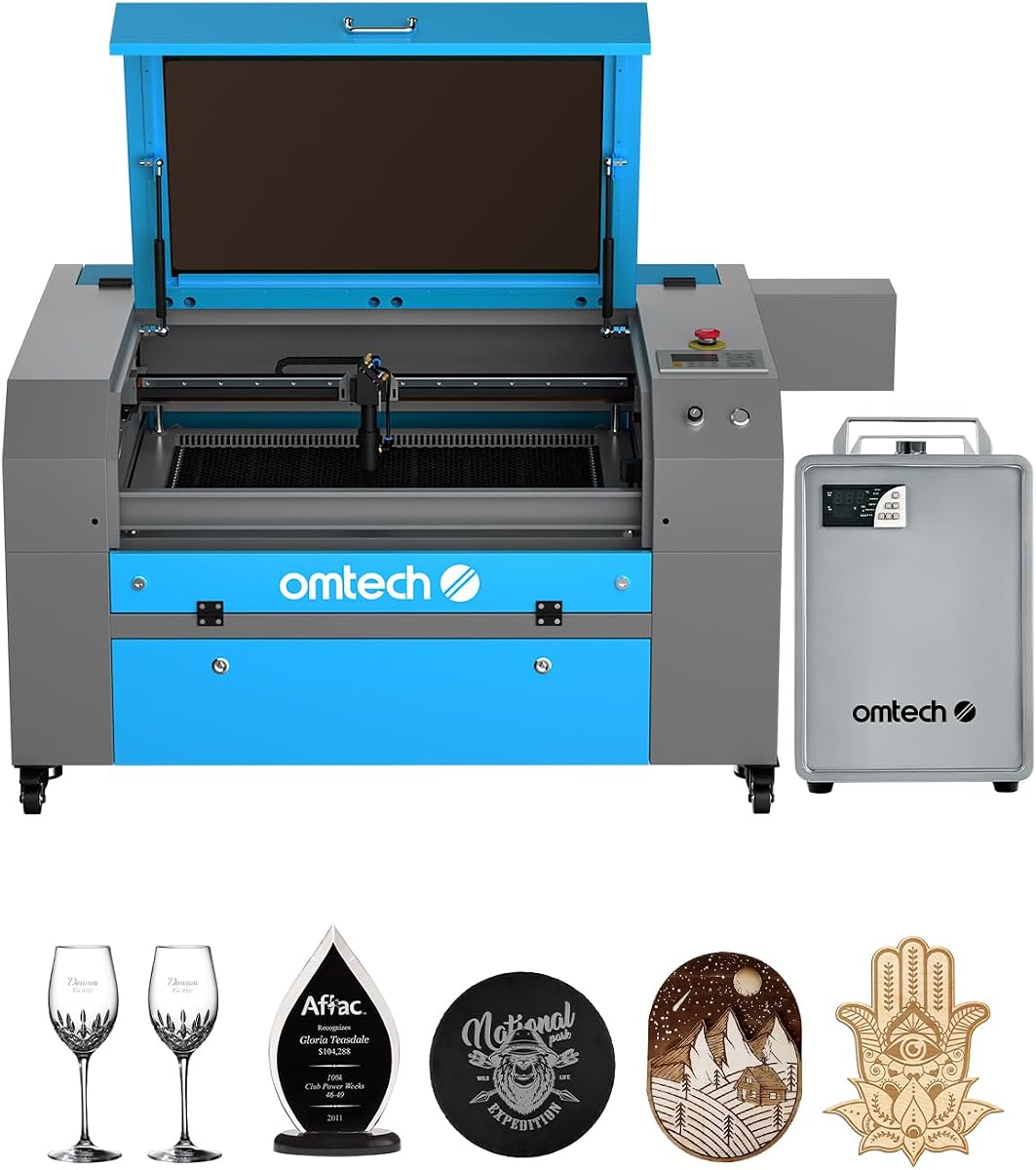
OMTech K40+ 45W Desktop CO2 Laser Engraver & Cutter
4.4Editor score
45W laser power
12 by 8 workspace
LightBurn compatible
This guide compares the top 10 CO2 laser cutters for 2026, evaluating power, speed, safety, and workflow features to help you choose the right machine for your
Finding the right CO2 laser cutter means balancing power, precision, and safety for your specific projects. Whether you work with wood, acrylic, or leather, a capable machine transforms raw material into polished results without excessive manual effort.
We compared ten real models based on wattage, work area, software support, and safety features. Each entry reflects verified specs and user ratings to ensure you see what performs well in both hobbyist and commercial settings.
Every pick shows key strengths and honest trade-offs so you can match a machine to your budget and workflow. Prices and availability change often, so check current listings before finalizing your purchase decision.
4.4Editor score

4.5Editor score

The following table summarizes key specifications for all ten models, highlighting power, workspace dimensions, safety class, and standout features to help you compare options side by side.



The xTool P3 stands out as a flagship CO2 laser cutter with 80W power and intelligent automation. It earns a 4.5 rating for its ability to cut thick materials and offer precise positioning with dual cameras.
We may earn a commission when you buy through this link, at no additional cost to you.
Its ACS system integrates LiDAR autofocus and an AutoLift Base to simplify setup. The 36 by 18 workspace supports large projects, while the Class 1 safety design ensures protection with interlocks and active detection systems.
Trade-offs include a higher price point and accessories like conveyors or IR lasers sold separately. These costs reflect professional-grade performance and safety features that justify the investment for serious makers.
Buyers seeking industrial-grade speed and safety should choose this model. It delivers consistent results across wood and acrylic while minimizing manual intervention through automated workflows.
Smart Nesting and Variable Batch Fill reduce waste and streamline mass customization tasks.
Fully enclosed Class 1 design with lid interlocks provides peace of mind during operation.
We may earn a commission when you buy through this link, at no additional cost to you.
The OMTech K40+ offers solid entry-level performance at a budget-friendly price. It earns a 4.4 rating for its upgraded 45W power and reliable engraving speeds suitable for hobbyists and small businesses.
We may earn a commission when you buy through this link, at no additional cost to you.
Its compact 12 by 8 workspace fits standard materials well, while the built-in air assist keeps cuts clean. Full compatibility with LightBurn and LaserGRBL ensures smooth workflows for both beginners and experts.
Trade-offs include a smaller work area and manual focusing compared to premium models. These limitations are acceptable for users prioritizing cost and portability over high-volume production.
DIY enthusiasts and small shops should consider this model for its value. It provides professional results on acrylic and wood without breaking the bank.
Lower initial cost makes it accessible for those exploring laser engraving for the first time.
Works well with wood, acrylic, and leather through adjustable settings and air assist.
We may earn a commission when you buy through this link, at no additional cost to you.
The VEVOR 100W offers a spacious 24 by 35 workspace ideal for large-format projects. It earns a perfect 5.0 rating for its powerful cutting ability and intuitive digital control panel.
We may earn a commission when you buy through this link, at no additional cost to you.
Its 100W power cuts materials up to 0.59 inches thick in one pass. The front and back pass-through doors expand possibilities for handling long items while the honeycomb bed ensures stability.
Trade-offs include assembly complexity and weight due to its size. These factors are manageable for fixed workshops where the large area delivers significant productivity gains.
Users needing large surface coverage should choose this machine. It balances power and accessibility with strong compatibility across major operating systems.
The generous workspace accommodates big sheets and multiple items simultaneously.
Digital control panel simplifies setup and file transfer for diverse software users.
We may earn a commission when you buy through this link, at no additional cost to you.
The OMTech Maker 90W bundles a water chiller to support extended engraving sessions. It features a 20 by 28 workspace and robust safety features for reliable performance.
We may earn a commission when you buy through this link, at no additional cost to you.
Its 90W Yongli tube supports up to 8,000 hours of usage while maintaining deep engraving capabilities. The four-way pass-through doors make handling larger items straightforward and efficient.
Trade-offs include a lack of recent review data and mandatory ventilation requirements. These factors are standard for industrial machines and manageable in well-equipped spaces.
Commercial users needing reliable cooling should consider this model. It balances power with durability to handle demanding daily workloads effectively.
The bundled chiller keeps the laser tube cool during long production runs.
Flame-retardant viewing window and interlock system protect users effectively.
We may earn a commission when you buy through this link, at no additional cost to you.
The OMTech Maker 60W offers a complete bundle with LightBurn and a water chiller. It earns a 4.7 rating for its autofocus convenience and consistent performance on standard projects.
We may earn a commission when you buy through this link, at no additional cost to you.
The autofocus feature simplifies setup by automatically finding the right focal distance. A 20 by 28 workspace supports most mid-size projects while air assist maintains clean cutting results.
Trade-offs include lower power compared to 90W or 100W options. These limits are acceptable for users valuing ease of use and software inclusion over raw cutting depth.
Buyers seeking a ready-to-run solution should choose this model. It reduces initial setup effort with helpful included tools and proven reliability.
LightBurn provides professional-grade tools without needing to purchase separately.
Autofocus removes guesswork so you can start engraving quickly.
We may earn a commission when you buy through this link, at no additional cost to you.
This OMTech K40+ variant provides reliable desktop performance with strong support. It earns a 4.5 rating for fast engraving speeds and flexible design options for small shops.
We may earn a commission when you buy through this link, at no additional cost to you.
The 12 by 8 workspace handles standard materials while a detachable base allows cylindrical engraving. Integrated air assist and safety features ensure clean cuts and user protection.
Trade-offs include limited cutting depth and manual adjustments compared to automated models. These are acceptable for users prioritizing portability and cost over production volume.
Small businesses needing a reliable desk unit should choose this model. It balances capability and footprint for efficient daily use.
Fits easily on sturdy desks for efficient workspace organization.
Detachable base expands creative options for round object engraving.
We may earn a commission when you buy through this link, at no additional cost to you.
The OMTech Pronto 100W delivers rapid engraving speeds and powerful performance. It features a 40 by 24 workspace and autofocus to streamline production workflows.
We may earn a commission when you buy through this link, at no additional cost to you.
Its 100W tube supports up to 12,000 hours of usage while the 39.4 inches per second speed boosts throughput. Superior airflow ensures clean cuts with minimal material burn.
Trade-offs include limited review data and higher investment costs. These reflect newer technology and high performance suitable for growing businesses.
Makers needing speed and efficiency should choose this model. It combines power with automation to reduce cycle times effectively.
Engraving up to 37 percent faster than traditional models saves time.
Autofocus takes guesswork out of focusing for consistent results.
We may earn a commission when you buy through this link, at no additional cost to you.
The OMTech Pronto 130W earns a 5.0 rating for powerful performance and extensive workspace. It supports deep engraving and rapid speeds ideal for professional environments.
We may earn a commission when you buy through this link, at no additional cost to you.
Its 130W tube supports up to 12,000 hours while autofocus simplifies setup. The 51 by 35 workspace accommodates large projects with two-way pass-through doors for efficient material handling.
Trade-offs include high cost and requirements for industrial setups. These are justified for users needing maximum throughput and durability for daily commercial use.
Commercial buyers seeking top-tier power should choose this model. It delivers premium features that support consistent high-volume production.
The 130W tube handles thick nonmetallic materials with ease.
Large workspace and autofocus reduce cycle times for bulk orders.
We may earn a commission when you buy through this link, at no additional cost to you.
This OMTech K40+ model provides a straightforward entry into CO2 engraving. It focuses on essential capabilities with a compact design and safety protections.
We may earn a commission when you buy through this link, at no additional cost to you.
The 45W power handles common materials while the desktop size fits small studios. Basic safety features and support help users get started without excessive complexity.
Trade-offs include limited advanced features and lack of user reviews. These are expected at this level and acceptable for initial experimentation.
Newcomers wanting a simple start should choose this model. It delivers core engraving functionality without unnecessary cost or complexity.
Low barriers to entry make it easy to try laser engraving.
Small footprint suits studios or desks without sacrificing utility.
We may earn a commission when you buy through this link, at no additional cost to you.
The OMTech Pro 130W targets industrial users with extensive workspace and smart controls. It earns high marks for reliability and workflow integration capabilities.
We may earn a commission when you buy through this link, at no additional cost to you.
Its 35 by 55 workspace and servo motors support precise, rapid engraving. The built-in water chiller maintains temperature stability while WiFi and touchscreen allow remote management.
Trade-offs include significant cost and footprint requirements. These are justified for professional environments needing high precision and consistent operation.
Industrial buyers needing maximum capability should choose this model. It combines power with advanced controls to streamline complex production.
Touchscreen and WiFi provide convenient remote workflow management.
Built-in chiller keeps performance stable during continuous operation.
We may earn a commission when you buy through this link, at no additional cost to you.
Choosing a CO2 laser cutter requires evaluating power, workspace, safety, and support. These factors determine what materials you can process and how efficiently you can work.
Laser power measured in watts determines cutting depth and speed. Higher wattage like 80W or 100W cuts thicker acrylic and wood faster, while 45W suits thinner materials.
Choose wattage based on typical material thickness to balance cost and capability.
The work area defines maximum project dimensions. Models range from compact 12 by 8 inches to expansive 51 by 35 inches.
Match workspace to your largest frequent projects to avoid frequent material trimming.
Safety class indicates enclosure quality. Class 1 fully encloses the beam, while Class 2 requires user responsibility.
Select Class 1 for shared spaces to reduce eye and skin exposure risks.
Compatible software determines workflow ease. Support for LightBurn and industry standards ensures you can use preferred tools.
Confirm software support before buying to avoid extra purchases.
Water chillers maintain tube temperature during long runs. Built-in options reduce setup complexity.
Choose machines with chillers for extended production to protect the tube.
Autofocus saves setup time by finding focal distance automatically. Manual focus requires trial and error.
Prioritize autofocus if you change material thickness often.
Air assist clears smoke and debris to protect lenses and improve cut quality. Integrated systems adjust airflow with power.
Ensure air assist is included to maintain consistent results.
Global support and warranty terms provide long-term security. Look for multi-year service and technical guidance.
Select brands with responsive support to resolve issues quickly.
Begin by ensuring proper ventilation and safety gear are in place. Clear the workspace and secure materials to avoid shifting during engraving.
Calibrate focus and test settings on scrap material before running full jobs. Use recommended power and speed to achieve clean edges without burn marks.
Regularly clean lenses and mirrors with soft cloths and approved solutions. Check water levels or chiller systems and lubricate rails to maintain precision.
CO2 lasers excel with non-metallics like wood, acrylic, leather, cardboard, and fabric. They cannot cut metals directly but can engrave coated surfaces.
Always use protective eyewear and ensure the enclosure is sealed. Monitor operations to prevent fires and maintain proper ventilation to clear fumes.
Yes, you need design software like LightBurn or LaserGRBL to create files. The machine interprets these vectors to drive the laser head.
Clean lenses every few weeks or after dusty projects. Dirty optics reduce power and quality, so regular maintenance is essential.
A chiller helps maintain tube performance during extended runs. For short sessions air cooling may suffice, but chillers are best for production.
Yes, using a rotary attachment allows cylindrical engraving. Ensure the device supports rotation to maintain consistent focus.
The top picks span budget to premium, covering diverse needs from hobbyists to industrial shops. xTool P3 leads in automation, OMTech K40+ offers entry value, and Pro 130W delivers raw power.
Prioritize workspace, safety class, and support when selecting. Match wattage to material thickness to balance cost and capability effectively.
Prices fluctuate frequently, so check current listings before buying. Verify software and accessory requirements to ensure a smooth workflow.