
VEVOR 45W CO2 Laser Engraver
5.0Editor score
Compact 12×8 work area
Compatible with LightBurn software
Built-in air assist system
Finding the right CO2 laser engraver can transform your creative projects into professional-quality products. Whether you are a hobbyist or a small business owner, selecting a machine with the right power, workspace, and safety features is crucial for success.
We have evaluated ten leading models based on laser power, work area size, software compatibility, and user safety features. Our analysis covers desktop units suitable for beginners and industrial-grade options designed for high-volume production environments.
Each selection below highlights key specifications and real-world performance characteristics to guide your decision. Prices and availability may change over time, so please verify current details before making your final purchase decision online.
5.0Editor score

4.7Editor score

4.5Editor score
As an Amazon Associate we earn from qualifying purchases.
The following comparison table outlines the core specifications of each selected model to help you quickly identify the best fit for your specific project requirements and workspace limitations.

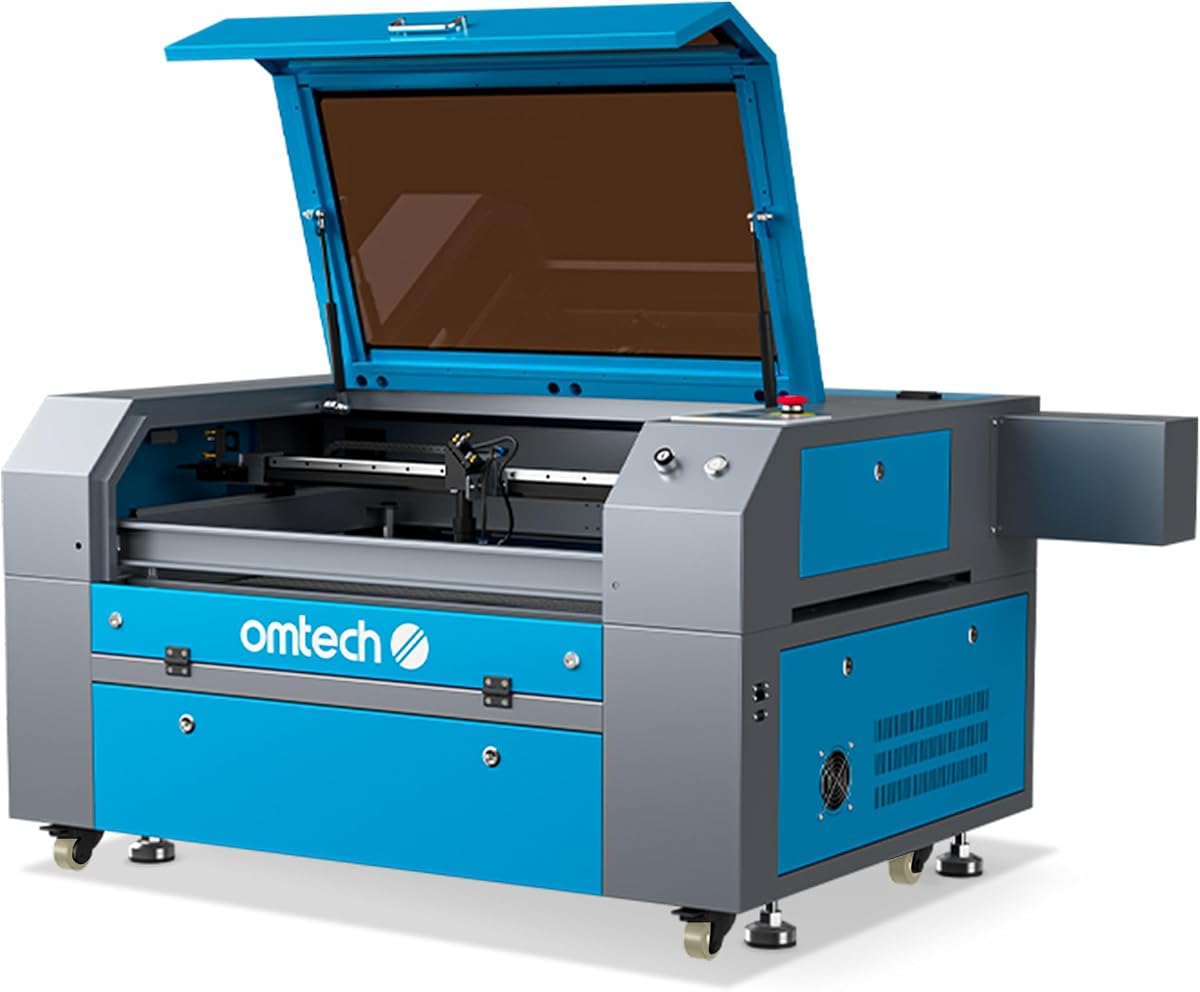


This model stands out as a top contender for serious makers due to its balanced power and workspace. With a 60W laser and 20×28 inch bed, it handles diverse materials efficiently while maintaining precision.
We may earn a commission when you buy through this link, at no additional cost to you.
The autofocus workbed is a significant advantage that reduces setup time and human error. You can simply press a button to find the right focal distance, ensuring consistent results across varying material thicknesses.
While the unit is larger than typical desktop options, the trade-off provides room for substantial production work. The included water chiller ensures the laser tube remains cool during extended sessions, prolonging its operational life.
It is ideal for small businesses needing reliable throughput without jumping to industrial systems. The combination of software compatibility and safety features makes it a robust choice for professional engraving tasks.
The autofocus system and large bed allow you to process multiple items in one cycle, significantly speeding up production times for custom orders.
Flame retardant materials and air assist systems work together to protect both the machine and the user from smoke and potential fire hazards during operation.
We may earn a commission when you buy through this link, at no additional cost to you.
This machine offers an excellent entry point for hobbyists looking to explore laser engraving without a massive financial commitment. It supports common materials like wood and acrylic effectively.
We may earn a commission when you buy through this link, at no additional cost to you.
The inclusion of a rotary axis allows you to engrave cylindrical objects like phone cases or bottles easily, expanding your creative options beyond flat surfaces. This feature is often an extra cost on other brands.
Manual focusing is straightforward using the precision knob and red-dot positioning, giving you hands-on control over your work. While not automatic, this system is reliable for standard project heights.
It is best suited for beginners or those needing a secondary machine for small batch customizations. The air assist keeps cuts clean, and the pull-out waste tray makes maintenance simple and efficient.
Full compatibility with LightBurn and GRBL ensures you can use the software ecosystem you are already familiar with, reducing the learning curve for new users.
The 12×8 inch work area fits well on standard desks, making it a practical choice for home offices or makerspaces with limited floor space.
We may earn a commission when you buy through this link, at no additional cost to you.
This flagship model represents the pinnacle of desktop laser technology with intelligent automation and superior cutting power. It is designed for users who need industrial performance in a desktop form factor.
We may earn a commission when you buy through this link, at no additional cost to you.
The dual HD camera system provides microscopic alignment accuracy, ensuring that your designs land exactly where you intend. This is critical for precise work like jewelry engraving or detailed graphic cuts.
Class 1 safety rating means the entire enclosure is secure, allowing you to operate without needing additional safety glasses in a controlled environment. The active detection and suppression system adds another layer of protection.
It is the best choice for commercial studios prioritizing efficiency and safety. Features like AI smart nesting maximize material usage, reducing waste and lowering the cost per unit on large production runs.
With the optional conveyor feeder, you can run unlimited length projects, making this machine capable of continuous production for high-demand custom products.
The ACS system integrates LiDAR for perfect autofocus and auto-lift, significantly reducing the setup time required for complex or irregular objects.
We may earn a commission when you buy through this link, at no additional cost to you.
The K40+ model is a solid desktop option for those needing reliable performance for small scale tasks. It has been upgraded to offer better cutting power than standard entry level models.
We may earn a commission when you buy through this link, at no additional cost to you.
Its integrated air assist system auto-adjusts airflow based on power settings, which helps clear smoke and debris during operation. This protects the lens and reduces carbonization on wood materials.
Safety features like door protection and an emergency stop button ensure that the machine halts immediately if an issue arises. This gives users peace of mind during active engraving sessions.
It suits makers who want a balance of performance and price in a compact package. While the work area is limited, it is sufficient for keychains, coasters, and personalized gift items.
The combination of flame retardant panels and emergency stops makes this unit a safer choice for environments where unsupervised or novice operation might occur.
Support for LightBurn and LaserGRBL allows users to choose the interface that best fits their workflow, whether they are beginners or experienced designers.
We may earn a commission when you buy through this link, at no additional cost to you.
This variant continues the legacy of the K40 series by providing consistent cutting and engraving capabilities for small projects. It is well suited for hobbyists with budget constraints.
We may earn a commission when you buy through this link, at no additional cost to you.
The honeycomb bed allows air to pass through easily, which helps prevent the material from burning or sticking to the base during operation. This ensures cleaner cuts and less post-processing work.
Its compact design fits easily into smaller workspaces, making it an ideal addition to a home workshop or craft room. Despite its size, it handles common non-metal materials with ease.
Users appreciate the wide software compatibility that ensures they can use familiar tools for their designs. It remains a strong choice for those prioritizing affordability without sacrificing essential functionality.
The detachable base allows for flexibility in handling irregular materials, enabling engraving on taller objects when combined with optional rotary accessories.
Access to 24/7 support and local demos helps resolve setup issues quickly, ensuring users get the most out of their machine from day one.
We may earn a commission when you buy through this link, at no additional cost to you.
This machine delivers powerful cutting and engraving results suitable for both commercial and advanced hobbyist use. The 90W power allows for deeper cuts and faster processing times.
We may earn a commission when you buy through this link, at no additional cost to you.
The spacious work area accommodates larger projects that would not fit on desktop units, such as full-size wood panels or large fabric sheets. Pass through doors further enhance this capability.
Automatic cover interlocks ensure safety by shutting off the laser when the lid is opened, protecting the user from exposure. The widened viewing window offers clear visibility without compromising safety.
It is an excellent option for those growing their production capacity and needing more speed and volume. The included accessories and software streamline the workflow for efficient project management.
The high-speed operation capabilities mean you can complete bulk orders faster, reducing wait times for clients and increasing overall business productivity.
Safety features like flame retardant materials and automatic shutoffs provide a secure environment, which is critical when running machines for extended periods unattended.
We may earn a commission when you buy through this link, at no additional cost to you.
This powerhouse is designed for users who need high throughput and the ability to handle large materials. The 100W tube allows for cutting through thicker materials with ease.
We may earn a commission when you buy through this link, at no additional cost to you.
Engraving speeds reach up to 1000 mm per second, making it significantly faster than standard models. This speed translates to higher production volumes without compromising on quality.
The advanced autofocus technology eliminates guesswork during setup, ensuring precise focal points every time. This consistency is vital for maintaining high standards in commercial environments.
It is best suited for professional workshops requiring industrial performance and reliability. The comprehensive safety features like temperature alarms and air pressure monitoring protect the machine from damage.
The combination of fast speeds and large beds reduces total job time, allowing you to take on more orders and increase your revenue potential.
High performance motors and rails ensure controlled movement, preventing misalignment and ensuring every engraving is clean and professional.
We may earn a commission when you buy through this link, at no additional cost to you.
This bundle offers a complete package for users wanting a ready-to-use commercial solution. The inclusion of a water chiller ensures stable operation and longer tube life.
We may earn a commission when you buy through this link, at no additional cost to you.
The honeycomb and aluminum blade beds provide versatility for different material types, allowing flat items and irregular shapes to be processed effectively. This flexibility supports diverse product lines.
Cover interlocks automatically cut the laser beam if the window is opened, prioritizing user safety during operation. This feature is essential for preventing accidental exposure to laser radiation.
It is ideal for businesses needing a balanced solution between power and usability. The large work area accommodates substantial items, making it suitable for furniture signage or custom large scale projects.
The water chiller maintains consistent cooling, which prevents thermal issues during long runs and helps maintain the precision of the laser beam over time.
Comprehensive safety features including flame retardant windows ensure a safe working environment for both operators and the equipment itself.
We may earn a commission when you buy through this link, at no additional cost to you.
This unit combines high power with convenience features like instant autofocus to streamline workflow. It is designed for users who need reliability and precision in a commercial setting.
We may earn a commission when you buy through this link, at no additional cost to you.
The X and Y axis motors ensure steady movement, preventing shaking or misalignment during engraving. This stability is crucial for detailed patterns and large scale designs alike.
Advanced sensors monitor air pressure and temperature to prevent overheating, pausing operation if needed. This protects the machine from damage and ensures consistent quality across batches.
It is the best choice for professional environments where speed and precision are non-negotiable. The software compatibility allows you to integrate easily with your existing design tools.
The powerful air pump and turbo exhaust fan keep the workspace clean, reducing the need for frequent cleaning and extending the lifespan of the optical components.
Capable of handling a wide variety of non-metal materials, this machine supports diverse product creation, from leather goods to acrylic signage.
We may earn a commission when you buy through this link, at no additional cost to you.
This model delivers powerful cutting and engraving with a focus on efficiency and speed. The 90W power is sufficient for cutting thick wood and engraving glass and leather effectively.
We may earn a commission when you buy through this link, at no additional cost to you.
The work area is designed to handle large items easily, making it suitable for custom signs and large format projects. Pass through doors add extra convenience for accommodating longer materials.
The laser tube is rated for up to 12000 hours of operation, providing reliable performance over time. Consistent use at lower settings can extend this lifespan even further.
It is an excellent choice for businesses needing a dependable workhorse. The safety interlocks ensure that the machine is safe to operate even in busy shared workshop environments.
Fast engraving speeds combined with a large bed mean you can process more orders per day, directly impacting the bottom line of your business.
Built to last with high performance components, this machine is designed to withstand the rigors of commercial use while maintaining precision.
We may earn a commission when you buy through this link, at no additional cost to you.
Selecting the right machine requires balancing power, size, and features to match your specific needs and workspace constraints.
Laser power determines how fast and deep you can cut. Higher wattage allows for thicker materials and faster processing, which is essential for production environments.
Look for at least 45 watts for hobby use and 60 watts or more for professional work.
The bed size dictates the maximum size of the items you can engrave. A larger bed provides flexibility for bigger projects but requires more floor space.
Choose a size that fits your typical project dimensions while leaving room for setup and cooling equipment.
Ensure the machine supports the design software you prefer, such as LightBurn or CorelDraw. Compatibility saves time during setup and operation.
Look for drivers and software that are regularly updated for reliability and security.
Safety is critical when working with high-power lasers. Look for emergency stops, door interlocks, and flame retardant materials to protect users.
A Class 1 enclosure or equivalent safety rating ensures the laser is contained and safe for operation.
Continuous operation generates heat that can damage the laser tube. Water chillers are recommended for long runs to maintain performance and tube life.
Choose a unit with efficient cooling options to ensure consistent results and durability over time.
Reliable technical support and a comprehensive warranty protect your investment. Look for companies that offer training and parts availability.
A solid support network reduces downtime and ensures you can resolve issues quickly.
Price varies widely based on power and features. Consider the total cost including accessories like software and air pumps.
Investing in a slightly higher end model often pays off in longevity and performance.
Always start by setting up your machine in a well-ventilated area away from flammable materials to ensure safety during operation. Check all connections and secure the material firmly on the bed.
Calibrate your focus and test settings on scrap material before starting the main job to prevent waste. Use the air assist system to clear smoke and debris for cleaner cuts.
Regularly clean the lenses and mirrors using proper tools to maintain optical clarity. Schedule routine maintenance to keep moving parts lubricated and the water cooling system functioning properly.
Generally, no. CO2 lasers are effective for non-metals like wood and acrylic but cannot cut raw metals. You may engrave coated metals but will not cut through them.
Most models support LightBurn and GRBL. Some also work with CorelDraw and AutoCAD. Check specific compatibility for your model before purchasing software.
Yes for extended use. Water chillers keep the laser tube cool, preventing overheating and extending its lifespan. It is a necessary accessory for commercial work.
Small desktop models need about 2 feet of space while larger ones require more. Ensure you have room for the exhaust fan and safety zones around the unit.
You can engrave wood, acrylic, leather, glass, and coated metals. Avoid materials like PVC or vinyl which release toxic fumes when cut.
Clean the lenses regularly with approved solutions and cloths. Dust and debris can reduce performance. Inspect them before each session to ensure clarity.
Our top picks offer a range of options from affordable desktop units to high power commercial machines. Consider your project size and budget to find the right fit.
Prioritize safety and reliability when making your choice. A machine with good support and essential safety features will serve you better in the long run.
Check current prices and availability before buying as stock varies. Investing in the right tool will enhance your creativity and productivity significantly.