
8Bitdo SN30 Pro Bluetooth Wireless Gamepad Retro Controller – Gray
4.6Editor score
Hall Effect Joysticks
Bluetooth and USB-C
Motion Controls and Rumble
This guide compares the top ten controllers for retro console gaming across platforms and budgets to help you find the perfect controller for your classic
Finding the right controller for retro console gaming can transform your experience from frustrating to flawless. Whether you prefer wireless convenience or wired reliability, the right hardware ensures precise inputs and authentic feels. Modern controllers now support legacy emulators while maintaining classic layouts that players remember fondly from their childhood years.
We evaluated ten highly rated controllers based on compatibility, build quality, connectivity options, and user feedback. Our comparison covers budget-friendly options and premium models that offer Hall Effect sticks or multi-platform support. Each product was assessed for its ability to handle diverse retro titles from NES to PlayStation era classics without input lag or drift issues.
Each pick highlights specific strengths such as battery life, button responsiveness, or ergonomic design tailored for long sessions. While we aim for accuracy, pricing and availability fluctuate regularly across retailers. Always check the latest details before purchasing to ensure the controller meets your specific console and emulator requirements for optimal performance.
4.6Editor score
3.8Editor score

4.4Editor score
This table provides a side-by-side comparison of the ten selected controllers to help you quickly identify key specifications and compatibility features that matter most for your retro gaming setup.


The Logitech G F310 stands out as an accessible entry point for retro gaming enthusiasts on a tight budget. With a strong rating from users, it delivers reliable performance for both classic emulators and modern titles. Its straightforward design ensures you can start playing immediately without complex configuration steps.
We may earn a commission when you buy through this link, at no additional cost to you.
This controller features a familiar layout similar to Xbox 360 pads, reducing the learning curve for most players. The unique floating D-pad provides responsive directional changes, which is crucial for precision platformers. Additionally, the included Profiler software allows mapping keyboard commands, expanding compatibility with games lacking native gamepad support.
While the corded design limits mobility compared to wireless options, the six-foot length offers reasonable freedom of movement. Build quality is functional but not premium, so it may not withstand heavy daily use over years. However, for casual retro sessions, it remains a solid choice that balances cost and utility effectively.
We recommend this model for budget-conscious gamers who prioritize function over form. It is ideal for PC users looking to relive classic titles without spending much. Check compatibility with your specific emulator settings before purchase to ensure seamless integration with your setup.
Works seamlessly with popular new titles and old favorites through versatile mapping software.
Requires no drivers for basic play, allowing immediate engagement with your favorite retro games.
We may earn a commission when you buy through this link, at no additional cost to you.
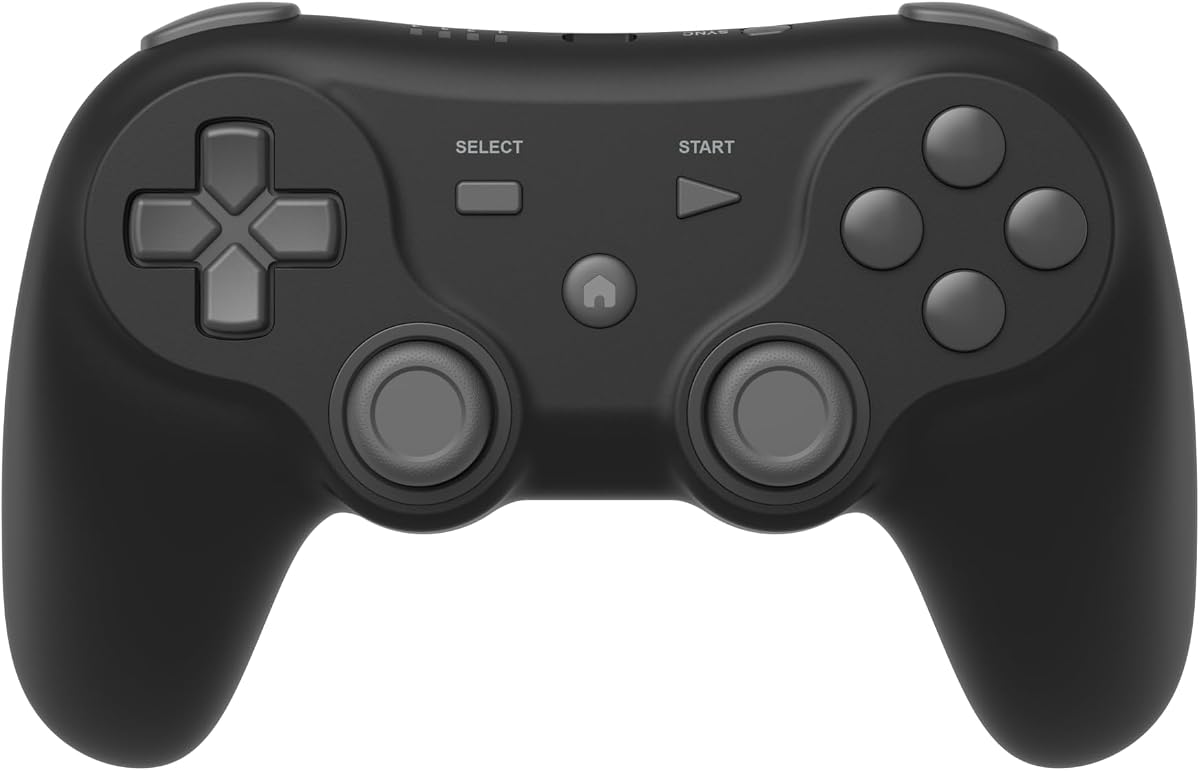
The 8Bitdo SN30 Pro combines nostalgic aesthetics with cutting-edge technology like Hall Effect joysticks for unmatched durability. It earns high marks for offering a full feature set including motion controls and rumble that many retro controllers lack. This makes it a top choice for those wanting modern performance with classic looks.
We may earn a commission when you buy through this link, at no additional cost to you.
Wireless connectivity via Bluetooth ensures a clutter-free experience on Switch, PC, or mobile devices. The proper D-pad and clickable sticks allow for accurate inputs in fighting games or precise platformers. Firmware updates keep it current, extending its lifespan as new platforms emerge.
Despite the higher cost, the battery life and wireless freedom justify the investment for serious players. Some users may find the feature depth overwhelming initially, but customization options pay off. This controller is built to last, addressing common failure points like stick drift common in older models.
Ideal for collectors or enthusiasts who demand reliability across multiple systems. Whether you play on Steam Deck or an iPhone, it adapts well. Ensure your devices support Bluetooth gaming to fully leverage its capabilities before ordering.
Offers higher precision and sensitivity without the risk of mechanical wear or drift over time.
Officially supported on Switch, PC, Steam Deck, Android, and now iPhone, iPad, macOS, and Apple TV.
We may earn a commission when you buy through this link, at no additional cost to you.
The Retro Fighters Defender Pro is unique for supporting legacy PlayStation hardware alongside modern systems like Switch and PC. Its Hall Effect sticks promise longevity, while pressure-sensitive buttons add depth to games requiring analog input. This versatility makes it a standout option for users with mixed console collections.
We may earn a commission when you buy through this link, at no additional cost to you.
Dual wireless modes allow switching between 2.4GHz for lower latency and Bluetooth for convenience. Customizable triggers can be toggled between analog and digital stops, tailoring control to your playstyle. While the rating is lower than some peers, its specific feature set fills gaps that standard retro controllers cannot.
Potential buyers should note compatibility nuances with older PlayStation systems which may vary. The build quality aims for premium feel, justifying the cost for those who need broad multi-system support. It bridges the gap between vintage needs and modern connectivity standards effectively.
Perfect for enthusiasts who play across generations from PS1 to current handhelds. If you value flexibility and specific features like trigger stops, this model is worth the investment. Always verify current firmware support for your specific console before finalizing your purchase decision.
Compatible with PS1, PS2, PS3, PS Classic, Switch, and PC for a unified control experience.
Hall Effect Sticks prevent drift while customizable triggers adapt to your specific gaming needs.
We may earn a commission when you buy through this link, at no additional cost to you.
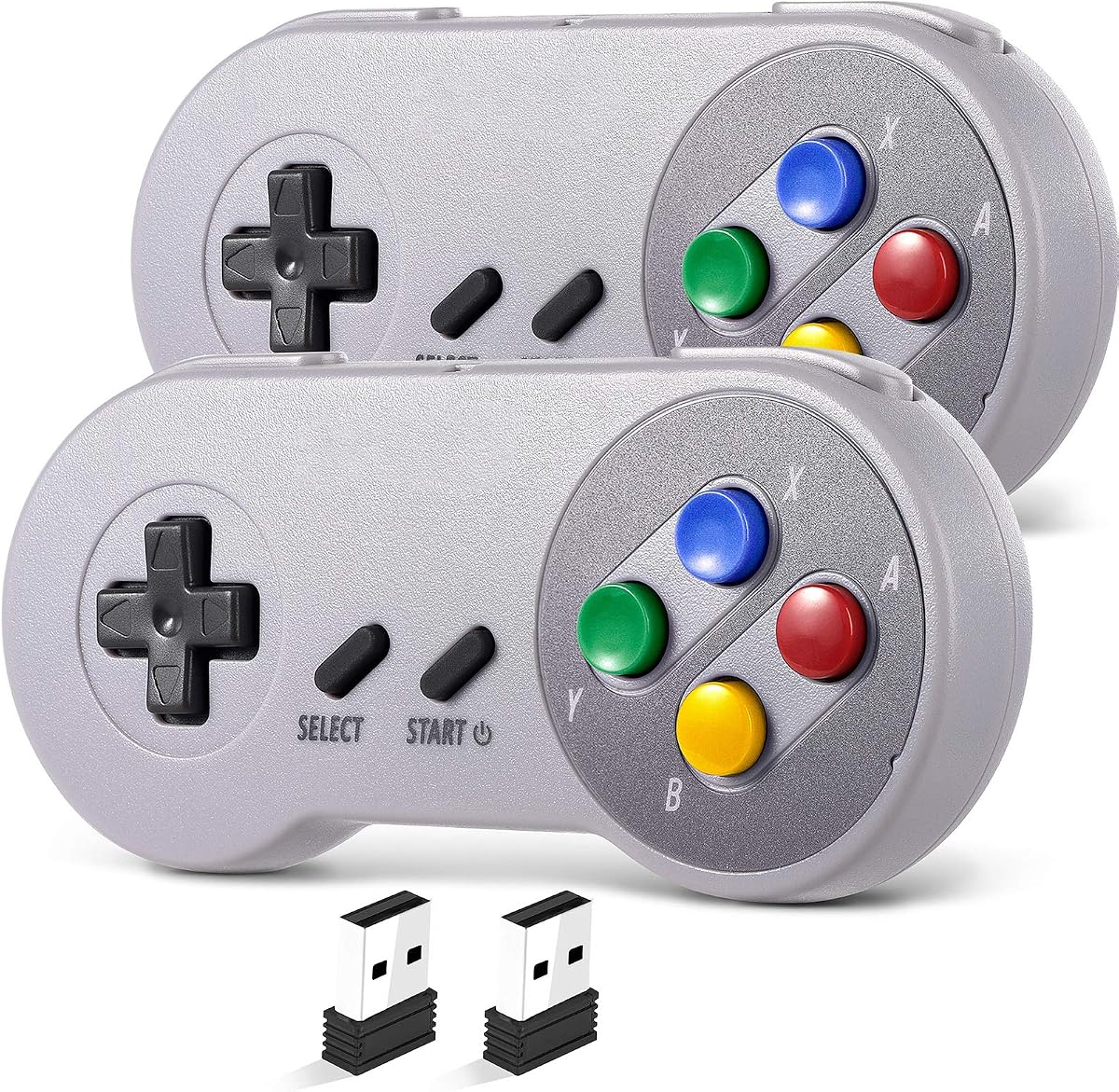
This 2 Pack Wireless USB SNES Controller set provides excellent value for those wanting to play classic games with a friend. Designed specifically for Windows and macOS emulators, it mimics the layout of the original Super Nintendo controller closely. The 2.4GHz connection ensures stable performance without the need for complex drivers.
We may earn a commission when you buy through this link, at no additional cost to you.
Features like zero-lag performance and high-sensitivity buttons make it suitable for precise retro gameplay. The built-in rechargeable battery offers ten hours of runtime, reducing frequent charging interruptions. However, it lacks compatibility with Switch devices, which is a critical note for console-focused gamers.
While the design is functional, it is tailored for PC users rather than modern handhelds. The multi-color keys add a retro flair that fits well with vintage setups. For couples or families looking for local multiplayer on PC, this pack offers convenience and affordability in equal measure.
We suggest this option for PC-based emulation where two controllers are needed immediately. Ensure your system does not require Switch-specific button configs before ordering. The wireless setup simplifies your gaming area while maintaining a classic aesthetic.
Features a 2.4GHz wireless link with a 10-meter range for lag-free gaming sessions.
Standard USB receiver ensures no driver installation is needed for compatible devices.
We may earn a commission when you buy through this link, at no additional cost to you.
The happymaxplus Retro Classic is a specialized solution for owners of AV 620, HD 621, and HD 821 consoles. Its DB9 plug ensures direct compatibility with these specific hardware units without adapters. User ratings reflect high satisfaction for those needing reliable replacements for original controllers that may have worn out.
We may earn a commission when you buy through this link, at no additional cost to you.
Features like continuous fire give players an edge in rapid-action games without holding buttons constantly. The 2-pack design allows for simultaneous local play, enhancing social gaming experiences. Simple plug-and-play setup means no configuration is required to start playing immediately.
Keep in mind that this controller is not universal for all retro systems, limiting its use to compatible hardware. Build quality is reported as durable, though it lacks modern features like wireless connectivity. For owners of these specific consoles, it remains a top choice for authenticity and function.
Ideal if you own one of the listed retro consoles and need replacement pads quickly. Verify your console model before purchasing to ensure the DB9 port matches. It delivers a classic feel that aligns well with the original gaming experience.
Designed with a 9-pin DB9 plug specifically for AV 620, HD 621, and HD 821 consoles.
Just plug and play to enjoy your retro games without complex setup or software.
We may earn a commission when you buy through this link, at no additional cost to you.
The Retro-Bit Legacy 16 captures the essence of the golden era with its authentic 16-bit design. It pairs nostalgia with modern usability by including dedicated Home and Screenshot buttons for platforms like Nintendo Switch. This blend appeals to retro fans who also appreciate some convenience in modern emulation.
We may earn a commission when you buy through this link, at no additional cost to you.
Ergonomics are strong, designed for comfortable control during longer sessions of fighting or shooter games. The 10ft cable offers generous reach, allowing players to sit back from their screen. It works across multiple platforms including PC, MacOS, and RetroPie for broad flexibility.
While it lacks wireless options, the sturdy build and simple connectivity ensure reliability for core gaming. The layout balances old-school buttons with necessary modern inputs like shoulder triggers. For those valuing design heritage without sacrificing usability, it is a solid contender.
Recommended for players who prioritize authentic styling and multi-platform support over wireless. It works well for indie games and arcade classics. Check your emulator's button mapping to leverage the added shoulder buttons effectively.
Includes dedicated Home, Screenshot, and ZL/ZR shoulder buttons for expanded use on Switch.
Compatible with Nintendo Switch, PC, MacOS, RetroPie, Raspberry Pi, and other USB-enabled devices.
We may earn a commission when you buy through this link, at no additional cost to you.
The 8Bitdo 64 is designed specifically for fans of the Nintendo 64 style, particularly those with Analogue 3D hardware. It offers high precision and robust build quality with both wired and wireless options. Vibration support enhances immersion in games designed for it on compatible systems like Switch.
We may earn a commission when you buy through this link, at no additional cost to you.
Turbo function and S-input or D-input modes give players flexibility depending on the game being played. Bluetooth connectivity makes it convenient for use without being tethered to a console. Firmware updates are available to maintain compatibility with newer systems like Switch 2.
While the design is nostalgic, it does not compromise on modern functionality. It is a premium choice for those needing a specific analog feel with wireless benefits. Ensure you check the latest firmware status before purchasing for the best experience on updated consoles.
Perfect for enthusiasts building a dedicated N64 or Analogue 3D setup. The blend of classic shape with modern tech makes it a standout pick. Always verify Switch 2 compatibility requirements if planning to use it with upcoming consoles.
Compatible with Analogue 3D, Switch, Windows, and Android with flexible connection options.
Offers D-input and S-input modes plus vibration support for enhanced gameplay immersion.
We may earn a commission when you buy through this link, at no additional cost to you.
The GameSir Tegenaria Lite merges retro 90s aesthetics with high-performance features like 1000Hz polling rates. It ensures near-instantaneous response for competitive play while maintaining a classic look. Hall Effect sticks protect against drift, making it a durable choice for active gamers.
We may earn a commission when you buy through this link, at no additional cost to you.
Dual asymmetric motors provide nuanced feedback that enhances immersion in games where vibration matters. The two mappable back buttons allow quick access to functions without removing hands from grips. This setup is ideal for players who want advanced features in a stylish package.
While the wired design limits mobility, it ensures zero latency which is critical for certain games. The ergonomic design supports longer sessions without discomfort, though the retro shape takes some adjustment. For those prioritizing speed and reliability on PC or Switch, it offers strong value.
Best for competitive players or fans of retro design who need high-speed input. Verify wired compatibility with your primary device before purchasing. It stands out for balancing vintage style with modern responsiveness.
Enjoy an ultra-responsive gaming experience with a 1000Hz polling rate minimizing lag.
Hall Effect sticks ensure pinpoint accuracy with 360 seamless control and long lifespan.
We may earn a commission when you buy through this link, at no additional cost to you.
The ZAMPAM 2 Pack provides an affordable way to add wireless gaming to PC setups without breaking the bank. Each controller offers around 100 hours of battery life, minimizing frequent charging. The included USB adapter ensures a stable connection with supported systems like Windows and Linux.
We may earn a commission when you buy through this link, at no additional cost to you.
Features like turbo allow rapid button presses which can be useful for certain game types. Users may need to configure keys using software like joystick mapper for optimal use on PC. While compatibility with classic NES units is not supported, it works well for PC-based emulation.
The design focuses on utility rather than premium build materials, keeping costs down for a pair. It is a good starting point for those new to wireless retro gaming on computers. Be sure to review the manual for turbo settings to avoid accidental activation during play.
Ideal for casual PC users needing multiple controllers at a low price. Verify that your specific emulators support these generic controllers before committing. It balances cost with wireless convenience effectively.
Built-in rechargeable Lithium Ion battery lasts around 100 hours per charge.
2.4GHz technology provides up to 10 meters of stable connection range.
We may earn a commission when you buy through this link, at no additional cost to you.
The Hyperkin Trooper 2 offers a classic Atari feel combined with modern USB compatibility for contemporary systems. Its ergonomic design includes chamfered corners that provide comfort for long gaming sessions. Quality materials ensure durability, making it a reliable choice for daily use on PC or Linux.
We may earn a commission when you buy through this link, at no additional cost to you.
Six mappable buttons give flexibility to assign keys for different emulators or menu navigation. The joystick movement is quiet and responsive, allowing precise inputs in retro games. It serves as a solid bridge between nostalgic design and current connectivity standards.
While it does not offer wireless features, the 10-foot cable allows significant movement from the screen. The focus on build quality and comfort makes it stand out among budget options. For those prioritizing tactile feedback and reliability, it remains a strong candidate.
Recommended for users seeking a durable, classic-style controller for PC gaming. Ensure your setup supports standard USB HID devices for plug-and-play functionality. It is a straightforward option for fans of vintage aesthetics.
Chamfered corners grips provide increased comfort to hold in your hands for long gaming sessions.
Solid base and quality cord ensure long life during extensive gaming use.
We may earn a commission when you buy through this link, at no additional cost to you.
Choosing the right controller requires balancing nostalgia with modern technical needs. We outline key factors to ensure your pick enhances your retro gaming experience.
Decide between wireless and wired based on your setup. Wireless offers freedom but may introduce slight latency. Wired ensures zero lag and consistent power for long retro sessions.
Choose wired for competitive retro play and wireless for casual home setups.
Confirm your controller works with your emulator or console. Some support Nintendo Switch while others focus on PC or Linux. Mismatched layouts can frustrate play in classic titles.
Always verify specific system support before purchase to avoid return hassle.
Look for Hall Effect sticks to prevent drift over time. Plastic quality and cable strength also affect lifespan. Stronger builds last longer for daily use.
Prioritize durable components if you game frequently every week.
Comfort shapes impact long sessions without hand fatigue. Contoured grips and balanced weight distribution matter for precision. Test size against your hand if possible.
Ergonomic designs reduce strain during marathon classic game nights.
Traditional layouts like SNES or Xbox affect muscle memory. Choose what matches the original experience for nostalgia. Customizable buttons add utility for modern features.
Match the layout to the era you intend to replay most.
Turbo functions and vibration can enhance immersion but are not always essential. Some emulators benefit from specific mappings or motion controls. Consider what adds value to your specific collection.
Only select extras that you actually plan to use actively.
Rechargeable batteries offer convenience over replaceable cells. Longer runtimes mean fewer charging interruptions during play. USB charging is standard across most modern models.
Choose controllers with long battery life for uninterrupted retro marathons.
Budget models work well but premium ones last longer. Weigh cost against features like wireless or Hall Effect sticks. The best value balances your needs with long-term reliability.
Invest in quality if you plan to use it daily for years.
Start by pairing or plugging your controller into your main device securely. Check your emulator or console settings to recognize the input immediately. Calibration might be needed for analog sticks on some systems.
Clean your controller regularly with a dry cloth to remove dust from buttons. Avoid harsh chemicals that could damage the surface or internal components. Store it in a dry place when not in use.
Charge wireless models fully before long sessions to avoid unexpected battery drain. If using wired units, inspect cables for frays or twists that reduce lifespan. Proper care ensures consistent performance for your favorite retro games.
Many modern retro controllers support systems like Nintendo Switch, PC, and mobile devices via Bluetooth or USB. Always check the product specs for compatibility lists to ensure they work with your target platform. Some may require firmware updates to function correctly.
Hall Effect joysticks use magnets instead of physical contacts, preventing stick drift over time. This leads to higher precision and a longer lifespan compared to traditional potentiometer sticks. It is a critical upgrade for players tired of drifting controllers.
Yes, most controllers in this list work with Windows PC emulators. They typically plug-and-play or require minor driver installation. Verify compatibility with your specific emulator software for the best mapping experience.
Software like profiler tools allow you to map keyboard keys to controller buttons. This enables playing games that do not natively support controllers. Always install required software for full functionality if your games lack native support.
Models with responsive D-pads and clear button feedback are excellent for fighting games. The Logitech F310 and 8Bitdo SN30 Pro are popular choices due to their precision. Ensure the layout supports combo inputs comfortably for your playstyle.
Reset the controller or reconnect it via Bluetooth to resolve issues. Check batteries and ensure you are within the specified range. Updating firmware on compatible models often fixes persistent connectivity problems.
Wireless models typically include rechargeable lithium-ion batteries built-in. Some may come with charging cables but not external battery packs. Wired controllers do not require batteries as they draw power from USB.
For arcade setups, controllers with precise D-pads and durable buttons work best. The Retro Fighters Defender Pro or Retro-Bit Legacy 16 are strong choices for their ergonomic build. Select wired options to avoid latency in arcade cabinets.
We reviewed ten diverse controllers catering to different budgets and platforms for retro gaming. Our top picks like the 8Bitdo SN30 Pro and Logitech G F310 offer standout value and features for most users.
Prioritize compatibility and durability when selecting a controller to ensure long-term enjoyment. Modern features like Hall Effect sticks provide reliability that traditional retro pads often lack.
Remember to verify current availability and pricing before making a purchase decision. Retro gaming technology evolves quickly, so checking the latest details ensures you get the right fit for your setup.