
Lian Li V100-ATX Mid-Tower PC Case-Black-V100RX
4.8Editor score
Four pre-installed PWM ARGB fans included
Supports ATX and Micro-ATX motherboards
Tool-less side panel mounting mechanism
This guide compares the best cooling computer case options for 2026, evaluating airflow design, fan support, and thermal performance for optimal system
Choosing the right cooling computer case is essential for maintaining optimal system temperatures and ensuring long-term hardware stability. A well-designed chassis promotes efficient airflow, reducing heat buildup around critical components like the CPU and GPU during intense workloads.
We evaluated ten top-rated models based on their airflow architecture, fan pre-installation, and compatibility with modern cooling solutions. Our analysis focuses on how each case manages heat extraction and intake to support both air and liquid cooling configurations effectively.
Each selection highlights unique features such as modular frames, triple-chamber designs, or panoramic glass panels that balance aesthetics with thermal efficiency. Keep in mind that availability and pricing may vary over time, so always verify current stock before making your final purchase decision.
4.8Editor score

4.7Editor score
4.8Editor score
The following table provides a side-by-side comparison of all ten selected cooling computer case models, highlighting their key specifications and unique design elements to help you make an informed decision based on your specific build requirements.


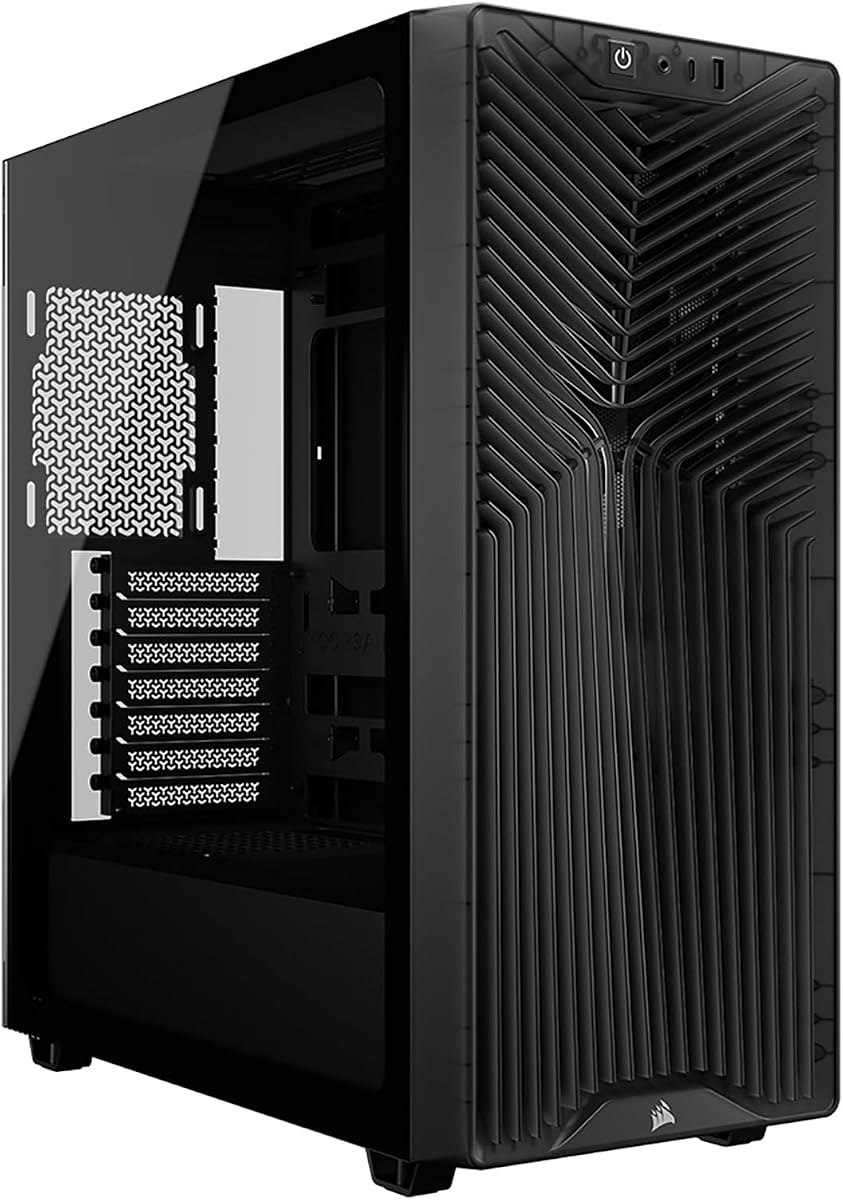


The CORSAIR 4000D RS ARGB stands out as a versatile cooling computer case designed for enthusiasts who value both thermal performance and flexibility. With a rating of 4.7 stars, it balances build quality and advanced features that cater to modern PC assembly needs.
We may earn a commission when you buy through this link, at no additional cost to you.
Its standout feature is the FRAME Modular Case System, which allows users to upgrade components like the motherboard tray or I/O panel to suit evolving requirements. The InfiniRail Fan Mounting System offers unmatched flexibility for positioning fans up to 200mm for targeted airflow efficiency.
While the customization options are extensive, they may require some initial time to configure to your liking. The price reflects these premium capabilities, but for builders seeking a chassis that grows with their system, the investment is well justified.
This case is ideal for users planning complex builds or those who anticipate hardware upgrades in the future. Its optimized airflow and comprehensive support for latest technologies make it a top recommendation for high-performance systems.
The FRAME system enables swapping parts like the motherboard tray to billet aluminum, ensuring the case adapts to your specific needs or aesthetic preferences over time.
The 3D Y-Pattern Airflow Panel minimizes restriction while guiding cool air directly to components, ensuring lower thermal thresholds during intense gaming or productivity sessions.
We may earn a commission when you buy through this link, at no additional cost to you.
The NZXT H5 Flow delivers exceptional cooling capabilities in a compact mid-tower form factor, making it a strong contender for budget-conscious builders. Its 4.6-star rating reflects satisfaction with its airflow design and ease of use for various configurations.
We may earn a commission when you buy through this link, at no additional cost to you.
A key strength lies in the perforated PSU shroud, which enables optimal air intake from fans placed below the GPU, directly improving graphics card temperatures. The ultra-fine mesh on all major panels ensures maximum airflow while filtering dust effectively over time.
Despite its compact footprint, it supports radiators up to 360mm in the front, offering significant liquid cooling potential for high-end CPUs. However, builders should note that pre-installed fans are functional but not premium quality, potentially warranting upgrades later.
This case is perfect for those seeking a balance between aesthetics and function without breaking the bank. Its streamlined design and robust cooling support make it a reliable choice for standard ATX builds.
The side and bottom perforations on the PSU shroud allow cool air to reach the GPU directly, reducing thermal throttling during extended gaming sessions.
With support for 360mm radiators in the front and 240mm on top, this case accommodates a wide range of AIO cooling setups for efficient CPU heat dissipation.
We may earn a commission when you buy through this link, at no additional cost to you.
The Antec Flux Pro Full-Tower is engineered for demanding builds that require extensive cooling options and support for larger motherboards. With a 4.7-star rating, it excels in providing a high-airflow environment for powerful hardware configurations.
We may earn a commission when you buy through this link, at no additional cost to you.
Its standout design includes support for up to 12 fans simultaneously, allowing users to create precise airflow paths that minimize hot spots inside the chassis. The inclusion of six pre-installed PWM fans ensures solid out-of-the-box thermal performance without immediate upgrades.
The innovative iShift PSU mount rotates the power supply by 90 degrees, creating more room for cable management and airflow while integrating dual temperature displays for monitoring. However, the large size and mixed materials like glass and wood may make it challenging to place in smaller rooms.
This case is best suited for professionals or enthusiasts building extreme systems with multiple GPUs or high-end components. Its comprehensive ventilation and build quality justify its premium positioning in the market.
Supporting up to 12 fans allows for extensive customization of airflow paths, ensuring every component stays cool even under heavy multi-gpu workloads.
Designed with dimensions that accommodate E-ATX motherboards, it offers the space needed for large chipsets and extensive expansion slots.
We may earn a commission when you buy through this link, at no additional cost to you.
The Lian Li V100-ATX earns an impressive 4.8-star rating by offering a premium aesthetic and strong thermal performance at a competitive price point. It combines visual appeal with practical features that simplify the building process for users of all skill levels.
We may earn a commission when you buy through this link, at no additional cost to you.
Pre-installed with four PWM-controlled ARGB fans and an integrated lighting strip, this case offers vibrant customization without requiring additional purchases. The tool-less mounting mechanism for side panels allows rapid access to internal components for maintenance or upgrades.
While the glass panels showcase components beautifully, they may require frequent cleaning to maintain their pristine look. The support for GPUs up to 420mm ensures compatibility with the largest modern graphics cards, making future-proofing easy.
This case is an excellent choice for users prioritizing aesthetics alongside cooling efficiency. Its robust feature set and high customer satisfaction make it a standout option in the mid-tower category.
The 26-LED ARGB strip provides full spectrum color control, enhancing the visual appeal of the build with minimal additional wiring required.
Tool-less side panels streamline maintenance tasks, allowing quick swaps of hardware without searching for screwdrivers or specialized tools.
We may earn a commission when you buy through this link, at no additional cost to you.
The Cooler Master HAF II 500 represents the pinnacle of thermal performance in a cooling computer case, earning a 4.8-star rating for its exceptional airflow capabilities. Its design prioritizes silence and efficiency through oversized components that move air with minimal resistance.
We may earn a commission when you buy through this link, at no additional cost to you.
Featuring an Oversized Mighty40 system with 220mm front and 180mm rear fans, it delivers superior air movement compared to standard 120mm or 140mm solutions. The split-level cable management optimizes routing space, ensuring unobstructed airflow paths throughout the chassis.
While the performance is top-tier, the high price and large footprint mean it is best suited for users with ample room and demanding thermal needs. The MasterRail mounting system further enhances flexibility for custom cooling loops or radiator placements.
This case is ideal for high-performance workstations or gaming rigs where silence and cooling efficiency are paramount. Its investment in thermal engineering pays dividends in stable system operation over time.
The dual 220mm front and 180mm rear fans ensure high-volume air intake and exhaust, maintaining lower temperatures with reduced fan speeds.
A dual-mode GPU holder accommodates heavy cards or dual GPU setups, adding stability and preventing sag during intensive operations.
We may earn a commission when you buy through this link, at no additional cost to you.
The MSI MAG Forge 321R stands out in the gaming segment for its integrated lighting and cooling support, reflected in its 4.6-star rating. It offers a balanced approach to performance and aesthetics suitable for mid-range gaming setups.
We may earn a commission when you buy through this link, at no additional cost to you.
A key feature is the included 1 to 6 ARGB LED control board, which provides flexible lighting customization without requiring separate software hubs. The case supports up to 11 system fans, allowing enthusiasts to tailor airflow paths precisely for their specific thermal loads.
Although it includes pre-installed ARGB fans, their quality is standard, potentially requiring upgrades for ultra-quiet operation. The magnetic dust filters on top make cleaning easier, reducing dust buildup that could otherwise hinder airflow over time.
This case is best suited for gamers who prioritize RGB aesthetics alongside functional cooling. Its versatile fan support and solid liquid cooling options make it a reliable choice for varied system builds.
The bundled control board allows detailed customization of ARGB lighting across multiple components, creating a unified visual effect throughout the build.
A fully vented front panel ensures unrestricted air intake, maintaining optimal system temperatures during demanding gaming sessions.
We may earn a commission when you buy through this link, at no additional cost to you.
The CORSAIR 3200D RS is designed with future-proofing in mind, earning a 4.6-star rating for its compatibility with modern motherboard technologies. It balances practical features with a straightforward design that appeals to builders seeking efficiency.
We may earn a commission when you buy through this link, at no additional cost to you.
Its standout feature is full support for reverse-connector motherboards, simplifying cable management by routing power directly from the back. Additionally, the built-in GPU anti-sag stabilization arm provides robust support for heavy graphics cards, preventing potential hardware stress.
While the chassis offers room for nine fans and strong top-mounted radiator support, the front I/O options are somewhat limited compared to premium competitors. However, the focus on utility ensures a clean and organized build environment.
This case is ideal for users upgrading to new motherboard standards or those needing reliable GPU support. Its practical design and cooling potential make it a solid choice for standard gaming PCs.
Support for reverse-connector motherboards reduces visible wiring, leading to a cleaner aesthetic and improved airflow inside the chassis.
The anti-sag arm secures heavy GPUs effectively, ensuring stability and preventing physical damage to the motherboard slots over time.
We may earn a commission when you buy through this link, at no additional cost to you.
The CORSAIR AIR 5400 RS introduces a revolutionary triple-chamber design, earning a 4.6-star rating for its advanced thermal management capabilities. This architecture isolates heat sources to prevent cross-contamination between components.
We may earn a commission when you buy through this link, at no additional cost to you.
Its isolated CPU cooling chamber holds a 360mm radiator, ensuring CPU heat does not affect the GPU or motherboard. The innovative airflow ducts accelerate air velocity into narrow channels, boosting cooling power without increasing fan noise significantly.
While the design offers exceptional performance, the premium price and specialized cleaning needs may deter budget-conscious users. The panoramic glass panels enhance visibility, showcasing the clean separation of internal hardware effectively.
This case is best suited for high-end workstations or enthusiasts demanding maximum thermal separation. Its unique engineering makes it a standout choice for specialized cooling requirements.
Isolating the CPU, GPU, and PSU into separate chambers ensures that heat generated in one area does not impact other components, maintaining overall system stability.
Innovative ducts accelerate airflow through narrow channels, increasing velocity without raising fan speeds for quieter operation under load.
We may earn a commission when you buy through this link, at no additional cost to you.
The CORSAIR AIR 5400 LX offers an RGB-enhanced version of the triple-chamber design, achieving a 4.7-star rating by blending aesthetics with high-end thermal performance. It builds on the RS model with added visual customization.
We may earn a commission when you buy through this link, at no additional cost to you.
With isolated chambers for CPU, GPU, and PSU, it ensures optimal cooling separation similar to the RS model. The airflow ducts maintain high velocity without added noise, while RGB integration enhances the visual impact of the panoramic glass panels.
While it offers superior isolation, the price point is higher, making it a niche choice for those prioritizing looks alongside performance. Cleaning remains complex due to multiple chambers, requiring regular attention to maintain dust-free operation.
This case is ideal for enthusiasts who want premium cooling with striking aesthetics. Its balanced feature set makes it a compelling option for high-end builds.
Integrated RGB lighting highlights the separation of chambers, creating a stunning visual effect that complements high-performance hardware.
The triple-chamber layout ensures that CPU and GPU heat remain isolated, maintaining stable temperatures across all major components.
We may earn a commission when you buy through this link, at no additional cost to you.
The MONTECH XR Panoramic delivers a high-end look at a budget-friendly price, earning a 4.7-star rating for its exceptional value. It offers a panoramic glass view that appeals to modern aesthetics without the premium cost.
We may earn a commission when you buy through this link, at no additional cost to you.
Key features include side-mounted reverse-blade fans that present a cleaner appearance, and solid support for GPUs up to 420mm. The front I/O includes USB-C and USB 3.0 ports, ensuring modern peripherals connect easily without adapters.
While it includes three ARGB PWM fans, users may wish to expand airflow for high-end setups. The magnetic filters at top and bottom simplify routine cleaning, maintaining airflow efficiency with minimal effort.
This case is perfect for budget builders seeking a modern, premium look. Its blend of affordability and thoughtful design makes it a top choice for cost-conscious gamers.
Panoramic glass panels showcase components beautifully, while reverse-blade fans ensure a seamless, uncluttered visual presentation.
USB-C and dual USB 3.0 ports on the front panel provide convenient access for high-speed peripherals and charging.
We may earn a commission when you buy through this link, at no additional cost to you.
Selecting the right cooling computer case requires evaluating several key factors to ensure optimal thermal performance and build compatibility.
Airflow architecture determines how efficiently air moves through the chassis, directly affecting component temperatures. Look for cases with mesh panels or perforated vents rather than solid metal to maximize air intake and exhaust.
Prioritize designs that support both front intake and rear exhaust configurations to create a linear airflow path that minimizes heat accumulation.
The number and size of fans a case supports dictate its cooling potential. Cases supporting multiple large fans (e.g., 200mm) often provide better silent cooling than many smaller fans due to lower rotational speeds.
Ensure the case supports the total number of fans needed for your setup, including any additional radiators for liquid cooling.
If you plan to use an AIO or custom loop, check the case's radiator support for dimensions like 240mm, 360mm, or larger. Verify placement options such as front, top, or bottom mounting.
Support for larger radiators ensures adequate heat dissipation for high-performance CPUs, reducing reliance on noisy fan configurations.
Confirm the case supports your motherboard form factor, whether ATX, Micro-ATX, or E-ATX. Some high-end boards require additional clearance for VRMs or expansion cards.
Compatibility ensures all mounting points align correctly, preventing installation issues during assembly.
Effective cable management improves airflow by reducing obstruction. Look for cases with deep side channels, tie-down hooks, and reverse-connector support to route cables cleanly.
Good organization not only cools components better but also makes future upgrades significantly easier.
High-end graphics cards can be exceptionally long, requiring generous internal clearance. Check the case's supported GPU length to avoid fit issues.
Similar checks should apply to CPU cooler height and PSU length to ensure all components fit within the chassis dimensions.
Materials like tempered glass offer aesthetics but may trap heat if not balanced with metal vents. Dust filters on intake areas prevent debris from accumulating on fans and radiators.
Prioritize cases with removable magnetic filters for easy maintenance and better long-term airflow retention.
Modular cases allow you to swap components like trays or fans as your needs evolve. This flexibility extends the case's useful life against future hardware changes.
Consider cases with removable brackets or panels to accommodate different configurations over time.
To maximize cooling efficiency, ensure all fans are oriented correctly with intake at the front and exhaust at the rear to maintain positive pressure inside the case.
Regularly clean dust filters and fans using compressed air every few months to prevent buildup that restricts airflow and increases noise levels.
Monitor component temperatures using software tools to validate that your cooling case is performing as expected under load.
A cooling computer case prioritizes airflow through mesh panels, perforated vents, and optimized fan placements to reduce internal heat. Standard cases often use solid panels that restrict air movement, leading to higher component temperatures.
Pre-installed fans provide immediate out-of-the-box cooling but vary in quality. Premium models often include high-static pressure fans that move air more efficiently than standard stock fans.
Larger fans can move more air at lower RPMs, resulting in quieter operation. They reduce the need for multiple small fans, simplifying cable management and reducing noise.
Liquid cooling support is essential for high-end builds generating significant heat. For standard office PCs, air cooling may suffice, but large radiators offer more headroom for overclocking.
Remove magnetic dust filters and rinse them under water or use compressed air to clear debris. Ensure they are completely dry before reattaching to prevent moisture issues inside the case.
Positive air pressure, where intake fans outnumber exhaust fans, pushes air out through gaps rather than drawing dust in. This helps maintain cleaner internal components over time.
Mesh panels provide unrestricted airflow compared to glass, which can trap heat. Hybrid designs with tempered glass sides and mesh fronts offer a balance of aesthetics and cooling efficiency.
Monitor temperatures regularly after hardware changes or during heavy usage. Consistent spikes indicate dust buildup or fan issues that need immediate attention to prevent thermal throttling.
We have reviewed ten outstanding options ranging from budget-friendly panoramic models to high-end modular designs. Each case offers unique strengths tailored to different build sizes and cooling requirements.
Prioritize airflow architecture and fan support to ensure your system remains cool under load. Consider future expansion needs when selecting dimensions and motherboard compatibility.
Always verify current pricing and stock before purchasing, as availability may vary. Choosing the right cooling computer case is a vital step toward building a reliable and efficient system.