
TECKNET Compact Ambidextrous Wireless Mouse for Laptop Pink
4.6Editor score
Compact portable design
Soft quiet clicks
Multi-stage sleep modes
This guide compares ten top-rated cute laptop mouse options featuring wireless connectivity, silent clicks, and ergonomic designs for productivity and style.
Finding a stylish accessory that enhances both productivity and aesthetics can be challenging in today digital fast-paced digital landscape. A cute laptop mouse offers the perfect blend of functional performance and adorable design to personalize your workspace effectively. Whether you prefer pastel tones or whimsical shapes, there is a device tailored to match your unique personality and daily workflow needs.
We evaluated ten standout models based on connectivity reliability, battery longevity, ergonomic comfort, and overall build quality to ensure you make an informed decision. Each product was selected for its ability to maintain stable wireless connections across various operating systems while delivering smooth cursor tracking and responsive button clicks. Our team focused on user feedback and technical specifications to highlight the most dependable options available right now.
Every recommendation below includes detailed insights into key features, pros, and cons to help you identify the best fit for your specific computing environment. Keep in mind that availability and pricing may fluctuate due to market demand and seasonal promotions so checking current listings is always advisable. This comprehensive overview empowers you to choose a device that balances charm with reliable everyday performance.
4.6Editor score

4.7Editor score

4.4Editor score
The following table provides a side-by-side comparison of key specifications and features for all ten selected models to streamline your selection process.





The TECKNET Compact Ambidextrous Wireless Mouse delivers exceptional value with a bright pink finish that brightens any workspace. With a strong user rating it stands out as a practical choice for students and professionals alike who need reliable performance without breaking the bank.
We may earn a commission when you buy through this link, at no additional cost to you.
Its standout feature is the silent click technology which reduces noise significantly making it ideal for libraries or shared offices. The compact dimensions ensure it fits easily into laptop bags while the auto sleep modes conserve battery life up to fifteen months on a single AA cell.
While it lacks Bluetooth connectivity and relies on a USB nano receiver which may not suit modern ultrabooks without adapters. The small form factor might feel slightly tight for users with larger hands who prefer more substantial palm support during long sessions.
This model is perfect for budget-conscious buyers seeking a portable and quiet solution for everyday tasks like browsing and document editing. We recommend it for students or travelers needing a dependable secondary mouse that combines affordability with functional ergonomic comfort.
The silent click mechanism ensures your work environment stays peaceful without distracting colleagues or classmates during quiet hours.
Smart sleep settings adjust based on inactivity duration extending battery life significantly and reducing waste from frequent replacements.
We may earn a commission when you buy through this link, at no additional cost to you.
This Bluetooth Mouse stands out with a distinctive donut shape and a fully rechargeable battery that eliminates the need for disposable cells. Its high rating reflects strong user satisfaction with the ease of connecting to multiple devices seamlessly across different platforms.
We may earn a commission when you buy through this link, at no additional cost to you.
The dual connection modes allow instant switching between Bluetooth and 2.4GHz wireless making it versatile for tablets and laptops with or without USB ports. The silent click technology ensures smooth operation in quiet environments while the rechargeable feature reduces waste and long-term costs significantly.
Some users may find the compact donut shape less ergonomic for extended sessions compared to traditional contours. The battery life while impressive at up to twenty days may require occasional charging depending on intensity of use and brightness of any indicators.
It is an excellent choice for those seeking a stylish and eco-friendly wireless option with strong connectivity features. We recommend this model for tech-savvy users who value convenience design and the ability to work across multiple devices without cables.
Switch between your laptop and tablet effortlessly with a single button press streamlining your daily multitasking routines.
A rechargeable battery design reduces plastic waste and saves money over time compared to models requiring disposable cells.
We may earn a commission when you buy through this link, at no additional cost to you.
The Akko Cat Theme Wireless Gaming Mouse combines high performance with an adorable cat shape that appeals to animal lovers and gamers. Its tri-mode connectivity offers superior flexibility ensuring you can connect via Bluetooth or wireless receiver depending on your device needs without hassle.
We may earn a commission when you buy through this link, at no additional cost to you.
Built with precision in mind this mouse delivers smooth optical tracking suitable for both gaming and daily productivity tasks. The ergonomic shape supports your palm comfortably during extended use while the anti-slip bottom keeps the device stable on various desk surfaces.
The cat shape might not suit users who prefer traditional contours or require a larger surface area for precise wrist movements. Premium gaming features may go unused if you primarily perform office work though they add value for versatile computing environments.
This mouse is ideal for users seeking a blend of high-performance specs and whimsical design in a premium package. We recommend it for gamers or tech enthusiasts who want a reliable mouse that looks unique and performs well across multiple platforms.
Switch between Bluetooth 3.0 5.0 and 2.4G wireless to match any device or connection preference effortlessly.
The molded shape supports the palm naturally reducing strain and enhancing comfort during long working or gaming sessions.
We may earn a commission when you buy through this link, at no additional cost to you.
The wegear USB Wireless Mouse is designed for efficiency with extra side buttons that streamline navigation through documents and web pages. Its strong user rating reflects consistent performance and comfort for users needing advanced controls in a pink stylish package.
We may earn a commission when you buy through this link, at no additional cost to you.
With five adjustable DPI levels you can customize cursor speed for tasks ranging from detailed design work to casual browsing. The stable 2.4GHz connection ensures minimal lag while the battery lasts up to 24 months on a single AA cell reducing maintenance needs.
Users on Mac systems may find the forward and backward side buttons unsupported limiting some workflow enhancements. The reliance on AA batteries may be less convenient for those preferring rechargeable options though the long life mitigates this inconvenience significantly.
This model suits power users who prioritize productivity features and reliability in a wireless mouse. We recommend it for office professionals needing extra controls and long battery life for daily tasks without frequent battery changes.
Extra side buttons provide quick forward and backward access improving browsing speed and document handling productivity.
Multiple DPI settings allow precise speed adjustments tailored to specific tasks or personal movement preferences accurately.
We may earn a commission when you buy through this link, at no additional cost to you.
The Unipows Wireless Mouse features a sleek slim profile and a gradient pink to purple finish that adds a touch of romance to your desk. Its high rating indicates strong approval from users who value portability and a clean aesthetic for their mobile setups.
We may earn a commission when you buy through this link, at no additional cost to you.
Designed for travel this mouse stays slim enough to fit in any laptop bag while delivering reliable wireless performance up to 49 feet. The noiseless click technology ensures quiet operation and the durable build withstands millions of clicks for long-term daily use.
This model does not support USB-C directly requiring an adapter for newer laptops which may be a minor inconvenience for some users. The feature set remains basic with no extra programmable buttons but delivers core functionality reliably for everyday computing needs.
It is perfect for frequent travelers seeking a compact stylish mouse that balances looks with reliable connectivity performance. We recommend it for users prioritizing portability and aesthetic design in a simple dependable wireless solution.
The thin profile ensures easy storage in any bag making it ideal for commuters and travelers on the go.
Noiseless buttons provide a silent experience perfect for libraries or shared office spaces without distracting others.
We may earn a commission when you buy through this link, at no additional cost to you.
The HuGuWdy Pink Wireless Car Mouse offers a playful sports car design with dazzling LED lights that add a fun twist to your workspace. Its strong user rating suggests it is a fun and functional gift choice for those who enjoy unique tech accessories.
We may earn a commission when you buy through this link, at no additional cost to you.
Despite its novelty shape it delivers stable wireless connectivity up to 10 meters ensuring smooth cursor movement for daily tasks. The compact size fits comfortably in smaller hands and the LED accents provide visual appeal without compromising basic functionality or comfort.
Some users may find the car shape less ergonomic than traditional designs for extended productivity sessions. The reliance on AAA batteries which are not included can add a small initial cost though the simple design ensures long-term usability.
This model is best for users seeking a fun budget-friendly option that doubles as a unique gift for friends or family. We recommend it for casual users who value style and novelty in a reliable wireless mouse for everyday browsing.
The sports car shape and LED lights make it a standout accessory that sparks joy and conversation.
Reliable 2.4GHz technology ensures stable connectivity even with its whimsical unconventional design shape.
We may earn a commission when you buy through this link, at no additional cost to you.
The JUHOO Wireless Mouse focuses on quiet functionality making it ideal for environments where noise must be minimized. Its user rating confirms consistent satisfaction with its ability to deliver silent clicks without sacrificing tracking accuracy or connection stability.
We may earn a commission when you buy through this link, at no additional cost to you.
The advanced 2.4GHz wireless transmission ensures reliable connectivity up to 10 meters allowing freedom of movement while working. Auto sleep modes save power after inactivity while the durable button design withstands millions of clicks for long-term reliable use.
It lacks extra buttons or a rechargeable battery which may limit customization for advanced users or eco-conscious buyers. The standard shape may feel generic compared to more stylized options though it offers a neutral reliable experience for general tasks.
This mouse is perfect for office environments or shared spaces requiring silent operation without compromising on performance. We recommend it for professionals needing a dependable quiet wireless mouse for standard productivity work.
Special soundless buttons ensure your workspace remains quiet avoiding distractions for you and others around you.
10-meter operating range allows you to move freely without losing connection during presentations or multitasking.
We may earn a commission when you buy through this link, at no additional cost to you.
The TENMOS M101 Wireless Mouse features a soft flower design and silent clicks that appeal to users wanting a calm workspace vibe. Its user rating reflects consistent performance and value for those seeking an affordable and attractive wireless solution.
We may earn a commission when you buy through this link, at no additional cost to you.
The high performance optical sensor ensures accurate tracking on most surfaces while the silent design keeps click noise to a minimum. With a wireless range up to 10 meters and auto sleep features it balances energy efficiency with reliable everyday connectivity.
The battery is not included and the standard shape may not offer ergonomic benefits compared to premium curved models. Its feature set is basic with no extra buttons but delivers core wireless functionality with a pleasant aesthetic touch.
This model suits users seeking a quiet stylish option that fits a budget while maintaining solid performance for general tasks. We recommend it for students or home office workers wanting a reliable silent mouse with a soft look.
Special soundless buttons ensure your environment stays calm and free from distracting clicking noises.
The soft flower theme adds a gentle decorative touch to your desk setup enhancing personal style.
We may earn a commission when you buy through this link, at no additional cost to you.
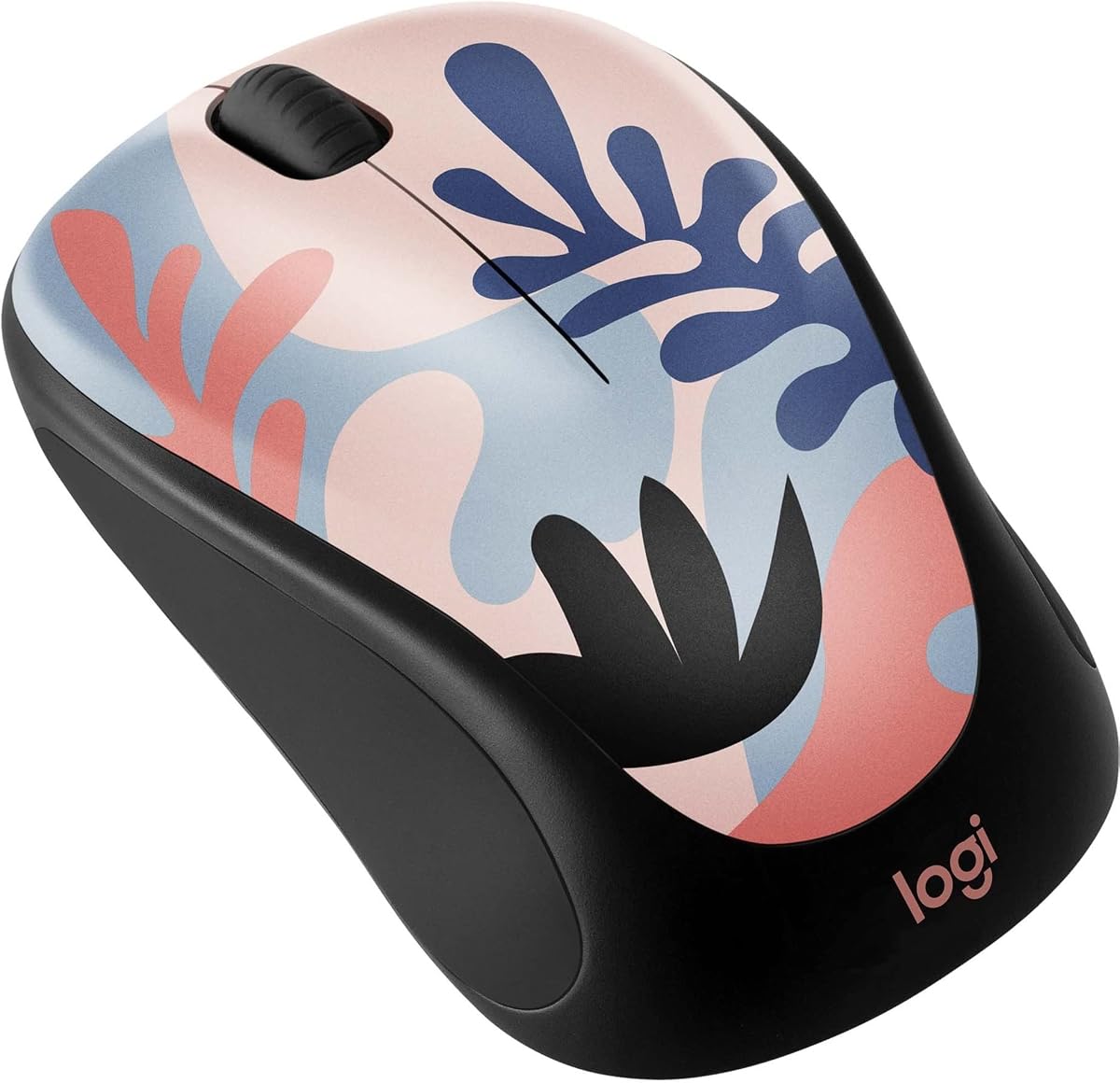
The Logitech Design Collection Limited Edition Wireless Mouse brings trusted brand quality with a vibrant look and soft rubber grips for comfort. Its high user rating underscores Logitech's reputation for durable reliable devices that perform consistently across various operating systems.
We may earn a commission when you buy through this link, at no additional cost to you.
The Unifying receiver supports pairing up to six devices reducing USB clutter and streamlining connectivity for multi-device users. Efficient power-saving technology delivers up to 12 months of battery life while post-consumer recycled plastic parts show environmental responsibility.
This model requires a USB port and may not suit newer laptops without adapters limiting its use for some modern setups. The design focus is aesthetic and functional but lacks advanced features like silent clicks or dual connectivity modes.
It is ideal for brand-loyal users needing a reliable colorful mouse with excellent battery life and eco-conscious materials. We recommend it for general office work or home computing where brand reliability and simple functionality matter most.
Pair multiple devices with one USB receiver to reduce dongle clutter and simplify your desk setup.
Post-consumer recycled plastic parts show commitment to sustainability without sacrificing performance or durability.
We may earn a commission when you buy through this link, at no additional cost to you.
The FMOUSE Cute Cartoon Silent Wireless Mouse features a dual mode design allowing flexible connections and a charming cat meme print. Its strong user rating shows appeal to cat lovers and professionals needing a versatile quiet mouse for mixed device environments.
We may earn a commission when you buy through this link, at no additional cost to you.
Dual mode connectivity supports Bluetooth and USB wireless offering instant plug and play or cable free connection to various devices. Silent clicks keep noise down in office environments while the 33ft range ensures reliable performance across your workspace.
The reliance on AA batteries may be less convenient than rechargeable options though the auto-sleep feature minimizes power drain significantly. The specific kawaii design might not suit all tastes but adds a unique personality touch to the desk setup.
This model is perfect for office workers or remote teams needing silent dual mode connectivity and a fun aesthetic touch. We recommend it for users wanting versatile connectivity and personality in a reliable wireless solution.
Switch between Bluetooth and USB wireless to connect easily with laptops tablets or desktops seamlessly.
Up to 90 percent quieter clicks ensure a distraction-free environment for shared workspaces and meetings.
We may earn a commission when you buy through this link, at no additional cost to you.
Selecting the right cute laptop mouse involves balancing aesthetics with technical performance and comfort needs.
Connectivity defines how your mouse interacts with devices. Bluetooth allows cable-free connection to modern ultrabooks while 2.4GHz wireless provides stability with a USB receiver. Dual mode models offer flexibility for mixed setups.
Prioritize Bluetooth if your device lacks USB ports or choose dual mode for versatility across laptops and tablets.
Battery life ranges from disposable AA cells to built-in rechargeable options. Rechargeable batteries reduce waste and long-term costs but require charging cycles. Disposable options offer simplicity with up to a year of use.
Choose rechargeable for eco-conscious users and disposable for those preferring minimal maintenance without charging hassles.
Ergonomics impact comfort during extended use. Cute shapes like donuts or cars may sacrifice palm support for aesthetics. Traditional contours ensure comfort but might lack personality. Consider hand size and session length when choosing.
Opt for ergonomic curves if you work many hours daily or prioritize unique shapes for shorter lighter usage tasks.
Silent click technology reduces noise significantly making it ideal for libraries shared offices or meetings. Standard clicks offer tactile feedback but can disturb others in quiet environments. Assess your surroundings before purchasing.
Select silent models for shared spaces and standard clicks if tactile feedback is more important for your workflow.
DPI determines cursor sensitivity and tracking precision. Higher DPI supports detailed tasks while lower DPI suits casual browsing. Most cute mice offer fixed or adjustable DPI to match various usage scenarios effectively.
Look for adjustable DPI settings if you switch between design work and general browsing regularly.
Ensure the mouse supports your operating system such as Windows macOS or ChromeOS. USB-C adapters might be necessary for modern laptops relying on USB-A receivers. Check system requirements before finalizing your purchase decision.
Verify port availability and OS compatibility to avoid connectivity issues after delivery.
Compact lightweight models fit easily into laptop bags and are ideal for travelers. Larger mice offer more surface area for precision but take up more space. Assess your travel frequency when selecting a size.
Choose slim or compact designs if you carry your mouse daily for work or school.
Established brands often provide better support and warranties compared to generic options. Check warranty length and return policies to ensure protection against defects. Reliable customer service adds peace of mind to your purchase.
Prefer brands with clear warranty terms to safeguard your investment against unexpected issues.
Start by inserting a battery or charging the device fully before first use. Connect the USB receiver to an available port or pair via Bluetooth settings to enable connectivity with your laptop or tablet.
Clean the optical sensor regularly using a soft dry cloth to remove dust and debris. Avoid using harsh chemicals on the surface to maintain the aesthetic finish and ensure smooth tracking.
Store the mouse in a protective case when transporting to prevent scratches or physical damage. Keep it in a dry environment away from direct sunlight to preserve color and battery health over time.
Most modern models support macOS but check for USB-C compatibility or included Bluetooth support. Some USB receivers require an adapter on newer MacBooks without USB-A ports.
Plug in the included USB cable to a computer or charger until the indicator light stops blinking. Some models may take up to two hours for a full charge depending on capacity.
Silent click mechanisms are rated for millions of keystrokes similar to standard buttons. Regular usage should not degrade performance significantly if the mouse is used within its weight limits.
Most wireless models offer ranges between 10 meters to 15 meters. Walls or heavy interference may reduce effective range depending on your environment and device.
Optical sensors typically work on most surfaces but may struggle with transparent glass. Using a mousepad ensures consistent tracking and protects both the mouse and desk surface.
Battery life varies by model with some lasting up to 24 months on a single AA cell. Rechargeable units generally provide 20 to 30 days per charge depending on usage intensity.
We highlighted ten standout options ranging from budget-friendly picks to premium dual mode models that balance charm with performance. The top picks offer unique designs silent operation and strong connectivity to suit different user needs.
Prioritize features like battery type and connectivity based on your daily workflow and device compatibility. Silent clicks and ergonomic comfort are key considerations for shared environments or extended work sessions.
Always verify current prices and stock availability as market conditions may change. Choosing a model that matches your specific aesthetic and functional needs ensures long-term satisfaction.