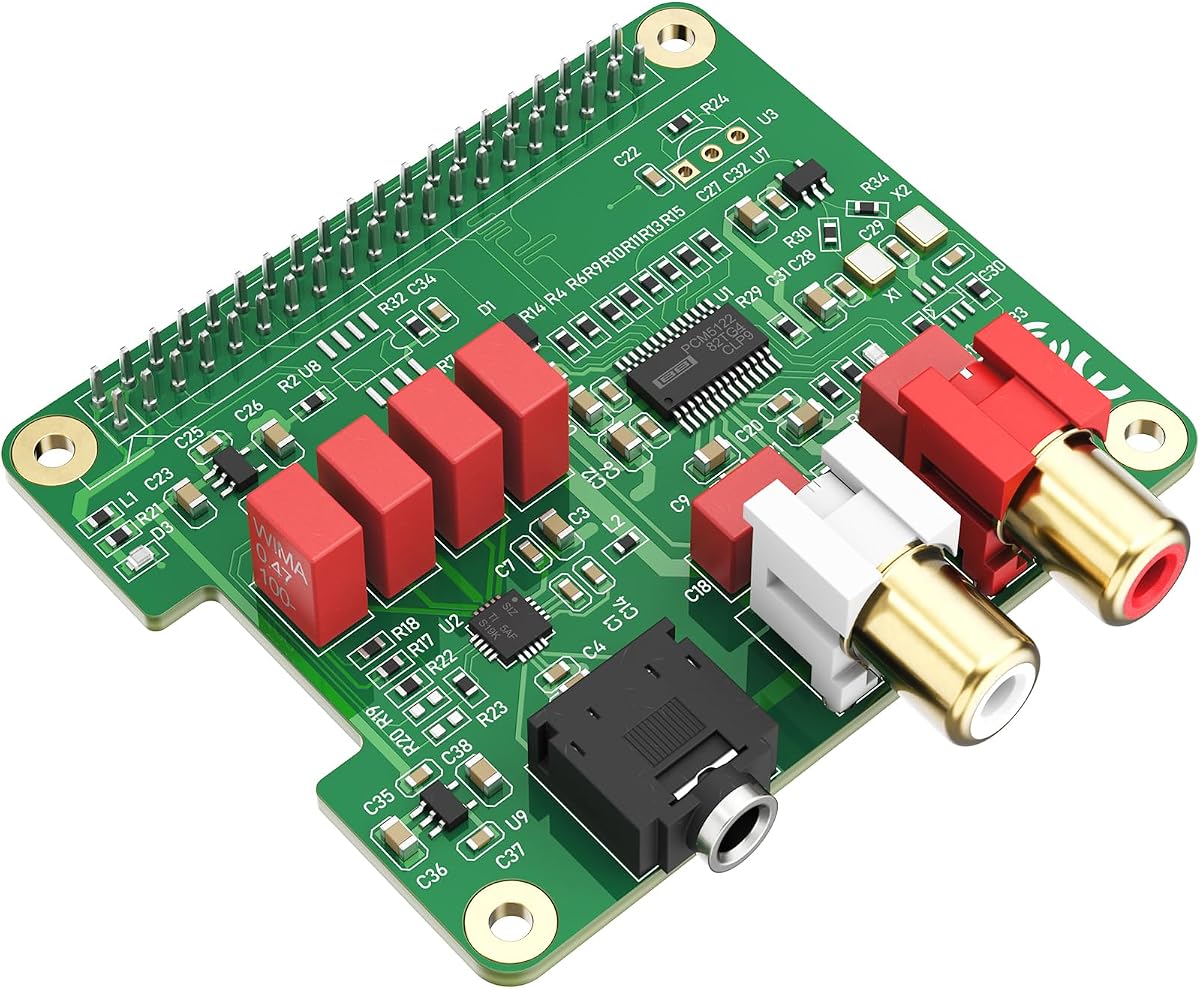
HiFi DAC HAT for Raspberry Pi 5/4/3B+/Zero
4.5Editor score
PCM5122 DAC chip
Dual clock oscillators
RCA and 3.5mm outputs
This guide compares the top DAC for Raspberry Pi options including HATs and digital cards for audiophile sound and high-res audio streaming on all Pi models.
If you want high-quality sound from your Raspberry Pi, a dedicated DAC board is the perfect upgrade. These audio cards plug directly into the GPIO pins to bypass the weak built-in audio and deliver crystal clear music playback for your projects.
We compared ten real DAC products based on chip quality, output options, software support, and ease of use. Our list covers budget HATs, premium ESS chips, and digital output cards so you can find the right match for your specific audio needs.
Each pick shows key features, pros, cons, and real user ratings to help you decide quickly. Prices and stock change often so check the links for the latest deals before you order your new audio upgrade for your Pi.
4.5Editor score

4.5Editor score

4.1Editor score
Here is a side by side comparison of all ten DAC boards to help you see the differences in chips, outputs, and special features at a glance.


This HiFi DAC HAT is a top pick for budget buyers who want high-resolution audio on their Raspberry Pi. With a 4.5 star rating and strong praise for its PCM5122 chip it delivers clear sound that beats the built-in audio by far.
We may earn a commission when you buy through this link, at no additional cost to you.
Its standout feature is the dual ultra-low jitter oscillators that eliminate timing errors for pure audio. The board offers both RCA and 3.5mm outputs plus it supports all major player software like Volumio and Moode out of the box.
The trade-off is that it does not have a balanced XLR output so pro setups might prefer a pricier board. Still for most listeners the audio quality is excellent and the low noise floor makes quiet passages sound clean and detailed.
Buy this if you want a simple drop-in upgrade for a music server or media center without spending a lot. It is easy to install and works well on Pi 5 Pi 4 and Zero models for a great listening experience.
The two dedicated oscillators ensure accurate sample timing which removes harshness from high-res tracks.
An onboard EEPROM makes the board recognized by the OS instantly so you just need to install a player.
We may earn a commission when you buy through this link, at no additional cost to you.
This DAC Mini Hat is designed specifically for small boards like the Raspberry Pi Zero while still working on larger models. It scores 4.2 stars for its neat fit and solid PCM5122 performance in a tiny package.
We may earn a commission when you buy through this link, at no additional cost to you.
The board offers both RCA and 3.5mm outputs with a strong TPA6133 amplifier that drives headphones well. It supports all the popular music software including Moode and Volumio making it ready to use right away.
While it lacks the dual clocks of higher end boards it still sounds clear and balanced for most listeners. The only real limit is that it is a basic design so you won't get extra features like balanced outputs.
Buy this if you are building a portable music player or small network streamer with a Zero. It keeps the size down without sacrificing much sound quality and saves space in small enclosures.
The board is sized to avoid overhang on Zero models so it fits in tight cases easily.
The TPA6133 amp delivers 2.1Vrms which is powerful for portable headphones and earbuds.
We may earn a commission when you buy through this link, at no additional cost to you.
The HiFi DAC Pro Hat earns Editor's Choice with its flagship ES9038Q2M chip that delivers studio quality sound. Rated 4.5 stars it is the top pick for listeners who want DSD playback and balanced outputs.
We may earn a commission when you buy through this link, at no additional cost to you.
This board supports DSD512 and PCM up to 32bit/384kHz with ultra low jitter clocks that remove noise from the signal. The three op amp headphone section and balanced outputs make it easy to connect to high-end amplifiers.
The main trade-off is the higher price and the need for a stable power supply to avoid any hum. If you can afford it the clarity and detail are a big step up from simpler PCM5122 based boards.
Buy this if you run a serious music server or want to drive high-impedance headphones cleanly. It is the best all-round option for those who want the most audio quality from a Raspberry Pi.
This flagship converter offers 129dB DNR and -120dB THD+N for pure clean audio.
Balanced outputs eliminate noise and let you connect to pro audio gear without issues.
We may earn a commission when you buy through this link, at no additional cost to you.
The Digi One Hat is a special card that outputs digital audio instead of analog signals. With a high 4.8 star rating it is loved by users who want to connect to an external DAC for top sound.
We may earn a commission when you buy through this link, at no additional cost to you.
It offers both optical Toslink and coax S/PDIF outputs with galvanic isolation that blocks noise from the Pi. The dual oscillators and master clock mode ensure accurate timing so your streamers play bit perfect audio.
The only downside is you need a separate DAC to get analog sound since this board has none. Still the isolation and clock design make it one of the most reliable options for a digital streamer setup.
Buy this if you already have a good external DAC and want to use the Pi as a high-quality source. It is ideal for setups where clean digital signals are a priority over on-board analog sound.
The isolator blocks electrical noise so your digital stream stays pure and clean.
The board sends raw audio data without changes so your DAC gets the best signal possible.
We may earn a commission when you buy through this link, at no additional cost to you.
This HiFi DAC Module is a basic board that uses the PCM5122 chip for clear sound. With a 4.8 star rating users love its simplicity and low price for adding digital audio to a Pi project.
We may earn a commission when you buy through this link, at no additional cost to you.
It connects via I2S and supports high sample rates up to 384kHz. The board has an LED that shows power and decode status which is helpful for debugging audio setups.
Unlike full HATs it has limited output options and may need extra wiring for RCA. Still for DIY builders it offers strong performance without the cost of extra features they do not need.
Buy this if you want a no-frills DAC for a small custom project. It is easy to integrate and provides clean audio without the bulk of a full board.
The I2S interface makes wiring easy for custom projects without GPIO conflicts.
Red and green LEDs show power and decode status at a glance.
We may earn a commission when you buy through this link, at no additional cost to you.
The RASPIAUDIO Audio DAC Hat is a simple value board that brings USB-level audio to the GPIO. Rated 4.2 stars it gets praise for its ready to use EEPROM setup and clean output.
We may earn a commission when you buy through this link, at no additional cost to you.
It supports all major Pi models from Pi 5 to Zero and offers both 3.5mm and RCA outputs. The 112dB SNR is solid for a low-cost board and it works with all common music software.
The trade-off is that it uses a basic design without dual clocks or extra op amps. Still for casual listening and small media servers it is a reliable pick that saves time on setup.
Buy this if you want a quick audio upgrade without fiddling with drivers. It is a solid choice for general use and works well for streaming and local playback.
The EEPROM chip makes the board recognized by the OS so no manual driver install is needed.
It fits all 40-pin models so it works on Pi 5 Pi 4 and Zero without issues.
We may earn a commission when you buy through this link, at no additional cost to you.
This Argon BLSTR DAC holds a rare perfect 5.0 rating thanks to its clean audio and noise reduction. Users praise its ability to block hum and work well on the Pi 5.
We may earn a commission when you buy through this link, at no additional cost to you.
It includes a built-in ground loop isolator which solves a common issue with cheap DACs that produce hum. The 3.5mm output is powered by the PCM5122 chip for clear sound and easy setup.
The only limit is that it has no RCA outputs and focuses on a single jack. Still if you want a quick plug-and-play fix for noisy audio it is an ideal compact choice.
Buy this if you get hum from your system or want a simple Pi 5 audio upgrade. It is a great budget fix that delivers quiet reliable sound.
The built-in isolator removes hum so your audio stays clean and noise-free.
Designed for Pi 5 it works out of the box with no config needed.
We may earn a commission when you buy through this link, at no additional cost to you.
The HiFiBerry DAC+ DSP is a premium board with a 300 MHz DSP that can mix and EQ audio. Rated 4.1 stars it is chosen by pros who need flexible audio control and room tuning.
We may earn a commission when you buy through this link, at no additional cost to you.
It supports sample rates up to 192kHz and can act as a standalone DAC even without a Pi. The DSP lets you change settings on the fly so it fits many speaker setups.
The trade-off is that it costs more and needs a specific case to work properly. Still for advanced users it offers unmatched control over sound quality and routing.
Buy this if you need room EQ or want to use the board as a standalone processor. It is the most powerful option for DSP and flexible audio routing.
The DSP runs many instructions per sample so you can apply EQ and mixing in real time.
You can adjust frequency response to match your room for more natural sound.
We may earn a commission when you buy through this link, at no additional cost to you.
The HiFiBerry Digi+ Standard is a trusted board that outputs Toslink and coax signals. With a 4.6 star rating it is popular for its reliable bit-perfect playback on older Pi models.
We may earn a commission when you buy through this link, at no additional cost to you.
It supports audio up to 192kHz/24bit and offers both optical and coax outputs so it fits many setups. The design is simple and works well with all major music players.
The trade-off is that you need a separate DAC since it does not have analog outputs. Still for streaming digital audio it is a proven and reliable choice.
Buy this if you need Toslink or coax for your system and want a stable option. It is a classic board that works well for digital audio routing.
The board sends raw audio data without modification for clean playback.
Optical and coax ports give you flexibility to connect different external DACs.
We may earn a commission when you buy through this link, at no additional cost to you.
The HiLetgo PCM5102 Module is a simple low-cost board for adding audio to a Pi or Arduino. Rated 4.2 stars users like its affordability and decent PCM5102A sound.
We may earn a commission when you buy through this link, at no additional cost to you.
It uses the I2S interface and comes with a soldered 3.5mm jack ready to go. The PCM5102A chip is known for good performance so it sounds much better than the Pi's onboard audio.
The trade-off is that it is very basic with no RCA outputs or extra features. Still for tight budgets and DIY experiments it is a great entry point.
Buy this if you want to test DACs or build a simple audio project without spending much. It is a basic board that delivers clear sound for the price.
This board offers the lowest price while still using a quality DAC chip.
The 3.5mm jack is pre-soldered so you just plug and play.
We may earn a commission when you buy through this link, at no additional cost to you.
Choosing the right DAC depends on your budget audio goals and system setup.
The DAC chip sets the sound quality baseline. Most budget boards use the PCM5122 which offers 384kHz/32bit and low noise. Premium boards like the ES9038Q2M push DSD and higher SNR for audiophile listening.
Check the chip before buying to match your sound goals.
Look for RCA outputs for line level audio and 3.5mm jacks for headphones. Balanced outputs like XLR are rare but useful for pro setups. Some cards are digital-only and need a separate DAC.
Pick outputs that match your speakers or headphones.
Dual low jitter oscillators remove timing errors that add noise. Basic boards rely on the Pi's internal clock which can cause jitter. Good boards have dedicated clocks for cleaner audio.
Opt for boards with dual clocks if you listen to high-res files.
Top player apps like Volumio Moode and LibreELEC must support the board. EEPROM support makes setup easier. Check docs for compatibility before buying to avoid driver issues.
Ensure your player software lists the board as compatible.
HATs fit Pi 5 Pi 4 and Zero models. If you use a Zero or small case check that the board does not overhang. Some boards are small modules for DIY wiring.
Match the board size to your Pi model and case.
Some boards include galvanic isolation to remove ground loops and hum. This helps in setups with external amps. Look for isolators if you hear buzzing.
Isolation boards solve noise issues in many setups.
Most boards draw power from GPIO but some benefit from clean power. A good PSU reduces noise. Boards with regulators help maintain clean audio.
Use a stable power supply to avoid audio hiss.
Budget boards start near twenty dollars with good PCM5122 chips. Premium boards with DSP or balanced outputs cost more. Pick the range that fits your goals.
Higher price brings more features and higher performance.
Install your Pi card by plugging it into the GPIO pins. Align the pins carefully and use spacers to keep it secure. Check that it is flush and steady.
Install a player app like Volumio or Moode on the Pi. Set the output device to the new board. Adjust volume settings and enable high-resolution playback options.
Keep the board clean and dry. Do not touch the chips. If you hear noise check the power and cables. Use short cables to avoid hum.
Yes a DAC improves sound over the Pi's onboard audio. The built-in audio has low SNR and noise. A DAC board provides high-resolution digital audio and cleaner analog outputs for better music playback.
The PCM5122 is a great choice for budget builds. For higher-end audio the ES9038Q2M offers better resolution and noise performance. The best chip depends on your budget and audio goals.
Install the card by aligning it on the GPIO pins. Use spacers if needed. Install a player app that supports the board and enable the DAC in the audio settings.
Most DAC boards work with these players. Check the docs to be sure. Some boards use EEPROM to auto-configure. If not you may need to set the output device in settings.
Analog boards output audio to speakers via RCA or jacks. Digital boards send bit-perfect signals to an external DAC. Use analog for simple setups and digital for pro gear.
Yes a good DAC with dual clocks and isolation reduces noise and hum. Some boards have ground loop isolators which help block interference from the Pi's circuits.
Our top picks include the HiFi DAC HAT for budget value the HiFi DAC Pro Hat for audiophile features and the HiFiBerry DAC+ DSP for advanced control.
Focus on chip quality clock system and output options that fit your speakers or headphones. Consider software support and ease of setup before you buy.
Check current prices and stock for these boards as they change often. Choose the DAC that matches your budget and audio goals for the best results.