
Lenovo 23.8 All-in-One Desktop
4.3Editor score
Intel Core i3-N305 Processor
512GB PCIe SSD Storage
Borderless FHD IPS Display
Finding the right desktop computer for kids requires balancing performance, durability, and ease of use. Today's youth need devices that can handle schoolwork, creative projects, and entertainment without lagging or crashing during important tasks.
We compared ten real desktop computer bundles focusing on processor power, memory capacity, storage types, and display quality. Each option was evaluated based on reliability, connectivity, and overall value for families seeking a reliable home computing solution.
Every pick shows specific strengths like all-in-one design or renewed value. Keep in mind that prices and availability change frequently, so verify details before purchasing to ensure you get the best current deal for your needs.
4.3Editor score

3.8Editor score

3.6Editor score
As an Amazon Associate we earn from qualifying purchases.
This side-by-side comparison highlights key specifications across all ten desktop computer options. Use this table to quickly identify which system offers the memory power storage or design features that best match your child's needs and your home setup.


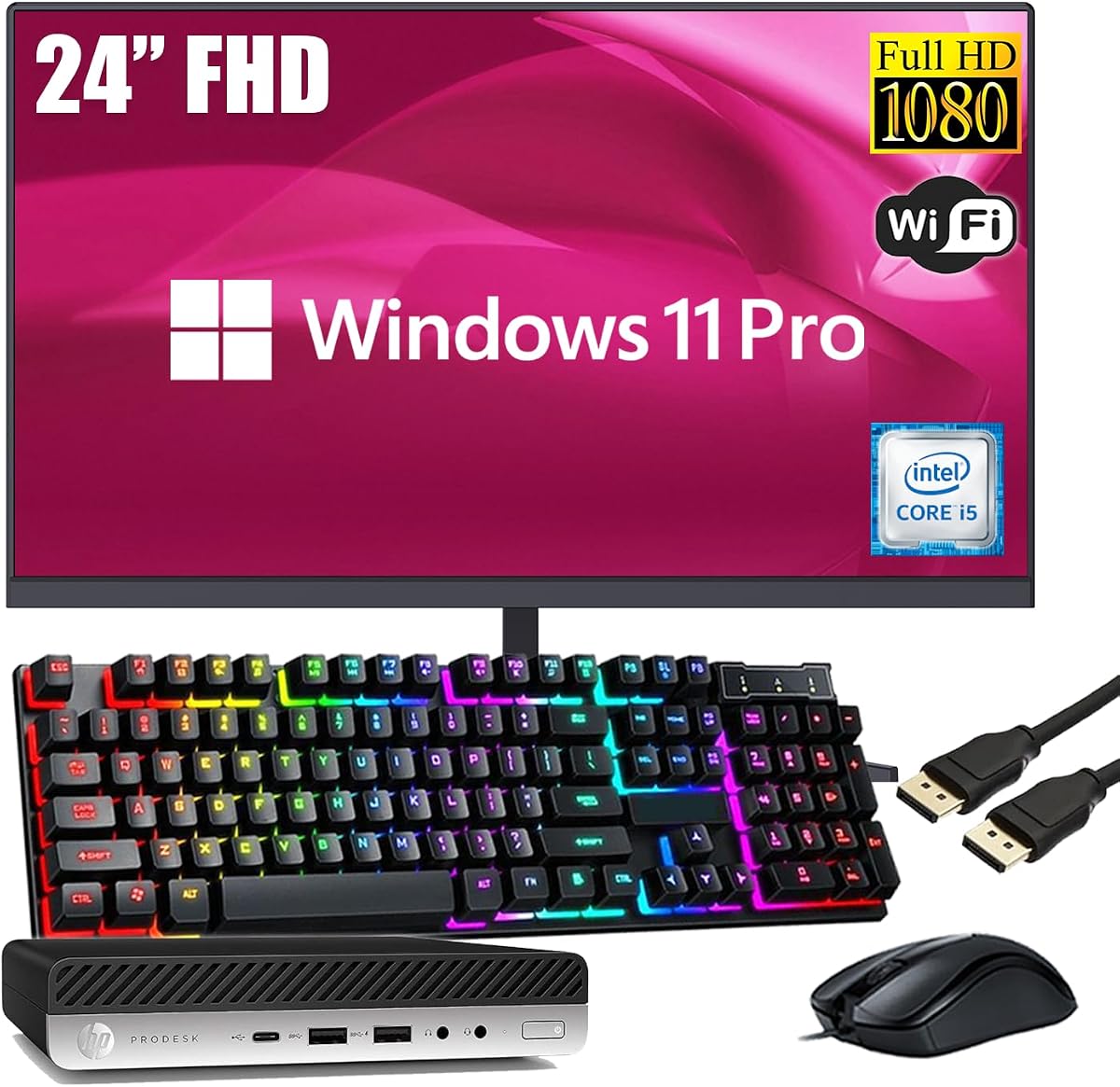


This HP desktop bundle offers a balanced mix of speed and storage ideal for student use. It holds a solid 3.8 rating among buyers who value quick performance and reliable connectivity features like Wi-Fi 6.
We may earn a commission when you buy through this link, at no additional cost to you.
The 16GB RAM allows multiple browser tabs and educational apps to run smoothly without lag. The 500GB SSD ensures fast startup and file access which keeps kids focused on their tasks rather than waiting for loading screens.
While the RGB keyboard adds a fun touch for younger users the renewed nature of the device means cosmetic condition may vary. The monitor model is also subject to change which is worth checking before finalizing your order.
Families seeking a reliable home office or student setup will find this HP bundle excellent. It delivers modern specs in a compact design that saves desk space while supporting productivity and light entertainment needs effectively.
The 16GB of RAM ensures that even demanding educational software runs without interruption during homework sessions.
The Small Form Factor case fits neatly on any desk freeing up valuable space for books and stationery.
We may earn a commission when you buy through this link, at no additional cost to you.
The Lenovo 23.8 All-in-One delivers a premium experience with its borderless FHD IPS display and powerful octa-core processor. It earns a strong 4.3 rating for users seeking a clean look and smooth performance in one unit.
We may earn a commission when you buy through this link, at no additional cost to you.
Its 512GB PCIe NVMe SSD provides lightning-fast boot times and ample storage for large media libraries. The 16GB RAM ensures seamless multitasking between video calls research tabs and creative apps without slowdowns.
The integrated HD webcam and speakers simplify setup for remote learning but limit future upgrade options. The design is sleek and professional but comes at a higher price point compared to standard desktop bundles.
Best suited for families wanting a modern clutter-free setup this Lenovo model is ideal. It combines high-quality visuals with reliable speed making it perfect for both schoolwork and creative home projects easily.
The three-sided borderless design and 99 percent sRGB coverage make this display excellent for media and design work.
Combining the tower and monitor into one unit reduces cable clutter and frees up desk space significantly.
We may earn a commission when you buy through this link, at no additional cost to you.
This Dell Optiplex bundle provides an affordable entry point for families needing a reliable desktop. It holds a 3.6 rating reflecting its value as a cost-effective solution for basic computing tasks and homework.
We may earn a commission when you buy through this link, at no additional cost to you.
Equipped with an Intel Quad-Core i5 processor it handles everyday apps and web browsing efficiently. The 500GB HDD offers plenty of space for files though it is slower than modern SSDs for boot times.
While the DDR3 RAM is older it still supports smooth multitasking for standard school use. The included 20 inch monitor and RGB accessories make it a complete ready-to-use package without extra purchases.
For budget-conscious shoppers this renewed Dell option offers great value. It delivers essential performance in a full bundle that works well for students and light home office use effectively.
The bundle includes everything needed to start right away saving money on separate monitor and accessory purchases.
Even with older memory specs the Quad-Core i5 ensures consistent speed for web apps and document editing.
We may earn a commission when you buy through this link, at no additional cost to you.
This HP Elite desktop offers a robust mix of memory and storage for families needing significant data capacity. It holds a 3.5 rating reflecting its utility as a renewed workstation for multitasking and storage needs.
We may earn a commission when you buy through this link, at no additional cost to you.
The 16GB RAM allows for running many applications simultaneously without slowdown. The 1TB HDD provides ample room for photos games and movies ensuring long-term storage without immediate upgrades.
While the HDD is slower than an SSD it remains sufficient for media libraries and file archiving. The included RGB accessories and Windows 11 Pro add value and usability for both work and leisure.
Best for users prioritizing memory and capacity this HP bundle is a practical choice. It delivers reliable performance for demanding tasks and offers a complete setup ready for immediate use at home.
The 1TB drive stores extensive media collections and project files without needing external storage solutions.
16GB RAM ensures that multiple apps like browsers and editors run smoothly at the same time.
We may earn a commission when you buy through this link, at no additional cost to you.
This Dell OptiPlex bundle stands out for its massive 2TB storage capacity ideal for families with large data needs. It holds a 3.6 rating reflecting its appeal as a cost-effective storage solution with solid memory.
We may earn a commission when you buy through this link, at no additional cost to you.
The 16GB RAM ensures smooth performance when handling multiple tasks or large files. The 2TB HDD allows for extensive archiving of videos photos and documents without worrying about running out of space soon.
While the 3rd Gen processor is older it remains competent for standard computing needs. The included RGB keyboard and monitor make it a ready-to-use bundle with extra storage value included.
Best for users needing maximum storage on a budget this Dell option is practical. It supports long-term file retention while providing enough memory for daily productivity tasks effectively and reliably.
The 2TB drive accommodates large media libraries and school archives without needing external hard drives.
Complete with monitor and keyboard this bundle saves setup time and offers immediate usability at home.
We may earn a commission when you buy through this link, at no additional cost to you.
This HP ProDesk mini offers a compact footprint with the speed benefits of SSD storage. It holds a strong 4.2 rating reflecting user appreciation for its quick performance and space-saving physical design.
We may earn a commission when you buy through this link, at no additional cost to you.
The 256GB SSD ensures rapid startup and application launches making it efficient for daily tasks. The 8GB RAM supports multitasking for standard school apps and browsing though it may limit heavier usage.
USB-C connectivity adds modern flexibility for external devices and displays. The bundle includes a 24 inch monitor making it a complete solution for small desks or shared home spaces.
Ideal for families with limited desk space this mini desktop provides reliable performance. It balances speed and size effectively for those who value quick access and efficient storage over massive capacity.
The SSD storage allows the system to boot and open apps in seconds keeping kids productive immediately.
The mini form factor fits easily on crowded desks without sacrificing essential computing power or features.
We may earn a commission when you buy through this link, at no additional cost to you.
This Lenovo All-in-One delivers a balanced experience with ample memory and modern connectivity. It holds a 4.2 rating reflecting satisfaction with its reliability and ease of setup for home office use.
We may earn a commission when you buy through this link, at no additional cost to you.
The 16GB RAM ensures smooth multitasking across educational apps and browsers. The 256GB PCIe SSD provides quick access to files while the IPS panel offers clear viewing from multiple angles.
While storage is moderate it suits general users who use cloud storage for large media. The wireless keyboard and Bluetooth 5.2 improve comfort and reduce desk clutter for a cleaner workspace.
Best for users wanting a tidy setup with good memory this Lenovo model is recommended. It provides reliable performance for daily tasks and integrates well into modern home or office environments easily.
Built-in Wi-Fi 6 ensures fast internet speeds and stable connections for streaming and video calls.
The IPS panel with 99 percent sRGB provides sharp text and accurate colors for reading and study.
We may earn a commission when you buy through this link, at no additional cost to you.
This Lenovo IdeaCentre offers a dependable solution with ample SSD storage for daily computing needs. It holds a strong 4.3 rating among users who appreciate its reliability and balanced performance for home use.
We may earn a commission when you buy through this link, at no additional cost to you.
The 512GB SSD provides fast boot times and room for essential apps and files. The 8GB RAM supports smooth browsing and multitasking for typical student tasks without significant lag.
While memory is limited to 8GB the system supports upgrades up to 32GB for future needs. The integrated security features like TPM 2.0 help protect data and ensure safe access for users.
Best for families seeking a stable secure system this IdeaCentre is recommended. It delivers consistent performance for school and leisure while offering expandability for growing storage needs over time.
The system supports up to 32GB of total memory allowing for future upgrades as needs grow.
Built-in TPM 2.0 security hardware protects data and ensures secure login for home use.
We may earn a commission when you buy through this link, at no additional cost to you.
This Dell package provides a complete functional setup for those seeking a basic reliable computer. It holds a 3.8 rating reflecting its utility as a budget-friendly solution for standard home and school needs.
We may earn a commission when you buy through this link, at no additional cost to you.
The 8GB RAM and Quad Core i5 processor handle daily tasks like browsing and document editing well. The 500GB HDD provides enough space for files while the included DVD drive supports legacy media.
The 19-inch LCD is smaller than modern standards but remains functional for reading and study. Renewed condition ensures lower costs while maintaining core performance for essential computing without extra accessories.
Best for basic use cases this bundle offers a complete ready-to-go solution. It delivers reliable performance for entry-level tasks and provides a solid foundation for students needing a simple desktop.
Includes monitor keyboard and mouse so there is no need to buy extra accessories before use.
Core i5 processing ensures smooth operation for homework and web browsing without complex requirements.
We may earn a commission when you buy through this link, at no additional cost to you.
This HP All-in-One stands out with a unique docking hub and a clean design suitable for modern spaces. It holds an excellent 4.5 rating reflecting high user satisfaction with its versatility and ease of use.
We may earn a commission when you buy through this link, at no additional cost to you.
The Intel N100 processor offers efficient performance for web apps and study tasks. The 8GB RAM ensures smooth multitasking while the docking hub simplifies connectivity for multiple peripherals and displays.
Storage capacity can be expanded using the included SD card for added flexibility. The 21.5 inch FHD screen provides clear visuals suitable for reading and light media consumption effectively and comfortably.
Best for users valuing design and connectivity this HP model is a strong choice. It offers a polished workspace solution with added features that enhance daily workflow and peripheral management easily.
The 8-in-1 docking hub allows easy connection of cameras drives and displays without adapter hassles.
The sleek white finish and slim profile add a modern touch to any home or office desk.
We may earn a commission when you buy through this link, at no additional cost to you.
Selecting the right desktop involves considering speed storage and design. These factors help ensure the system meets your child's needs now and as their needs grow.
The processor is the brain of the computer and determines how fast it runs apps. For schoolwork and browsing an Intel Core i5 or N100 offers smooth performance without lagging during homework sessions.
Aim for at least a quad-core processor to handle multiple tabs and educational programs simultaneously without slowdown.
RAM controls how many programs can run at once without the computer slowing down. Eight gigabytes is the minimum for basic tasks but sixteen gigabytes ensures smoother multitasking for heavier workloads.
Choose 16GB if your child runs many apps or uses creative software that requires extra memory.
Hard drives and solid state drives store files but SSDs boot faster and load apps quicker. Look for an SSD if possible to ensure the system starts up quickly for school readiness.
SSDs are preferred over HDDs for speed though HDDs may offer more space at lower prices.
Kids spend hours looking at the screen so clarity and size matter for comfort and eye health. A Full HD IPS panel with anti-glare properties reduces eye strain during long study sessions.
Opt for monitors between 21 and 24 inches for a good balance of screen space and desk fit.
Modern peripherals need good ports to connect like USB-C or Wi-Fi 6 for reliable internet. Ensure the desktop has enough USB ports and wireless capability to support devices like printers or headsets.
Check that the model includes essential ports like HDMI and USB to avoid buying extra adapters later.
Desktops come as towers or all-in-one units which integrate the screen and PC into one. All-in-ones save space and reduce cable clutter while towers allow for easier future upgrades of parts.
Consider desk space and future needs when choosing between a standalone tower or an integrated all-in-one design.
Windows 11 provides the latest features and security tools needed for safe home use. A professional version might offer better management tools but the standard Home version works for most families.
Ensure the device comes pre-installed with a genuine license to avoid security risks and setup issues.
Bundles that include a monitor keyboard and mouse save time and money on separate purchases. RGB accessories can add a fun touch for kids making the workspace more engaging and personalized.
Check the bundle contents carefully to confirm all needed items are included before buying.
Start by setting up the operating system and creating a separate user profile for your child to protect your files and limit screen time distractions effectively.
Keep the computer away from direct sunlight and heat sources to maintain internal component longevity and ensure stable performance during intensive usage sessions.
Regularly update Windows and run antivirus scans to protect against malware while clearing cache files monthly to keep the system running smoothly over time.
A desktop offers better value and performance for the price with less wear and tear than a portable laptop. It stays in a fixed location which helps manage screen time and keeps cables organized for study areas.
Most of these bundles ship with a clean installation of Windows 11 or 11 Pro. Always verify the listing details to confirm the specific version included before purchasing to ensure compliance with your needs.
Eight gigabytes is sufficient for basic homework and web browsing. For gaming or creative editing sixteen gigabytes provides smoother performance and prevents slowdowns when running multiple heavy applications.
Renewed models are tested and refurbished to work like new with a warranty for support. They offer significant cost savings compared to buying new making them an excellent value for budget-conscious families.
Most desktop towers allow internal upgrades but all-in-ones often have limited upgradeability. Check the specific model's specs for expansion slots before buying if you plan to add more storage later.
A larger screen with higher resolution allows text and icons to be displayed more clearly reducing eye strain. Ensure the display has anti-glare coatings to protect eyes during long study sessions.
The HP Windows 11 Desktop Computer leads our list with balanced speed and memory ideal for daily student tasks. Its strong performance and accessory value make it a top pick for families seeking reliability.
Prioritize storage type and memory capacity when shopping to ensure smooth operation for both school and leisure. All-in-one models save space while towers offer upgradeability depending on your home needs.
Verify current availability and warranties before purchasing as specs and stock may change. Checking details ensures you get the exact configuration needed for your child's setup today.