
WALI Computer Monitor Stand
4.7Editor score
Adjustable height levels
44 lbs weight capacity
Vented platform design
Discover the top desktop monitor risers for 2026. We compare features, ergonomics, and storage to help you choose the perfect stand for your workspace needs.
Finding the right desktop monitor riser can transform your workspace into a more ergonomic and organized environment. A good riser elevates your screen to eye level, reducing strain on your neck and back during long hours of work or leisure activities.
We compared ten top-rated models based on build quality, adjustability, storage capacity, and user reviews. Our analysis focuses on real-world performance, durability, and how well each option fits various desk setups and budget constraints.
Each pick below highlights specific strengths and ideal use cases for different users. Please note that prices and availability change frequently, so verify current details before making your final purchase decision.
4.7Editor score
4.7Editor score

4.6Editor score
This side-by-side comparison evaluates all ten models across key dimensions including material, weight limit, dimensions, and unique features to help you make an informed choice.


The WALI Computer Monitor Stand offers an exceptional value proposition for users seeking an affordable yet reliable solution for elevating their screens. With a robust 4.7-star rating from numerous verified buyers, this stand has proven its worth in daily office environments across the globe.
We may earn a commission when you buy through this link, at no additional cost to you.
Its standout feature is the adjustable height mechanism, allowing you to choose between three specific levels to match your ergonomic needs. The large metal shelf provides ample space for most flat-screen displays, laptops, and even small printers, ensuring versatility in your setup.
While the finish is basic and may not appeal to those seeking a premium aesthetic, the functional benefits outweigh this minor drawback. The vented holes on the platform help prevent overheating, keeping your devices running cool during intensive tasks.
This stand is ideal for budget-conscious professionals, students, or anyone needing to reduce neck strain without breaking the bank. We recommend it as a top budget choice for those who prioritize function over form.
The ability to set the monitor at 3.9, 4.7, or 5.5 inches off the desk helps align your screen with eye level, significantly reducing long-term strain on your posture.
Vented holes on the platform ensure proper airflow around your devices, preventing heat buildup that could otherwise lead to performance throttling or hardware issues over time.
We may earn a commission when you buy through this link, at no additional cost to you.
The TEAMIX 20 Inch Monitor Stand brings a touch of elegance to your desk with its high-quality MDF wood construction. Rated at 4.6 stars, it appeals to users who want a sturdy, permanent-looking solution that complements home decor styles.
We may earn a commission when you buy through this link, at no additional cost to you.
Its primary strength lies in its impressive 80-pound weight capacity, making it suitable for heavier monitors or multiple devices. The shelf design is straightforward, providing a flat surface that can accommodate laptops under 20 inches and screens under 50 inches.
Although it lacks height adjustability compared to other models, its fixed height is generally sufficient for standard setups. The assembly process is minimal, requiring just a few steps to get it up and running on your workspace.
Choose this stand if you prefer a natural wood aesthetic and need to support heavier equipment without worrying about stability. It is a reliable choice for home offices where style and strength are equally important.
Made from high-quality MDF wood board, this stand offers a robust surface that resists wobbling and provides a premium feel compared to plastic alternatives.
Beyond monitors, this stand can serve as a shelf for printers, notebooks, or decorative items, giving you flexibility in how you utilize your desk space.
We may earn a commission when you buy through this link, at no additional cost to you.
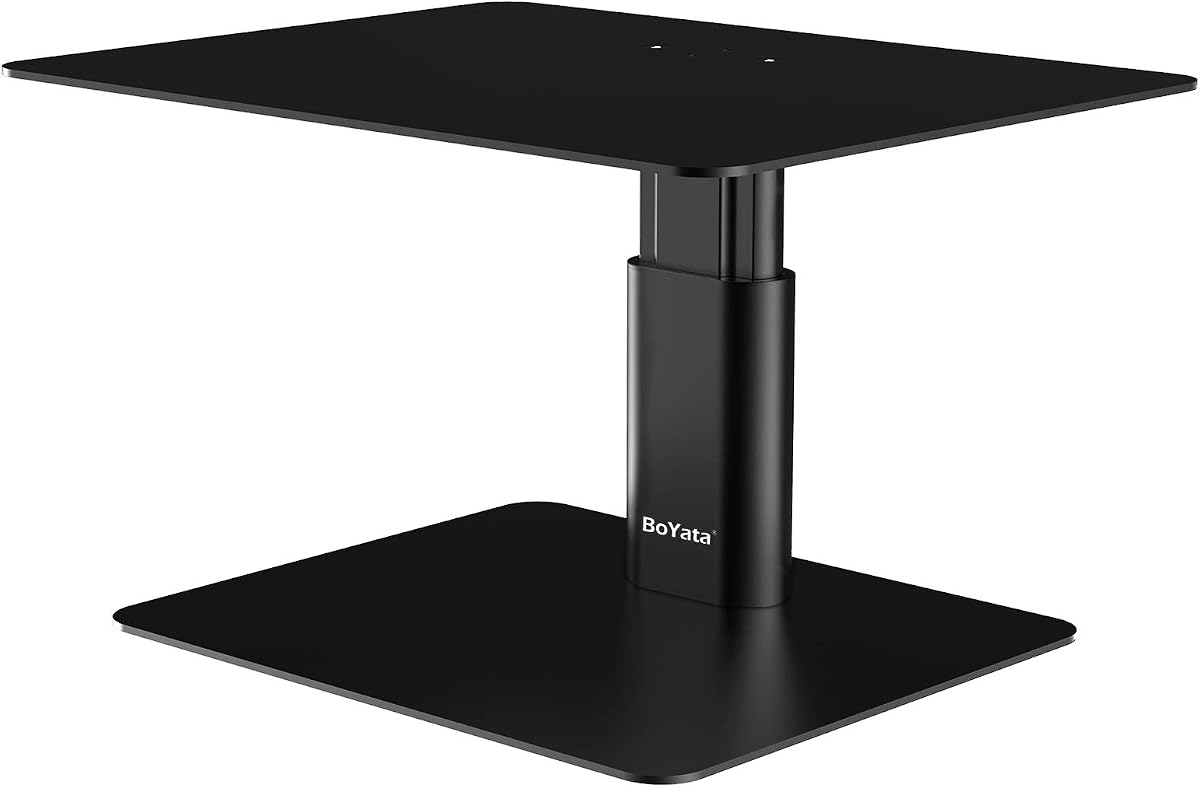
The BoYata Monitor Stand stands out for its unique twist knob adjustment mechanism, offering precise control over screen height. With a 4.7-star rating, it is a favorite among users who demand ergonomic customization without sacrificing build quality.
We may earn a commission when you buy through this link, at no additional cost to you.
Its metal construction ensures longevity and stability, while the skidproof pads prevent any unwanted sliding during use. The design prioritizes space efficiency, leaving sufficient room underneath for keyboards and notebooks to keep your desk clutter-free.
While assembly requires a screwdriver (which is included), the process is straightforward and can be completed quickly. The fixed base size means you should measure your desk to ensure compatibility, but for most users, it fits seamlessly.
We recommend this stand for professionals who need exact ergonomic positioning to relieve shoulder and neck pain. It strikes an excellent balance between durability, adjustability, and practical storage.
The twist knob allows you to fine-tune the height to match your eye level perfectly, helping correct posture and reduce physical strain during long working sessions.
Constructed from strong metal materials, this stand is not easy to bend or dent, ensuring it remains stable even with heavier monitors or dual setups.
We may earn a commission when you buy through this link, at no additional cost to you.
The Amazon Basics Height Adjustable Monitor Stand offers a flexible solution with its 3-level stackable design, allowing you to customize the height to suit your needs. It holds a 4.6-star rating, reflecting its reliability for standard office use.
We may earn a commission when you buy through this link, at no additional cost to you.
Made from high-quality ABS plastic, it is lightweight yet durable enough for daily tasks. The tapered design ensures stability, while the non-skid feet keep the stand secure on any flat surface without scratching your desk.
While it supports up to 22 lbs, which may not be enough for heavy monitors, it is perfect for laptops and smaller screens. The stackable nature adds versatility if you need to adjust height over time as your setup changes.
This is an excellent choice for users with lighter devices who value portability and simplicity. It is a cost-effective way to improve ergonomics without investing in a heavy-duty metal or wood frame.
The detachable legs allow you to choose between three different heights, providing flexibility to adapt the stand as your ergonomic needs evolve over time.
Constructed from durable ABS plastic, this stand balances strength and portability, making it easy to move or store if you change your workspace frequently.
We may earn a commission when you buy through this link, at no additional cost to you.
The YAOHUOO Dual Monitor Stand Riser is engineered for professionals who use multiple screens to boost productivity. With a massive 39-inch width and a 100-pound weight capacity, it provides the stability needed for heavy or dual monitor setups.
We may earn a commission when you buy through this link, at no additional cost to you.
Built with heavy-duty steel footing and a wooden top, it combines strength with a clean aesthetic. The ergonomic height helps reduce neck pain, while the open space underneath stores keyboards and accessories efficiently.
Assembly takes about 10 minutes, and the included tools make the process straightforward. While it is larger and pricier than single stands, its capacity and sturdiness justify the investment for serious workstation setups.
Choose this model if you need to mount two monitors side-by-side or support a large TV or printer. It is the premium choice for maximizing desk space and maintaining a clutter-free professional environment.
Designed to hold two monitors, laptops, or TVs, this stand is an ideal choice for multitasking professionals who require multiple screens for efficient workflow management.
Steel footing ensures the stand remains stable without shaking, supporting up to 100 pounds and protecting your desk from scratches with non-slip pads.
We may earn a commission when you buy through this link, at no additional cost to you.
This metal monitor stand offers a unique value by selling as a 2-pack, allowing you to elevate multiple devices or share across rooms. Rated at 4.7 stars, it features a cold-rolled steel build with anti-rust coating for long-lasting durability.
We may earn a commission when you buy through this link, at no additional cost to you.
Each stand supports up to 44 lbs and includes a phone holder, adding convenience to your workspace. The design includes 150 heat dissipation holes to prevent overheating, ensuring your devices run efficiently during extended sessions.
Assembly is quick, taking under 30 seconds without tools, which makes it ideal for quick setups. However, because it comes in a pair, you need sufficient desk space to utilize both units effectively.
This option is perfect for families, small offices, or anyone who wants extra storage without spending a fortune. It combines practicality with robust construction to keep your workspace organized and functional.
With 150 precisely placed holes, the metal platform actively cools your devices, preventing overheating and extending the lifespan of your laptops or desktop computers.
The built-in phone holder keeps your device visible and accessible, allowing you to stay connected without cluttering your desk with additional accessories.
We may earn a commission when you buy through this link, at no additional cost to you.
The Klearlook Foldable Monitor Stand combines ergonomics with smart storage features. With a 4.7-star rating, it offers a foldable design, a hidden storage drawer, and a tablet/phone holder, making it a comprehensive solution for desk management.
We may earn a commission when you buy through this link, at no additional cost to you.
Its width is adjustable across three lengths to fit various workstations, and it supports up to 55 lbs. The lack of assembly requirement means you can use it immediately out of the box, saving time and effort.
While the white finish may limit aesthetic choices, the functionality compensates for this. The hidden drawer is perfect for small items, keeping your desk clean and reducing visual clutter throughout the day.
We recommend this for users who need organization tools alongside monitor elevation. It is an ideal choice for home offices where minimizing assembly hassle and maximizing storage are priorities.
The foldable design allows you to easily store the stand away when not in use, saving valuable space in compact or multi-purpose rooms.
A built-in hidden drawer keeps small essentials organized and accessible, ensuring your workspace remains tidy and professional at all times.
We may earn a commission when you buy through this link, at no additional cost to you.
The OPNICE Dual Monitor Stand focuses on organization with its built-in drawer and two pen holders. Rated at 4.6 stars, it is designed to keep your workspace tidy while providing an ergonomic lift for your screens.
We may earn a commission when you buy through this link, at no additional cost to you.
Constructed from premium metal, it offers rock-solid stability for heavy daily use. The lack of installation means you can start using it immediately, while the drawer helps hide clutter from view.
This stand is perfect for offices where supplies need to be close at hand. The dual-monitor capability ensures you can set up a wide workspace without worrying about stability or wobbling.
Choose this for a clean, organized desk setup that prioritizes accessibility. It is an excellent choice for administrative roles or creative studios where quick access to tools is essential.
Hanging pen holders and a drawer keep your office supplies visible and instantly accessible, reducing the time spent searching for essentials during busy workdays.
The sleek metal construction ensures stability and blends aesthetics with functionality, transforming clutter into a calm and professional workspace environment.
We may earn a commission when you buy through this link, at no additional cost to you.
The WESTREE Dual Monitor Stand features a unique original design combining wood and steel for a rustic look. Rated at 4.6 stars, it supports dual monitors and offers strong storage capabilities thanks to its sturdy construction.
We may earn a commission when you buy through this link, at no additional cost to you.
Thick solid steel legs ensure the stand remains stable without sliding, while pre-drilled holes make assembly quick and straightforward. The design helps protect your eyes by raising screens to a comfortable sight level.
While assembly is required, the process is designed to be completed in just a few minutes. It is a good option for those who want a distinctive aesthetic that stands out in home or office settings.
We recommend this for users who value both style and function. It is an excellent choice for gaming setups or creative studios where a rugged look complements the equipment.
The original design features a rustic brown wood finish on sturdy steel, adding a unique look that enhances your workspace aesthetics while maintaining professional durability.
Thick solid steel legs and anti-slip pads ensure the stand holds weight firmly without any sliding, providing a safe base for expensive dual monitor setups.
We may earn a commission when you buy through this link, at no additional cost to you.
The gianotter Dual Monitor Stand offers a hassle-free setup with no assembly required. Rated at 4.5 stars, it combines dual monitor support with practical storage features like a drawer and magnetic pen holders.
We may earn a commission when you buy through this link, at no additional cost to you.
Built with high-strength metal, it ensures support performance for heavy devices. The patented design helps keep your workspace clear and tidy, allowing easier access to essentials without cluttering the desktop.
While it lacks adjustability, the fixed height is generally suitable for standard ergonomics. The ability to unbox and use immediately makes it a convenient choice for busy professionals.
Choose this if you need a quick, reliable solution for dual screens. It is an ideal choice for those who want to revitalize their desktop aesthetics without dealing with assembly instructions.
With no assembly required, this stand allows you to transform your workspace immediately, saving time and effort for those who prefer convenience.
Magnetic pen holders and a drawer ensure your accessories stay organized, keeping your workspace clear and tidy for efficient work.
We may earn a commission when you buy through this link, at no additional cost to you.
Selecting the right monitor riser requires considering several factors to ensure it meets your ergonomic and storage needs.
Always check the maximum weight limit to ensure it can safely support your monitor or laptop. Exceeding this limit can cause instability and damage to your device or desk.
Choose a stand with a capacity higher than your device's weight for safety.
Look for models with height adjustment features to align your screen with eye level. This is crucial for reducing neck strain and improving posture during long work sessions.
Adjustable stands offer better long-term ergonomic benefits than fixed models.
Metal and wood stands are generally more durable than plastic. Consider the environment where the stand will be used to select a material that withstands daily wear and tear.
Premium materials ensure longevity and stability in demanding office settings.
Many risers include space underneath for keyboards or drawers for accessories. Assess what you need to store to maximize desk space effectively.
Integrated storage solutions help keep your workspace tidy and organized.
Some models require tools and assembly time, while others are tool-free. Consider how much effort you want to invest when setting up your workspace.
Quick assembly options are ideal for those who value convenience and speed.
Choose a design that complements your office decor. Whether you prefer a rustic wood look or a sleek metal finish, the visual appeal matters for your workspace environment.
Aesthetics play a role in creating a pleasant and professional working area.
Ensure the stand supports the size of your device, such as dual monitors or large TVs. Check dimensions to avoid compatibility issues with your setup.
Verify compatibility to ensure the stand fits your specific device requirements.
Prices vary significantly from budget to premium models. Determine your spending limit while ensuring the features you need are included.
Balance cost with functionality to find the best value for your needs.
Place the riser on a flat, stable surface to prevent wobbling. Ensure your monitor is centered on the shelf to maintain balance.
Use the adjustable features to set the height at your eye level. This helps reduce strain on your neck and back during use.
Clean the surface regularly with a soft cloth to prevent dust buildup. Check for any loose screws or wear to maintain safety.
Most standard risers can hold monitors up to 32 inches and laptops up to 17 inches. However, always check the specific weight capacity and dimensions listed in the product details to ensure compatibility with your setup.
Yes, raising your monitor to eye level promotes better posture and reduces neck strain. It helps prevent you from looking down, which is a common cause of discomfort during long work hours.
Many risers are designed to support multiple devices simultaneously. If you plan to stack both a monitor and a laptop, ensure the combined weight does not exceed the stand's maximum limit.
Yes, several models include storage drawers or pen holders. These integrated features help keep your desk organized by allowing you to store office supplies directly on the stand.
Use a soft, dry cloth to wipe down the metal surface regularly. Avoid harsh chemicals that might damage the finish, and check for any rust or dust buildup that could affect stability.
Not all models require assembly; some are ready to use out of the box. Always check the product description to see if tools are needed or if the stand is tool-free.
We have reviewed ten excellent options ranging from budget-friendly metal stands to premium dual-monitor solutions. Each model offers unique benefits tailored to different ergonomic and storage needs.
Prioritize adjustability and weight capacity when making your choice to ensure long-term comfort and safety for your devices.
Remember that prices fluctuate frequently. Always verify current pricing and availability before finalizing your purchase to get the best deal available today.