
Ostrich Charger
4.5Editor score
65W 45W Output
Round Tip Compatibility
Safety Tested Design
This guide compares the top battery backup options for Dell laptops including UPS units power banks and chargers to help you choose the right power protection
Keeping your Dell laptop powered during outages is crucial for productivity. A reliable battery backup ensures you stay connected and protect your data from unexpected shutdowns.
We evaluated ten top-rated products including UPS systems portable power banks and compatible chargers. Each option offers unique benefits for different usage scenarios and power needs.
Every pick highlights key features ratings and compatibility details. Prices may vary so always check current listings before purchasing to ensure you get the best value available today.
4.5Editor score

4.4Editor score

4.3Editor score
This table provides a side-by-side view of all ten products highlighting their key specifications and compatibility features to help you make an informed decision quickly.




The CyberPower EC850LCD is a robust UPS unit designed to protect your Dell laptop and peripherals from power surges and outages. With a rating of 4.4 stars it offers reliable performance for home and office setups.
We may earn a commission when you buy through this link, at no additional cost to you.
This unit features twelve outlets including six battery backup protected connections. The multifunction LCD panel provides immediate information on battery health and power conditions. The ECO mode automatically reduces energy usage when devices are in sleep mode.
While the unit is quite large and heavy it ensures maximum protection for your equipment. The size is a trade-off for the extensive outlet coverage and stability it provides during power fluctuations.
Ideal for users needing comprehensive power protection the EC850LCD is a solid investment. It keeps your Dell laptop running safely through interruptions and includes valuable management software for monitoring.
With twelve outlets and surge protection you can secure your entire workstation including monitors and routers against electrical spikes.
The ECO mode outlets turn off power to peripherals when the main device sleeps saving energy without manual intervention.
We may earn a commission when you buy through this link, at no additional cost to you.
The Ostrich Charger is a budget-friendly power adapter for Dell laptops with round tip connectors. Rated at 4.5 stars it provides a reliable alternative to expensive original chargers.
We may earn a commission when you buy through this link, at no additional cost to you.
It supports 65W and 45W outputs making it suitable for most Inspiron XPS and Vostro models. Safety standards are met according to independent testing ensuring it won't harm your device.
Although it is a third-party product the lifetime warranty offers peace of mind. The build is functional but not premium which is expected given the affordable price point.
Perfect for students or budget-conscious users this charger keeps your Dell laptop powered without breaking the bank. It is a practical choice for daily charging needs.
Independent consumer testing confirms this product meets electrical safety standards reducing risks of damage to your laptop.
It works with various Dell series and includes a converter cable for broader device support.
We may earn a commission when you buy through this link, at no additional cost to you.
This UGREEN power bank delivers 145W output making it one of the most powerful portable chargers available. With a 4.3 rating it is built to handle demanding laptops like the Dell XPS.
We may earn a commission when you buy through this link, at no additional cost to you.
The 25000mAh capacity can recharge a laptop multiple times. It features USB-C PD 3.1 and fast bi-directional charging which means you can recharge the power bank itself in just two hours.
The digital display is a convenient touch that shows remaining battery life clearly. However the weight and price make it a premium choice rather than a casual accessory.
Best for professionals who travel and need guaranteed power on the go this bank ensures your Dell laptop stays active. It is a top-tier solution for portable power.
With 145W total output it can charge a 16 inch laptop from zero to fifty-six percent in thirty minutes.
The digital display allows quick checks on remaining energy ensuring you never run out unexpectedly.
We may earn a commission when you buy through this link, at no additional cost to you.
The Omni 20C+ is a versatile power bank that also functions as a USB hub. With a 4.2 rating it offers a unique all-in-one solution for laptop and accessory charging.
We may earn a commission when you buy through this link, at no additional cost to you.
It features 100W USB-C output which handles most ultrabooks and the Dell XPS well. The wireless charging pad allows you to charge a phone without extra cables simultaneously.
The USB hub mode lets you connect peripherals directly to the power bank. While it lacks a wall charger in the box it is a feature-rich device for travelers.
If you need a central charging station for multiple devices this power bank is ideal. It simplifies your tech setup while keeping your Dell laptop powered up on the road.
Connect USB devices through the power bank ports to access your laptop without occupying its USB slots.
The built-in wireless charger ensures your mobile devices stay topped up while you focus on work.
We may earn a commission when you buy through this link, at no additional cost to you.
This Dell laptop charger is a genuine OEM adapter designed specifically for Latitude and XPS models. It has a 4.0 rating and ensures perfect compatibility without third-party issues.
We may earn a commission when you buy through this link, at no additional cost to you.
It delivers 65W output via USB Type-C supporting multiple voltage profiles for various Dell devices. The adapter includes a three-foot power cord making it suitable for desk use.
While it is pricier than third-party options the quality and reliability are unmatched. It avoids compatibility errors and provides stable charging for your specific laptop model.
Ideal for those who want guaranteed performance this charger is a safe choice. It keeps your Dell laptop running efficiently and meets the brand's strict technical standards.
Being an original Dell product ensures it meets the exact electrical specifications required for your laptop's safe operation.
The USB Type-C tip supports fast charging protocols used by modern Dell laptops for efficient power delivery.
We may earn a commission when you buy through this link, at no additional cost to you.
While not a battery backup itself this external drive adds functionality to laptops with limited ports. With a 4.5 rating it is a reliable accessory for media playback and software installation.
We may earn a commission when you buy through this link, at no additional cost to you.
It draws power directly from the USB port so no extra cord is needed. The slim design fits easily in bags and complements the look of modern Dell Ultrabooks.
Though optical media is less common it is still necessary for legacy software or DVDs. The pre-loaded CyberLink Media Suite enhances the experience with easy disc management tools.
For users with Dell laptops that lack an internal drive this unit is a convenient addition. It ensures you can still read or burn discs on the go.
Its slim profile makes it easy to carry in any laptop bag without adding bulk.
Plug and play functionality means no driver installation is required to start using it.
We may earn a commission when you buy through this link, at no additional cost to you.
This 65W AC charger is a solid replacement option for various Dell Inspiron models. It holds a 4.4 rating and offers a balance of performance and affordability for daily use.
We may earn a commission when you buy through this link, at no additional cost to you.
It features a long eight-foot cord providing flexibility for your workspace setup. The round tip connector is compatible with many older Inspiron laptops ensuring broad utility.
Certified for safety it reduces the risk of electrical issues. However the build is mostly plastic and is not as durable as premium alternatives for rigorous travel.
For users seeking a reliable backup charger at a reasonable price this unit works well. It keeps your Dell laptop charged for regular home or office tasks.
The eight-foot cord gives you plenty of reach to plug in without moving closer to an outlet.
Compliance with FCC safety certificates ensures the charger meets regulatory standards for electrical devices.
We may earn a commission when you buy through this link, at no additional cost to you.
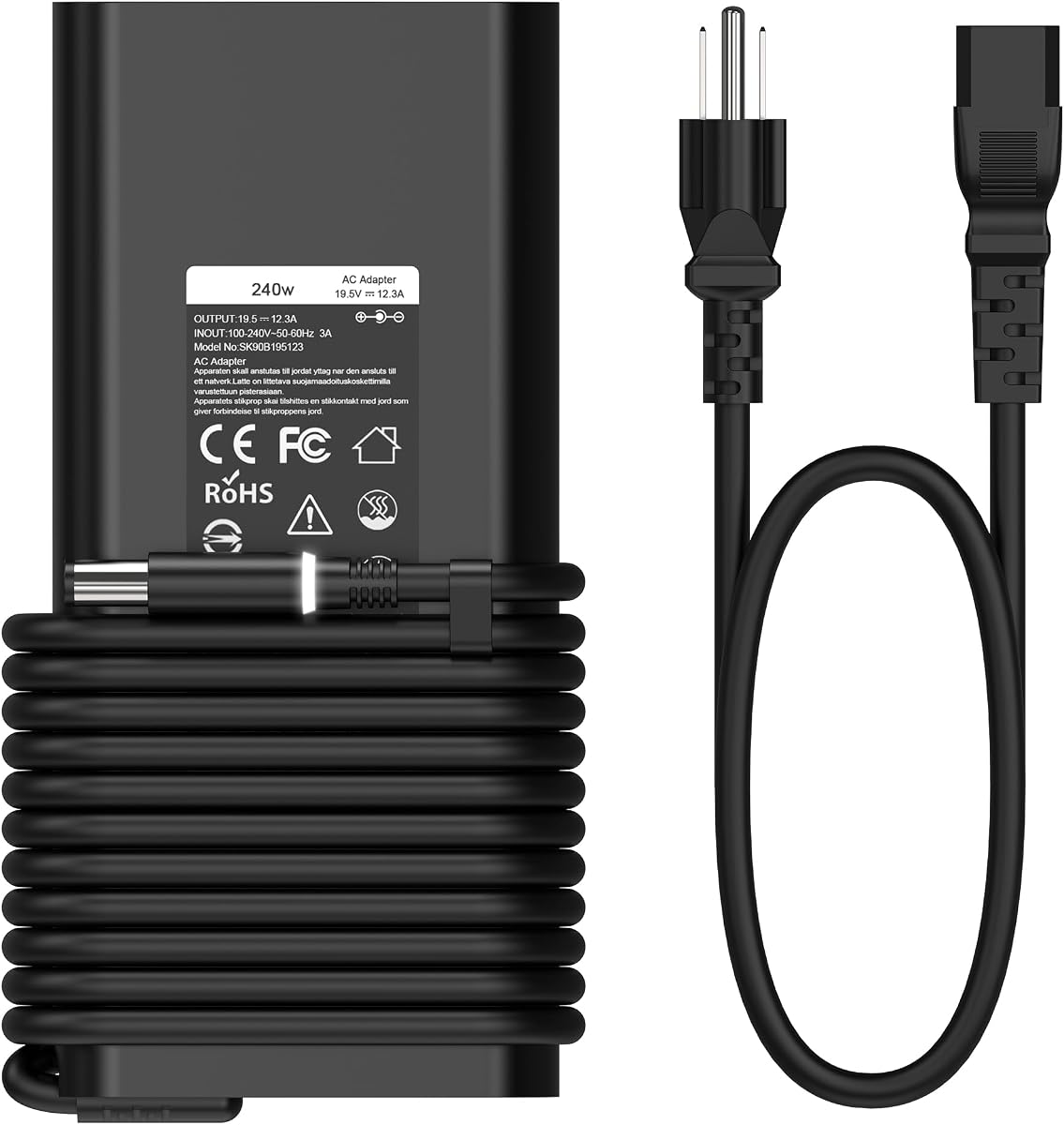
Designed for high-performance gaming laptops this charger delivers up to 240W. It has a 4.4 rating and ensures your Dell Alienware or Precision models run at full capacity.
We may earn a commission when you buy through this link, at no additional cost to you.
It supports various high-end models ensuring you get enough power for gaming and rendering. The slim design makes it easier to carry than older brick-style adapters.
It runs warm under heavy loads which is normal for high-power adapters. Just ensure proper ventilation to maintain its longevity during intensive use.
If you use a gaming laptop for demanding tasks this charger is essential. It prevents throttling and keeps your Dell system performing at its peak during critical work.
The 240W output supports demanding GPUs in Alienware laptops preventing frame drops during games.
Its slim profile reduces bulk in your bag compared to traditional bulky chargers.
We may earn a commission when you buy through this link, at no additional cost to you.
This 330W charger is designed for the most powerful Alienware laptops needing maximum power. It has a 4.7 rating and ensures smooth performance even under the heaviest loads.
We may earn a commission when you buy through this link, at no additional cost to you.
The high wattage prevents thermal throttling by supplying more power than required. It is also backward compatible with 180W and 240W devices offering flexibility for multiple devices.
It is large and heavy but delivers stable performance. For power users the extra weight is a small trade-off for the power headroom it provides.
Ideal for professionals with top-tier Dell gaming rigs this charger ensures reliability. It keeps your system running without interruptions during rendering or high-end gaming sessions.
Extra power capacity reduces the load on the adapter allowing it to run cooler during long tasks.
Works with both high-end 330W devices and lower-wattage models providing versatile utility.
We may earn a commission when you buy through this link, at no additional cost to you.
This kit converts a USB-C PD power source into various DC tips for different laptops. With a 4.0 rating it is a handy tool for charging multiple devices with one cable.
We may earn a commission when you buy through this link, at no additional cost to you.
It includes fifteen different connectors ensuring you can find a match for most Dell or other brands. The smart chip adjusts current automatically to prevent overcharging.
Note that it requires a 20V PD output power source. Without a compatible charger it won't function. But with one it provides great versatility.
Best for travelers with mixed devices this kit simplifies your packing. It keeps your Dell laptop and other electronics powered with a single compact power cable.
Fifteen connector tips ensure you can adapt the cable to nearly any laptop on the go.
Built-in E-mark chips safely adjust power delivery to match your specific device needs.
We may earn a commission when you buy through this link, at no additional cost to you.
Selecting the right power protection requires understanding your usage patterns and Dell model specifications. This guide breaks down key factors to help you decide confidently.
Check your Dell laptop's power adapter rating to ensure compatibility. Most standard laptops need 65W but high-performance models like Alienware require 180W or more.
Always choose a backup that meets or exceeds your laptop's wattage to prevent underpowering.
Dell laptops use either USB Type-C or round barrel connectors. Verify your model's port before buying to ensure the tip fits correctly.
A wrong connector will not charge your laptop so always check the physical plug type.
Power banks offer minutes to hours of runtime while UPS systems provide short surge protection. Decide if you need full shut-down time or just enough to save work.
For long power outages consider higher capacity banks or UPS units with larger batteries.
UPS units are heavy and best for desks. Power banks are designed for travel and offer mobility during commutes.
Choose based on whether you work from a fixed location or need power on the go.
Some power banks offer USB hubs or wireless charging pads. Consider if these extra features add value to your daily workflow.
Features like LCD displays or ECO modes can improve usability and energy efficiency.
Look for safety standards like FCC or CE to ensure electrical safety. Third-party chargers should meet these to avoid hardware damage.
Safety certifications reduce the risk of overvoltage or overheating issues during charging.
Manufacturer warranties vary from one year to lifetime. Check the support policy before purchasing for peace of mind.
A longer warranty period usually indicates better build quality and reliability from the brand.
Always keep your UPS or power bank partially charged. Regularly plug in your backup even if not in use to maintain battery health.
For power banks avoid draining the battery to zero often as this can shorten its lifespan over time.
Store your backup units in a cool dry place to prevent heat damage which can degrade battery performance quickly.
No a UPS protects against surges while a power bank only provides runtime. If your goal is surge protection a UPS is better.
Newer Dell models use USB-C but older ones use barrel tips. Always verify your specific model's port type before buying.
Yes if they meet safety standards. Look for certifications like FCC or CE to ensure they are safe for your device.
Alienware models often need 180W or more. Check your laptop's power label and match it with the charger's wattage.
No if your Dell uses a round tip. You would need a specific USB-C to barrel adapter for compatibility.
It is normal during heavy charging. Ensure it is in a ventilated space to avoid overheating during use.
We reviewed ten options ranging from UPS systems to powerful power banks. Each serves different needs whether you prioritize cost or portability.
Focus on matching your laptop's power requirements and connector type for best results. A mismatch can lead to ineffective power management.
Prices fluctuate so check current listings before buying. Always verify the latest specs to ensure the product still fits your needs.