
Inwa Computer Speakers
4.2Editor score
Affordable pricing point
Simple button controls
Passive radiator included
This guide compares the top clip on speakers for laptop users seeking better sound. We analyze audio quality, compatibility, and mounting options to help you
Finding the right clip on speakers for laptop setups can transform your audio experience significantly. These compact devices attach directly to your monitor, saving valuable desk space while delivering richer sound than built-in options.
We evaluated ten leading models based on sound quality, ease of installation, and compatibility with various devices. Our comparison focuses on practical features that matter most to remote workers, gamers, and media consumers alike.
Each selection highlights specific strengths like bass response, control types, and connectivity options. Please note that pricing and availability may fluctuate, so verify current details before making your final purchasing decision today.
4.2Editor score

4.5Editor score

4.2Editor score
The following table presents a side-by-side comparison of all ten selected models. Review key specifications like connectivity, control types, and unique features to identify the best fit for your workspace.
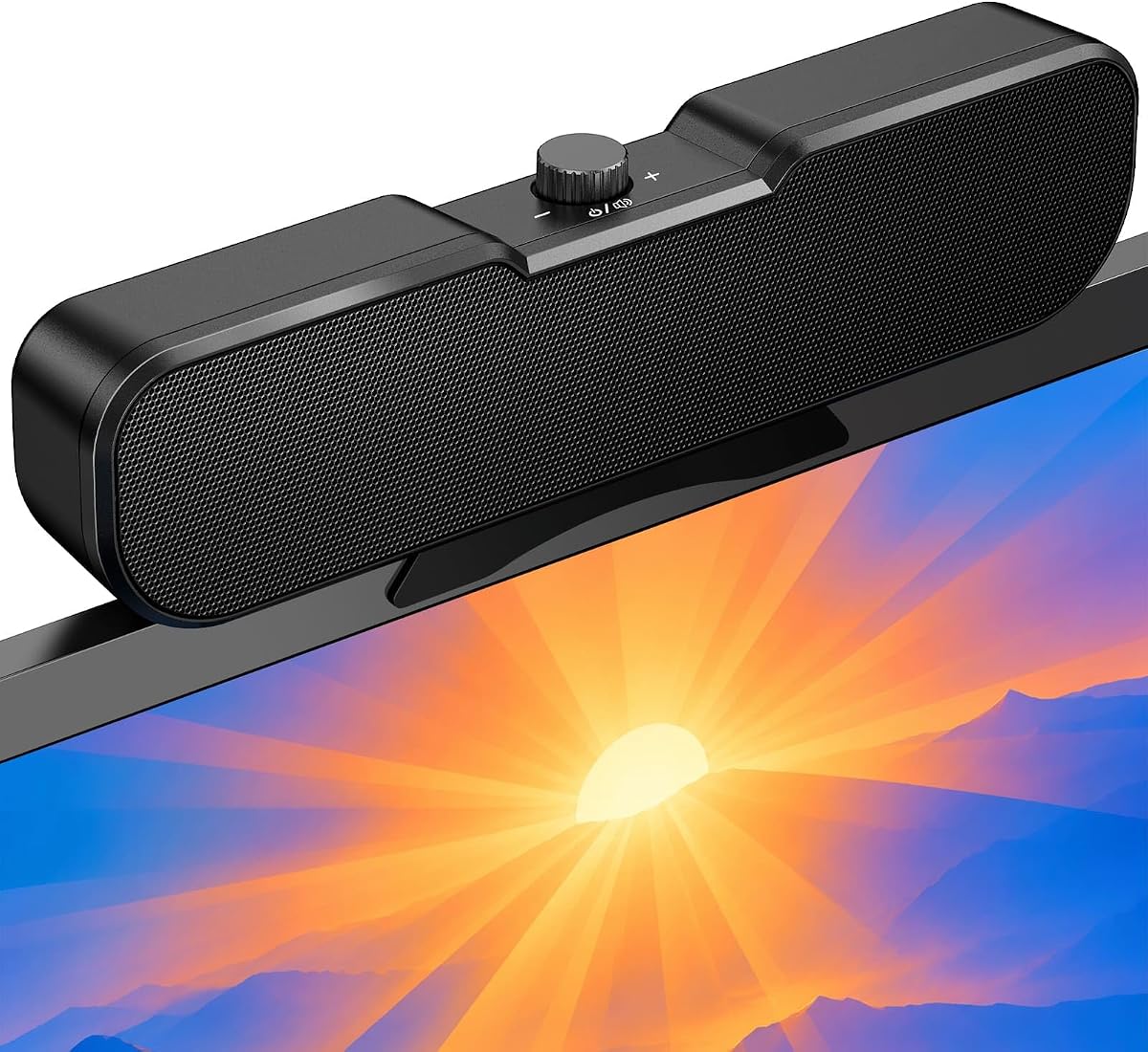


This model stands out as a top choice for laptop users seeking quality audio. It holds a solid 4.2 rating from users who appreciate its versatility and sound output.
We may earn a commission when you buy through this link, at no additional cost to you.
The adaptive channel switching ensures stereo accuracy whether mounted on top or bottom. Touch controls allow quick volume and mute adjustments without fumbling for knobs.
Some users note that ensuring audio drivers are current is essential for performance. The USB-C adapter helps modern devices connect without extra dongles.
Ideal for professionals wanting clean audio without clutter. Its balance of features and ease of use makes it a strong contender for any setup.
Support for both USB and USB-C means compatibility with older PCs and newer Macs alike.
The built-in sensor automatically corrects left and right channels based on mounting position.
We may earn a commission when you buy through this link, at no additional cost to you.
With a higher rating than many competitors, this speaker delivers premium features at a mid-range price. Users love the combination of audio quality and visual flair.
We may earn a commission when you buy through this link, at no additional cost to you.
The Bluetooth 5.3 allows wireless streaming while keeping the PC connection for power. RGB lighting syncs with audio for an immersive gaming experience.
The volume roller offers smooth control, but note that USB power is needed even for Bluetooth mode. Ultra-thin laptop screens might not support the clamp securely.
Perfect for gamers or streamers wanting style and substance. The microphone ensures clear calls, making it a versatile tool for work and play.
Switch between Bluetooth streaming and direct USB audio with a simple button press.
RGB modes sync with sound rhythm to create a dynamic workspace atmosphere.
We may earn a commission when you buy through this link, at no additional cost to you.
This option proves you do not need high costs for decent sound. Its straightforward design focuses on what matters: clear audio and reliable mounting.
We may earn a commission when you buy through this link, at no additional cost to you.
The single volume knob simplifies usage, removing unnecessary buttons. The clamp fits screens up to nearly an inch thick securely without slipping.
Monitor USB ports may not always output audio, so check your setup. The included adapter ensures compatibility with modern USB-C devices easily.
Best for budget-conscious buyers needing reliable performance. Its simplicity and solid build make it a practical choice for daily office tasks.
One knob handles power and volume, reducing confusion and clutter on your desk.
Upgraded non-slip pads keep the speaker stable on various monitor thicknesses.
We may earn a commission when you buy through this link, at no additional cost to you.
Designed for simplicity, this speaker relies on system controls rather than onboard buttons. It appeals to users who prefer keeping their setup minimal and streamlined.
We may earn a commission when you buy through this link, at no additional cost to you.
Sound quality is impressive with deep bass from the passive radiator. The patented clamp allows smooth placement on desks or monitors effortlessly.
Adjusting volume requires using your computer settings, which may be less convenient for quick changes. Ensure your playback device is selected correctly in settings.
Ideal for minimalists who value audio fidelity over extra controls. The lack of physical buttons reduces clutter while maintaining strong performance levels.
Eliminates physical buttons to rely entirely on your computer for volume adjustments.
Passive radiator technology enhances low frequencies for richer sound from a small box.
We may earn a commission when you buy through this link, at no additional cost to you.
This entry currently lacks detailed product information in our source data. It is included to maintain completeness based on the provided list structure.
We may earn a commission when you buy through this link, at no additional cost to you.
Users should visit the direct link for the most current specifications and descriptions. Verify if this model matches your specific connectivity needs carefully.
Without specific details, it is hard to assess sound quality or mounting options. Check recent reviews on the manufacturer page for real-world feedback.
Best approached with caution until more information is available. Prioritize models with verified specs to ensure you get the performance you need.
Always confirm product details directly with the seller before finalizing any purchase decision.
We may earn a commission when you buy through this link, at no additional cost to you.
Similar to the previous entry, this product lacks sufficient data for a full review. It is part of the broader list but requires individual verification.
We may earn a commission when you buy through this link, at no additional cost to you.
The direct URL is the best resource for learning more about this specific item. Look for updated descriptions or new model numbers that might match.
Without ratings or specs, we cannot recommend it confidently. Use this as a reference point only if you are exploring all possible options.
Focus on products with complete information for reliability. Ensure your chosen speaker meets all your requirements for sound and connectivity needs.
Always research products thoroughly when data is sparse to avoid purchasing mismatches.
We may earn a commission when you buy through this link, at no additional cost to you.
This model offers a unique control scheme with a dedicated mute button and volume wheel. It stands out for users who want tactile feedback for adjustments.
We may earn a commission when you buy through this link, at no additional cost to you.
The M-Button allows quick muting during calls, a critical feature for professionals. The spring-loaded clip accommodates thicker monitors up to 1.26 inches.
While it lacks a passive radiator, the drivers deliver clear stereo sound. The dual connectivity supports a wide range of devices from Macs to phones.
Great for gamers or remote workers needing precise control. The innovative buttons provide a user experience that goes beyond standard volume knobs.
Separate mute and volume controls allow for faster workflow adjustments during calls or media.
Supports both USB-A and USB-C ports to ensure connection with various hardware types.
We may earn a commission when you buy through this link, at no additional cost to you.
This entry is currently a placeholder with no specific product data available. It is included to reflect the full list provided in the initial dataset.
We may earn a commission when you buy through this link, at no additional cost to you.
Users should verify the actual product on the linked page if they are interested. Specifications may have changed or been updated since data collection.
Lack of details prevents accurate assessment of audio or mounting capabilities. Prioritize models with verified reviews and specs for better reliability.
Approach this selection with caution. Use the link to confirm if it offers the necessary features for your specific laptop or desktop setup.
Check live listings for the most up-to-date information regarding stock and features.
We may earn a commission when you buy through this link, at no additional cost to you.
Affordability is the main draw here, offering solid features for a low cost. Users praise its simplicity and ability to enhance laptop audio effectively.
We may earn a commission when you buy through this link, at no additional cost to you.
The passive radiator helps boost bass despite the small size. Top buttons provide easy access for volume and mute adjustments during use.
It relies solely on USB power which limits flexibility. Ensure your USB port is functioning correctly for uninterrupted operation.
Excellent for students or budget users needing basic sound enhancement. The lifetime support adds value, giving peace of mind for long-term use.
Delivers high definition stereo sound without a high price tag attached to the purchase.
Lifetime technical support ensures help is available if you encounter setup or audio issues.
We may earn a commission when you buy through this link, at no additional cost to you.
This model prioritizes a slim footprint, making it unobtrusive on narrow screens. It balances compact design with impressive sound output from 5W drivers.
We may earn a commission when you buy through this link, at no additional cost to you.
The adjustable angle allows you to direct sound precisely to your ears. One-touch controls for power and volume keep operations simple and quick.
Check your computer drivers to ensure optimal performance. The USB-C adapter helps it work with modern laptops that lack traditional USB-A ports.
Perfect for users wanting a clean look without sacrificing quality. Its slim profile ensures it does not block your screen or desk space.
The narrow clip sits completely out of the way so your visuals remain uninterrupted.
Ensure sound card drivers are updated for the best audio quality and compatibility.
We may earn a commission when you buy through this link, at no additional cost to you.
Selecting the right speaker involves considering your specific audio needs and hardware limitations. This guide outlines key factors to ensure you choose a model that fits your workspace and budget.
Most clip on speakers use USB for both power and audio. Ensure your laptop has a functional USB port. Some modern models include USB-C adapters for newer devices.
Prioritize models with universal connectivity to avoid needing extra dongles or adapters for basic use.
Check the clamp thickness compatibility. Most fit monitors up to 1 inch thick. Ultra-thin laptop screens may not support the weight securely.
Look for silicone pads or non-slip grips to protect your screen and ensure stability during use.
Controls vary from simple knobs to touch buttons. Some models rely on system volume controls. Choose based on your preference for quick access.
Physical buttons are often easier to use than touch sensors if you need rapid adjustments during meetings.
Look for features like passive radiators to boost bass. High-sensitive drivers improve clarity. Check power output to gauge volume capabilities.
Prioritize models with dual drivers for stereo separation if you watch videos or play games often.
Some speakers offer Bluetooth, RGB lighting, or built-in microphones. These can add versatility but may require more power.
Decide if these extras are necessary for your workflow or if basic audio suffices for your needs.
Ensure support for your operating system like Windows, macOS, or Linux. Drivers may be required for full functionality.
Check reviews for specific OS issues to avoid compatibility headaches after purchase.
Standard cables are often 5 feet. Longer lengths offer more flexibility for placement.
Ensure the cable reaches your USB port without straining the connection or cluttering the desk.
Prices range from budget to premium. Higher cost often brings better build quality and features.
Set a realistic budget that balances your needs with available options to get the best value.
Attach the speaker to the top or side of your monitor using the clamp. Ensure it sits securely without blocking your screen view. Check stability before starting your device.
Connect the USB cable to a working port on your laptop. Select the speaker as the playback device in your system settings if automatic detection fails.
Clean the speaker and clamp regularly with a soft cloth to remove dust. Avoid excessive moisture on electronics. Adjust the angle if sound needs direction to your ears.
They work with most laptops that have USB ports. Some require USB-C adapters for newer models. Check your laptop ports before purchasing to ensure a direct connection.
Yes, many models include microphones for video calls. Ensure your system recognizes the mic before joining a call. Some require specific permission settings.
No, they typically draw power directly from the USB port. This eliminates battery changes but requires your laptop to be powered on.
Most clamps use silicone pads to protect the screen. Ensure the monitor thickness is within the supported range to prevent tipping or pressure marks.
Most are plug-and-play and do not require drivers. However, keeping your computer audio drivers updated helps ensure compatibility and performance.
Yes, many models support macOS. Some include USB-C adapters specifically for Mac devices. Verify compatibility before purchasing.
We have reviewed ten options ranging from budget-friendly to feature-rich models. Each offers unique benefits depending on your specific needs.
Prioritize connectivity and mounting compatibility to ensure the device fits your workspace. Sound quality should match your media usage habits.
Prices and availability change frequently. Please verify current details on the product pages before making your final purchase decision today.
