
Cooling Station and Stand for PS5/Slim/Pro
4.5Editor score
Automatic temperature fan control
Nine RGB lighting modes
Two point five hour fast charge
This guide compares the top cooling stands for PS5 Console including vertical and horizontal options with fans, charging docks, and RGB lights to optimize
Keeping your PlayStation 5 running smoothly requires proper ventilation to prevent overheating during long gaming sessions. A dedicated cooling stand helps dissipate heat efficiently while organizing your controllers and accessories neatly on your entertainment setup.
We evaluated ten top-rated cooling stations based on fan performance, compatibility with all PS5 models, charging speed, and build quality. Each product was assessed for its ability to maintain safe operating temperatures and offer convenient features like USB hubs and LED indicators.
Every pick below highlights specific strengths and trade-offs to help you choose the right accessory for your gaming needs. Please note that product availability and pricing may change frequently so verify current details before making your final purchase decision today.
4.5Editor score
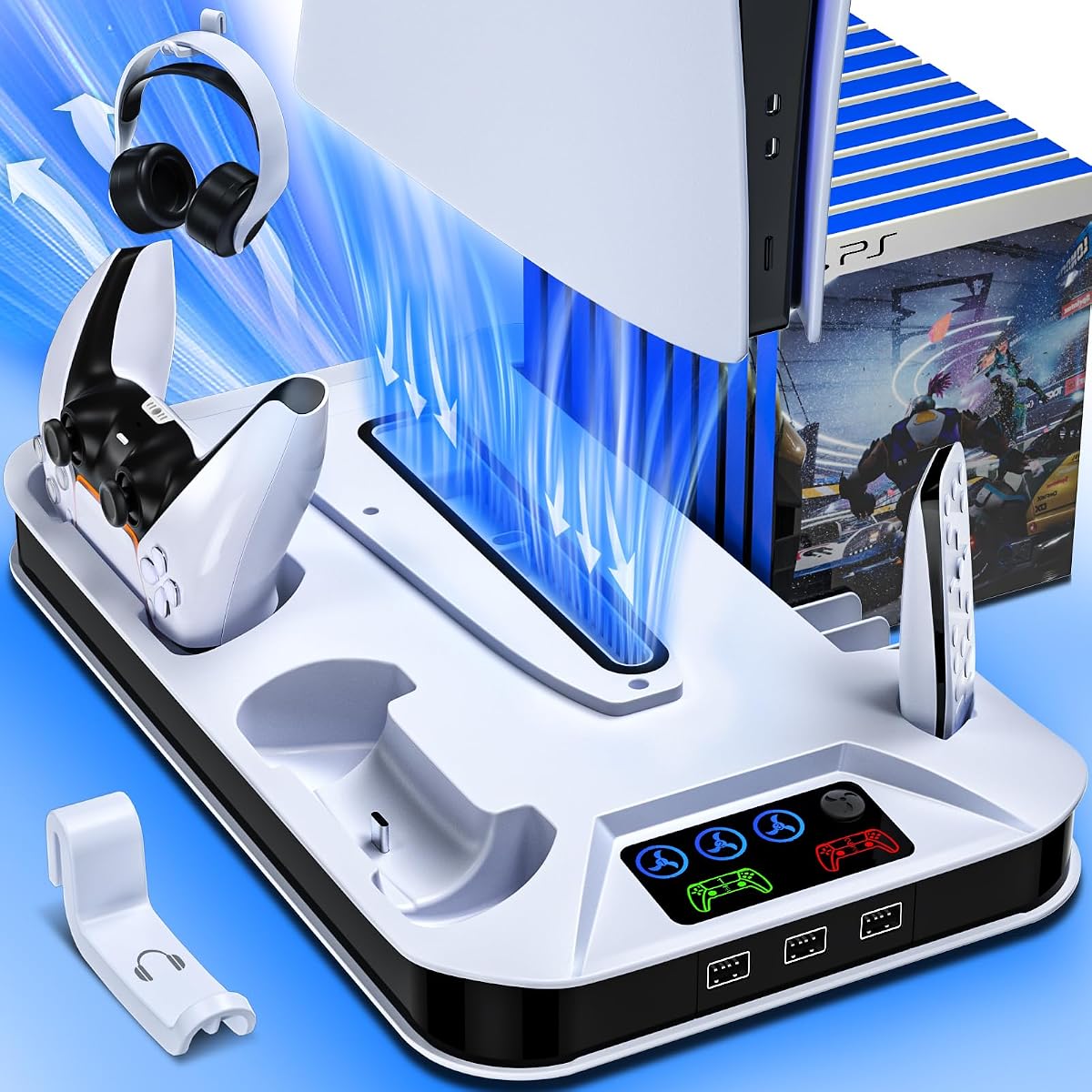
4.4Editor score

4.3Editor score
The following comparison table outlines the key specifications and features of each cooling stand to help you quickly identify the best fit for your PS5 setup and gaming preferences.


This cooling station stands out as the most complete solution for PS5 owners seeking thermal management and organization. It offers a powerful turbo fan with three speed settings and dual controller charging docks that work seamlessly with standard and Edge controllers.
We may earn a commission when you buy through this link, at no additional cost to you.
The high-efficiency turbo fan significantly reduces operating temperatures by dissipating hot air from the bottom of the console. Users can adjust fan speeds to match their gaming intensity while LED indicators clearly show charging status and fan levels at a glance.
While it requires removing a panel adapter for slim digital models the installation remains straightforward with included screws. The lack of RGB lighting keeps costs lower but some gamers might prefer more customizable visual effects on their setup.
It is ideal for players who need reliable cooling and organized accessory storage. The extra USB hubs and headset holder make it a practical upgrade over the official base stand for any PS5 gaming room.
The turbo fan effectively prevents overheating during extended sessions by maintaining consistent airflow across the console surface.
Dedicated slots for remotes and headsets keep your gaming area tidy while providing easy access to frequently used items.
We may earn a commission when you buy through this link, at no additional cost to you.
This horizontal stand provides a sleek alternative to vertical cooling stations and is perfect for users with limited shelf height. Its scalable design ensures compatibility with all PS5 generations while the integrated charging dock simplifies your setup.
We may earn a commission when you buy through this link, at no additional cost to you.
The high-performance turbo fan offers three adjustable speed settings that can be changed via a convenient touch switch. This allows you to balance noise levels with cooling power based on your current gaming demands or ambient room temperature.
Although the horizontal orientation requires more desk depth it eliminates the risk of toppling over during play. The included EVA foam ensures a secure fit for digital editions which adds value for owners of those specific console variants.
Choose this if you prefer a lower profile setup that keeps your console flat and accessible. It delivers reliable cooling and charging in one compact unit without needing extra accessories or complex assembly steps.
Placing the console horizontally can reduce overall height which helps with fitting under TVs or into enclosed entertainment centers.
The up-and-down push design ensures controllers connect securely so you do not have to readjust them during charging.
We may earn a commission when you buy through this link, at no additional cost to you.
This cooling station delivers exceptional value by combining automatic thermal control with customizable RGB lighting at a budget friendly price. It supports all PS5 models and includes dual controller charging that is fast enough to keep you in the game.
We may earn a commission when you buy through this link, at no additional cost to you.
An intelligent temperature probe adjusts fan speed automatically based on console heat which removes the guesswork for users. You can also switch to manual control if you prefer setting speeds yourself or turn off lights to save energy.
The honeycomb LED lighting system offers nine modes including breathing and single-color options. While some may find the lights too flashy they provide a fun visual touch that enhances the gaming atmosphere when used in dark rooms.
It is the best pick for gamers on a tight budget who still want smart features. The automatic fan control and fast charging ensure your console stays cool and your controllers stay ready without spending much money.
The built-in sensor monitors temperature continuously so the fan ramps up only when needed to maintain optimal performance silently.
RGB modes let you match lighting to your setup theme or turn them off entirely if you prefer a minimal look.
We may earn a commission when you buy through this link, at no additional cost to you.
This white variant matches the PS5 aesthetic perfectly and provides reliable cooling with dual controller charging in just two hours. The compact design includes a headset holder and USB hubs to keep all your essentials within easy reach.
We may earn a commission when you buy through this link, at no additional cost to you.
The turbo fan features three speed levels including normal medium and strong to handle heat during intense gaming sessions. Non-slip pads on the base ensure the stand stays put while protecting your surface from scratches or slips.
Charging speed is a standout feature here as controllers reach full power quickly so you avoid delays. However the included cable is somewhat shorter which may require a USB extension if your console port is far away.
Select this model if you prioritize a clean look and fast charging speed. It is ideal for white setups where style matters and you need efficient cooling without extra lighting distractions.
The white finish blends seamlessly with your console so the stand does not look like an afterthought on your desk.
Two hour charging cycles mean less waiting time and more play time even when both controllers are depleted simultaneously.
We may earn a commission when you buy through this link, at no additional cost to you.
This station is a great choice for Edge controller owners since many cooling stands do not support the larger form factor. It also features a safety screw to lock your console in place and memory functions that recall your preferred fan settings.
We may earn a commission when you buy through this link, at no additional cost to you.
Three distinct fan speed levels let you customize airflow from quiet to powerful depending on your gaming intensity. The memory function ensures your setup remains consistent even after power cycles so you do not lose your preferred config.
While it lacks a remote slot the USB ports provide ample room for headphones or other accessories. The design balances functionality with protection but cable management around the stand may require a bit of routing to keep it tidy.
It suits Edge controller users and those who value secure mounting. The safety screw and reliable cooling make it a solid pick for protecting your investment during heavy daily gaming use.
The charging dock accommodates the wider Edge controller so you do not need a separate charging solution for it.
The safety screw locks the console to the base which prevents accidental bumps or slides on smooth surfaces.
We may earn a commission when you buy through this link, at no additional cost to you.
This horizontal stand comes as a complete kit with EVA foam and charging docks to simplify setup. Its scalable design ensures it fits any PS5 model and the no-tool installation makes it accessible for all users.
We may earn a commission when you buy through this link, at no additional cost to you.
The three-speed adjustable cooling fans allow you to balance noise and performance depending on your environment. The included EVA foam guarantees a snug fit for digital models which helps prevent wobbling during gameplay.
It is a bit larger than vertical options which means you need more desk depth for proper placement. High-speed fan settings can produce some noise but this is typical for powerful cooling systems under heavy load.
Choose this kit if you want a hassle-free horizontal solution. It combines cooling charging and stability in one box so you can set up quickly and start gaming without additional purchases.
The foam pads adapt to digital console contours for a secure fit that reduces vibration during intense sessions.
All parts connect by hand so you can assemble the stand in minutes without searching for a screwdriver.
We may earn a commission when you buy through this link, at no additional cost to you.
This stand offers intelligent auto-adjustment of fan speeds based on live temperature readings which simplifies operation. It supports both disc and digital editions while charging two controllers in just two hours with built-in safety features.
We may earn a commission when you buy through this link, at no additional cost to you.
The auto mode keeps the fan running quietly when not needed and ramps up when temperatures rise. This passive management reduces user intervention and ensures consistent cooling without manual button presses during sessions.
It includes a Type-C cable which is convenient for modern power setups but manual control is limited compared to other models. The absence of RGB lighting keeps the design minimal which may appeal to users preferring a cleaner look.
Select this for automated thermal protection and fast charging. It works well for users who prefer set-and-forget cooling without sacrificing battery health or charging speed during daily use.
Built-in sensors track console heat in real time so fan speeds adjust instantly to maintain safe operating conditions.
Two hour charge cycles mean you are rarely waiting for controllers to fill up between gaming sessions.
We may earn a commission when you buy through this link, at no additional cost to you.
This cooling stand delivers vibrant RGB lighting with eight colors and modes to enhance your gaming ambiance while cooling the console. It includes dual charging docks and USB A hub ports for convenient accessory power on a single unit.
We may earn a commission when you buy through this link, at no additional cost to you.
The fan operates quietly on three silent levels which is ideal for late-night gaming sessions where noise is a concern. Charging takes three hours but the visual effects and organization features offset this for many users.
Panel adapters for disc and digital consoles are included which simplifies setup for either version. However the slower charge speed may be a drawback for those who need controllers refilled quickly before tournaments.
It is perfect for players who prioritize aesthetics and silent cooling. The RGB options and multiple ports make it a stylish centerpiece for any modern gaming setup.
Multiple color options let you create unique looks that match your room lighting or personal style preferences.
Low noise fans maintain quiet performance so you can focus on game audio without fan hum interference.
We may earn a commission when you buy through this link, at no additional cost to you.
This cooling station integrates Type-C and USB ports to support multiple devices including laptops and power banks. It provides a two-hour charge for controllers and includes security screws for a stable console connection during play.
We may earn a commission when you buy through this link, at no additional cost to you.
The concealed cable design keeps wires tidy and improves the visual appeal of your setup. Security screws and a sturdy base prevent movement while the fan offers three adjustable levels to suit different heat levels.
The weight of the base adds stability but may make moving the setup slightly harder. Fan buttons are small so careful pressing is needed to change speeds but overall control remains intuitive and responsive.
Choose this for its versatility in charging multiple devices. It is ideal for users who need extra ports and reliable cooling with strong warranty support for peace of mind.
Concealed wiring reduces clutter on your desk which creates a cleaner look and safer gaming environment.
Multiple ports allow charging of phones or headphones without needing extra wall adapters or cables.
We may earn a commission when you buy through this link, at no additional cost to you.
This cooling station offers a comprehensive feature set at a competitive price that appeals to budget conscious gamers. It includes three USB hubs and overcharge protection to keep your accessories safe and organized during long gaming sessions.
We may earn a commission when you buy through this link, at no additional cost to you.
The turbo fan provides reliable cooling while the safety screw ensures your console stays locked in place securely. LED indicators help you track charging and fan status so you always know the system is working as expected.
Although it lacks RGB lighting and may have variable cable lengths the core functions deliver strong value. The protective chip ensures controller longevity which saves money over time by preventing battery damage during charging.
It is the best value pick for anyone seeking core cooling and charging needs. Ideal for players who prioritize function and protection over decorative lighting effects.
Smart chips stop charging automatically when full to extend controller battery lifespan and reduce heat buildup.
The combination of cooling charging and storage at this price makes it an affordable upgrade for any setup.
We may earn a commission when you buy through this link, at no additional cost to you.
Choosing the right cooling stand involves evaluating compatibility, fan performance, and extra features. This guide breaks down the most important factors to consider for your PS5 setup.
Ensure the stand supports your specific PS5 model including Standard Slim or Pro. Some stands require panel removal or include adapters for digital editions so verify these details before purchasing.
Look for stands explicitly listing compatibility with your console type to avoid fit issues or instability during use.
Check the fan type and speed settings. Turbo fans with multiple speeds offer better heat dissipation than single-speed units and some models include auto-adjustment based on temperature.
Prioritize stands with adjustable or automatic fans to balance cooling power with noise levels during gameplay.
Dual charging docks are ideal for households with multiple players. Confirm the charging time per cycle as faster times mean less downtime between sessions.
Verify compatibility with both standard and Edge controllers if you own the Edge variant to ensure secure docking.
USB hubs or Type-C ports add versatility for charging headsets or other devices. More ports mean fewer cables cluttering your desk.
Choose stands with extra ports to centralize charging needs and keep your setup clean and organized.
Safety screws and non-slip pads ensure the console stays secure on the stand. Horizontal stands save vertical space while vertical stands save desk depth.
Select a design that fits your furniture layout and includes security features to prevent accidental falls or movement.
RGB lighting can enhance visual appeal but may distract from gameplay. Consider if you want customizable lights or prefer a minimal look.
If RGB is important check the number of modes and control options to match your style preferences.
Durable materials prevent wobbling and extend the stand's life. Check customer reviews for reports of stability or durability issues over time.
Invest in a sturdy build to protect your console and avoid frequent replacements.
A longer warranty period indicates confidence in product quality. Verify if customer support is responsive to tech issues or replacements.
Choose brands offering reliable support to minimize risk when purchasing electronics accessories.
Place the stand on a flat and level surface to ensure stability during use. Connect the USB cable to your console or a power adapter to activate the fan and charging docks.
Secure your console using the provided safety screws to prevent movement. Adjust the fan speed manually if your model allows or let auto mode handle temperature changes.
Keep the fan vents clear of dust by gently vacuuming or wiping them every few weeks. This maintenance ensures efficient airflow and prolongs the stand's operational lifespan.
No cooling stands are designed to protect consoles by improving airflow. Ensure the stand fits your model correctly and uses safe cables to avoid any risk of damage.
Most stands listed support PS5 Slim and Pro models but always check the product description for explicit Pro compatibility before purchasing.
The fan and charging require power via USB. You can connect to a wall adapter instead of the console if the stand supports external power.
Fan noise varies by model and speed setting. Low and medium settings are generally quiet but high speeds may be audible during intense sessions.
Many models include dedicated headset holders but confirm the specific product features since some may lack this accessory slot.
Yes most USB hubs support standard devices like phones or tablets. Ensure devices use standard charging voltages compatible with the USB output.
The top picks offer a range of cooling and charging features suited for different budgets and preferences. Whether you need RGB lighting or silent operation there is a stand that fits your setup.
Prioritize cooling performance and stability to protect your console from heat damage. Also consider how many ports and accessories you need to keep your space organized.
Check current prices and availability before buying since product details may change. Choose the stand that best balances your performance needs with your gaming environment.