
SANSUI 24 Inch Curved 160Hz Gaming Monitor
4.4Editor score
160Hz refresh rate
1500R curvature
1ms MPRT response
Finding the right curved gaming monitor can transform your entire gaming experience by providing deeper immersion and faster response times. With many options available, selecting a model that balances refresh rate, resolution, and price is essential for both casual and competitive players seeking peak visual fidelity.
We evaluated ten leading curved monitors featuring 160Hz refresh rates or higher, comparing their panel technologies, connectivity options, and ergonomic designs. Our analysis focuses on real-world performance metrics like response time, color accuracy, and compatibility with major graphics technologies to ensure you get a reliable display for intense gaming sessions.
Each pick in this guide highlights specific strengths such as budget-friendly pricing, premium build quality, or ultra-wide formats tailored for multitasking. Note that product availability and pricing fluctuate frequently, so verify current details before purchasing to secure the best deal for your specific gaming requirements and budget constraints today.
4.4Editor score
4.5Editor score

4.6Editor score
As an Amazon Associate we earn from qualifying purchases.
This side-by-side comparison examines all ten models to highlight their key specifications and unique features for easy decision-making.






The SANSUI 24 Inch Curved 160Hz Gaming Monitor stands out as a highly accessible option for gamers seeking performance without breaking the bank. With a solid 4.4 rating from users, it delivers a smooth gaming experience through its fast VA panel and robust connectivity options suitable for budget-conscious setups.
We may earn a commission when you buy through this link, at no additional cost to you.
Its standout quality lies in the 160Hz refresh rate which provides fluid motion essential for competitive titles. The 1500R curvature wraps around your field of view enhancing immersion while the 110% sRGB coverage ensures colors remain vibrant during extended sessions. Features like the crosshair overlay and game timer add tactical advantages for FPS players.
While it lacks speakers which means external audio solutions are needed, this trade-off keeps costs down. The stand offers tilt but not height adjustment which might require a monitor arm for perfect ergonomics. However for casual gaming this model provides excellent value and reliable performance across various genres.
Buy this monitor if you prioritize frame rate smoothness and curved immersion on a tight budget. It is ideal for entry-level gamers or those upgrading from older 60Hz screens looking to experience modern responsiveness without significant financial investment today.
The 1500R curvature matches the natural curve of the human eye reducing distortion and eye strain during long play sessions.
With a 160Hz refresh rate and 1ms MPRT response time motion blur is minimized ensuring crisp visuals during fast action.
We may earn a commission when you buy through this link, at no additional cost to you.
Expanding on the previous model the SANSUI 27 Inch Curved 160Hz Gaming Monitor offers a larger display area while maintaining budget-friendly pricing. Users praise its clear visuals and versatile connectivity options that support both gaming and office tasks seamlessly with a 4.4 rating overall.
We may earn a commission when you buy through this link, at no additional cost to you.
The 27 inch screen provides more room for multitasking compared to the 24 inch variant. Its 4000:1 contrast ratio ensures deep blacks and bright whites enhancing image quality in dark scenes. Game Assistant tools like shadow booster help uncover hidden enemies in low-light environments making it ideal for immersive gaming.
Note that HDR must be enabled via the HDMI port which restricts its use if you rely solely on DisplayPort. The lack of speakers remains consistent with this brand requiring external audio setups. Despite these minor constraints it remains a strong value pick for those needing a larger curved screen.
Choose this monitor if you want extra screen real estate for gaming or productivity without a premium price tag. It fits well in setups where screen size matters more than advanced ergonomic adjustments or built-in audio features for daily use.
The 1500R curvature reduces image distortion and eyestrain ensuring a comfortable experience during marathon gaming sessions.
Preset modes like FPS and Racing tailor the image settings to specific game genres optimizing performance for competitive play.
We may earn a commission when you buy through this link, at no additional cost to you.
The SANSUI 24 Inch Curved Gaming Monitor distinguishes itself with impressive color coverage and reliability features earning a higher 4.5 rating. It balances performance and durability with a VA panel that supports 160Hz refresh rates and rich color reproduction for a balanced visual experience.
We may earn a commission when you buy through this link, at no additional cost to you.
Its 97% DCI-P3 coverage delivers vibrant and accurate colors which is rare at this price point. The 178 degree viewing angle ensures consistent image quality even from side positions making it great for shared viewing or collaborative work. Anti-flicker and blue light reduction features protect eyes during long hours.
While the stand only tilts lacks height adjustment which might impact ergonomics for some users. The included HDMI cable simplifies setup but you might want additional cables for multi-device setups. Overall its color performance and support make it a solid choice for mixed use.
This monitor is perfect for gamers who also do creative work or value color accuracy on a budget. It offers a robust feature set that includes security locking and extensive support ensuring long-term satisfaction and reliable performance over time.
With 97% DCI-P3 coverage users enjoy a wider color gamut ensuring vivid and precise image representation across various media.
Flicker-free and blue light reduction technologies minimize eye strain allowing for comfortable extended usage sessions without fatigue.
We may earn a commission when you buy through this link, at no additional cost to you.
The CRUA 32 Inch 4K UHD 160Hz Curved Gaming Monitor offers high-resolution visuals that cater to users seeking sharper details. With a 4.3 rating it bridges the gap between consumer and prosumer displays by providing 4K resolution at a relatively accessible price compared to top tier brands.
We may earn a commission when you buy through this link, at no additional cost to you.
Its 120% sRGB coverage ensures rich and vibrant colors suitable for both gaming and content creation. The inclusion of built-in speakers reduces desk clutter making it a convenient all-in-one solution for minimalist workspaces. AMD FreeSync support helps eliminate screen tearing for smoother gameplay in compatible titles.
However running 4K at 160Hz demands a powerful graphics card which might be a limitation for budget systems. The monitor requires careful placement due to its size and curvature which might not suit smaller desks. Yet its clarity and connectivity options like HDMI 2.1 make it future-ready.
Consider this monitor if you have a capable GPU and want high detail without paying flagship prices. It suits enthusiasts who prioritize resolution and immersive 4K visuals over ultra-high refresh rates found in lower resolution alternatives today.
The 3840×2160 resolution provides breathtaking clarity ideal for open-world games and detailed content creation tasks.
Integrated built-in speakers offer convenient audio reducing desktop clutter and simplifying setup for casual users.
We may earn a commission when you buy through this link, at no additional cost to you.
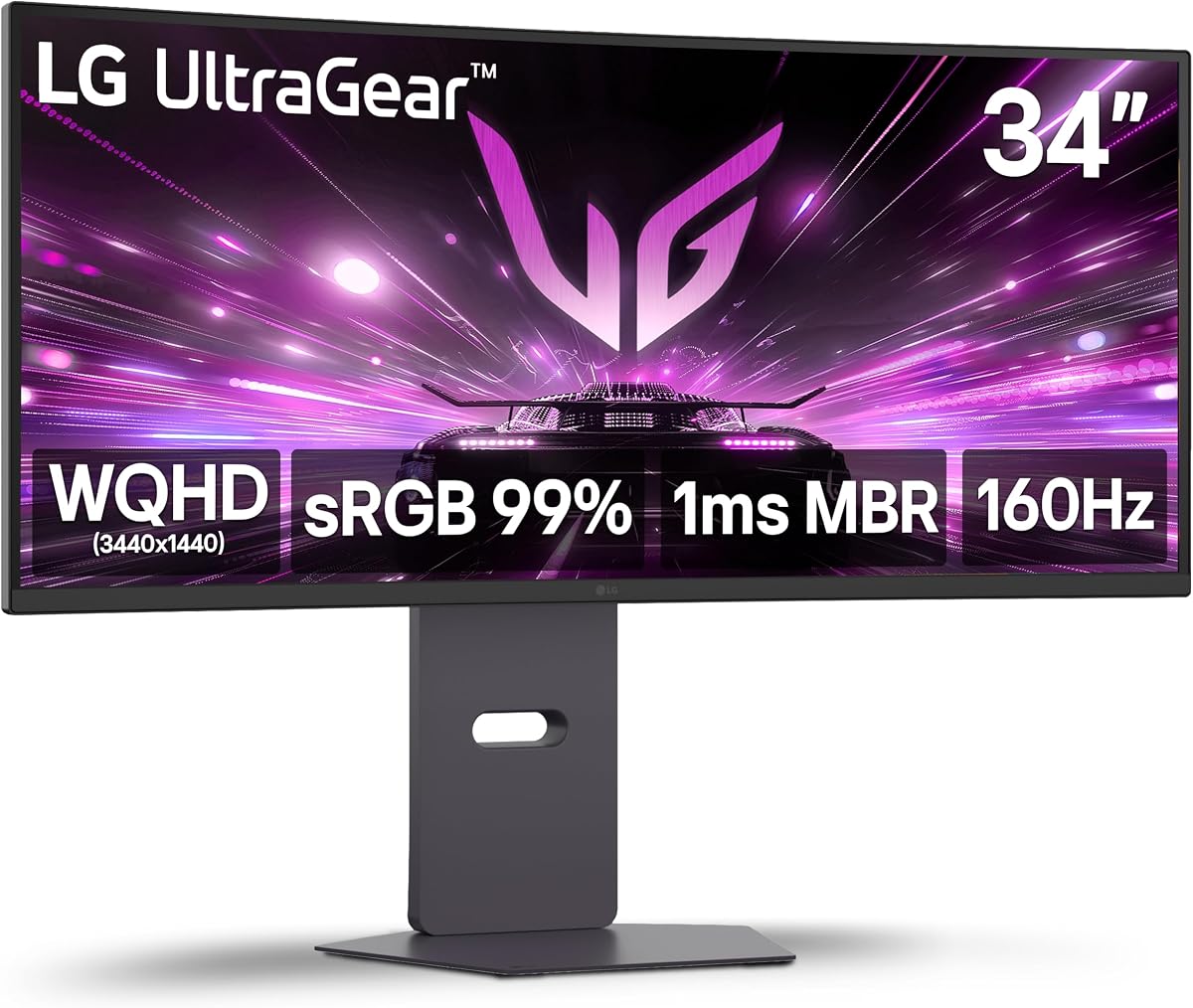
The LG 34G600A-B 34-inch Ultragear WQHD Curved Gaming Monitor earns its spot as a top choice for premium curved experiences. Boasting a 4.5 rating it combines a generous ultrawide panel with advanced gaming features that enhance immersion and precision for serious gamers.
We may earn a commission when you buy through this link, at no additional cost to you.
Its 3440×1440 resolution provides sharp visuals while the 1800R curvature pulls you into the action expanding your field of view significantly. Features like Dynamic Action Sync minimize input lag ensuring your commands are registered instantly. The adjustable stand supports tilt height and swivel making ergonomics fully customizable for comfort.
The built-in Waves MaxxAudio speakers deliver decent sound quality but external headphones may still be preferred for competitive play. HDR10 support enhances contrast in supported content but may be limited by SDR games. Despite these nuances it remains a robust all-rounder for diverse needs.
Opt for this monitor if you need ample screen space and premium build quality for gaming and work. Its mix of performance ergonomics and visual fidelity makes it a reliable investment for users seeking a high-end ultrawide experience without compromise.
The stand supports tilt height and swivel adjustments allowing you to find the perfect viewing position for comfort.
Dynamic Action Sync ensures minimal input lag for faster reactions giving you an edge in competitive scenarios.
We may earn a commission when you buy through this link, at no additional cost to you.
The Renewed version of the LG 34G600A-B offers a cost-effective way to own a premium ultrawide monitor without the full new price tag. With a perfect 5.0 rating from buyers this model delivers the same core performance as the new unit with tested functionality and warranty coverage.
We may earn a commission when you buy through this link, at no additional cost to you.
It retains all the benefits including the 34 inch WQHD display 160Hz refresh rate and adjustable stand for maximum comfort. Users appreciate the high-quality refurbishment that ensures reliable performance comparable to new units at a significant discount. This makes it an attractive option for budget-minded enthusiasts.
Since it is renewed packaging may vary slightly and cosmetic imperfections might exist though performance remains intact. It is crucial to check the specific seller's warranty terms to ensure adequate protection against potential defects. For those willing to accept minor cosmetic changes the value proposition is strong.
Choose this renewed model if you want premium LG quality at a lower cost and prioritize performance over a sealed box. It is ideal for gamers who want the best of LG engineering without spending a premium for a brand new box.
Tested units ensure reliable performance comparable to new models offering a significant discount for savvy shoppers.
Enjoy the same 160Hz refresh rate and adjustable stand as the new unit ensuring top-tier immersion.
We may earn a commission when you buy through this link, at no additional cost to you.
The Samsung 32 Inch Odyssey G55C stands out with its aggressive 1000R curvature that wraps completely around your vision for maximum immersion. With a 4.4 rating it delivers deep blacks and vibrant HDR10 visuals that make game scenes come alive effectively for immersive play.
We may earn a commission when you buy through this link, at no additional cost to you.
Its 165Hz refresh rate provides fluid motion which is critical for competitive titles. The 1000R curve minimizes distortion and eye strain while providing a wider view of your game world. Eye Saver Mode and flicker reduction technologies ensure comfort during extended gaming or work sessions.
However the strong curvature might feel too tight for non-gaming tasks like text work. It requires a dedicated gaming space to maximize its immersive benefits effectively. Despite this it remains a top choice for users focused purely on entertainment and immersive visual experiences.
Select this monitor if you prioritize immersion above all else and want a screen that feels like you are inside the game. Its curve and HDR capabilities are unmatched in this price range for dedicated gaming setups looking for maximum involvement.
The 1000R curvature fills your peripheral vision drawing you right into the character's shoes for total engagement.
HDR10 support brings a kaleidoscope of shades to life revealing hidden details in dark scenes for better visibility.
We may earn a commission when you buy through this link, at no additional cost to you.
The Sceptre 34-inch Curved ultrawide WQHD Monitor offers expansive screen real estate and a modern design with its backcover lights. With a 4.2 rating it balances performance and style providing a large canvas for multitasking and gaming with solid color performance.
We may earn a commission when you buy through this link, at no additional cost to you.
Its 21:9 ultrawide format provides 30% more screen space than conventional monitors helping you see more and do more. The up to 180Hz refresh rate ensures smooth motion which is great for fast-paced action. Built-in speakers and dual DisplayPort inputs add versatility for various setup configurations.
The stand offers basic tilt without height adjustment which might limit ergonomic precision. While the LED lights add style they cannot always be customized. Still the value and size make it a strong option for those wanting a wide screen without a massive cost.
Buy this monitor if you need extra width for productivity or gaming and appreciate unique design touches. Its wide format and speed make it a practical choice for users needing more screen space while maintaining a competitive refresh rate.
The 21:9 ultrawide format provides 30% more screen space than conventional monitors expanding your performance.
Colorful LED backcover lights deliver a uniquely modern design that enhances your gaming environment aesthetics.
We may earn a commission when you buy through this link, at no additional cost to you.
The Alienware 34 Curved Gaming Monitor AW3425DWM sets a high standard for premium ultrawide displays with its stunning design and advanced specs. Holding a 4.6 rating it delivers immersive quality with WQHD resolution and fluid visuals that bring virtual worlds to life effectively.
We may earn a commission when you buy through this link, at no additional cost to you.
Its 180Hz refresh rate ensures fluid performance with 1ms gray to gray response time for sharp reactions. The VESA DisplayHDR 400 certification and 95% DCI-P3 coverage deliver rich and vibrant colors suitable for high-end content and games. Console mode optimizes the screen for next-gen play.
As a premium device it carries a higher price tag but justifies it with build quality and advanced features like low blue light hardware. The stand is robust but requires significant desk space. It is the ideal choice for those who want the best without compromise.
Choose this monitor if you seek top-tier performance and a stylish look for your setup. It is perfect for enthusiasts who prioritize color accuracy high refresh rates and durability for long-term marathon gaming sessions.
WQHD resolution and 95% DCI-P3 color coverage provide rich and vibrant colors for a visually stunning experience.
A dedicated console mode ensures optimized gaming for next-gen consoles making it a versatile choice for all.
We may earn a commission when you buy through this link, at no additional cost to you.
The AOC 34 Inch Curved Gaming Monitor UWQHD 200Hz pushes speed limits with a remarkable refresh rate that caters to fast-paced competitive gaming. With a 4.5 rating it combines ultrawide immersion with rapid response times ensuring smooth gameplay without compromise for high-performance setups.
We may earn a commission when you buy through this link, at no additional cost to you.
Its 0.3ms MPRT response time drastically reduces motion blur keeping moving objects sharp. The 1500R curved VA panel offers panoramic views while the adjustable stand supports height tilt and swivel for optimal comfort. This blend of speed and ergonomics makes it a favorite among esports enthusiasts.
To achieve 200Hz you must use DisplayPort 1.4 as HDMI is limited to 100Hz. HDR support enhances contrast but is not as deep as dedicated HDR monitors. Despite this it remains a powerful performer for those prioritizing frame rates over deep contrast ratios.
Buy this monitor if you need extreme speed and an ergonomic stand at a competitive price. It is ideal for gamers who want to maximize their reaction times and enjoy a wide screen without sacrificing build quality or adjustability.
Enjoy ultra-smooth gameplay with 200Hz refresh rate via DisplayPort ideal for fast-paced PC gaming action.
0.3ms MPRT response time helps reduce motion blur and ghosting ensuring crisp images during fast scenes.
We may earn a commission when you buy through this link, at no additional cost to you.
Selecting the right curved gaming monitor requires evaluating several technical factors to ensure it matches your gaming style and hardware capabilities.
A high refresh rate such as 160Hz or higher ensures that the monitor updates the image more frequently per second. This results in smoother motion and less blur during fast-paced games which is essential for competitive play and precise tracking of moving targets.
Look for refresh rates of at least 160Hz to maximize smoothness. Ensure your graphics card can support this rate to fully benefit from the technology.
Response time measures how quickly a pixel changes color which affects motion blur and ghosting. A low response time like 1ms or lower ensures that images remain sharp during rapid movements. This is crucial for games where timing and clarity are vital.
Prioritize monitors with MPRT or gray-to-gray response times of 1ms or less to maintain clarity. This prevents distracting trails behind moving objects.
Curvature describes how much the screen curves towards the viewer. A 1000R to 1500R curve provides a more immersive experience by matching the natural shape of the human eye. It helps reduce eye strain during long sessions compared to flat panels.
Choose a curvature that fits your desk depth. Deeper curves like 1000R are best for close-up immersive setups.
Most curved gaming monitors use VA panels which offer high contrast ratios and deep blacks. This makes them excellent for dark scenes in games. However IPS panels may have better viewing angles and color consistency for non-gaming tasks.
VA is preferred for gaming due to contrast. Consider IPS if color accuracy for work is also a priority.
Resolution defines the number of pixels on the screen. 1080p is common for budget 24-inch monitors while WQHD or 4K is found in larger models. Higher resolution means sharper details but requires more graphics power to drive.
Match resolution to your GPU. 1080p is easier to drive at high refresh rates while WQHD offers a balance of detail and performance.
Connectivity options determine how you connect your devices. HDMI and DisplayPort are standard. To reach high refresh rates like 200Hz you may need specific versions like HDMI 2.1 or DisplayPort 1.4.
Check the ports on your graphics card to ensure they support the desired refresh rate and resolution.
An adjustable stand allows you to position the screen at a comfortable height and angle. This helps reduce neck and back strain during extended use. Some monitors only offer tilt while others include height and swivel adjustments.
Opt for a stand with height adjustment if possible. Alternatively use a VESA mount to customize your setup.
Color gamut measures the range of colors a monitor can display. A high sRGB or DCI-P3 percentage ensures vibrant and accurate colors. This is important for both gaming visuals and creative work.
Look for 99% sRGB or higher for rich visuals. This ensures games look as intended by the developers.
Begin by installing the stand securely and connecting the display to your PC using a high-speed cable like HDMI 2.1 or DisplayPort 1.4. Ensure your graphics drivers are updated to unlock the full refresh rate capabilities of the monitor.
Calibrate the display settings using the OSD menu to optimize contrast and brightness for your lighting conditions. Enable features like FreeSync or G-Sync in your graphics control panel to reduce screen tearing and ensure smooth gameplay.
Clean the screen regularly with a soft microfiber cloth to avoid scratches. Avoid harsh chemicals and keep the monitor away from direct sunlight to prevent long-term damage to the panel surface.
Yes 160Hz provides smooth motion and reduced blur which is highly beneficial for competitive and fast-paced games. It offers a noticeable improvement over standard 60Hz screens allowing for better tracking and reaction times during intense gameplay sessions.
A curved monitor wraps around your field of view providing deeper immersion and less eye strain. It reduces image distortion at the edges and helps focus attention on the center of the screen which is ideal for gaming and media consumption.
To fully utilize 160Hz you need a PC capable of rendering games at high frame rates. A weak PC might still use the monitor but will display at lower frame rates. You can still enjoy the resolution and other features even if you do not hit 160fps.
AMD FreeSync synchronizes the monitor refresh rate with the graphics card frame rate to reduce screen tearing and stuttering. It provides smoother visuals without needing expensive hardware upgrades and is standard on most modern gaming monitors.
Yes a curved monitor can enhance productivity by expanding your field of view and allowing more windows to be open simultaneously. However very deep curves might distort straight lines which could be distracting for text-heavy or design work.
Use a soft microfiber cloth to wipe the screen gently in a circular motion. Avoid using abrasive materials or liquid sprays directly on the monitor as these can damage the anti-glare coating or the curved glass surface.
1080p offers 1920×1080 resolution which is standard for smaller screens. WQHD offers 3440×1440 resolution which provides more detail and screen space. WQHD requires more graphics power but looks sharper especially on larger displays.
Some models include built-in speakers for convenience but many budget options do not. Check the product specs to confirm if audio is included. Most serious gamers prefer headphones for better sound quality and positioning.
We have explored ten top curved monitors that deliver smooth performance and immersive visuals for a range of budgets and needs. The SANSUI options offer excellent value for entry-level gamers while premium models like the LG and Alienware provide high-end features.
Prioritize factors like response time and refresh rate if you play competitive games or value ergonomics if you work long hours. Matching the monitor to your PC power is crucial to ensure you can fully utilize the high frame rates available.
Prices and availability change frequently so please check current listings to get the best deal. Verify your setup requirements before buying to ensure the monitor fits your desk and system perfectly for a seamless experience.